Repository navigation
#59_Fetching_Fitbit_Data
Shane Vincent - 27/03/2019
Find a method of gathering data from Fitbit's Cloud servers. This problem can be broken down into multiple smaller ones:
- How to access Fitbit's API
- How to authenticate with user's access credentials
- How to access user's Fitbit data
Describe what you discovered relating to the outcomes of the spike. Use screenshots, graphs, code examples etc. For code examples avoid screenshots and use the code tags.
- Go to https://www.fitbit.com/ and create an account with Fitbit. Verify your email address.
- Go to https://dev.fitbit.com/login and login.
- Register an application with Fitbit: *We should register the app as a server type, utilizing Authorization Code Grant Flow. This authorization type will allow a lengthy access token and allows access token refresh without re-prompting the user. More information available here.
The above registration implies that we must already have an app developed that adheres to Fitbit's terms of service in order to access data from their cloud.
- Our application will use Fitbit's OAuth 2.0 Authorization Code Grant Flow to gain access to user's data.
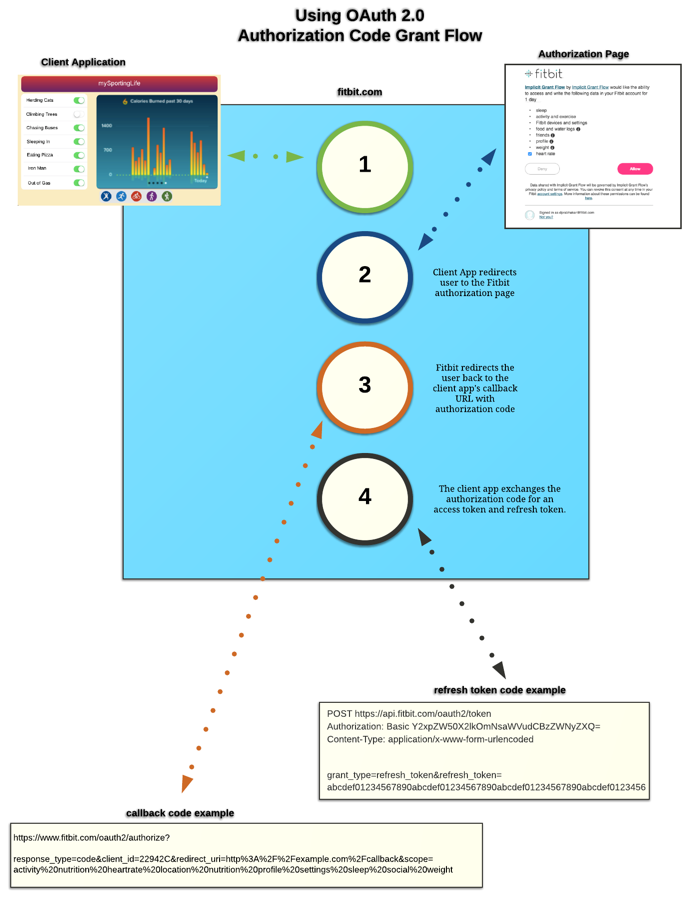
*Our application will have to redirect to Fitbit's authorization page by HTTP GET (https://www.fitbit.com/oauth2/authorize), passing in parameters for:
- Client ID - Fitbit application ID given to our registered app. Type: string
- Response type - 'code' for Authorization Code Grant Flow. Type: string
- Scope - A space-delimited list of the permissions you are requesting. Type: string
- Redirect Uri - Where Fitbit should send the user after the user grants or denies consent. Type: URI
-
Accessing a user's data is done via HTTP request with an authorization header attached. This authorization header is made up of the user's access token.
-
The following data can be accessed: