Repository navigation
Privacy and data
Voxtrama keeps your audio, transcripts and recaps in one folder on your own machine, and sends content elsewhere only to a model server that you configure. This page lists what stays, what can leave, what is never kept, and how data is deleted. It states facts about the software and gives no legal advice.
| Data | Where it is |
|---|---|
| the audio you import, and the copies made from it |
recordings/ in the data folder |
transcripts, speakers, recaps, manifest.json and logs of each job |
runs/ in the data folder, and the database |
| the names you give speakers, and your own name | the database |
| settings | voxtrama.toml |
Transcription (Whisper) and speaker diarization always run inside Voxtrama, on your processor. Both skills are marked local_only and cannot be sent anywhere. Once the models are downloaded, a job with no summary model needs no network.
The application listens on 127.0.0.1 only. It refuses requests that carry another host name, which stops a website from reaching it through DNS rebinding, and requests that come from another site. Its content security policy allows its pages to load only their own resources.
Two things leave the machine, and both can be avoided.
| What | Where to | When |
|---|---|---|
| the transcript, in parts, and the context you wrote in the new-job form | the model server of the job | only when that server is remote |
| model weights are downloaded | the Hugging Face repositories of the models | the first time a model is needed; nothing of yours is sent |
A model server is local when its address is localhost, 127.0.0.1, ::1 or host.docker.internal, and remote otherwise. With Ollama on the same machine, nothing of your content leaves it. Summary models and servers explains how to configure a server.
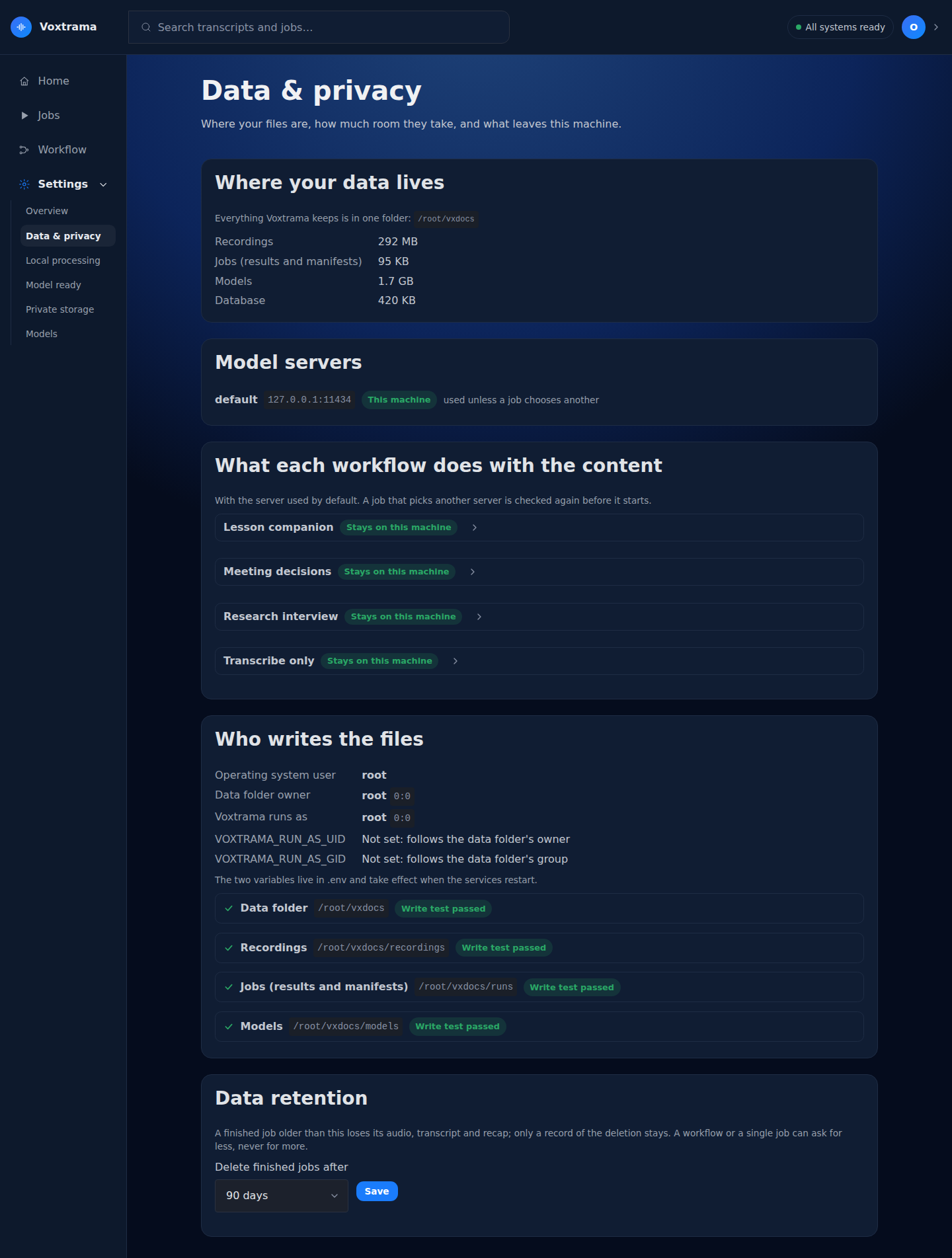
Settings, under Data & privacy, lists each model server as This machine or Remote. For each step of each workflow, it shows whether the step runs Inside Voxtrama, on a Model server on this machine, or Leaves this machine.
The code of Voxtrama contains no usage reporting and no update check. The only requests it makes are the model download from Hugging Face and the calls to the model server you configure.
A step is kept on the machine in three ways, and the tightest one wins.
| Level | How |
|---|---|
| a skill | the skill declares privacy: local_only; transcribe and diarize do |
| a workflow | the workflow file says privacy: local_only, which covers every step |
| a step | the step says privacy: local_only
|
A job that would send a local_only step to a remote server is refused before anything is sent. A workflow or a step can only narrow the declaration of a skill, never widen it. Workflow files describes the field.
A credential for a model server is sent only over https to a remote server, and may go over http to a server on this machine. An address with a credential in it is refused at start-up. The credential appears in no log and in no job record. Log lines are written from an allow-list of fields, and a call to the model logs the length of its prompt and never the prompt.
Voxtrama tells speakers apart inside one recording and keeps no voice print to recognise a person in the next recording. You name the speakers by hand, in the Speakers tab of a job, and the names belong to that recording.
A voice print is biometric data. Keeping one would turn a transcription tool into a system that identifies people, and it would put biometric data in the installation. Voxtrama does not do that. A name you type is stored in the database and is not matched to any voice.
Data is deleted in four ways.
| How | What it removes |
|---|---|
| Delete on a job | what you tick: Audio, Transcript, Recap; ticking all three removes the job |
| retention | the audio, transcript, recap and files of a finished job, after the limit |
| Clean up on the Jobs page | failed, cancelled and interrupted jobs that ended a week ago or more, recordings no job uses, and folders that belong to no job |
| removing the data folder | everything |
Retention is off by default. The limit is the strictest of three levels: the installation (Data retention in Data & privacy, with Never, 7, 30, 90 or 365 days, or VOXTRAMA_RETENTION_DAYS), the workflow (the shortest retention_policy of its skills), and the job (Delete after in the new-job form). A job can ask to be kept for less time, never for more. A recording that another job still uses is kept.
Retention runs when the worker starts, once a day, and when you choose Clean up. It does not run the moment you save the setting.
A job deleted by retention leaves its manifest.json, emptied. The record says that the job existed, which models ran, and when and under which limit its content was deleted.
Field of manifest.json
|
After retention |
|---|---|
| input hash, duration, steps run, models, provider | kept |
content_deleted (deleted_at, retention_days, retention_level) |
added |
| job name, source title and source address of the recording | removed |
| context you wrote and the context Voxtrama deduced | removed |
| the error of each step and the failure message | removed |
| the list of outputs | emptied |
voxtrama retention lists these jobs and checks that nothing of them is left on disk or in the database. See Command line.
The Manifest (JSON) export and the manifest inside the job's ZIP are copies made for sharing. In them, the context you wrote, the context Voxtrama deduced, and the host of every model server are replaced with [removed], including where a host appears in an error message. The manifest.json in the data folder keeps everything.
These are facts about Voxtrama, listed for whoever assesses a deployment. They are not legal advice.
- Audio, transcripts and recaps are stored in one folder that you choose and control, and are removed by the actions listed under Retention and deletion.
- With a model server on the same machine, no content is sent to another system. With a remote server, the transcript and the context are sent to that server, and the Data & privacy page and the
manifest.jsonof each job say which server a step used. - No voice print or other biometric template is created or stored.
- A step can be forbidden from leaving the machine, and the refusal happens before any data is sent.
- The backup of the data folder is an unencrypted archive of your recordings and transcripts. Protect it like the recordings. Taking your data with you explains the backup.