Repository navigation
Summary models and servers
Transcription and speaker diarization run inside Voxtrama. The recap and the extractions (decisions, themes, concepts) are written by a summary model, which a model server runs. Voxtrama talks to Ollama through Ollama's own API.
A job that needs a summary model and has none fails at its recap step. The page shows the banner No summary model configured with the message that the transcript is done, and the transcript stays available. Open settings leads to the page where you choose a model, and Retry this step runs only what is left.
A job that should not use a summary model at all starts with Transcription only, no summary, a checkbox in the Advanced section of the new-job form. Such a job produces the transcript and the speakers.
When the model is set but the server does not answer, the banner reads No summary model reachable.
-
Install Ollama from ollama.com and start it.
-
Pull a model, for example:
ollama pull qwen3:4b
-
In Voxtrama, open Settings, then Restart setup, and go to Model ready.
You should see: Connected with the server's host, and the models Ollama has, each with its size and Installed. Pick one and choose Continue. You can also choose the model later in Settings under Change generative model.
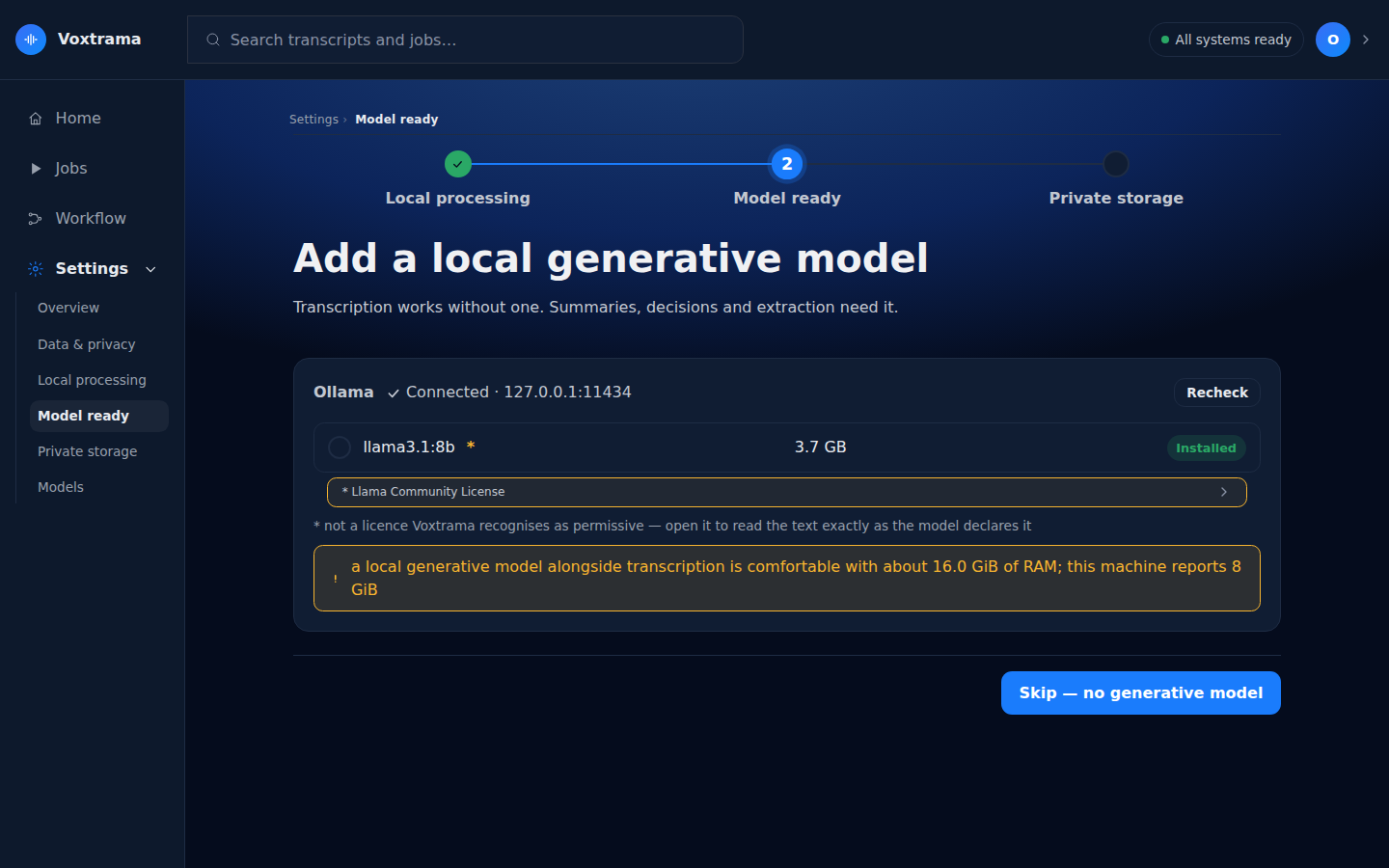
Ollama runs outside Docker, directly on your machine. From inside the containers, Voxtrama reaches it at host.docker.internal:11434, which is the address the guided setup tries. Set up the summary model walks through the installation.
Set the address and the model in .env, then restart with make down and make up:
VOXTRAMA_OLLAMA_URL=http://gpu-box.lan:11434
VOXTRAMA_OLLAMA_MODEL=qwen3:30b
An address that carries a credential, such as https://user:secret@gpu-box.lan, is refused at start-up. Put the credential in VOXTRAMA_OLLAMA_AUTH.
A model server behind a proxy can ask for credentials. Set them in .env:
VOXTRAMA_OLLAMA_AUTH=user:password| Value | Sent as |
|---|---|
contains a colon, for example user:password
|
Basic authentication |
| anything else | a Bearer token |
- To a remote server, a credential is sent only over
https. Overhttp, the call fails with<host>: credentials are only sent over https to a remote server. - To a server on this machine, a credential may travel over
http, because it never leaves the machine. - The credential appears in no log and in no job record. The
manifest.jsonthat you export has the server's host replaced by[removed]. - A server that answers 401 or 403 produces
<host> requires credentials we do not have.
A job can choose among several model servers. Name them in .env as JSON, each with an address and, if needed, a credential:
VOXTRAMA_PROVIDERS='{"default": {"url": "http://host.docker.internal:11434"}, "gpu": {"url": "https://gpu.example.org", "auth": "user:password"}}'- The server called
defaultis used unless a job chooses another. Without adefault, the first one is used. - The new-job form shows Model server in Advanced only when more than one server is configured, with each marked local or remote.
- A name a job chooses uses letters, digits,
.,_and-, up to 64 characters. The names inVOXTRAMA_PROVIDERSare checked when a job chooses one. - Each server takes
urlandauth, and nothing else. -
VOXTRAMA_PROVIDERSreplacesVOXTRAMA_OLLAMA_URLandVOXTRAMA_OLLAMA_AUTH, including the credential, when both are set.
A server is local when its address is localhost, 127.0.0.1, ::1 or host.docker.internal, and remote otherwise. A job on a remote server sends it the transcript and the context you wrote.
A step marked local_only never goes to a remote server. A job that would send it there is refused before anything is sent. Settings, under Data & privacy, shows what would leave the machine for each workflow. Privacy and data lists what stays and what can leave.
The summary model decides the quality of the recap and how long it takes.
- Memory: a model needs roughly its download size in memory, on top of what transcription uses. The Model ready page warns when the recommended model looks too large for the machine, and
voxtrama doctorchecks the same. - Speed: on a processor, a model of a few billion parameters writes a few words per second, so a long recap takes minutes. Ollama can use a graphics card when the machine that runs it has one. The Voxtrama image itself does not use a graphics card.
- Size: small models follow instructions less closely. They write fewer points than asked, or quotes that cannot be found in the transcript, which then show as Needs review.
The Summary model field of the new-job form lists the model you configured and the models measured during the setup.
The context window is the amount of text a model reads at once. Ollama calls the setting num_ctx. Voxtrama handles it in four steps.
- During the setup, Voxtrama reads the model's maximum from Ollama and stores it in
voxtrama.toml. When no measurement exists, for example for a model chosen outside the setup, Voxtrama uses 8192 tokens. - Voxtrama splits a long transcript into parts of about 12 000 characters. It cuts at the longest pause near the boundary, and reads each part together with the end of the part before and the start of the part after, so that a point made across a cut keeps its conclusion. The size of a part is fixed. It does not follow the limit.
- For each part, Voxtrama asks Ollama for a context equal to the estimated prompt plus 4096 tokens for the answer plus 512 tokens, kept between 4096 tokens and the limit.
- The results of the parts are joined into one recap.
Use at most, in Settings under Change generative model and on the Model ready page, lowers the limit Voxtrama uses. It can only lower the limit and never raise it past the model's maximum.
Warning
A limit that is too low makes the step fail
A part that does not fit in the limit is not cut down. When Ollama reports that it read the prompt only up to the limit, Voxtrama stops the step instead of returning a recap built on part of the text. The job shows This job failed with a message of the form <model>: prompt_eval_count N sits at the requested num_ctx of M: the prompt did not fit. Raise Use at most to the model's maximum, or choose a model with a larger window. Do not set the limit lower than 8192 tokens, the value Voxtrama uses when it has no measurement.
The setup pages say that lowering the limit costs time and not completeness. For a part larger than the limit, that statement does not hold.
Voxtrama sends two parts of a long transcript to the model at the same time, and the step waits for the slowest instead of adding the times. VOXTRAMA_PARALLEL_WINDOWS changes the number, from 1 to 16. The value 1 sends the parts one after another.
Ollama answers parts together only when it was started with OLLAMA_NUM_PARALLEL at least as high as the number you set. It also reserves the context memory once for each parallel request, so a machine short of memory does better with 1. The Activity panel of a job shows each part as it is sent and as it is answered, in whatever order the answers arrive.
One call to the summary model may take up to 1800 seconds, which is 30 minutes. VOXTRAMA_PROVIDER_TIMEOUT_SECONDS in .env changes the limit. A call that runs past it fails the step with a message of the form <address> did not answer within 1800.0s, and the job shows This job failed.
A separate limit covers the whole job: the length of the audio, the downloads and a margin for the model. When it runs out, the page shows This job ran out of time. Troubleshooting explains both.