Repository navigation
Code Editing
This set of tools enables the agent to effectively edit and syntax-check ABAP sources. The editing workflow:
- Fetch the file from SAP
- Edit and check syntax in a local file
- With write permission: push, activate. Without write permission: the user is responsible for pushing the source to SAP
-
Automated Shell Creation: Stage the appropriate metadata or source artifact, then give its
source_file_pathtosap_push. Dictionary metadata can establish a missing backend shell. Textual source requires a backend shell, which can be created from the object's staged metadata first. Classic Dynpro screens are represented and edited locally. - Every code push is recorded in the internal version control system.
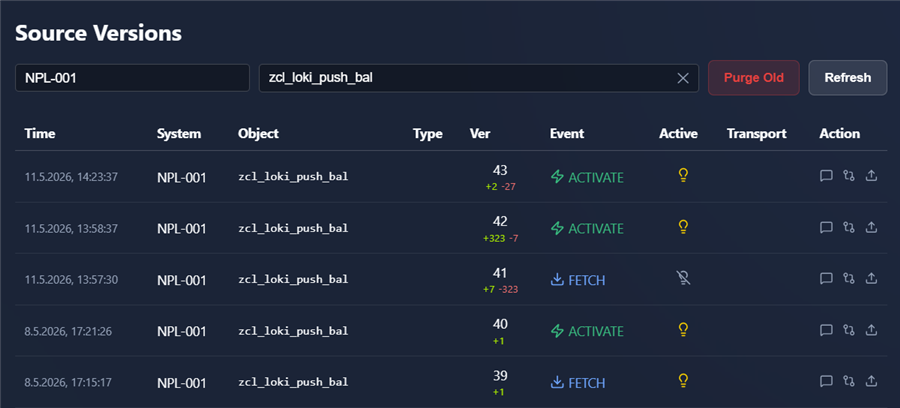
- You can diff the versions and restore them to SAP system whenever needed.

| Tool Name | Description |
|---|---|
sap_activate_object |
Activates inactive ABAP development objects in the SAP backend and returns syntax or activation messages. |
sap_check_syntax |
Runs a native ADT syntax check matching Eclipse engine logic to validate ABAP or native DDIC DDL source without saving. |
sap_diff_versions |
Computes unified diffs between revisions of an ABAP object (local draft vs. active, or between historical version numbers). |
sap_fetch_inactive_objects |
Fetches the list of all inactive objects currently held by the authenticated user from the SAP backend. |
sap_fetch |
Stages complete repository artifacts. Its schema lists supported aspects and when an aspect can be inferred from a source path. Returns file_path, artifact hash/size/line count and bounded ABAP index; revision is the backend signature. Use sap_inspect_source for bounded local inspection. |
sap_inspect_source |
Inspects staged text: ABAP block index, exact block, lines or literal search with context. Bounds output by lines and bytes; continue with page.next_offset, next_byte_offset and expected_sha256. |
sap_get_creation_template |
Prepares a template using kind (sap_object, screen, or extension_template) and its typed target. |
sap_push |
Pushes the staged artifact selected by source_file_path; use allAspects=true for related staged aspects where supported and activate=true to activate after saving. |
sap_run_tests |
Executes ABAP Unit (AUnit) tests for classes, programs, or packages within the configured risk ceiling and returns test results. |
sap_syntax_quick_fix |
Retrieves or applies syntax quick-fix suggestions for ABAP compiler diagnostic messages. |
Workspace abaplint analysis runs before sap_check_syntax and sap_push. Workspace initialization creates abaplint.json when missing and preserves existing configurations. The default profile supports partial SAP checkouts: parser_error and configured avoid_use checks are Errors, obsolete_statement checks are Warnings, and unknown_types is disabled. Customize the workspace file for the customer landscape, retaining each rule's options when changing its severity. ABAP Unit test-class discovery and deep function-parameter validation remain enabled independently of Cloudification; the function-parameter checker validates calls against SAP signatures.
To adopt current defaults, back up your configuration, remove the workspace's abaplint.json, then restart the daemon or reopen its dashboard. Review the regenerated profile before restoring custom rules. Dependency URLs in the configuration supply no extra sources to local analysis; SAP resolves backend types and references.
The checks analyze the outgoing staged ABAP file and report its coverage. Locally available companion class aspects supply parsing context and are checked when staged separately. Source storage and editing continue under ./src/<system_alias>/; a complete local repository is unnecessary, and unseen sources remain outside the check's coverage.
| Finding | Syntax check | Push |
|---|---|---|
| Configured abaplint error | Returns the error before the SAP syntax request. | Stops with ABAPLINT_RULES_FAILED; correct the source and retry. |
| Configured abaplint warning | Accompanies the SAP syntax result. | Does not block by itself. |
| Incomplete local analysis | Reports the incomplete check. | Stops until the source can be analyzed. |
| Disallowed API already in the stored baseline | Cloudification warning. | Warning; existing use can remain. |
| Newly introduced disallowed API | Cloudification warning. | Stops with CLOUDIFICATION_REVIEW_REQUIRED and creates a pending review. |
| API absent from the selected dataset | Reported as unverified. | Does not require an exception by itself. |
Cloudification API checks run only when the developer enables them in the dashboard and syncs the selected SAP release profile. If the stored baseline cannot be parsed, disallowed usage requires review without being described as newly introduced. See Cloudification reviews and exceptions for approval and retry steps. A multi-aspect push checks every changed source before its first write.
SAP syntax checks and ATC remain the authoritative backend checks. The Cloudification profile controls API policy for the workspace's Dev → Quali → Prod landscape. SAP determines the object's supported ABAP language version; see Dynamic ABAP Version Resolution.
Use the exact file_path returned by fetch or template creation. Namespaced objects use a flat filename with # representing each namespace slash, for example /ACME/CL_ROUTER becomes #acme#cl_router.clas.abap. Preserve the companion identity file for inspection artifacts. Re-stage older nested namespace paths after preserving local edits.
sap_push infers the system, object, and aspect from source_file_path. Use allAspects: true for related staged aspects where supported. Its former object_name, object_type, object_uri, and aspect selectors are retired. sap_check_syntax also infers the type from the staged path; use parent_container when an include needs its owning program or function group.
Native source saves and activation verify backend readback before refreshing the editing baseline. SOURCE_FRESHNESS_UNVERIFIED, SOURCE_BASELINE_CONFLICT, saved_activation_unverified, or activation status: "unverified" require inspection of active/inactive source and history before another write. After accepting inspected backend content, an editing fetch may use that read-only fetch's exact revision as expected_revision; a changed revision requires fresh inspection.
Discover supported creation, fetch, push, and activation operations with sap_get_supported_capabilities before extending an object workflow. Create and maintain packages manually in SAP. See Extensibility for the activated backend lifecycle contract.
Native table (TABL/DT) and structure (TABL/DS) source is staged as <name>.tabl_dt.asddls and <name>.tabl_ds.asddls. Use the returned source path for inspection, SAP syntax checks, and pushes; XML under metadata/ describes repository metadata and creation shells. Preserve drafts from older .tabl.xml or .tabl.abap source paths, fetch the source again, and apply intended edits to the returned path. SAP's compiler validates this DDL; procedural ABAP lint and function-call analysis apply to ABAP source.
Function-module and function-group include creation verifies the owning group and its package on the selected system before permission and transport selection. Keep the function-group identity separate from its inherited package when preparing a creation template.
Use sap_run_tests fields passed and outcome for automated verification. passed is true only for a PASSED outcome with at least one method result and no blocking method or higher-level alert. Other outcomes are FAILED, NO_TESTS, ABORTED, and ERROR; inspect alerts and spillovers even when method counters show no failures. Discovery that finds no tests returns NO_UNIT_TESTS before execution.
Execution and the AUnit Permission Wizard share active-source declarations and native executable selections. Inspect aunit_discovery for source, evaluation, or capability failures. Select supported classes or methods with an explicit risk ceiling; a whole-object approval is a separate unchecked choice. HARMLESS declarations also require approval. Bound class approvals cover every advertised active source aspect, including main source, definitions, implementations, macros, and test classes. Renew older include-only approvals when prompted. Changed source revokes temporary grants; unavailable live evidence blocks execution while preserving the grant for recovery.