Repository navigation
Upgrade
The Upgrade tab in the sap-bridge Web Dashboard is a central command hub for synchronizing ABAP reference components, managing transport requests, and tracking local SQLite database migration health.
The v1.1602 auto-installer replaces files included in a newer release ZIP. It leaves older files that are absent from that ZIP in the installation directory. After an in-place upgrade to v1.1715, the old Markdown manuals and Fiori accelerator script can remain on disk even though the current skill uses instructions and the script served by the running bridge.
For a clean installation, stop the bridge, move the existing sap-dev skill directory to a backup location outside the active skills directory, and extract the new release ZIP into the active skills directory. Restart the bridge and verify the new skill before retiring the backup. Inspect the backup for user-owned files and settings first. Later updates made by the newer updater ask for confirmation before removing obsolete files.
If auto-update fails or reports UPDATE_STATUS_INVALID, update manually. An older installed dashboard may require this procedure to install the updater correction in v1.1733:
- Stop SAP-Bridge before replacing files.
- Back up the existing
sap-devskill directory outside the active skills directory, preserving user-owned files. - Extract the new release ZIP into the active skills directory.
- Restart SAP-Bridge from the same workspace, refresh the dashboard, and verify the intended version before retiring the backup. Preserve workspace credentials, settings, and databases; review user-owned files before restoring them from the backup.
An installed updater runs its current code while downloading a newer release. Downloading a corrected version alone does not repair an older dashboard's confirmation flow.
The encrypted credential vault and workspace settings now live in the workspace's .sap_dev.db database. On upgrade, an existing .sap_credentials.json is imported into empty vault storage and removed only after the saved data is verified. An existing database vault takes precedence over a different older credential file. Keep the database with its workspace when backing up or moving an installation; stop SAP-Bridge before making a filesystem backup, and retain the pre-upgrade credential file in that private backup when present.
Dashboard login, lock, and credential recovery apply to the selected workspace. Unlock each workspace through its own dashboard. Use normal software and database migrations to retain credentials and history. Fresh Reinstall Database clears credentials, connection and authentication settings, findings, runs, and version history, then returns that workspace to setup. Its confirmation requires RESET; the completed operation reports a database backup filename. Treat that backup as private workspace data.
Software updates resolve the shared skill installation even when its master directory has a custom name or is reached through a Windows junction. Obsolete-file confirmation supports Unicode file names and groups a wholly obsolete folder as a single entry marked all contents. Review that list before approving removal.
If an update fails, the dashboard shows the failed stage, a technical reason, and available HTTP or operating-system codes, together with corrective guidance. Use those details to check connectivity, installation permissions, file locks, or bundle layout. Diagnostic messages expose technical categories while keeping raw credentials and authenticated URLs private. The installed updater handles the download; use the manual update procedure above if an older installation cannot complete the update.
Install the complete v1.1763 package and synchronize its bundled ZCL_SAP_DEV_TUNNEL reference through Upgrade. The tunnel correction preserves native request query parameters separately from request bodies, including lock, save, and unlock operations. Reconnect the tunnel browser after deploying and activating the matching reference.
This release retains the v1.1762 workspace storage behavior. Workspaces used with unreleased development builds require a separate compatibility review; this package does not repair incompatible development-workspace storage. Preserve a private backup and request recovery guidance if initialization fails. Fresh Reinstall Database clears credentials and history.
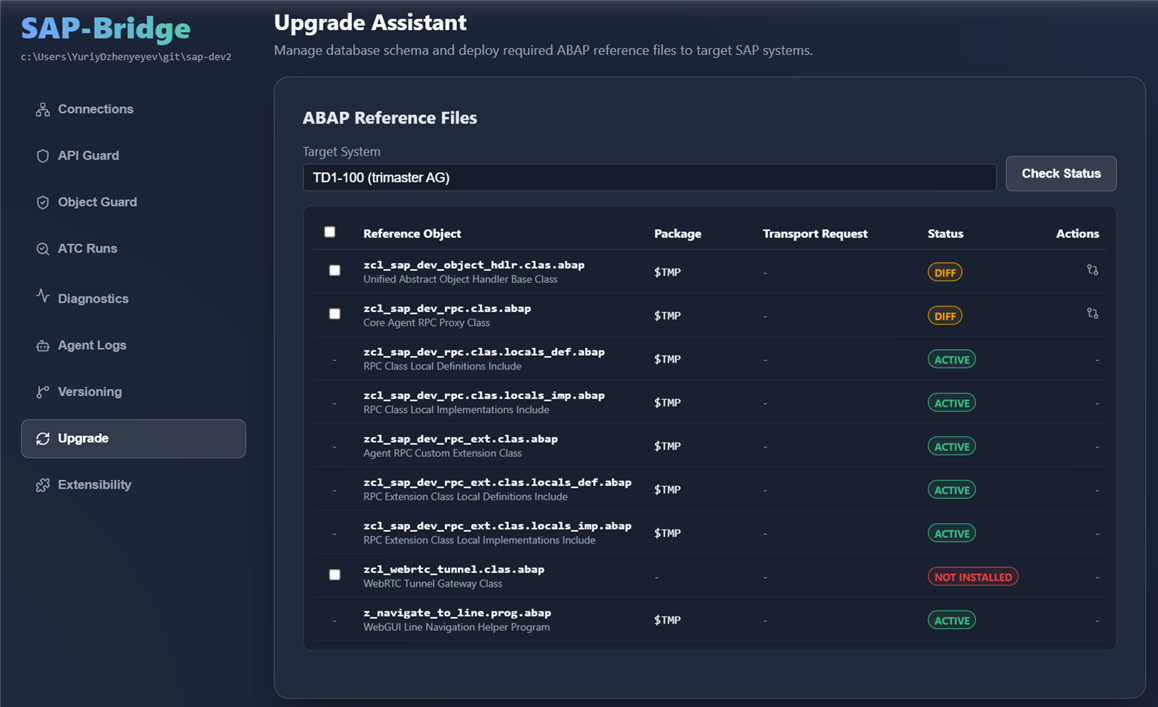
This section displays a checklist of all core ABAP reference files (such as unified object handlers, RPC proxy classes, and navigation utilities) required to support advanced agent operations.
Install the skill package and synchronize the bundled backend reference set as one release. For v1.1762, use the supported Upgrade workflow to install the matching RPC, scratchpad, and tunnel references before relying on the revised debugging and object workflows. Review local extension edits in the comparison view before selecting extension components. Custom direct subclasses of ZCL_SAP_DEV_OBJECT_HDLR declare describe_lifecycle and, for procedural operations, implement execute_lifecycle; see Extensibility for the current contract. Historical workspace routing rows remain preserved, while active custom object support comes from the activated backend declaration.
A more general check is performed by the connection dashboard. It will show you a yellow badge if either sap-bridge or the back-end files need an update:

-
Live Version Resolution: The Assistant compares embedded reference components directly from the
sap-bridgebinary with active versions on the target SAP backend, marking each file as:-
Active(Green): Backend matches the embedded reference version exactly. -
Diff(Yellow): Backend version differs from the embedded reference baseline. -
Not Installed(Grey): The object does not yet exist on the SAP system.
-
-
Side-by-Side Diff Editor:
- For any file showing a
Diffstatus, click the Compare icon (git-compare) to open a side-by-side code comparison. - Powered by the Monaco Diff Editor, it features full ABAP syntax highlighting and synchronized scrolling to easily spot codebase deltas before deploying.
- For any file showing a
-
Automatic Version Tracking & Safety Backups:
- The Upgrade Assistant is integrated directly with the bridge's local versioning timeline.
-
Automatic Backup (
FETCH): Before overwriting any file on the backend, the Assistant fetches the current live backend code and saves it as a"FETCH"version in the SQLite history log if it differs from the reference baseline. -
Update Record (
PUSH): Immediately after successfully deploying the new code, the Assistant records a"PUSH"version in the log. - This guarantees that your backend edits are never lost and can be compared or restored at any time.
-
Customizable Extension Safety Warnings & Overwrite Protection:
- For the custom extension class components (
ZCL_SAP_DEV_RPC_EXTmain class, local definitions, and local implementations) which contain custom handler methods or ICF endpoint overrides:- Displays a prominent yellow warning message spanning all columns directly below the class component:
⚠️ Customizable Extension (contains your custom ICF handlers). Overwriting will discard local edits. - Automatically excludes these files from the "Select All" checked toggle if they are already installed, preventing accidental bulk updates.
- Triggers a blocking confirmation dialog requesting explicit user approval before starting deployment if any existing extension files are selected.
- Displays a prominent yellow warning message spanning all columns directly below the class component:
- For the custom extension class components (
-
Smart Package & Transport Request Reuse:
- Existing Objects: The tool dynamically queries the SAP repository to resolve current package assignments and open Transport Requests (TRs). It automatically reuses these assignments to prevent configuration conflicts.
- New Objects: Newly created objects are assigned to the package specified in the Target Package input field.
-
Automated Lock/Unlock Lifecycle:
- Clicking Deploy & Activate Selected triggers an atomic deployment pipeline:
- Lock the objects on the SAP backend.
- Upload the source code payloads.
- Activate the objects.
- Unlock the objects safely.
- The dashboard updates silently upon success without blocking browser alerts.
- Clicking Deploy & Activate Selected triggers an atomic deployment pipeline:
The Upgrade Assistant synchronizes the following reference components embedded directly inside the sap-bridge binary:
| Object | Type | Component Files | Role & Operational Purpose | Landscape Strategy |
|---|---|---|---|---|
ZCL_SAP_DEV_RPC |
CLAS |
zcl_sap_dev_rpc.clas.abap*.locals_def.abap*.locals_imp.abap
|
Core Agent RPC Gateway: Implements IF_HTTP_EXTENSION to serve the ICF endpoint (/sap/bc/zsapdevrpc). Dispatches non-ADT commands such as dynamic SQL queries (sap_execute_sql), schema lookups, and extension methods. |
Transportable (DEV Deploy to a transportable package if read-only queries, diagnostics, or test executions are required across landscapes. |
ZCL_SAP_DEV_RPC_EXT |
CLAS |
zcl_sap_dev_rpc_ext.clas.abap*.locals_def.abap*.locals_imp.abap
|
Custom RPC Extension Class: Subclasses ZCL_SAP_DEV_RPC and serves as the actual handler class configured on the SICF node. Hosts custom RPC extension methods (sap_execute_ext_method). |
Transportable (DEV Follows ZCL_SAP_DEV_RPC. Protected in the Upgrade Assistant against accidental bulk overwrites. |
ZCL_SAP_DEV_OBJECT_HDLR |
CLAS |
zcl_sap_dev_object_hdlr.clas.abap |
Object Lifecycle Base: Defines describe_lifecycle and execute_lifecycle for explicit custom object declarations and supported operations. |
Transportable (DEV Required dependency of ZCL_SAP_DEV_RPC. |
ZCL_SAP_DEV_DEV_HELPER |
CLAS |
zcl_sap_dev_dev_helper.clas.abap*.locals_def.abap*.locals_imp.abap
|
Development Write Helper: Dispatches all mutating backend operations (source/metadata push, transaction code creation, text pool translations, dynpro screens, CUA statuses). | ⛔ STRICTLY DEV-ONLY ($TMP)NEVER transport to Q or P. Keeping this class in $TMP strictly on DEV ensures that mutating/writing capabilities are structurally impossible in test and production environments. |
ZCL_SAP_DEV_TUNNEL |
CLAS |
zcl_sap_dev_tunnel.clas.abap |
Nostr Relay Tunnel Gateway: HTTP extension class serving an embedded single-page application for Nostr WebSocket tunneling when operating behind strict corporate firewalls. |
Transportable (DEV Can be assigned to a transportable package if tunnel access is required in staging environments, or kept in $TMP. |
Z_NAVIGATE_TO_LINE |
PROG |
z_navigate_to_line.prog.abap |
WebGUI Deep-Link Helper: Executable report bound to transaction Z_SAP_DEV_NAV. Enables deep-linking from the Web UI directly into SAP WebGUI at a specific source line. |
Transportable (DEV Can be transported if WebGUI deep-linking is used across test systems, or kept in $TMP. |
Important
Landscape Transport Rule:
The only object that must never be transported to Quality (Q) or Production (P) is ZCL_SAP_DEV_DEV_HELPER. It must always reside in package $TMP on the development system. All other objects can be assigned to a transportable package and moved across the transport landscape as needed.
At the bottom of the page, the SQLite Database Status card shows the health and state of your local workspace database.
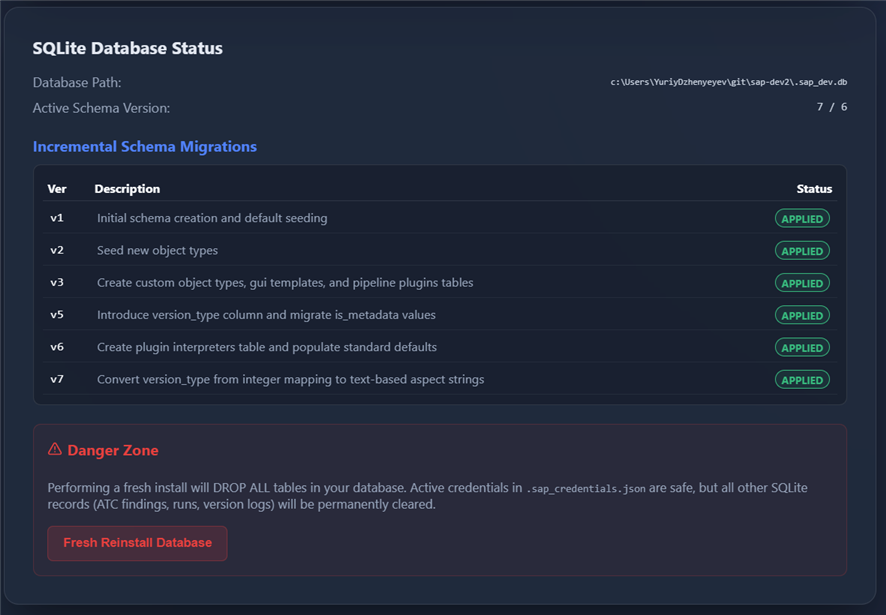
- DB Migrations Tracker: Displays the current database schema version alongside the expected target version.
- Integrity Validation Checklist: Validates the local activity, diagnostics, and version history storage needed by the current release.
- Fresh Reinstall Database: Recreates workspace storage, including the encrypted vault. It clears credentials, connection and authentication settings, findings, runs, and version history, and returns the selected workspace to setup. The completed reset reports a private database backup filename. Use ordinary migrations when retaining workspace data is intended.