Calendar
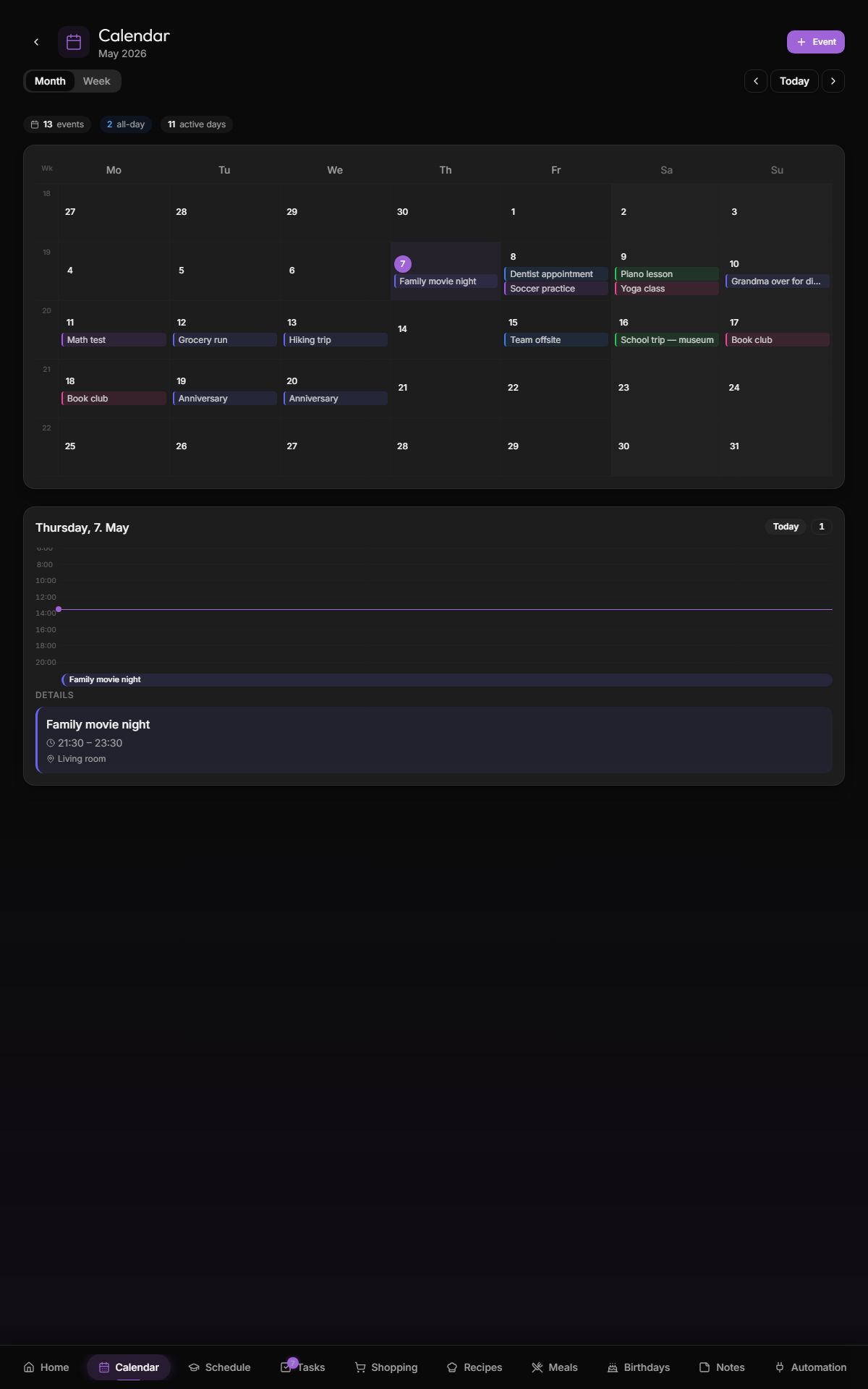
The /calendar page — month and week views of your family's calendar, synced from Google + any local events you add by hand.
TODO: week view variant
The calendar surface unifies events from:
- Google Calendar (two-way sync) — any calendar you've enabled in Settings → Google Calendar. Events created or edited in Kinboard are pushed back to Google; edits made on the Google side flow down at the next sync interval. Subject to Google's per-calendar permissions: a read-only subscribed calendar (holidays, sports schedules, etc.) stays read-only in Kinboard too.
-
Local events — added directly in the Kinboard UI without selecting a Google calendar. Lives in
public.eventswith no Google link and never round-trips to Google. - Holidays — Google calendars marked with the "holidays" badge get rendered with the 🎉 indicator and slightly different styling.
- Waste-pickup calendars — Google calendars marked with the "waste pickup" badge are hidden from the calendar view and show up only on the waste widget. Avoids cluttering month view with weekly bin reminders.
The default. 35-42 cells, one per day in the month. Each day shows:
- The day number (today highlighted with the monthly theme color)
- Up to 3 event chips, color-coded per person
- Holiday indicator if applicable
- Birthday indicator if applicable
Tap a day → day-detail panel slides in showing all events + birthdays + holidays for that date.
7-column hourly grid for the active week, like a typical calendar app. Useful for time-bound planning. Time-of-day events show as colored blocks; all-day events float at the top.
Each event is color-coded by the person it's assigned to. Assignment happens in three ways:
- Whole calendar → one person — set in Settings → Google Calendar per calendar
-
Per-event mapping rule —
contains "Emma"/starts_with "Mama:"→ assign to Emma. Configured in the same settings page. - Manual override — edit a local event and pick the person directly
If no rule matches, the event is "family-wide" (gray accent).
The blue "+ New event" button opens a dialog:
- Title (required)
- All-day toggle
- Start + end (date picker)
- Person assignment (or "family")
- Calendar — pick any of your Google calendars (event will round-trip to Google) or "Local only" (stays inside Kinboard)
- Notes
Events show up immediately for everyone in the family. If you picked a Google calendar, the event lands on Google within a few seconds and the next sync round-trip cements it. Edits and deletes also propagate.
Tap any existing event → edit dialog with the same fields. Delete via the trash icon.
Tapping any day in month view (or any block in week view) opens a side panel with:
- Date + day name
- Holiday card if applicable
- Event list for that day, grouped by all-day → timed → ended
- Birthday cards for anyone celebrating that day
- Add-event quick action
The day panel is the main "interaction" surface — month/week views are glance surfaces.
- "What's on this week" → tap any day in the current week, then arrow through
- "Find an event" → no built-in search yet (v1.2). For now, eyeball it or browse Google Calendar
- "Add a recurring event" → not directly supported in the local-event editor. Add as a recurring event in Google Calendar and it'll sync in.
The holidays widget reads German federal holidays (webapp/src/lib/german-holidays.ts) by default. Add a Google Calendar with the "holidays" flag to override or augment with your country's holidays.
Country-aware holiday support is on the v1.1 list —
getGermanHolidayswill generalize to aholidays/<country-code>directory.
Hidden under Settings → Google Calendar. Useful when:
- One shared family calendar, want each person's events colored differently → use rules to auto-assign by title pattern
- Subscribed to a calendar that mixes events for multiple people (school, sports club) → rules split it
Rules support contains / starts_with / ends_with / regex matching. Test in-place with the Test button before saving.
Read-only .ics feeds shipped in v1.0.19 and live alongside Google Calendar. The two providers can coexist — a typical setup is "Google for the family's main shared calendar (read/write) plus iCloud Family Sharing as an .ics feed for the partner's iPhone calendar (read-only)".
Add a feed at /settings/ics:
- Paste the feed URL.
webcal://links from iCloud and Google's "secret iCal address" are auto-rewritten tohttps://. - Click Test — Kinboard fetches the feed and reports the event count + the first event's title so you can sanity-check before saving.
- Set a name, color, and (optionally) the family member it represents.
- Click Sync now any time to refresh; otherwise the feed re-syncs every 30 minutes via cron. ETag conditional GETs mean a 304 from the upstream is a no-op (no re-parse).
Recurring events are expanded server-side and capped at 200 instances per calendar. The sync window is −30 days to +60 days from "now" so multi-year feeds don't bloat the events table. Events present in a previous fetch but absent from the current one are removed.
ICS sources Kinboard handles cleanly today: iCloud Family Sharing, Google's "secret iCal address", Outlook/Office 365 calendar publishing, most CalDAV providers (via their published .ics URL), school district calendars, sports league schedules.
- Attendees / invites. Google events show their attendees in the day panel as read-only text; you can't RSVP or invite people from Kinboard.
- Editing read-only subscribed Google calendars — if Google itself marks the calendar as read-only (someone else's calendar shared with you, public holiday calendars, etc.), Kinboard can't write to it either.
- Writing to ICS feeds. ICS support is read-only by design — feeds are typically published-only URLs without CalDAV write semantics. Use Google Calendar for editable family events.
- Google-Calendar — connect Google + per-event mapping rules
- Birthdays — birthdays appear in the calendar; managed separately
- Themes — date formatting per locale