Repository navigation
ChatGPT MCP API Key Authorization
中文 | English
Enter your MCP server URL in ChatGPT and select OAuth. ChatGPT discovers the authentication endpoints and opens the 1flowbase authorization page, where you enter your 1flowbase user API key and approve the connection.
ChatGPT: enter the server URL and select OAuth
  → Discover OAuth endpoints and register a client automatically
  → 1flowbase: enter your API key, verify it, and approve access
  → Return to ChatGPT and use the tools you are authorized to call
Your API key goes only to 1flowbase. Do not paste it into ChatGPT's client ID or client secret fields, or include it in the server URL. ChatGPT receives separate access and refresh tokens.
Current releases enable OAuth discovery by default. No additional OAuth environment variables are required. If discovery fails, use the deployment checks below.
In 1flowbase, open Settings → MCP → Connect client, then select the ChatGPT tab. The tabs are ordered General → ChatGPT → Codex → Claude Code → OpenCode, with General selected by default.
The API key field and notices remain above the tabs. You do not need to enter or save a key there to connect ChatGPT; you will enter it on the authorization page later.
- OAuth configuration enabled: copy the server URL.
- ChatGPT authorization is not enabled for this deployment: this usually indicates an older release. Update the API and frontend first.
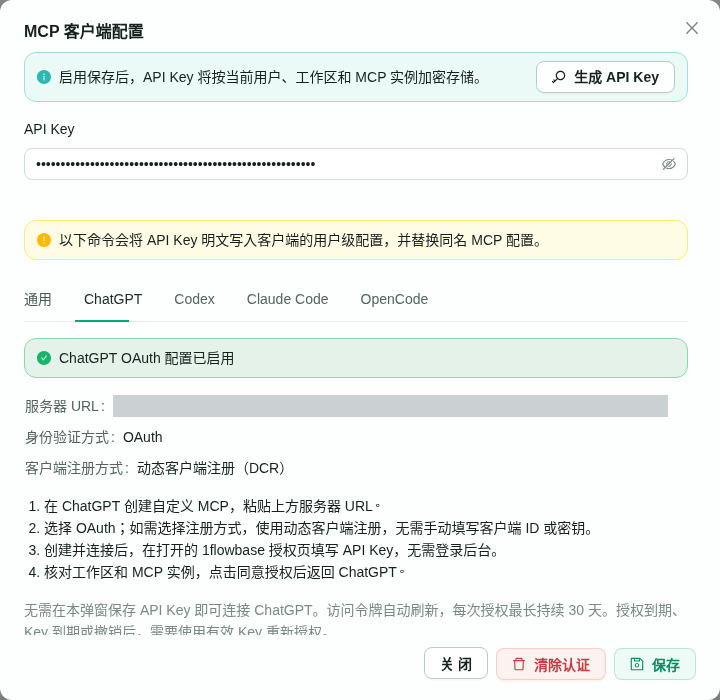
The screenshots show the Chinese UI, with private deployment hostnames redacted. This guide uses the official website, https://1flowbase.taichuy.com/, as an example hostname. Replace it with your deployment's public HTTPS address. The example does not imply that the website hosts this MCP instance.
Current ChatGPT URLs include the browser origin—scheme, hostname, and port—so the API does not need to infer the public address from rewritten proxy headers. For example:
https://1flowbase.taichuy.com/api/mcp/1flowbase?origin=https%3A%2F%2F1flowbase.taichuy.com
Use the exact URL copied from your deployment. Have a valid user API key ready; its workspace must contain the MCP instance you want to connect.
Open Create custom MCP server in ChatGPT. The name and location of this option may vary by release.
| Field | What to enter |
|---|---|
| Name | For example, 1flowbase
|
| Icon and description | Optional; neither affects authentication |
| Connection | Select Server URL and paste the full URL from Step 1 |
| Authentication | Select OAuth |
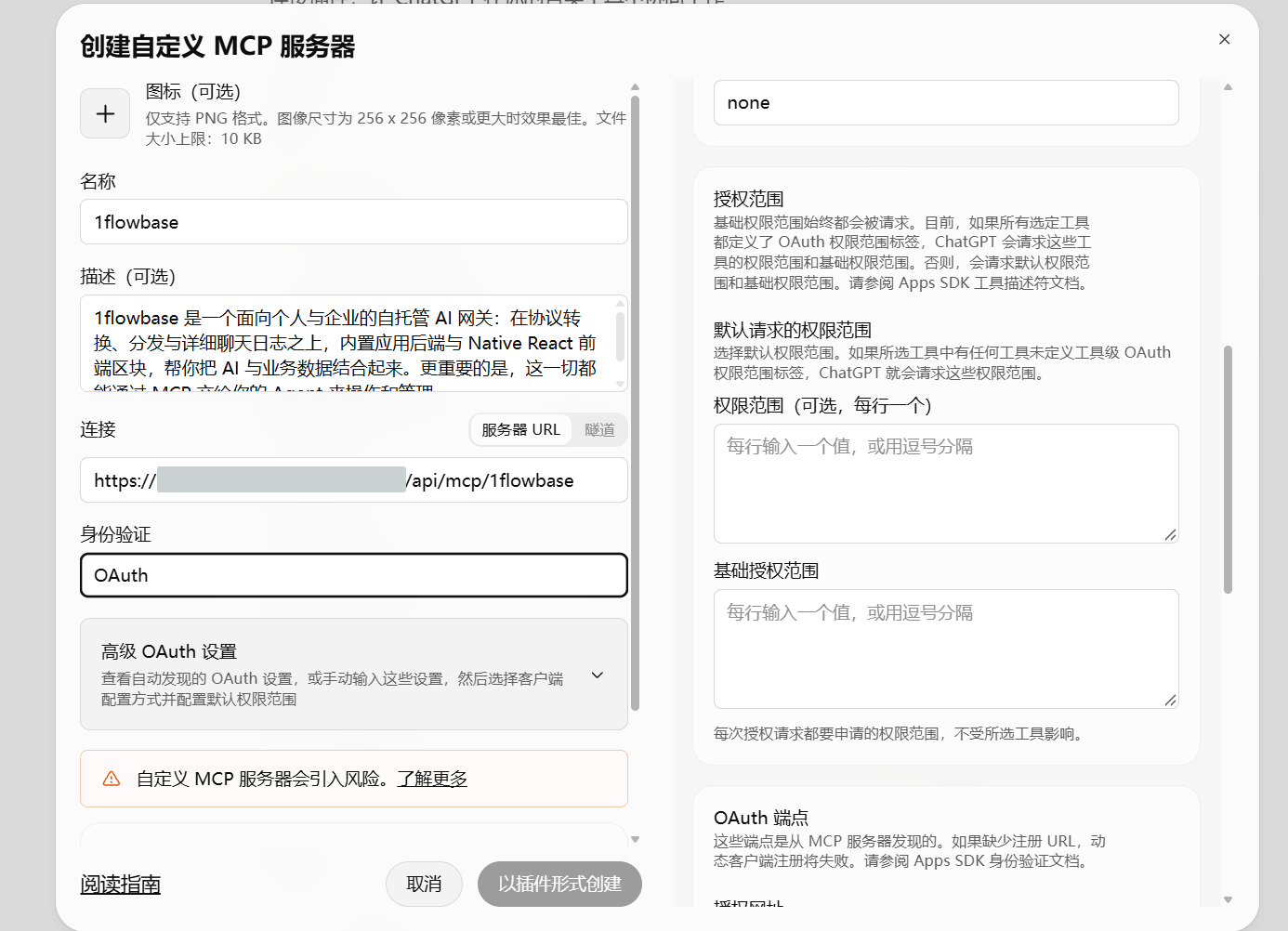
Expand Advanced OAuth settings and check the following:
| Setting | Value |
|---|---|
| Client configuration or registration method | Dynamic Client Registration (DCR). The current implementation does not support CIMD. |
| OAuth client ID and client secret | Leave these unset when using DCR. Do not enter your user API key. |
| Token endpoint authentication method, if shown |
none. The client exchanges tokens without a client secret; you still need to authorize access. |
| Default requested scopes | If a value is required, use mcp:invoke. Do not use openid, email, or profile. |
| Base authorization scope | Leave blank. |
| OAuth endpoints | Let ChatGPT discover them automatically. |
If the endpoints are missing or discovery fails, check your service version and proxy routes below. Entering endpoints manually will not fix a routing problem. If the endpoints have been discovered but the Create button is still disabled, check for missing required fields or validation errors.
Click Create as plugin, or the equivalent Create button in your version, and follow ChatGPT's prompts to connect and authorize. Creating the configuration and granting access may be separate steps; creating the plugin alone does not complete authorization.
ChatGPT should open the 1flowbase authorization page during connection.
- Check that the page is on the same 1flowbase domain you are connecting to.
- Enter your 1flowbase user API key in the API Key field.
- Click Verify API key.
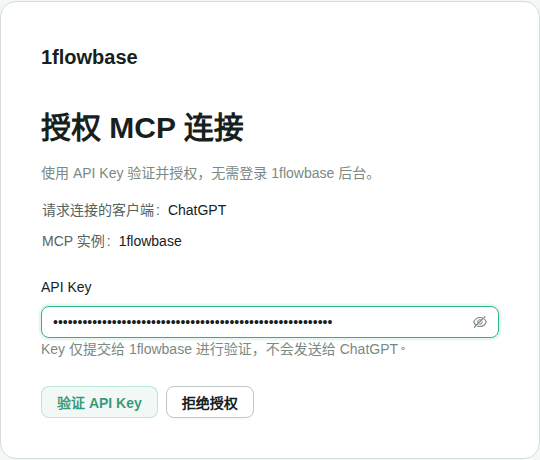
You do not need your admin-console username or password, and you do not need to save the key in the MCP client configuration dialog.
If the request is invalid or has expired, return to ChatGPT and start the connection again. Do not open /mcp/authorize manually without the authorization request parameters.
After verification, 1flowbase clears the API key field and shows:
| Information | What to check |
|---|---|
| Requesting client | ChatGPT |
| MCP instance | The instance you intend to connect |
| Authorized workspace | The workspace associated with your API key |
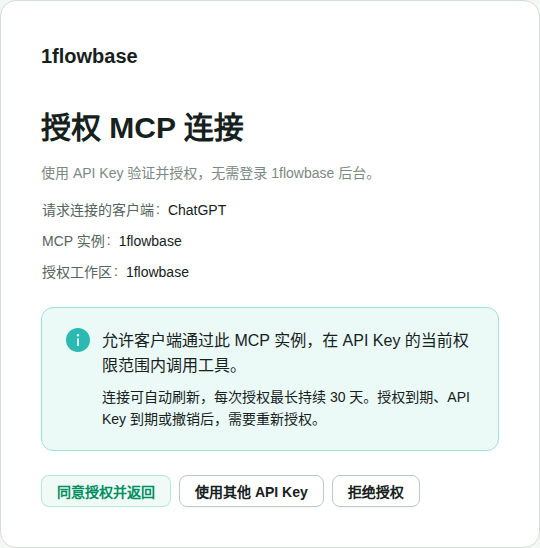
If the details are correct, click Authorize and return.
If the workspace is wrong, choose Use another API key and verify a different key. Choose Deny authorization if you do not want to connect.
Back in ChatGPT, check the connection status and call a tool you have permission to use.
The connection is complete when authorization returns you to ChatGPT and a tool call succeeds. Verifying the API key or creating the plugin alone is not enough.
| Symptom | What to check |
|---|---|
| 1flowbase says ChatGPT authorization is not enabled | Ask the administrator to check the release and deployment using the steps below. |
ChatGPT reports MCP server ... does not implement OAuth
|
An unauthenticated POST probe should return 401 with WWW-Authenticate. Update the service if it returns 415 or 400 instead. |
| ChatGPT cannot discover OAuth endpoints | Check that both metadata URLs under /api/public/mcp-oauth/ return JSON. A 404 under the root /.well-known/ path does not necessarily block newer clients. |
| Metadata or MCP requests receive a Cloudflare challenge or 403 | Adjust WAF rules for the necessary machine requests while retaining MCP authentication. |
| ChatGPT asks you to enter a client ID or secret | Check that DCR is selected rather than manual client configuration. |
| The authorization page never opens | Check whether you still need to click Connect or Authorize after creation, and review ChatGPT's error message. |
| API key verification fails | Check that the key is valid, the user is enabled, and the workspace and instance match. |
| The authorization request is invalid or expired | Start the connection again from ChatGPT. |
| Calls fail after the original key is revoked, expires, or has its permissions changed | Authorize again with a valid key that has the required permissions. |
| Access expires after roughly 30 days | Reconnect and authorize again. Token refresh does not extend the overall authorization period. |
Deploy the API, frontend, and database migrations from a release that includes OAuth discovery enabled by default. No OAuth environment variables or manually configured public address are required.
Use HTTPS in production. The web app, API, and authorization page must share the same public origin. The frontend sends window.location.origin in the URL's origin parameter. The API validates that complete origin and uses it throughout discovery and authorization. Older connections without this parameter still derive the address from Host and the forwarded scheme.
Reconnect in ChatGPT if the public address changes. Explicit-origin connections use an issuer under /api/public/mcp-oauth/origins/…. Copy the new complete MCP URL and recreate the ChatGPT connection to pick up this discovery configuration.
Use the same public origin for the web app, API, and authorization page:
| Path | Destination |
|---|---|
/api/ |
API service |
/mcp/authorize |
Web frontend |
The repository's Nginx and Vite configurations include these routes. Current discovery endpoints live under /api/, so there is no need to change a hosting panel's default certificate-validation rules for the root /.well-known/ path or add OAuth environment variables.
For current ChatGPT URLs, the explicit origin travels through discovery, registration, authorization, and token exchange even if the proxy rewrites Host to an internal address. Older URLs without the parameter still require the proxy to preserve the public hostname and correct X-Forwarded-Proto scheme. Cloudflare or other WAF rules must allow ChatGPT's metadata, registration, token, and MCP requests without requiring a browser challenge.
Replace the domain and instance ID in this URL with your actual values:
https://your-domain/api/public/mcp-oauth/config?instance_id=your-instance-id&origin=https%3A%2F%2Fyour-domain
The response should contain enabled: true and the correct server_url. If an older release returns enabled: false, update the service. If a current release returns an error, check that the origin parameter includes the correct scheme, hostname, and port. Connections without the parameter still need correctly preserved proxy headers.
For an explicit-origin connection, follow the resource_metadata URL in the MCP 401 response, then the issuer in authorization_servers, and read issuer + /.well-known/openid-configuration. These URLs carry an automatically generated origin context in their paths; do not enter it manually. The following fixed URLs check the older discovery flow without an origin parameter:
https://your-domain/api/public/mcp-oauth/.well-known/openid-configuration
https://your-domain/api/public/mcp-oauth/protected-resource/your-instance-id
Both legacy URLs should return JSON. The explicit-origin discovery flow is (… represents the generated origin context):
ChatGPT requests /api/mcp/your-instance-id?origin=encoded-complete-origin
  → The 401 response's WWW-Authenticate header points to
    /api/public/mcp-oauth/origins/…/protected-resource/your-instance-id
  → Resource metadata identifies the authorization server as
    https://your-domain/api/public/mcp-oauth/origins/…
  → The client tries the discovery URLs in protocol order
  → If root discovery fails, it continues to
    issuer + /.well-known/openid-configuration
  → It reads the authorization, token, and client-registration endpoints
/.well-known is a standard discovery path. This implementation uses the OpenID Connect path-appending discovery option supported by MCP to place the metadata under the authorization server's path. The document provides OAuth endpoint information; it does not require the openid scope, add OpenID sign-in, or issue ID tokens.
If a hosting panel intercepts the root /.well-known/ path, the first two root discovery requests may return 404. Clients that follow the MCP 2025-11-25 discovery sequence continue to the /api/ URL above. An older client that stops at the first 404 needs an update or forwarding rules for the standard root discovery paths. Not all older clients support this sequence.
Authorization server metadata should use the correct public HTTPS addresses:
| Field | Current path |
|---|---|
issuer |
https://your-domain/api/public/mcp-oauth |
authorization_endpoint |
/api/public/mcp-oauth/authorize |
token_endpoint |
/api/public/mcp-oauth/token |
registration_endpoint |
/api/public/mcp-oauth/register |
These fields are useful for diagnostics. Users do not need to enter them individually in ChatGPT.
New endpoints live under the contextual issuer above; the fixed paths in the table remain available for legacy connections. The origin parameter must be a complete, valid origin without credentials, a path, extra query parameters, a fragment, or duplicate values. Authorization requests, codes, and tokens are bound to that origin. It is not saved as a global setting that could override another domain.
ChatGPT's discovery probe may omit a JSON content type or request body. This request should return 401, with a WWW-Authenticate header pointing to the resource metadata for that explicit origin context:
curl -i -X POST 'https://your-domain/api/mcp/your-instance-id?origin=https%3A%2F%2Fyour-domain'Older releases could return 415 before authentication, preventing ChatGPT from receiving the metadata URL and causing the “does not implement OAuth” error. Current releases return the OAuth challenge first for unauthenticated requests. Authenticated tool calls still require a valid JSON request.
The local Vite development proxy writes [mcp-oauth-proxy] diagnostics to tmp/logs/web.log, including the request method, path without query parameters, User-Agent, and status code. It does not log API keys, tokens, or request bodies. Requests blocked by an outer Nginx proxy do not reach this log; inspect that proxy's existing access logs instead.
Opening the website in a browser does not prove that ChatGPT's backend can complete discovery. A GET request to the MCP endpoint returning 405 also does not establish that OAuth is unsupported.
If ChatGPT can see the tools but a call fails with structuredContent: Input should be a valid dictionary, the connection has reached tool invocation. The service needs an update to its tool-result format.
MCP requires structuredContent to be a JSON object. Current releases wrap directory arrays as {"result": [...]} and preserve the fields of object results. The text content contains the same object. Update and restart the API, then retry mcp_list, for example with {"depth": 2, "limit": 100}. No API key or proxy configuration changes are required for this fix.
- OAuth tokens are limited to the authorized MCP instance and the API key's workspace. They cannot sign you in to the admin console or access other instances.
- Each token use rechecks the original API key, user status, and role permissions. Tool calls remain subject to business permissions.
- An expired browser session for the admin console does not invalidate an established MCP OAuth authorization.
- Access tokens last up to one hour. ChatGPT can renew them with a refresh token, but each authorization lasts no more than 30 days.
- Access ends sooner if the original key expires or is revoked, or the user is disabled. Refresh tokens rotate; reusing an old refresh token invalidates the associated authorization.
The implementation uses the authorization code flow with PKCE S256 and Dynamic Client Registration. Registration accepts supported ChatGPT HTTPS callback URLs only. Fetching external CIMD client metadata is not supported. Authorization codes and refresh tokens are consumed atomically in the database; stored credentials are token hashes and their associations, not the original API key.
This guide reflects the current 1flowbase authorization flow, OpenAI's authentication documentation, and the automatic discovery, client registration, and authorization-page implementation in the AgentDock reference project.
The connection screenshot was refreshed during browser verification of the current static build, with the server URL masked. The other 1flowbase screenshots were captured from a real development service through its public URL. A temporary API key was used and revoked afterward. The ChatGPT creation screenshot was supplied by the user. Private deployment hostnames are redacted.
A public test client completed discovery despite root discovery returning 404, then verified API key authorization, callback capture, tool listing, read-only invocation, token refresh, and revocation. Calling mcp_list with {"depth": 2, "limit": 100} returned 93 directory entries with object-valued structuredContent.
Live ChatGPT verification was confirmed on October 5, 2026: after retrying in their ChatGPT session, the user confirmed that the connection and tool call worked. The OAuth discovery and tool-result format issues were resolved in that environment. See issue #2280 for the fixes and associated commits.
The verified environment was a privately operated deployment, with its public hostname redacted, forwarding through frpc to a local development service. No changes were made to the outer Nginx or frpc configuration, and no required OAuth environment variables were added. Other deployments still need updated API and frontend services and their own connection checks. A separate production deployment was not performed. If the existing proxy forwards /api/ and the authorization page correctly, this discovery change does not require modifying the outer Nginx configuration.
Source and updates: Repository guide.
References: MCP authorization and discovery · OpenAI MCP authentication requirements · Initial implementation and acceptance record.
The frontend built with an empty VITE_API_BASE_URL, a real development API, and installed Chrome passed a test in which the proxy rewrote Host to 127.0.0.1 and root discovery returned 404. The test client completed discovery, API key authorization, tool invocation, refresh, and revocation. Backend integration tests separately cover HTTPS public origins. The new connection format still needs a live ChatGPT reconnection check after deployment; the historical confirmation above does not establish that result.
Update both the frontend and the API it actually connects to. Replacing only the frontend archive can leave an older API ignoring origin and returning an internal address. After updating both, copy the new server URL and create a new connection in ChatGPT.