First Run and Host Setup
The first page asks for one, and nothing else works until it is set. Minimum
eight characters, stored as a scrypt hash in auth.json with mode 0600.
/api/health stays outside the gate deliberately — it is what the container
healthcheck probes, and it only claims the process is answering, which reveals
nothing.
Sessions are HMAC tokens in a SameSite=Lax cookie. Signing out and restarting
the controller both end them.
Keelarr probes the machine, scores every host profile it knows, and shows you each candidate with its reasoning.
Two adapters exist today:
| Adapter | Suggests |
|---|---|
qnap |
QNAP Container Station conventions — /share/Container, /share/Media
|
generic-docker |
$HOME/keelarr/... |
Detection suggests; it never decides. Every field carries its own confidence and status, and you can click a different profile to apply its defaults instead. Nothing is written until you save.
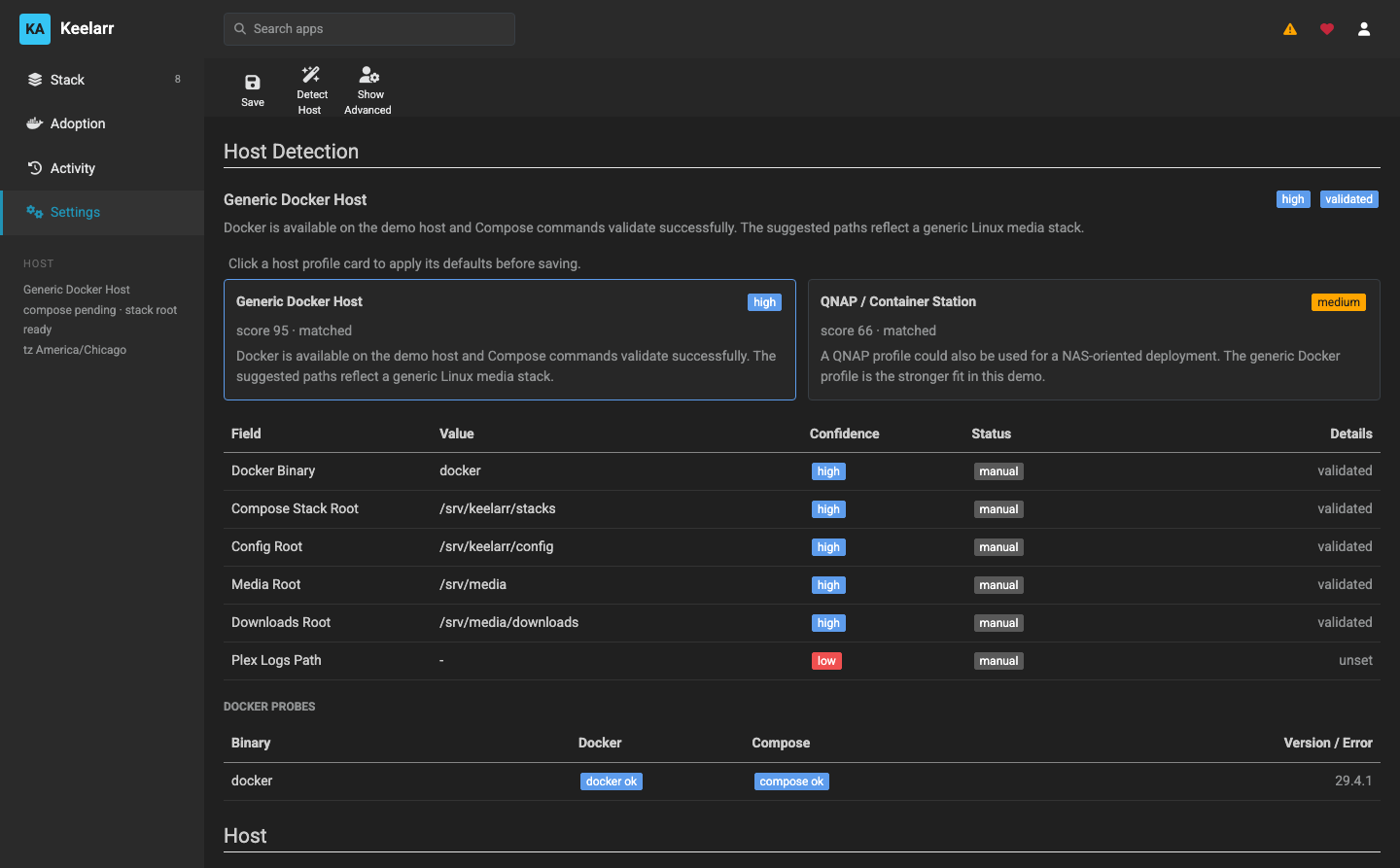
Synology, Unraid and TrueNAS have no adapter and fall back to generic detection. Nobody has reported what that produces on those systems — see docs/host-support.md.
Detection is cached and invalidated on save, because it spawns docker version
and docker compose version for every binary candidate across every adapter,
and running that on each dashboard poll cost seconds per refresh.
This is the one rule everything else follows:
The controller mounts each host root at the same absolute path inside the container as outside.
If your media is at /srv/media on the host, it is at /srv/media inside the
Keelarr container too.
Keelarr generates Compose files for other containers. Those files must contain paths that are correct on the host, because that is where Docker resolves them. But Keelarr also has to read those paths itself — to create a library folder, to check a directory exists, to snapshot a config.
If the paths differed inside and outside, every generated path would need translating, and every translation would be a place to get it wrong. Mounting them identically removes the problem instead of managing it.
It is also why Windows is unsupported outside WSL2: C:\Media has no absolute
path a Linux container can mirror.
| Root | Holds |
|---|---|
| Stack root | Generated compose.yml and .env per service |
| Config root | Each app's own configuration directory |
| Media root | Your library |
| Downloads root | Where the download client puts things |
A fifth, Plex logs, is optional and only used by Tautulli.
If you set a root the controller cannot see, Keelarr says so and names the environment variable that fixes it. It does not silently continue — a path the controller cannot read is a path it cannot create folders in or snapshot, and discovering that later is worse.
Changing a root in the app rewrites deploy/.env for you. The controller has to
be recreated for a new mount to take effect, and Keelarr tells you when that is
the case rather than every time you save.
Defaults are 1000/1000 and the host timezone. These are passed to the
LinuxServer images, which use them to own the files they write.
If your media is owned by a different user, set these to match, or the apps will create files your other tools cannot read. Keelarr creates library folders inheriting the parent directory's ownership, which is usually what you want.
The wizard offers the catalog. Selecting an app makes it available to install; it does not install it. Nothing is deployed until you say so.
You can install one app at a time from its row menu, or deploy everything selected at once from the toolbar.
- Settings are validated — every root is checked for existence and readability
-
settings.jsonis written -
deploy/.envis regenerated from those settings - If a mounted path changed, Keelarr tells you to recreate the controller
Validation errors block the save. Warnings do not, but they are shown.