FS_Sys_Eventlog
The directory sys/eventlog exists as a sub-directory to the file system root on Windows Vista and later.
The directory contains Windows event logs recovered from the event logging service. It provides the original recovered EVTX files, best-effort repaired EVTX files and parsed text records. All files in the sys/eventlog directory and its sub-directories are read-only.
The files in the sys/eventlog directory are listed in the table below:
| File | Description |
|---|---|
| eventlogs.txt | Summary of recovered event logs and their backing file objects. |
| eventlog_original/_summary.txt | A copy of the event log enumeration summary. |
| eventlog_original/[event log].evtx | Original recovered EVTX file, zero-padded where memory could not be read. |
| eventlog_repaired/_summary.txt | Per-log repair status and recovery statistics. |
| eventlog_repaired/[event log].evtx | Original or best-effort repaired EVTX file when one can be exposed. |
| eventlog_parsed/_summary.txt | Per-log parsing, CRC and record recovery statistics. |
| eventlog_parsed/[event log].txt | Successfully parsed event records in a normalized, line-oriented text format. |
Files in the sys/pool directory and sub-directories are read-only.
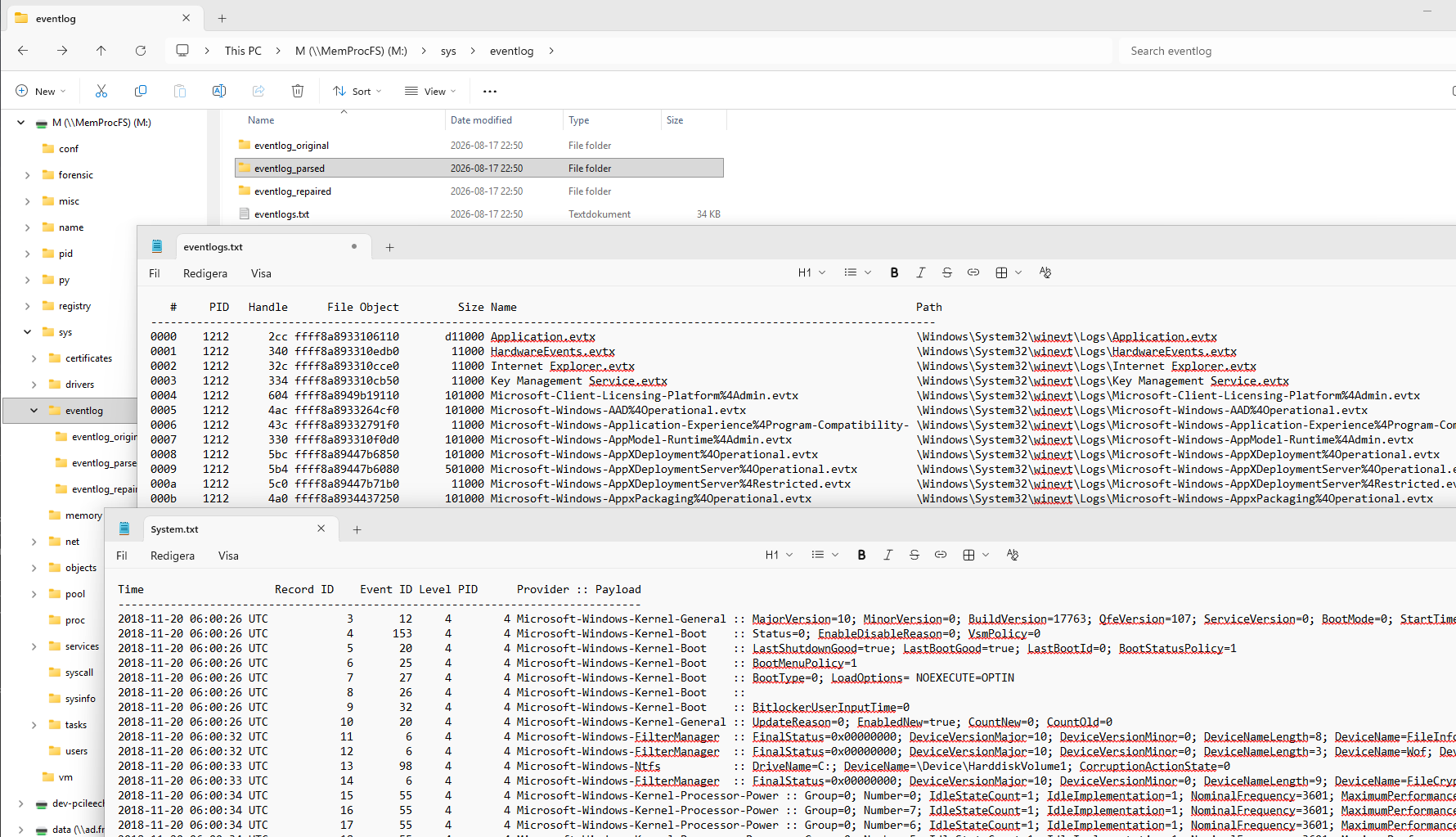
The file eventlogs.txt lists each recovered event log together with the Event Log service process ID, handle, file object address, recovered file size, file name and original path. Handle, file object and size values are displayed in hexadecimal.
The example below is from the TrickBot memory sample:
   #    PID Handle      File Object    Size Name                      Path
------------------------------------------------------------------------------------------------------------------------
0000    1212   2cc ffff8a8933106110  e00000 Application.evtx          \Windows\System32\winevt\Logs\Application.evtx
0001    1212   340 ffff8a893310edb0   11000 HardwareEvents.evtx       \Windows\System32\winevt\Logs\HardwareEvents.evtx
0002    1212   32c ffff8a893310cce0   11000 Internet Explorer.evtx    \Windows\System32\winevt\Logs\Internet Explorer.evtx
The eventlog_original directory contains the event log bytes recovered from the target memory. Unreadable or unavailable memory ranges are returned as zeroes so that file offsets and the recovered file size remain stable. Consequently, an original EVTX file may be incomplete or corrupt even though it has the expected size.
The file _eventlog_original/summary.txt contains the same enumeration information as eventlogs.txt. Preserve these original files when forensic provenance is important; the repaired and parsed views are derived analysis aids.
The eventlog_repaired directory contains EVTX files intended to be easier to consume with standard event log tools. A valid original file may be exposed unchanged. Otherwise MemProcFS attempts to rebuild a consistent EVTX header and chunk sequence from usable recovered chunks. Logs for which no usable file can be produced are omitted from the directory.
The file _eventlog_repaired/summary.txt reports whether each log is original, repaired or unavailable, together with original and exposed sizes, chunk counts, recovered record counts, duplicate counts and record ID continuity. For example, the TrickBot sample reports:
   # Status   Original   Exposed Chunks Valid Kept Records Unique Duplicates IDs Name
--------------------------------------------------------------------------------------------------------
0000 repaired   e00000    ca1000    223   202  202   29614  29614          0 yes Application.evtx
0001 original    11000     11000      1     1    1       0      0          0 yes HardwareEvents.evtx
0005 repaired    b1000     91000     11     9    9     330    330          0 yes Microsoft-Windows-AAD%4Operational.evtx
Repair is best-effort and cannot recreate data that is absent from memory. Copy an EVTX file to a writable local directory before opening it in Windows Event Viewer. Always retain the corresponding file from eventlog_original when the exact recovered bytes are evidence.
The eventlog_parsed directory contains one text file for each recovered log. Successfully decoded records are written in timestamp order with the record ID, event ID, level, process ID, provider and normalized payload. Damaged or partially recovered records that cannot be decoded safely are skipped.
The file _eventlog_parsed/summary.txt reports the original file size, chunk counts, valid header and data CRC counts, candidate, parsed and skipped record counts, and the first and last recovered timestamps.
The example below is a recovered PowerShell record:
Time                    Record ID    Event ID Level PID      Provider :: Payload
--------------------------------------------------------------------------------
2019-08-12 22:57:48 UTC     2744        53504     4 10096 Microsoft-Windows-PowerShell     :: param1=10096; param2=DefaultAppDomain
The example shows the sys/eventlog directory and the eventlogs.txt.
The sys/eventlog sub-directory is implemented as a built-in native C-code plugin. The plugin source is located in the file modules/m_sys_eventlog.c in the vmm project.