Repository navigation
MCP and AI Agents
This page explains how to connect AI agents such as Claude Code, Claude Desktop or Cursor to NodePilot over MCP. It covers the HTTP endpoint and local stdio mode, client setup, choosing token permissions, the full tool catalogue with the permission each tool needs, how calls are audited, and example prompts.
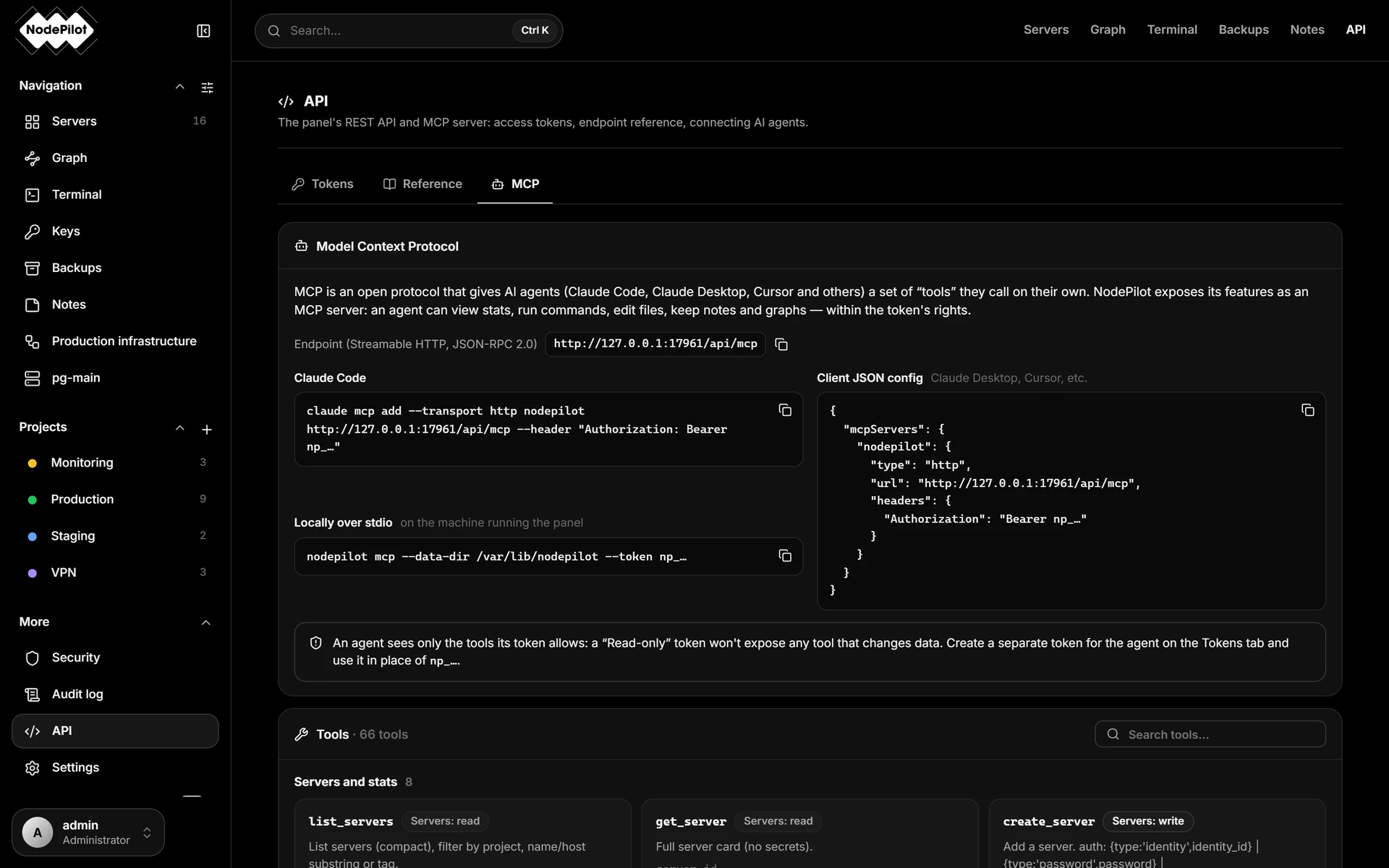
MCP (Model Context Protocol) is an open protocol that gives an AI agent a set of tools it can call on its own. NodePilot is an MCP server: it exposes its features (servers, commands, terminals, files, services, notes, graphs, backups) as 66 tools.
The agent acts with the rights of an API token:
-
tools/listreturns only the tools the token allows. A read-only token never sees a tool that changes data. -
tools/callchecks the permission again before running the tool. - Every call is written to the audit log.
On initialize the server also sends the agent short instructions: how projects, servers and graphs relate, the typical workflow, that commands run as the server's SSH user (sudo -n for service and power actions when it's not root), and that these are production servers, so it should check first and explain destructive actions before doing them.
The panel's API → MCP tab shows the endpoint, ready-made client configs and the list of tools your current session can see.
| HTTP | stdio | |
|---|---|---|
| Where | POST https://panel.example.com/api/mcp |
nodepilot mcp on the panel host |
| Auth |
Authorization: Bearer np_… (required) |
--token np_… or NODEPILOT_TOKEN; without a token, full access
|
| Agent runs | Anywhere that can reach the panel | On the panel host, as a user that can read the data directory |
| Use for | Most setups | Local agents on the panel host, tests |
HTTP: JSON-RPC 2.0 in the request body, a JSON response back (no streaming). Notifications (messages without id) get 202 Accepted. Supported methods: initialize, ping, tools/list, tools/call. Protocol version 2025-06-18. The endpoint needs any valid credential; what the agent can do comes from the token's areas.
stdio: nodepilot mcp reads JSON-RPC messages from stdin, one per line, and writes responses to stdout. Logs go to stderr. It opens the same database as the running panel.
nodepilot mcp --data-dir /var/lib/nodepilot --token np_…Without --token the agent gets full access, acting as the first user created in the panel. Always pass a token unless you really want that. The data directory belongs to the nodepilot user (mode 0700), so run the command as that user. If the master key is sealed in the TPM, see Running the CLI with a sealed key.
First create a token for the agent in API → Tokens → Create token (see Choosing token permissions). The "Token created" dialog shows a ready-to-copy Claude Code command.
claude mcp add --transport http nodepilot https://panel.example.com/api/mcp \
  --header "Authorization: Bearer np_…"
Locally over stdio, on the panel host:
claude mcp add --transport stdio --env NODEPILOT_TOKEN=np_… nodepilot -- nodepilot mcp --data-dir /var/lib/nodepilotClaude Desktop, Cursor and other clients that read an mcpServers config:
{
  "mcpServers": {
    "nodepilot": {
      "type": "http",
      "url": "https://panel.example.com/api/mcp",
      "headers": { "Authorization": "Bearer np_…" }
    }
  }
}
stdio variant:
{
  "mcpServers": {
    "nodepilot": {
      "command": "nodepilot",
      "args": ["mcp", "--data-dir", "/var/lib/nodepilot"],
      "env": { "NODEPILOT_TOKEN": "np_…" }
    }
  }
}curl -X POST https://panel.example.com/api/mcp \
-H "Authorization: Bearer np_…" -H "Content-Type: application/json" \
-d '{"jsonrpc": "2.0", "id": 1, "method": "tools/list"}'
curl -X POST https://panel.example.com/api/mcp \
-H "Authorization: Bearer np_…" -H "Content-Type: application/json" \
-d '{"jsonrpc": "2.0", "id": 2, "method": "tools/call",
"params": {"name": "list_servers", "arguments": {"q": "web"}}}'A tool result is returned as text: JSON for structured data, plain text for logs, files and graphs. If a tool fails or is not allowed, the result has "isError": true and the message, for example this API token has no 'write' access to 'exec'. An unknown tool name is a JSON-RPC error -32602.
The MCP token is an ordinary API token: it works against the REST API too. Its permissions are the real limit on what the agent can do, so grant only what the task needs and set an expiry date.
| Agent's job | Suggested permissions | Tools it gets |
|---|---|---|
| Observe and report | Read-only preset | Lists, details, stats, process and service lists, logs, files (read), notes, graphs, backup status |
| Document the infrastructure | Read-only + notes: write + graphs: write
|
Also create and edit notes and graphs |
| Look after backups |
servers: read, projects: read, backups: write
|
Configure storages and jobs, run backups, read history |
| Operate servers | Read-only + exec + system: write
|
Also run commands, terminals, restart services, kill processes, reboot |
| Edit configs | Read-only + files: write
|
Also write, rename and delete files |
Things to keep in mind:
-
execlets the agent run any command as the server's SSH user, on one server or many at once. Grant it only to agents you supervise. The token dialog warns about it. -
admingives no MCP tools at all, but the same token could then manage tokens, the panel key and the audit log through the REST API. Don't give it to agents. -
files: readlets the agent read any file the SSH user can read, including configs with passwords.identities: readshows only names and kinds, never secrets. - Prefer clients that ask you before running tools that change data. The tool annotations below help them decide.
Each tool in tools/list carries:
| Field | Meaning |
|---|---|
annotations.readOnlyHint |
true for tools that change nothing |
annotations.destructiveHint |
true for tools that can delete, overwrite, run arbitrary commands or interrupt service |
_meta["nodepilot/permission"] |
The permission the tool needs, e.g. exec:write
|
inputSchema |
A self-contained JSON Schema of the arguments |
Two terminal tools need exec: write because they give access to terminal sessions, but they change nothing, so they are marked readOnlyHint: true:
-
terminal_read: read output of an open session; -
terminal_list: list open sessions.
They are logged at warning level like other exec tools. All other exec tools change state.
66 tools in 9 groups. "Destructive" is the destructiveHint annotation.
| Tool | Description | Permission |
|---|---|---|
list_projects |
List projects (groups of servers) with server counts. | projects:read |
create_project |
Create a project. | projects:write |
update_project |
Rename a project or change its description/color. | projects:write |
delete_project |
Delete a project; servers stay in the panel. Destructive. | projects:write |
add_server_to_project |
Add a server to a project. | projects:write |
remove_server_from_project |
Remove a server from a project. | projects:write |
| Tool | Description | Permission |
|---|---|---|
list_servers |
List servers (compact); filter by project, name/host substring or tag. | servers:read |
get_server |
Full server card, without secrets. | servers:read |
create_server |
Add a server. auth is {type:'identity',identity_id}, {type:'password',password} or {type:'key',private_key,passphrase?}. |
servers:write |
update_server |
Change server fields; omit auth to keep credentials; project_ids replaces the whole set. |
servers:write |
delete_server |
Remove a server from the panel; the machine itself is untouched. Destructive. | servers:write |
test_server |
Test SSH connectivity and latency. | servers:read |
get_server_stats |
Collect live stats: CPU %, load, RAM, swap, disks, network, uptime, OS. | servers:read |
get_stats_history |
Metrics history, downsampled to about 600 points (hours 1–744, default 24). |
servers:read |
| Tool | Description | Permission |
|---|---|---|
list_identities |
Keychain entries: names and kinds only, never secrets. | identities:read |
create_identity |
Store a reusable password or SSH private key. | identities:write |
update_identity |
Rename or replace the secret of a keychain entry. | identities:write |
delete_identity |
Delete a keychain entry; fails if servers use it. Destructive. | identities:write |
| Tool | Description | Permission |
|---|---|---|
exec |
Run a non-interactive shell command on one server. Returns exit_code, stdout, stderr (1 MiB cap each). timeout_secs default 60, max 3600. Destructive. |
exec:write |
bulk_exec |
Run the same command on many servers in parallel, by project_id and/or server_ids. Destructive. |
exec:write |
terminal_open |
Open a persistent interactive shell (PTY) on a server. Keeps cwd and env between commands; for interactive programs and prompts. Returns the session and its first output. | exec:write |
terminal_send |
Type into a terminal session (Enter pressed by default) and return the new output, ANSI stripped. wait_ms default 2000, max 30000. Destructive. |
exec:write |
terminal_read |
Read terminal output since an offset, e.g. while a long command runs. Read-only. | exec:write |
terminal_list |
List open terminal sessions. Read-only. | exec:write |
terminal_close |
Close a terminal session. | exec:write |
| Tool | Description | Permission |
|---|---|---|
list_processes |
Top 200 processes by CPU. | system:read |
kill_process |
Send TERM (default), KILL or HUP to a process. Destructive. |
system:write |
list_services |
systemd services with load/active/sub state. | system:read |
service_action |
start, stop, restart, reload, enable or disable a systemd service. Destructive. |
system:write |
service_logs |
Recent journal lines of a systemd service (default 200). | system:read |
power |
Reboot or shut down a server. Destructive. | system:write |
| Tool | Description | Permission |
|---|---|---|
list_files |
List a directory over SFTP (default: the home directory). | files:read |
read_file |
Read a UTF-8 text file (max 256 KiB). | files:read |
write_file |
Create or overwrite a text file. Destructive. | files:write |
make_dir |
Create a directory. | files:write |
rename_path |
Rename or move a file or directory. Destructive. | files:write |
delete_path |
Delete a file, or a directory with recursive=true. Destructive. |
files:write |
| Tool | Description | Permission |
|---|---|---|
list_notes |
Markdown notes, optionally for a project or server. | notes:read |
get_note |
A note with its full body. | notes:read |
create_note |
Create a markdown note, e.g. to document what the agent changed. | notes:write |
update_note |
Edit a note; project_id/server_id null detaches it. |
notes:write |
delete_note |
Delete a note. Destructive. | notes:write |
| Tool | Description | Permission |
|---|---|---|
list_graphs |
Infrastructure diagrams (graphs). | graphs:read |
get_graph |
Read a graph as text: nodes (ids, roles, linked servers), typed connections (ids) and notes. | graphs:read |
create_graph |
Create an empty graph. | graphs:write |
update_graph |
Rename a graph or change its description/project. | graphs:write |
delete_graph |
Delete a graph. Destructive. | graphs:write |
graph_add_node |
Add a node (type node with a role and optional server_id) or a canvas note (type note). Position is automatic if x/y are omitted. |
graphs:write |
graph_update_node |
Change a node: label, role, server, color, note, position. | graphs:write |
graph_remove_node |
Remove a node and all its connections. Destructive. | graphs:write |
graph_connect |
Connect two nodes. kind: link, depends, cascade, vpn, replication or other; label and note explain why. |
graphs:write |
graph_update_edge |
Change a connection: kind, label, note, direction, endpoints. | graphs:write |
graph_remove_edge |
Remove a connection. Destructive. | graphs:write |
| Tool | Description | Permission |
|---|---|---|
list_backup_storages |
Backup storages (panel directory or S3). | backups:read |
create_backup_storage |
Add a storage: kind local with local.path, or s3 with S3 settings. |
backups:write |
update_backup_storage |
Change a storage; the S3 secret is kept if omitted. | backups:write |
delete_backup_storage |
Delete a storage; fails if jobs use it. Destructive. | backups:write |
test_backup_storage |
Write and delete a probe object to verify a storage. | backups:write |
list_backup_jobs |
Backup jobs (files, postgres, mysql), schedules and last run. | backups:read |
get_backup_job |
A backup job. | backups:read |
create_backup_job |
Create a backup job. Schedule is cron in UTC: 6 fields with seconds (0 0 3 * * *, 0 0 4 * * Sun) or classic 5-field crontab (0 3 * * 1 = Mondays 03:00). |
backups:write |
update_backup_job |
Change a backup job; secrets are kept if omitted. | backups:write |
delete_backup_job |
Delete a backup job. Destructive. | backups:write |
run_backup |
Start a backup job now. It runs in the background; poll list_backups. |
backups:write |
list_backups |
Backup runs with status, size and errors. | backups:read |
delete_backup |
Delete a backup archive. Destructive. | backups:write |
The backup job tools accept the same fields as the REST API, including encryption (none, passphrase, recipients) and recipients. There are no MCP tools for downloading archives or generating age keys. See Backups.
No tool needs the admin area: tokens, the panel key, the audit log and updates are not reachable over MCP.
Every tools/call is recorded in the audit log, whether it succeeded, failed or was denied. initialize, ping and tools/list are not logged.
| Field | Value |
|---|---|
| Action |
mcp:<tool name>, e.g. mcp:bulk_exec
|
| User / token | The token's owner and the token name (shown as "Via API token …"). Local stdio without a token shows the user and no token. |
| IP | The client address (HTTP only) |
| Details | The tool arguments, with passwords, passphrases, secrets and private keys replaced by ***
|
| Outcome |
ok, denied, or error: <first 300 characters of the error>
|
| Severity |
critical for destructive tools and denied calls; warning for other tools that need write; info for read tools |
To review what an agent did, open Audit log, type mcp: in Action or target…, or filter by the token's user. Set up forwarding with Forward events from = critical to get alerts for destructive agent actions.
Note that arguments are logged in full apart from the redacted fields, so commands passed to exec and text sent with terminal_send appear in the log.
Monitoring and diagnosis (read-only token):
- "Which servers in the
productionproject have more than 85% disk usage or a load above their core count? Make a table." - "nginx on web-2 returns 502. Check the service status and its last 100 log lines and tell me what you see. Don't change anything."
- "Compare the last 24 hours of CPU and memory on db-1 and db-2. Anything unusual?"
- "List backup jobs whose last run failed, with the error, and which jobs have no schedule."
Documentation (read-only + notes and graphs):
- "Read the
infragraph and add the Redis servers from thecacheproject as nodes with rolecache, connected to the API nodes with kinddepends." - "Write a note on each server in the
stagingproject with its OS, kernel, uptime and the services that are running."
Operations (with exec and system:write, supervised):
- "On all servers in
staging, runapt list --upgradableand summarise what would be upgraded. Don't install anything yet." - "Restart php-fpm on web-1 and web-2 one at a time, checking that the site answers after each restart. Then add a note about what you did."
- "Open a terminal on db-1 and check
pg_stat_activityfor queries running longer than 5 minutes."
Backups (with backups:write):
- "Create a nightly backup of the
appPostgreSQL database in thepostgrescontainer on db-1 to thes3-mainstorage at 03:00 UTC, keep 14 archives, encrypted to the age keyage1…. Then run it once and tell me the result."