Repository navigation
Releases: voidksa/Loaderly
Release list
Loaderly 2.3.2

Loaderly 2.3.2
This update improves Windows Store updates, download resuming, community sign-in and theme switching. Windows, macOS and Linux share version 2.3.2.
Windows Store updates
- Automatically check for updates shortly after opening Loaderly and periodically while it is running.
- Download available updates while continuing your work. Save and install after active tasks finish.
- Check manually, manage automatic checks and see the last successful check in Preferences > About.
- Postpone the notice for 24 hours. Connection problems and canceled installation requests have clear status messages.
Microsoft Store determines availability for your device. Earlier Windows versions need to receive 2.3.2 through the Store before these controls become available.
Fixes on every platform
- Resume supported downloads using saved partial data, including the optional YouTube backup. Retain the transfer method used before pausing and check changed sources before reusing saved bytes.
- Remember Replace or Keep both when resuming the same task. Ask again if the existing file changes or a new task starts.
- Keep the saved community account visible during temporary connection failures. Restore protected sessions after reopening or updating, and prevent outdated requests from clearing a newer session.
- Replace previous custom colors, transparency and shapes when choosing a built-in theme. Preserve text size and workspace spacing, and clearly identify custom themes.
- Fix the download-history notice close button in both languages, with a centered icon and visible keyboard focus.
Read the guides · Download Loaderly
Downloads
| Platform | Package |
|---|---|
| Windows | Microsoft Store |
| macOS, Apple Silicon | ARM64 ZIP |
| macOS, Intel | Intel ZIP |
| Linux, Ubuntu / Debian | AMD64 DEB |
| Other compatible Linux desktops | x86-64 AppImage |
Windows 2.3.2 has been submitted to Microsoft Store and is awaiting certification. The Store provides the currently published Windows version until approval. Windows downloads and updates are available only through Microsoft Store. macOS requires version 12 or newer. Linux requires glibc 2.35 or newer on a 64-bit Intel or AMD computer.
The AppImage includes update information. Its .zsync companion is used by compatible update tools and is not a separate app to open. SHA256SUMS.txt contains checksums for the uploaded packages and update data.
Loaderly 2.3.1
Loaderly 2.3.1
More reliable downloads, clearer controls and easier speech-to-text setup. Loaderly 2.3.1 fixes save-location and startup problems and helps choose transcription settings for your audio.
Download fixes and controls
- Download directly to a drive: Fixed saving directly to a drive when per-website folders are disabled. Saved audio and video destinations work with either folder organization option.
- Pause or cancel from the download row: Use Pause during preparation or transfer, and Cancel to stop an active task. Cancellation also works while processing media or waiting for another matching download. Resume interrupted transfers when supported by the source.
- Clear finished and canceled states: Fixed queue updates that could leave a finished or failed task showing Preparing. Canceled downloads have their own state and filter.
- Understand the final processing step: Transfer complete now distinguishes finished downloading from preparing the audio file or combining video and audio. The result becomes completed when the file is ready.
- Replace duplicates on removable drives: Fixed replacing an existing download on FAT32 drives. The existing file is kept until its replacement has been downloaded and checked.
Easier speech to text
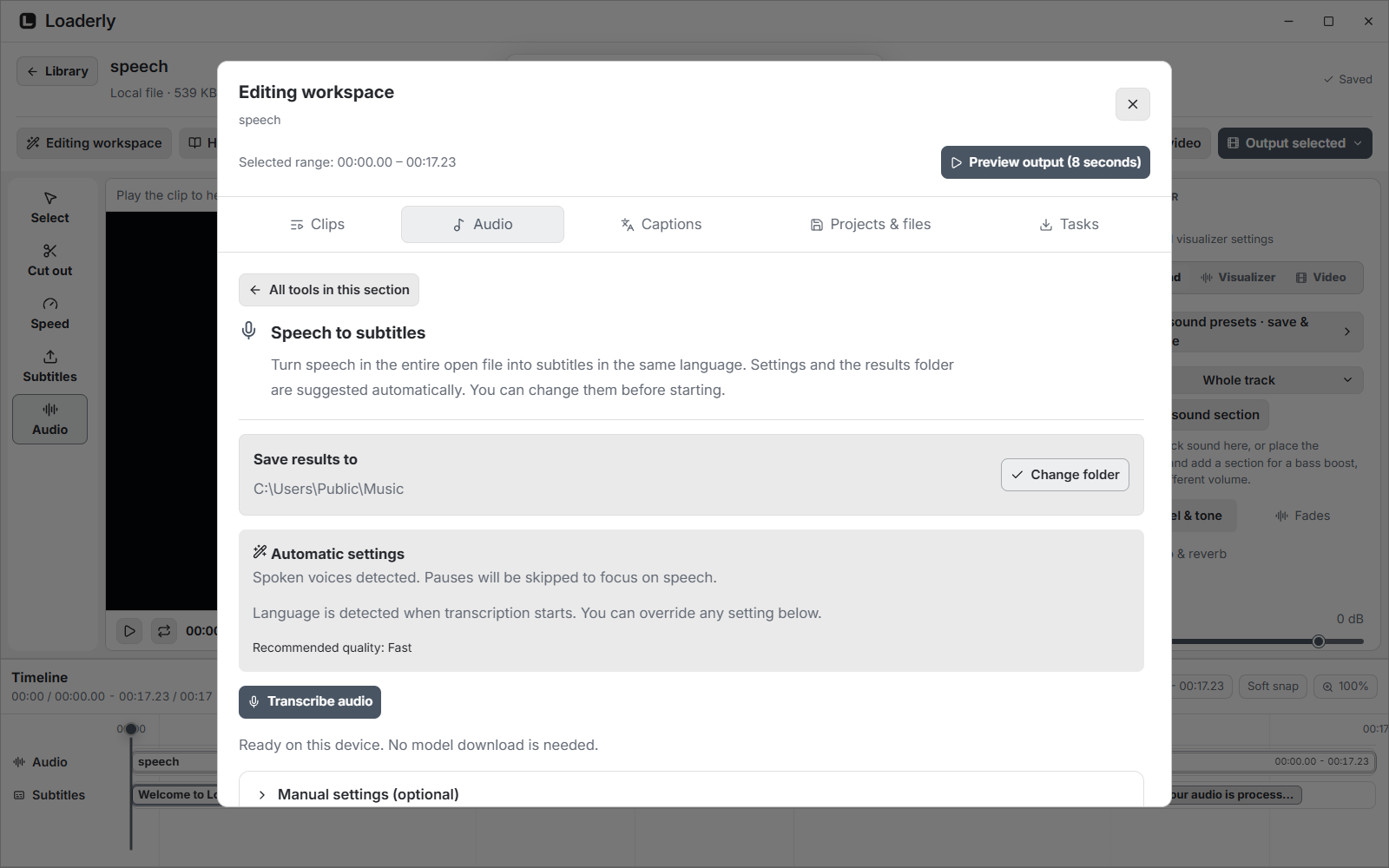
- Automatic audio analysis: Loaderly checks short samples on your device and suggests whether to focus on speech or analyze the full audio for music and processed voices. Language is detected when transcription starts. Review the result, especially for singing.
- Set up and start in one step: Start with the suggested recognition quality and a results folder beside the source. If a model is needed, Set up & transcribe downloads it and starts the task. The first download size is shown before you begin.
- Keep manual control: Expand Manual settings to change recognition quality, language or audio content. You can change the results folder and cancel setup before transcription begins.
Windows startup
- Start Loaderly with your computer: Fixed reading and changing startup settings in the Microsoft Store version. The option opens Loaderly after you sign in to Windows; it does not ask you to sign in to a Loaderly account.
Read the illustrated documentation for setup and usage.
Downloads
| Platform | Package |
|---|---|
| Windows | Microsoft Store |
| macOS, Apple Silicon | ARM64 ZIP |
| macOS, Intel | Intel ZIP |
| Linux, Ubuntu / Debian | AMD64 DEB |
| Other compatible Linux desktops | x86-64 AppImage |
Windows 2.3.1 has been submitted to Microsoft Store and is awaiting certification. The Store provides the currently published Windows version until approval. Windows downloads and updates are available only through Microsoft Store. macOS requires version 12 or newer. Linux requires glibc 2.35 or newer on a 64-bit Intel or AMD computer.
The AppImage includes update information. Its .zsync companion is used by compatible update tools and is not a separate app to open. SHA256SUMS.txt contains checksums for the uploaded packages and update data.
Loaderly 2.3.0
Loaderly 2.3.0
- Download from a floating button, automatic link capture or ready-to-use shortcuts. Customize shortcuts and use them across keyboard layouts.
- Choose Original audio, Vocals only or Instrumental for video and audio downloads. Keep the original and follow transfer, local separation and saving as distinct stages.
- Faster compatible downloads with parallel parts, recovery from refused segmented transfers, an optional YouTube backup engine, and bulk selection to clear download history.
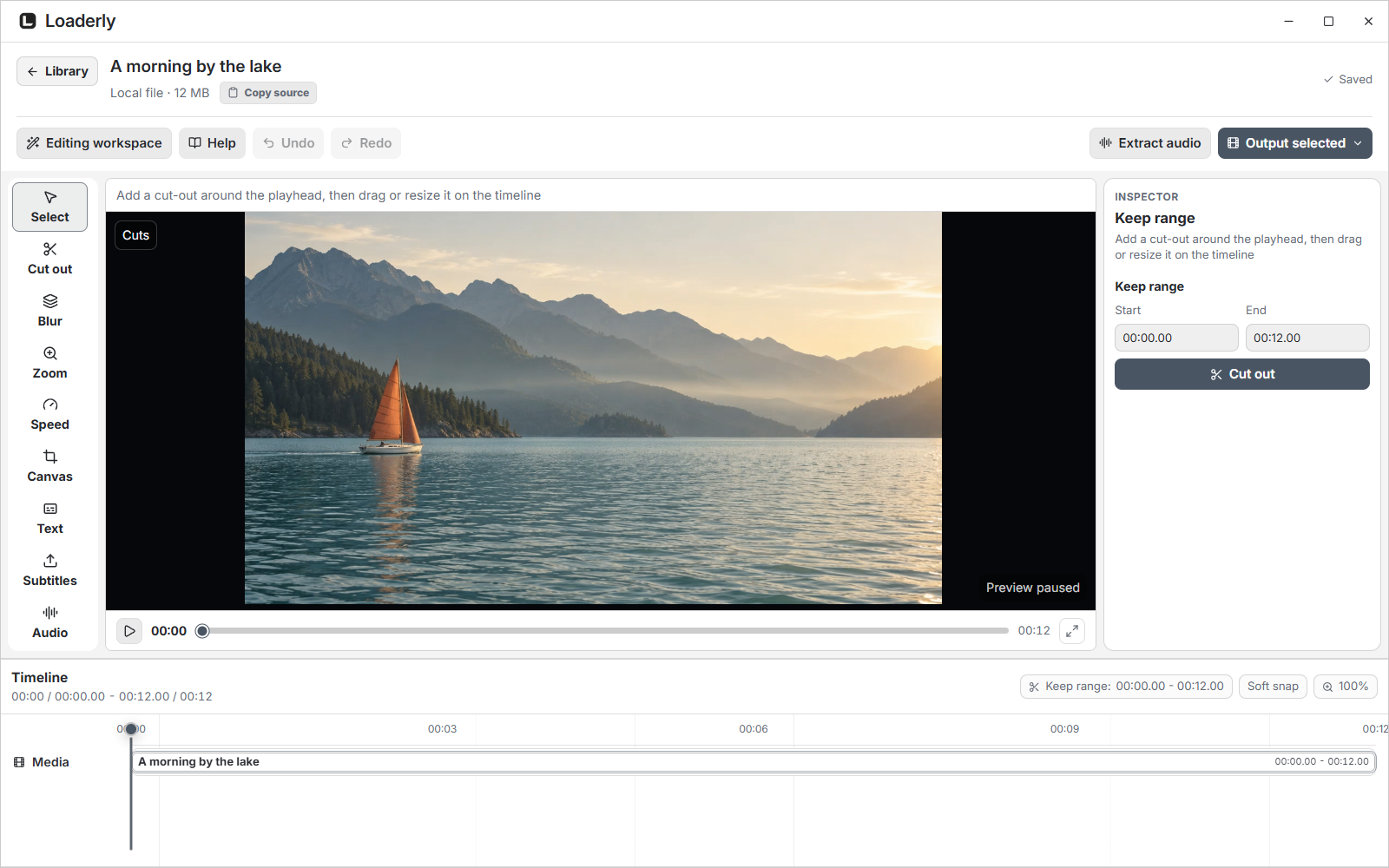
- Move projects between devices, keep named editing versions and export multiple clips with individual presets.
- More editing controls for picture, motion, text, soundtracks, loudness, noise and silence. Transcribe speech and separate vocals and music on your device.
- New visualizer shapes with better sound response, previews and reusable editing templates.
- Clearer preferences, tool updates and startup controls, with improved Arabic layout, glass appearance and scrolling.
- Fixed audio extraction and editor exports with updated media tools. Original, vocal and instrumental copies stay distinct.
Read the illustrated release guide for all additions, improvements and fixes.
Downloads
- macOS: Apple Silicon and Intel ZIPs. Requires macOS 12 or later.
- Linux: AppImage for direct use or DEB for installation on Debian/Ubuntu, for Intel/AMD x64. Requires Ubuntu 22.04+, Debian 12+, or a compatible distribution with glibc 2.35+.
- Windows: distributed through Microsoft Store. Version 2.3.0 is awaiting Microsoft certification and is not yet available through the Store.
See the installation guide and the attached SHA256SUMS.txt. Audio separation results and download speed vary with the source and device.
Linux AppImage refresh
Download Loaderly-2.3.0-x86_64.AppImage. Its modern runtime no longer needs a separate libfuse2 installation. AppImageUpdate support is included, with the accompanying .zsync file and updates sourced from this repository. Existing AppImages without update information need this refreshed file downloaded once. Download the AppImage to run Loaderly. The small .zsync file is update data for AppImageUpdate, not a separate application.
تحسين حزمة لينكس
نزّل Loaderly-2.3.0-x86_64.AppImage. تتضمن الحزمة مشغّلًا حديثًا لا يحتاج إلى تثبيت libfuse2 بشكل منفصل، وتدعم AppImageUpdate عبر ملف .zsync المرفق من هذا المستودع. إذا كانت لديك الحزمة السابقة التي لا تتضمن بيانات التحديث، نزّل الملف المحدّث مرة واحدة. نزّل AppImage للتشغيل المباشر أو DEB للتثبيت على Ubuntu وDebian. ملف .zsync الصغير مخصص لأداة التحديث، وليس نسخة أخرى من البرنامج. تتطلب النسخة جهاز Intel أو AMD بمعمارية 64 بت ونظام Ubuntu 22.04 أو Debian 12 أو أحدث، أو توزيعة متوافقة بمكتبة glibc 2.35 أو أحدث.
Loaderly 2.2.0
More control over where your files go, easier reuse of your designs, and a clearer desktop workspace.
Saving & exporting
- Extract audio without unwanted duplicates: When audio from the same source is already in your library, choose to open it, replace it or keep both. This works from the library and the editor, even when the files are in different folders.
- Choose how to save your edits: Keep an edited copy beside the original, replace the original when the format matches, or choose another location. The file picker starts in the original folder.
- Keep your originals safe: Edited copies keep a recognizable filename and get a separate name if one already exists. Replacing an original waits until the finished export is ready.
- Clearer results and cancellation: Save confirmations show the output location with Show in folder. Canceling a save or visualizer export no longer appears as a failure, and retrying clears the previous progress.
Downloads & locations
- See real download progress: Follow the downloaded size, percentage, speed and time remaining when available. Estimated totals are marked, and downloading is shown separately from preparing and processing the file.
- Name and reuse your folders: Add named locations on your computer or a connected external drive. Choose separate default locations for audio and video, or a location for an individual download.
- Organize each location your way: Limit a location to audio, video or both, and choose whether to create a folder for each website. Your existing default download folder remains available.
- Know where your download will go: Queued downloads keep their chosen location. See folder readiness and the complete path on hover. If a selected drive is unavailable, Loaderly explains the problem instead of silently saving somewhere else.
Your sound presets
- Save the sound you like: Name and save your current sound settings on this device. Search your saved presets from either the audio or video editor and reuse them on another clip.
- Apply with control: See which clip or section will receive the settings, then use Undo to restore its previous sound. Choose whether to include speed and pitch settings when working with a speed region.
- Keep or share a settings file: Import and export sound presets as files, or open the saved preset in community sharing. Only the settings are shared. Your audio stays on your device.
Your designs & community
- Smoother, more expressive visualizers: Refined spectrum response and softer default bars, with new Silk, Ember ring and Starlight presets. Build custom shapes from Infinity, Arch, Hexagon or Oval and adjust sensitivity and smoothing to your sound.
- Review before deleting a design: Deleting a saved design or removing it from the public library asks for confirmation, names the design and explains which copies are affected.
- More room to shape your visualizer: Move and add points across the drawing canvas without being confined to the original shape’s small box. Apply design and Cancel stay at the bottom, and Undo lets you try changes freely.
- A library for your own designs: Keep multiple themes, visualizers and sound presets on this device, including your existing drafts. Find them by name or type and see where each design is saved.
- Browse without losing your place: Open a design in its own editing view and return to the same search and filters. Opening a design or saving it unchanged no longer moves it to the top or changes its edit date.
- Easier theme and visualizer reuse: Save named designs from their controls and apply them again later. Import or export a settings file, and open a specific saved design when you want to share it.
- Clearer community browsing: Choose a list or grid view and keep your preferred view. Previews, ratings and actions stay together. Design types and saved items are easier to find, with cleaner spacing and previews that keep their proportions. Rating scores and counts are clearer in Arabic.
- Simpler sign-in and sharing: The sign-in code, copy action, browser link and waiting state are grouped in two clear steps. Device saving, private account copies and community publishing have clearer, separate actions.
A clearer workspace
- Readable editing controls: Blur, zoom, canvas and other inspector tabs wrap into clear rows without breaking words into letters. Subtitle timing controls stay available while you adjust the current cue, and the timeline menu supports keyboard navigation and Escape.
- Roomier Preferences and Tools: A larger 120% text size is now the default and stays adjustable. Related settings sit together and adapt to the window width. Preferences navigation stays visible while its content scrolls, and switching sections starts at the top.
- A more organized editor: The media title and source stay together, with editing and output actions in a separate row. Mixed Arabic and English titles follow the interface direction, and controls remain accessible in smaller windows.
- Less clutter while you work: Slim themed scrollbars, fewer nested scrolling areas and clearer spacing across design and preset controls. Library details scroll while their action buttons stay visible. Save and status notices now appear at the top center of the window.
Glass & appearance
- Native Liquid Glass on supported Macs: macOS 26 and later use the native system glass effect, with the existing vibrancy fallback on older Macs. Turning glass off or enabling reduced transparency restores an opaque background.
- Consistent glass controls: Buttons and selection states use the same translucent material across Preferences, the editor, design sharing and quick actions. Expandable sections use matching arrows in English and Arabic.
- A more even editor background: Reduced stacked tinting that made editor toolbars look like separate dark blocks. Your glass preference stays in place when you switch between Loaderly and other apps.
- Readable glass throughout the app: Improved glass backgrounds across the library, community, settings and editor, including the timeline. Menus, tooltips, color pickers and dialogs keep a readable background instead of letting text underneath show through.
- Clearer appearance controls: Transparency and layout sliders have visible tracks, and the theme preview reflects your appearance without a checkerboard. Even at maximum transparency, the background keeps text readable.
- Adapts to your system settings: Glass responds to reduced-transparency and contrast settings while Loaderly is open. When desktop glass is unavailable, the app keeps a solid background with your chosen colors.
Desktop details
- Window controls that fit your desktop: Refined Windows and Linux window buttons follow Loaderly’s theme, with distinct maximize and restore states. macOS keeps its familiar window controls.
- A cleaner quick-actions menu: The tray popup uses a continuous background and corners that follow your theme, and shows the installed version. Arabic actions fit without clipping, and keyboard navigation makes its commands easier to reach.
- A consistent identity and update notes: Updated Windows app and shortcut icons use Loaderly’s current identity. A notice introduces what changed after an update, and you can reopen these notes from Preferences → About.
Downloads and platform status
Download macOS (Apple silicon or Intel) and Linux (AppImage or DEB) below. Windows 2.2.0 is available from Microsoft Store. Windows updates remain managed by the Store.
macOS requires version 12 or later. Native Liquid Glass is available on macOS 26 or later. See the installation guide for setup instructions.
Loaderly 2.1.3
Windows: Get Loaderly from Microsoft Store. Microsoft Store delivers Windows updates. The attached packages are for macOS and Linux.
ويندوز: تنزيل Loaderly من Microsoft Store. تصل تحديثات ويندوز عبر المتجر. الملفات المرفقة للماك ولينكس.
Loaderly 2.1.3 fixes YouTube Mix links and makes playlist and file choices easier to recognize.
- Choose videos from lightweight playlist rows with thumbnails, clearer selection controls and a separate scrollbar.
- Duplicate downloads and removal confirmations follow your theme and show the media title and artwork.
- When an entry has no downloaded file, Loaderly explains what can be removed instead of presenting an inactive deletion choice.
- Interface text stays unselected; editable text uses your theme's selection color.
- The official website is now loaderly.app, with support@loaderly.app for help.
- On macOS, updates initiated from version 2.1.3 can close Loaderly, replace the application and reopen it after active work finishes. A recovery copy stays available until the new version starts.
When upgrading from 2.1.2 or older on Mac, quit the old app and replace it in Applications manually this time. Automatic replacement is part of 2.1.3 and applies to subsequent updates. The replacement transaction passed automated tests; native macOS installation still needs device verification.
يصلح Loaderly 2.1.3 روابط مزيج يوتيوب ويحسّن اختيار المقاطع والملفات.
- قائمة تشغيل بصفوف خفيفة وصور مصغرة وأدوات تحديد أوضح ومساحة منفصلة للتمرير.
- نوافذ المكرر والإزالة تتبع الثيم وتعرض اسم المقطع وصورته.
- توضيح عدم وجود ملف منزّل بدل عرض خيار حذف لا يستجيب.
- منع تحديد نصوص الواجهة، مع استخدام لون الثيم عند تحديد النص داخل الحقول.
- الموقع الرسمي: loaderly.app. الدعم: support@loaderly.app.
- تحديثات الماك المنفذة من الإصدار 2.1.3 تستطيع إغلاق البرنامج واستبداله وإعادة فتحه بعد انتهاء الأعمال، مع الاحتفاظ بنسخة للاسترجاع حتى يبدأ الإصدار الجديد.
عند الترقية من 2.1.2 أو أقدم على الماك، أغلق النسخة القديمة واستبدلها داخل التطبيقات يدويًا هذه المرة. الاستبدال التلقائي جزء من 2.1.3 ويُستخدم في التحديثات التالية. اجتازت خطوات الاستبدال الاختبارات الآلية، وما زال التثبيت الفعلي على جهاز ماك بحاجة للتحقق.
Loaderly 2.1.2
Windows: Get Loaderly from Microsoft Store. Windows updates are delivered through the Store. The downloads below are for macOS and Linux.
ويندوز: تنزيل Loaderly من Microsoft Store. تصل تحديثات ويندوز عبر المتجر. الملفات المرفقة للماك ولينكس.
Loaderly 2.1.2 improves update notifications and the download experience.
- On Mac and Linux, checks for new releases every 15 minutes while Loaderly is open, and checks again when you return after being away.
- Shows a compact update notice with clear actions. Choosing Later keeps that version dismissed for the session.
- Gives release notes, download buttons and progress more room, without a duplicate notice on the update settings page.
- Adds a smooth download bar that follows your theme, with a separate percentage and cancel button.
- Displays the full installed version and supports Arabic release notes.
- Adds a lighter Library list, cleaner gallery thumbnails and more space beside the scrollbar. Loaderly remembers your chosen view.
- Keeps gallery items the same size when opening file details, with consistent two-line titles.
- Checks actual folder write access and explains unavailable drives, permission problems, read-only drives and low storage.
- Refreshes a refused media-transfer request once, then shows a clear message if it still fails.
- Aligns the live theme preview with the customization tools and moves its label into the preview header.
On Mac and Linux, install over your current version to keep your library and settings. This includes the audio editor and Windows installer fixes from 2.1.1.
يحسّن تحديث Loaderly 2.1.2 تنبيهات التحديث وتجربة التنزيل.
- على الماك ولينكس، يتحقق من الإصدارات الجديدة كل 15 دقيقة أثناء فتح البرنامج، ويتحقق مجددًا عند العودة بعد غياب.
- يعرض تنبيهًا مختصرًا بأزرار واضحة. يخفي اختيار «لاحقًا» تنبيه هذا الإصدار طوال الجلسة.
- يحسّن المسافات بين وصف التحديث وأزراره، ويمنع تكرار التنبيه داخل صفحة التحديثات.
- يضيف شريط تنزيل سلسًا يتبع ألوان الثيم، مع نسبة واضحة وزر منفصل لإلغاء التنزيل.
- يعرض رقم الإصدار المثبّت كاملًا، ويدعم وصف التحديثات بالعربية.
- يعرض المكتبة بصفوف أخف وصور مصغرة أوضح، ويفصل شريط التمرير عن الملفات، ويتذكر طريقة العرض التي اخترتها.
- يحافظ على مقاس عناصر العرض الشبكي عند فتح تفاصيل الملف، ويوحّد عرض العناوين في سطرين.
- يتحقق من إمكانية الحفظ ويوضح مشكلة القرص أو المجلد وخطوات معالجتها.
- يعيد طلب الوسائط المرفوض مرة واحدة، ثم يعرض رسالة واضحة إذا استمر التعثر.
- يحسّن محاذاة المعاينة المباشرة للثيم، ويضع عنوانها داخل إطارها.
على الماك ولينكس، ثبّت التحديث فوق النسخة الحالية للاحتفاظ بالمكتبة والإعدادات. يتضمن أيضًا إصلاحات محرر الصوت ومثبّت ويندوز في 2.1.1.
Loaderly 2.1.1
Loaderly 2.1.1 fixes several audio editor issues.
- Fixed shortcut creation on Windows with Arabic and redirected desktop paths. An unavailable shortcut folder no longer stops installation.
- Video shape and quality selections now apply and stay saved.
- Audio speed, tone and effects remain consistent when the app is minimized and restored.
- Reset affects only the open sound section, preserving other adjustments.
- Visualizer bars respond to grouped music frequencies across the preview and exported video.
- Sound tab labels stay on one line.
Install this update over your current version. Your library and settings are preserved.
يتضمن تحديث 2.1.1 إصلاح إنشاء الاختصارات في مسارات سطح المكتب العربية والمعاد توجيهها. وإذا تعذّر إنشاء الاختصار، يكتمل تثبيت البرنامج مع توضيح طريقة فتحه.
أصلحنا أيضًا اختيار مقاس الفيديو وجودته، وثبات الصوت عند تصغير البرنامج والعودة إليه، واستجابة أعمدة الطيف. أصبحت إعادة ضبط الصوت تخص القسم المفتوح فقط، مع تحسين عرض عناوين التبويبات.
يمكن تثبيت التحديث فوق النسخة الحالية مع الاحتفاظ بالمكتبة والإعدادات.
Windows: Get the current Loaderly release from Microsoft Store. The Store handles installation and updates.
ويندوز: نزّل الإصدار الحالي من Microsoft Store. يتولى المتجر التثبيت والتحديثات.
Loaderly 2.1
Loaderly 2.1
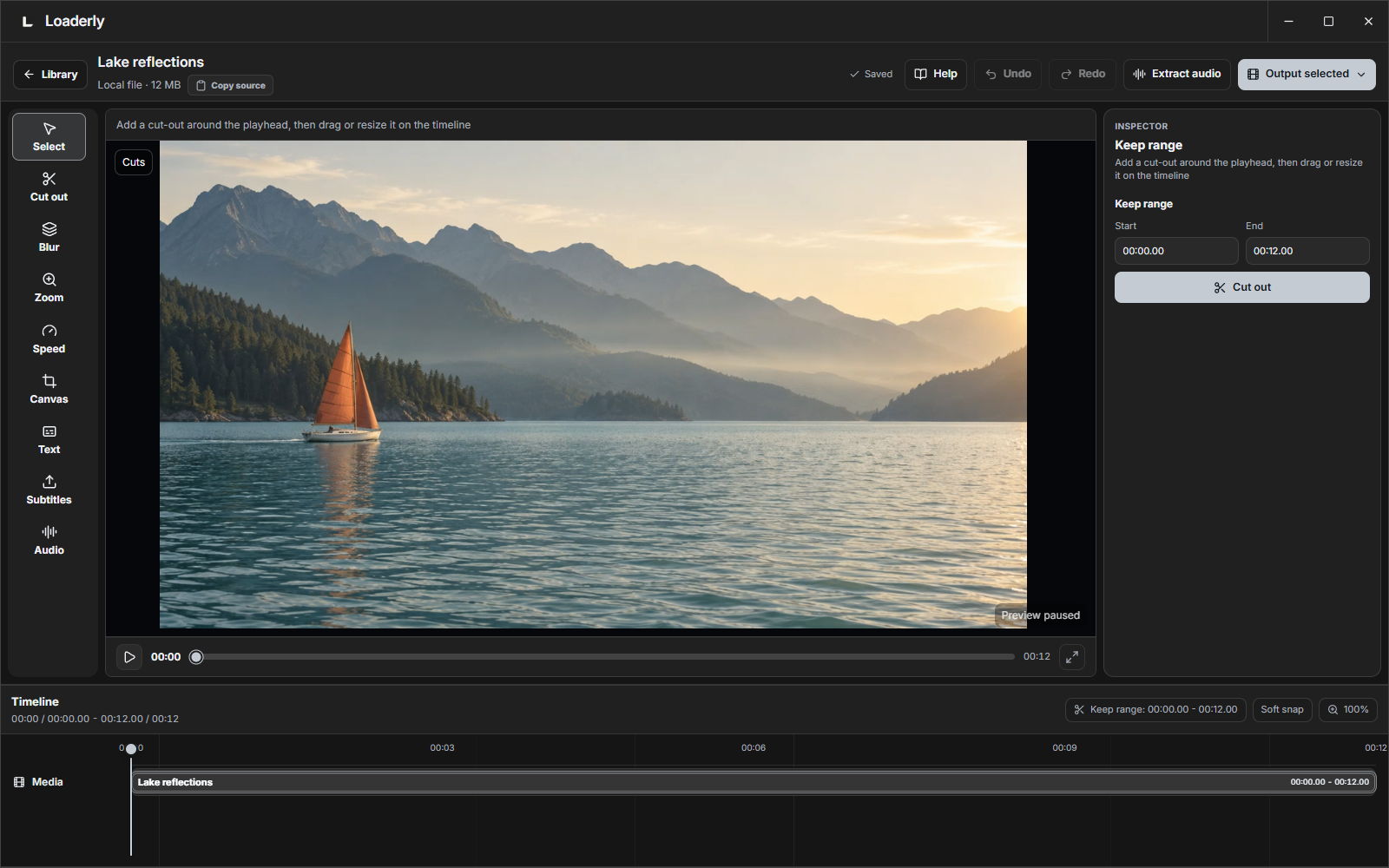
Loaderly now brings its desktop workspace to Windows, macOS and Linux, with a more personal look and a community built into the app.
- Publish from Loaderly. Sign in with GitHub, create a theme, visualizer or sound preset, and publish it in the app and on the community website. Keep private drafts and publish updates when ready.
- Make the interface yours. Customize colors for individual areas, transparency, text size, spacing, sidebar width and corners. Tooltips, menus and the editor follow your theme.
- Hear before applying. Try sound presets with your own audio, compare the original and edited sound, and add echo or reverb to individual sections.
- Create visualizer videos. Design inside Loaderly, then export music videos with moving artwork, titles, covers or logos.
- Edit with clearer controls. Familiar timecodes, easier timeline handles, readable media titles, and layouts that work in smaller windows.
- Manage files confidently. Choose playlist items, skip or replace duplicates, keep numbered copies, and choose between removing an entry and moving its file to Trash.
Download and install
Choose the right download for your computer · Step-by-step installation
- Windows 10/11: Get Loaderly from Microsoft Store.
- Mac with an Apple M chip: choose
mac-arm64.zip. - Mac with an Intel processor: choose
mac-x64.zip. - Ubuntu or Debian: choose the
.debinstaller. - Other compatible Linux distributions: use the
.AppImageto run without installing.
Your downloaded media stays in place when you update. Windows installation and updates now use Microsoft Store. On Mac and Linux, version checks are available in Preferences → About → Updates.
English guides · الوثائق العربية
بالعربي
إصدار 2.1 متاح لويندوز وماك ولينكس. خصّص ألوان البرنامج وشفافيته وتنسيقه، وجرّب إعدادات الصوت بملفاتك، وأنشئ فيديوهات الطيف من داخل البرنامج. تحسّن عرض الأسماء والتوقيت وسحب الأجزاء، مع خيارات أوضح للتكرار وحذف الملفات.
سجّل الدخول بحساب GitHub، ثم انشر تصميمك من مكتبة المجتمع ← تصميم ومشاركة. تظهر المشاركات في البرنامج وموقع المجتمع معًا. تبقى المسودات خاصة حتى تنشرها.
Loaderly 2.0

Loaderly 2.0 introduces a new visual identity and a completely redesigned app interface, bringing downloading, video editing and audio into one Windows workspace with English and Arabic support.
Windows download: Get the current Loaderly release from Microsoft Store. Supports Windows 10 and 11, 64-bit. The Store handles installation and updates.
This refreshed 2.0 download includes in-app Help links and support for word visualizers, separate shapes and new drawing finishes. For the current Windows version, install Loaderly from Microsoft Store.
Highlights
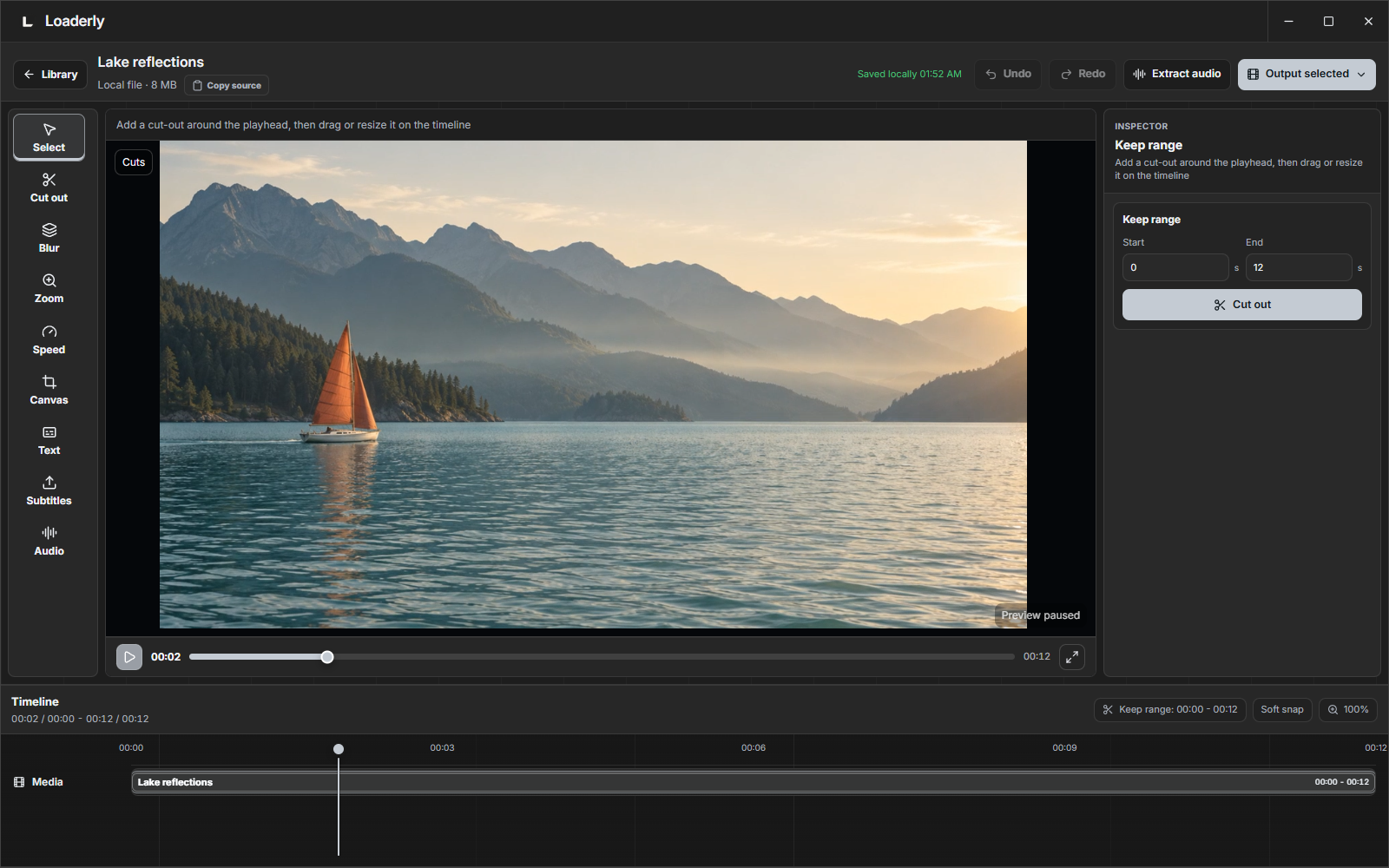
- New visual identity and complete interface redesign: a new app icon and a unified design across the Library, Downloads, video and audio editors, menus and preferences.
- Cut sections, blur and track an area, zoom, add text and reframe video.
- Edit audio with fades, tone controls, repeat playback, exact speed input and different sound modes.
- Make your own audio visualizer: change its colors and movement, draw a custom shape in the website designer, and import or share its code.
- Design initials, words and short phrases, including Arabic, with different fonts or your own font. Customize weight, spacing, slant, outlines, bars and dots.
- Move, resize and edit directly in the large website preview. Select multiple points, zoom into details, use grid alignment and undo/redo across keyboard languages. Repeat your uploaded audio while designing.
- Customize the app's light and dark themes and exchange themes and visualizers through Community looks.
- Improved subtitles, keyboard shortcuts, playback controls, menus and bilingual documentation.
- Open Help & guides from the app sidebar, or Help in the audio or video editor, for documentation in your interface language.
Website and guides · Full changelog · Community looks
Clean view is for screen recording; MP3 export saves audio only.
Loaderly 1.1.0
Loaderly 1.1.0 is focused on making downloading and editing clearer, faster, and easier to use.
Highlights:
- Add local videos to the library with the same trim, subtitle, snapshot, blur, and zoom tools.
- Internal cut-out sections in Watch / Trim, with saved edit state and right-click cut actions.
- Larger timeline with smoother dragging, playhead behavior, zooming, and panning.
- Blur regions with real preview effects, pixelate support, timeline markers, and tracking.
- Zoom regions for focusing on a selected video area, including Follow and Fix modes.
- Export name prompt, export result actions, and snapshot support.
- More compact Settings and Tools windows.
- Improved Windows installer progress and in-app update flow.
Get the current Windows release from Microsoft Store. The Store handles installation and updates.