2.1.3 The Graph
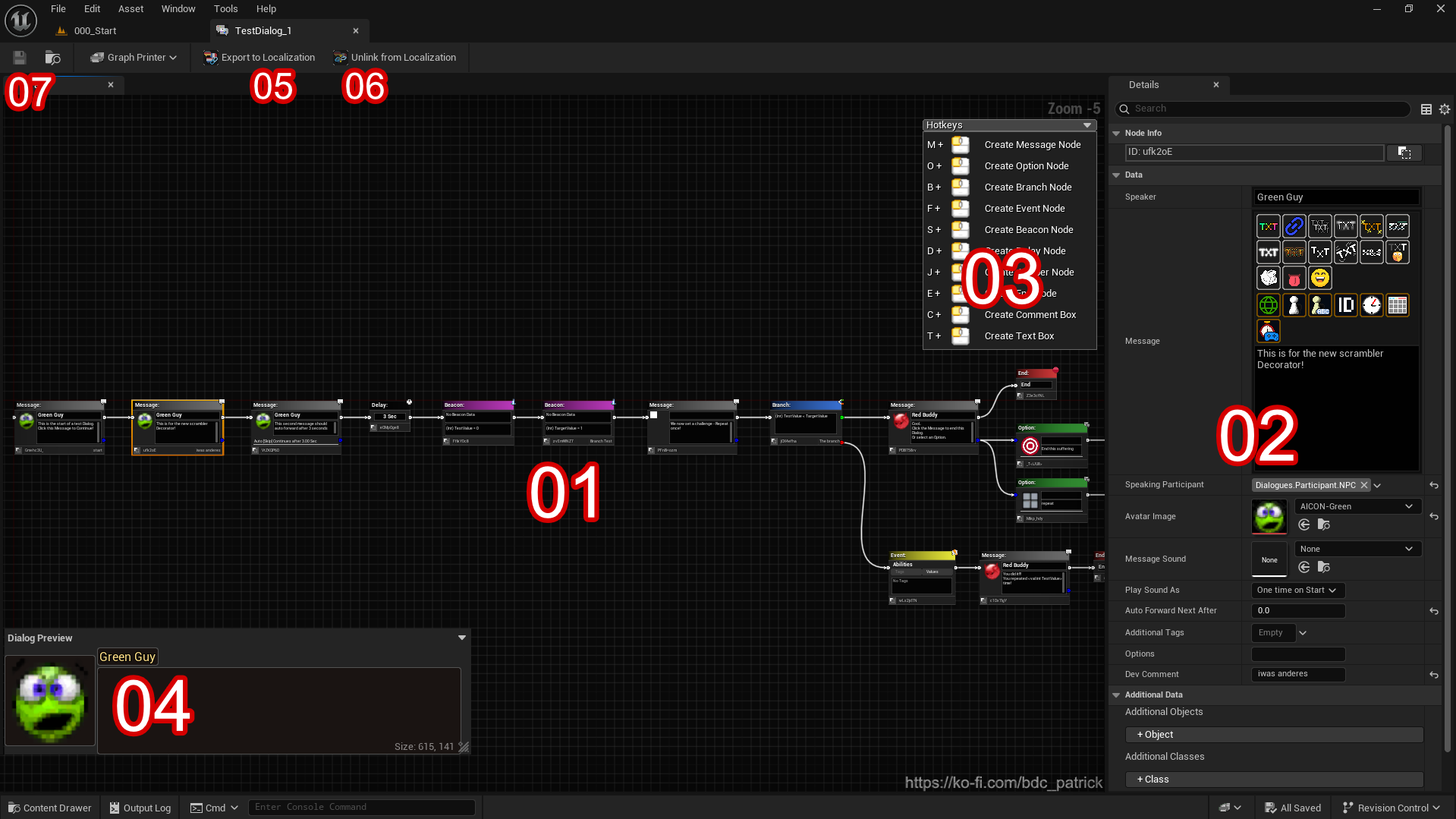
| Item | Description |
| 01. The Node Graph | Placing Nodes and Comments. The main workspace for your Dialogue Logic. |
| 02. The Detail Panel | For setting up the Node Details. Shows editable properties of the selected Node. |
| 03. The Hotkey-Dropdown | Collapsing/Expanding the Hotkey List helper. |
| 04. The Dialog Live Preview Window | Collapseable/Expandable, can be dragged around, can be resized. Shows a realtime preview of the selected Message/Option. |
| 05. The Export to Localization | Export all Speaker and Message texts to a String Table next to this Dialog asset and relink nodes to use the localized entries (+ Linking texts). |
| 06. The Unlink from Localization | Replace linked String Table texts with their source strings and remove the linkage. |
| 07. The Save Button | Saves the current state of the Dialog Data Asset. |