2.1.3 The Graph
| Visual | Description |
| [Graph_Overview](https://github.com/BDCPatrick/BDC_DialogBackend_Doc/blob/main/Images/Image_UI_GraphCanvas.png?raw=true) |
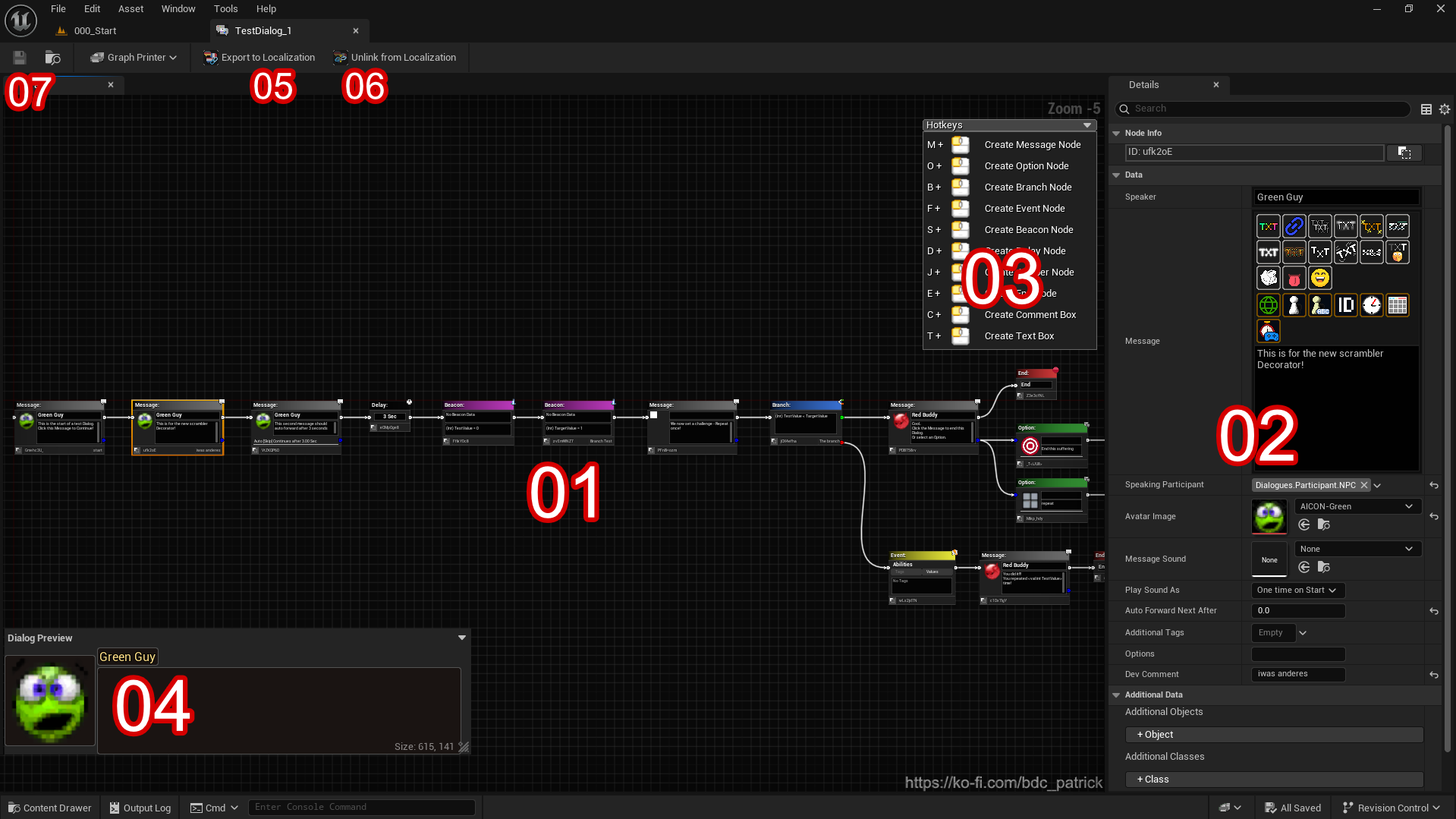
The Node Graph is the central workspace where you construct the flow of your dialogue.
A single Dialog Data Asset (DDA) can hold multiple disconnected Dialogues (Chains) within the same graph. |
| Visual | Description |
| [Details_Panel](https://github.com/BDCPatrick/BDC_DialogBackend_Doc/blob/main/Images/Image_UI_DetailsPanel.png?raw=true) |
The Detail Panel displays the editable properties of the currently selected Node. Unlike standard DataTables, this editor provides a custom Detail View for every node type (Message, Branch, Event, etc.) to make editing intuitive. Here you configure:
|
| Visual | Description |
| [Hotkeys_Box](https://github.com/BDCPatrick/BDC_DialogBackend_Doc/blob/main/Images/Image_UI_Hotkeys.png?raw=true) |
Located in the top-right corner of the graph. This helper box lists the keyboard shortcuts for placing nodes quickly (e.g., Hold M + Click for Message Node). It can be collapsed or expanded to save screen space. |
| Visual | Description |
| [Live_Preview](https://github.com/BDCPatrick/BDC_DialogBackend_Doc/blob/main/Images/Image_UI_Preview.png?raw=true) |
A "What You See Is What You Get" preview of your selected Message or Option node.
|
| Icon | Description |
| [Export_Icon](https://github.com/BDCPatrick/BDC_DialogBackend_Doc/blob/main/Images/TexUI_ExportLoca.png?raw=true) |
Toolbar Button: Export to Localization Automatically scans the entire Dialog Tree and moves all literal texts (Speaker Names and Messages) into String Tables.
|
| Icon | Description |
| [Unlink_Icon](https://github.com/BDCPatrick/BDC_DialogBackend_Doc/blob/main/Images/TexUI_UnlinkLoca.png?raw=true) |
Toolbar Button: Unlink from Localization Reverses the Export process.
|
| Description |
|
Standard Unreal Engine Save Asset functionality. When clicked, it synchronizes the visual representation of the Graph (Nodes, Connections, Positions) with the underlying |