Skip to content

4.4 Selecting an Option

BDC_Patrick edited this page Dec 9, 2025 · 3 revisions

Selecting an Option

If you followed the manual on Listing Options, you should have an Event bound to the "OnOptionSelected" Dispatcher of your Option Widget.

01. Processing the Selection

Visual Description
Select Option Logic

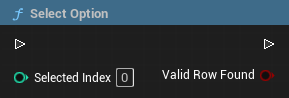
The SelectOption Function

When the bound Event is called (returning the selected Option Index), you must notify the Subsystem to proceed.

  • Function: SelectOption (Target: BDC Dialog Backend Subsystem).
  • Input: Connect the Option Index from your dispatcher.
  • Return: Returns true if the Option has a valid target node to jump to.

02. Option as Message

Feature Behavior

If the selected option has the property UseAsMessageUponSelection enabled in the data asset:

The Option itself will trigger an OnDialogUpdated event immediately after selection, causing the Option's text to be displayed as a Message (e.g., representing the player character speaking the chosen line).

Documentation Index

I. What is the Dialog Backend?
II. Setting up
III. Binding UI
IV. The Subsystem
V. The Components
VI. Dispatchers
VII. Others

Demo available: Demo Page

Clone this wiki locally