Repository navigation
Extensions
An extension is a small WebAssembly program that adds a feature to Streamline without being part of it. It can answer requests under a URL prefix of its own, read the parts of your library and the folders you allow, and keep its own database. Without the one exception below it cannot touch anything else: no file outside the folders you allowed, no password outside what its permissions name, no network. The exception is the ffmpeg permission, which is full trust, see Approving permissions.
The official ones are each published from a repository of their own:
| Extension | What it serves |
|---|---|
| player | The API behind the Streamline Player apps, at /extensions/player
|
| subsonic | The Subsonic and OpenSubsonic API for music apps, at /extensions/subsonic
|
| opds | The OPDS 1.2 e-book catalogue e-reader apps read, at /extensions/opds
|
An extension is an entry under extensions in the config file:
extensions:
  - name: opds
    source: https://github.com/Streamline-HQ/streamline-opds-ext/releases/download/vX.Y.Z/opds.wasm
    sha256: <the module's checksum>
enabled: true| Field | Notes |
|---|---|
name |
Lower-case letters, digits and -, up to 32 characters, starting with a letter or digit. It must equal the name inside the module |
source |
An https:// URL, or an absolute path to a .wasm file. Plain http:// is refused |
sha256 |
Required with a URL, optional with a path. Streamline refuses a module whose bytes do not match |
enabled |
false keeps the entry and stops the extension |
grants |
What you have allowed it, see Approving permissions |
An official extension's URL is a file on a release of its own repository (opds.wasm), and its checksum is in that release's opds.wasm.sha256. A URL is downloaded once and kept in <data_dir>/extensions/_sources, so later boots do not need the network.
An admin can also add one from Settings → Extensions in the web UI, which shows what the module asks for before anything is saved, or from the API (neither on a read_only instance, where the file is the only way in and the page gives you the entry to paste): POST /api/v1/extensions with name, source, sha256; POST /api/v1/extensions/inspect with the same body shows what a module asks for without saving anything. See REST API.
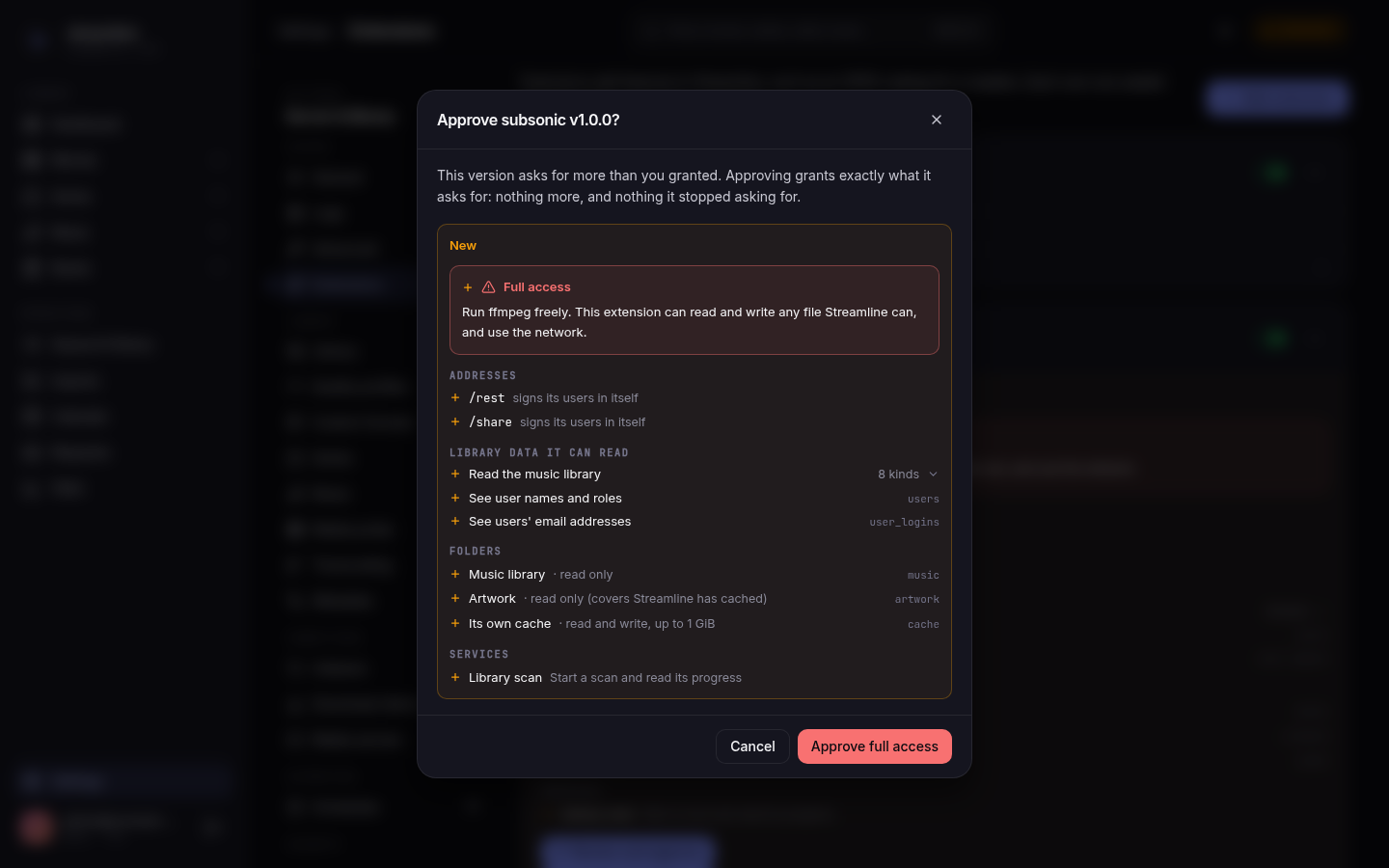
A module declares, in its manifest, what it needs:
-
mounts: the URL prefixes it answers, and whether it checks credentials itself (
self, as a reader app's Basic login) or uses Streamline's own sign-in. - views: read-only slices of your library, such as "Read the book library" or "See users' email addresses". Some come in groups: the music library and the book library. Each view lists its columns in Writing an extension.
-
folders: directories it can open.
-
music: your music library folder (library.music_path), read-only. -
moviesandseries: your movie and series library folders (library.movie_path,library.series_path), read-only. -
artwork: Streamline's own copies of covers, posters and artist photos, read-only. -
cache: a folder of its own,<data_dir>/extensions/<name>/cache, which it can write. Streamline deletes its oldest files once it holds more than 1 GiB (checked every hour by theextension-cache-sweepjob).
-
-
services:
-
serve_file: send a book file to a client, for downloads. -
serve_poster: send a book or author picture to a client. -
library_scan: see whether the library scan (thedrift-checkjob) is running, when it last finished and how many tracks have a file, and start one. -
http: call other servers, but only the ones you list yourself under the entry'shostsin the config file (see below). With no host listed it can call nothing. -
ffmpeg: run Streamline's ffmpeg and ffprobe with whatever options the extension chooses. Read the warning below before granting it.
-
Warning:
ffmpegis full trust. The web UI lists it as Run ffmpeg freely: "This extension can read and write any file Streamline can, and use the network." That is meant literally. Streamline runs ffmpeg with the extension's own options and nothing confines it, so an extension holding this permission can read any file Streamline's account can read (your library, the config file and its secrets, the database), overwrite or create files anywhere Streamline can write, and reach any address on your network or the internet. Grant it only to an extension you trust as much as Streamline itself. ffmpeg must be enabled on Settings → Media probe for it to run at all.
A new entry has no grants, so it sits in needs approval and does not run. Approve it from Settings → Extensions or the API (POST /api/v1/extensions/{name}/approve), or write the lists into grants yourself. The entry must hold everything the module asks for: nothing is optional, and an update that asks for one more view needs approving again. Approving sets the grants to exactly what the module asks for, so one it stopped asking for is dropped then; until then a grant beyond the module's list stays in force.
    grants:
      mounts: [/]
      views: [users, user_logins, books, book_series, authors, book_contributions, book_files]
      services: [serve_file, serve_poster]
For a module that asks for folders, grants carries a folders list beside the others (folders: [music, artwork, cache]).
A module holding the http service reaches only the servers named in hosts, which sits beside grants on the entry, each as host:port in lower case:
hosts: [engine.lan:8097]hosts is written in the config file only: neither the web UI nor the API changes it, and approving an update never touches it. The port is part of the match, and a redirect is handed back to the extension rather than followed, so a listed server cannot send the call somewhere else.
Every extension is served under /extensions/<name>: the OPDS extension at https://your-host/extensions/opds, the Subsonic one at https://your-host/extensions/subsonic (apps add /rest themselves). That prefix is Streamline's alone, so an extension can never take an address Streamline uses now or later, and the name you give the entry is the address. The mounts an extension asks for are relative to it: / is the whole of /extensions/<name>, /rest the part below /extensions/<name>/rest. Modules built for contract version 1, whose mounts were addresses of their own, are refused.
| State | Meaning |
|---|---|
running |
Loaded and answering |
disabled |
enabled: false |
needs approval |
The module asks for more than the entry grants. It is not run |
failed |
It could not start: a source that is neither an https:// URL nor an absolute path, an unreachable one, a missing or wrong checksum, a bad manifest, a name that differs from the entry's, a prefix already taken, or an in-memory core database. The reason is shown and logged; the rest of Streamline starts regardless |
starting |
A transient state while the server boots |
Changes made through the web UI or the API apply at once. A file edit is read at the next start.
An extension that is not running answers 404 on its mounts, to an app with no Streamline session too.
An extension answers on the same address as the web UI, so everything it serves is sent with a content policy Streamline sets itself: a page from an extension cannot run scripts, cannot read the web UI's session, and browsers do not guess a content type for it. It may show images and play audio from Streamline's own address. A reader app or an API client never notices.
Each extension has its own database, <data_dir>/extensions/<name>/data.db, and, when it asks for one, its cache folder beside it. The database holds whatever the extension stores (OPDS keeps its reader tokens there). Removing an entry leaves the data alone, so re-adding it picks up where it left off; DELETE /api/v1/extensions/{name}?purge=true removes the directory too.
The daily database-backup job snapshots every extension's database (never its cache folder) after Streamline's own, into <data_dir>/backups/extensions/<name>, keeping backup.retention.scheduled of them. A failing extension never fails the job; it logs a warning. Restoring one is a file copy: stop Streamline, copy the snapshot over <data_dir>/extensions/<name>/data.db, start it. See Backups.
An extension that serves reader or music apps gives each user a credential of its own. A running extension shows its card under Account → Players & readers in the web UI; the same is at /api/v1/account/extensions/{name}/credential: GET for its state, POST to generate or rotate (the secret is in that one response only), DELETE to disable.
See Writing an extension.