Configuration Reference
Every configuration key, its default, and where it can be changed from.
- Sources and precedence
- Environment variables
- Secrets
- What's editable at runtime
- CLI
-
Reference
- Top level · server · auth · library · schedules · metadata · ffmpeg · transcoding · log · otel · events
- media_server · download_clients · indexers · quality_profiles · custom_formats
Configuration is assembled by koanf from three layers, later overriding earlier:
- Built-in defaults — every key has one
-
The config file — YAML, at
--config/-c -
Environment variables —
STREAMLINE_-prefixed
Every key is optional. An unset key falls back to its default, so a minimal config file is legitimate — you only need to state what you're changing.
Generate a file containing every key at its default:
streamline config init --output ~/.config/streamline/config.yamlValidate one before restarting into it:
streamline config validate --config ~/.config/streamline/config.yamlconfig validate also reads from stdin, which makes it usable in CI.
Prefix STREAMLINE_. A double underscore (__) is the path separator; a single underscore is literal. That distinction is what keeps keys with underscores in their names reachable.
| Config key | Environment variable |
|---|---|
log.app.level |
STREAMLINE_LOG__APP__LEVEL |
auth.session_secret |
STREAMLINE_AUTH__SESSION_SECRET |
auth.seed_admin.password |
STREAMLINE_AUTH__SEED_ADMIN__PASSWORD |
metadata.tmdb_api_key |
STREAMLINE_METADATA__TMDB_API_KEY |
otel.endpoint |
STREAMLINE_OTEL__ENDPOINT |
library.import_mode |
STREAMLINE_LIBRARY__IMPORT_MODE |
Arrays (indexers, download_clients, auth.oidc, quality_profiles, custom_formats) can't be expressed sensibly as environment variables. Put them in the file and use _file secret references for the sensitive parts.
One non-prefixed variable is also read: STREAMLINE_PUBLIC_URL sets the canonical external base URL, used for OIDC redirect URIs and invite links. Without it, Streamline derives a base from http://<server.host>:<server.port>.
A top-level key that overrides the built-in download client's own listen_port:
torrent_listen_port: 61847It is top-level, rather than another field on the download_clients entry, so that the environment can reach it — a single underscore is literal and __ is the path separator, so STREAMLINE_TORRENT_LISTEN_PORT names it exactly, while nothing inside download_clients[] is addressable at all.
That matters for one situation: peering through a commercial VPN that assigns a forwarded port per session. Such a port rotates on every reconnect or server change, so it cannot be written into a config file that git owns and mounts read-only.
Behaviour worth knowing:
-
It wins wherever it is set. The entry's own
listen_portis ignored — a forwarded port is the only value that can be right, and a file naming a different one is stale by construction. Leave it at0(the default) to use the entry's value. -
It is read at startup, but that's only the initial bind.
PUT /api/v1/torrents/listen-port(admin) moves the running engine's peer sockets to a new port without a restart — it's the endpoint a gluetun sidecar should call on every port reassignment:VPN_PORT_FORWARDING: "on" VPN_PORT_FORWARDING_UP_COMMAND: '/bin/sh -c "curl -sS --fail -X PUT -H \"X-API-Key: $API_KEY\" -H \"Content-Type: application/json\" -d \"{\\\"port\\\":{{PORT}}}\" http://streamline:8080/api/v1/torrents/listen-port"'
An API key works here even though keys are otherwise locked out of parts of the API — that restriction is scoped to the identity band (
/auth/*,/users), and this endpoint isn't on it. The move is not persisted: it only changes what the running process is doing right now, so a restart re-readstorrent_listen_port/STREAMLINE_TORRENT_LISTEN_PORTfrom config as before. Keep the sidecar'sUP_COMMANDas the source of truth for the current port; don't expect the config file to reflect it. -
Peers find you again at different speeds. A completed move immediately re-announces every torrent to the DHT, which carries the new port straight away. Trackers are not re-announced — there is no way to force that in the torrent library Streamline pins — so a tracker keeps advertising the old port until its next scheduled announce, which on a private tracker can be half an hour. Nothing is lost in the meantime; inbound connections to the old port simply fail until the announce catches up.
-
It is validated like any port. A value outside 1–65535 fails config validation at boot rather than being silently ignored.
-
It applies to the built-in engine only. External clients (qBittorrent, Transmission, Deluge) manage their own listening port; Streamline never sets it for them.
Without a forwarded port, peering is outbound-only: downloads work, uploads stay at zero because nothing can open a connection to you.
Every secret-bearing key has a _file twin that reads the value from a path instead. The file's contents are trimmed of surrounding whitespace. When both are set, the file wins.
| Inline | File |
|---|---|
auth.session_secret |
auth.session_secret_file |
auth.seed_admin.password |
auth.seed_admin.password_file |
auth.oidc[].client_secret |
auth.oidc[].client_secret_file |
metadata.tmdb_api_key |
metadata.tmdb_api_key_file |
metadata.tvdb_api_key |
metadata.tvdb_api_key_file |
indexers[].api_key |
indexers[].api_key_file |
download_clients[].password |
download_clients[].password_file |
download_clients[].api_key |
download_clients[].api_key_file |
media_server.servers[].api_key |
media_server.servers[].api_key_file |
This is what makes Streamline work cleanly with Docker secrets, SOPS, sealed-secrets and Vault Agent — the config file stays in git, the values arrive as mounted files.
Two values are generated on first boot and written back into your config file if they're empty:
-
auth.session_secret— the JWT HMAC signing key. Regenerating it invalidates every session. -
media_server.plex_client_id— theX-Plex-Client-Identifierthis instance presents.
A third, auth.seed_admin.password, is generated and persisted only when you asked for a seeded admin without supplying a password.
With no writable config file (a :ro mount, read_only: true, or no file at all) the session secret falls back to an ephemeral value, regenerated at every start.
Warning
An ephemeral session secret means everyone is logged out on every restart. For any deployment where the config isn't writable, supply auth.session_secret explicitly. See GitOps and Kubernetes.
Some config is hot — changed through the UI or API, applied immediately, persisted back to the file. The rest requires an edit and a restart.
| Area | Runtime-editable? | Where in the UI |
|---|---|---|
| Indexers, download clients, media servers | ✅ Full CRUD | Settings → Connections |
| Quality profiles, custom formats | ✅ Full CRUD | Settings → Library |
quality_default_profile |
✅ The ★ button on a profile row | Settings → Quality profiles |
| Schedule intervals, pause/resume/run | ✅ | Settings → Schedules |
auth.registration_mode, auth.session_ttl, auth.default_role
|
✅ | Settings → Authentication |
auth.lockout.{threshold,window,duration} |
✅ | Settings → Authentication |
library.monitor_specials |
✅ | Settings → Series |
library.probe.* |
✅ Applies to the next import — see Import verification | Settings → Media probe |
library.{movie,series}_naming |
✅ Applies to the next import or rename | Settings → Library |
library.import_mode, keep_torrent_seeding, import_max_attempts, allowed_download_roots
|
✅ | Settings → Library |
library.no_match_cooldown, max_grab_failures, drift_grace_ticks
|
✅ | Settings → Library |
download.selective_files, download.selection_grace, download.path_mappings
|
✅ | Settings → Library |
ffmpeg.enabled |
✅ | Settings → Media probe |
ffmpeg.path |
Settings → Media probe | |
transcoding.{enabled,max_concurrent,max_failures,defer_seeding,hw_accel,hw_device,verify.*} |
✅ Read on every worker tick — no restart | Settings → Transcoding |
quality_profiles[].transcode |
— | |
events.retention |
✅ Applies on the next cleanup run | Settings → General |
metadata.* |
Settings → Metadata | |
log.*, otel.endpoint
|
Settings → General | |
| OIDC providers | Settings → Single Sign-On | |
| Everything else | ❌ File only, restart required | — |
Notably not runtime-editable: data_dir, server host/port, server.trusted_proxies, auth.mode, auth.trusted_networks, auth.trusted_role, auth.seed_admin.* and the session secrets.
Important
The trust-boundary keys are deliberately file-only — the same reason the OIDC provider API never exposes allow_admin or email_linking.
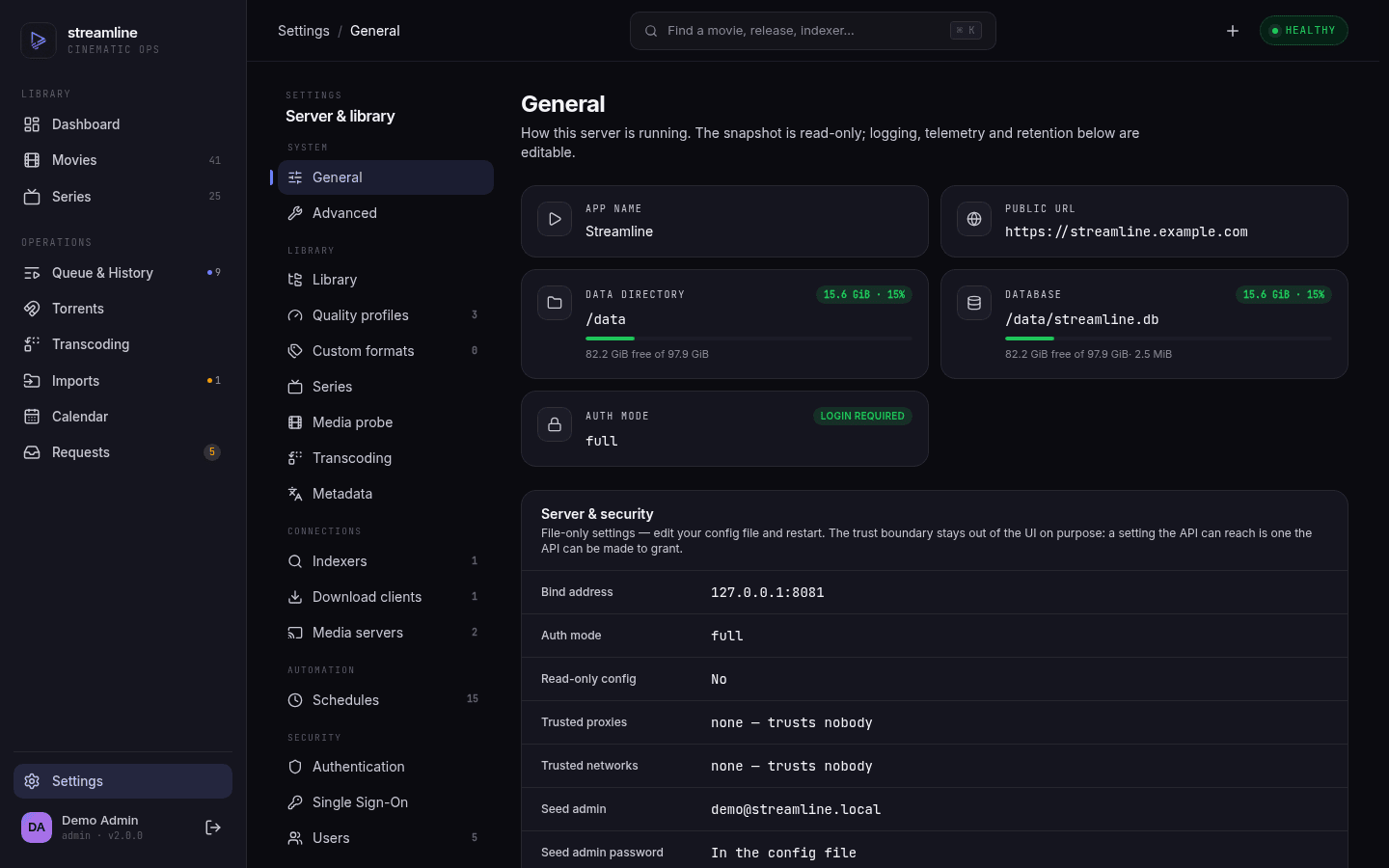
They are all shown read-only under Server & security on Settings → General, so one screen can tell you what is in force without reading the YAML on the host. Secrets appear there as a source (In the config file / From a file / Not set), never as a value.
torrent_listen_port is its own thing. It is not editable as config at all, because the value is authored by a VPN tunnel rather than by you: PUT /api/v1/torrents/listen-port moves the running engine's peer sockets and re-announces to DHT without writing anything, so a restart falls back to STREAMLINE_TORRENT_LISTEN_PORT. The normal caller is gluetun's VPN_PORT_FORWARDING_UP_COMMAND on every port rotation; Move listening port on Activity → Torrents is the manual re-issue for when that hook fails, since nothing retries it automatically.
Three settings name the peer port; only one of them wins. download_clients[].listen_port is what the builtin client's form edits, torrent_listen_port overrides it whenever it is non-zero (BuiltinDownloadClient resolves this), and the endpoint above moves the live socket without touching either. While an override is in force the form's Listen port field goes read-only and says so, because editing it there would save happily and change nothing — set the port through STREAMLINE_TORRENT_LISTEN_PORT, or move the running engine from Activity → Torrents.
The three library roots are a special case. library.movie_path, series_path and download_path show up read-only on Settings → Library and are changed through Settings → Advanced instead. That flow rewrites every stored path in the database and then repoints the config; a plain edit would leave every existing file recorded under the old prefix.
Setting read_only: true refuses every runtime write, turning the first two rows into ❌ as well.
streamline [global options] [command]

GLOBAL OPTIONS
  --config, -c <path>    path to config file
  --version, -v          print version
| Command | Purpose |
|---|---|
config init [--output <path>] |
Write a default config to stdout or a file |
config validate [--config <path>] |
Load a config (or stdin) and report errors |
auth unlock <email> |
Clear lockout state on an account |
Running streamline with no command starts the server.
Defaults shown are the built-in ones, as emitted by streamline config init.
| Key | Type | Default | Notes |
|---|---|---|---|
data_dir |
string | ./data |
Runtime data (SQLite DB, posters). Must already exist. Pin it to an absolute path in containers |
read_only |
bool | false |
Reject all runtime config write-backs. For GitOps deploys |
torrent_listen_port |
int | 0 |
Overrides the builtin download client's listen_port. Top-level so STREAMLINE_TORRENT_LISTEN_PORT can reach it — see torrent_listen_port
|
quality_default_profile |
string | default |
Profile used when an item names none |
| Key | Type | Default | Notes |
|---|---|---|---|
server.host |
string | 0.0.0.0 |
Bind address |
server.port |
int | 8080 |
1–65535 |
server.trusted_proxies |
[]cidr | [] |
CIDRs whose X-Forwarded-* headers are believed. Empty trusts none. List the proxies themselves, ideally a /32 each — never a client subnet |
| Key | Type | Default | Notes |
|---|---|---|---|
auth.mode |
enum | full |
full | trusted-network | disabled — see Authentication and SSO
|
auth.trusted_networks |
[]cidr | [] |
CIDRs auto-authenticated when mode is trusted-network
|
auth.trusted_role |
enum | member |
Role granted to trusted-network requests |
auth.session_secret |
string | generated | JWT HMAC key |
auth.session_secret_file |
path | — | Mutually exclusive with the above |
auth.session_ttl |
duration | 168h |
Session lifetime |
auth.registration_mode |
enum | disabled |
disabled | open | invite
|
auth.default_role |
enum | member |
Role a self-registering user lands on, local or SSO. Fallback only, and admin is clamped to member — see Authentication and SSO. Renamed from auth.oidc_default_role, which is no longer read at all
|
auth.seed_admin.email |
string | "" |
Bootstrap admin. No-op once any user exists |
auth.seed_admin.password |
string | "" |
Generated and persisted if left empty |
auth.seed_admin.password_file |
path | "" |
Wins over password
|
auth.lockout.threshold |
int | 10 |
Failed logins before an account locks |
auth.lockout.window |
duration | 15m |
Window those failures are counted over |
auth.lockout.duration |
duration | 15m |
How long the lock lasts |
auth.oidc[] |
array | [] |
See Authentication and SSO |
Independently of auth.lockout, login and registration are rate-limited per IP at 5 attempts / 15 minutes. That limit is not configurable.
| Key | Type | Default | Notes |
|---|---|---|---|
library.movie_path |
path | /media/movies |
Movie library root |
library.series_path |
path | /media/series |
TV library root |
library.download_path |
path | /downloads |
Where Streamline reads finished torrents from. Combined with the torrent name: <download_path>/<torrent.Name>
|
library.movie_naming |
template | {title} ({year}) {tmdb-{tmdb_id}}/{title} ({year}) [{quality}].{ext} |
See Quality Profiles and Naming |
library.series_naming |
template | {title} ({year})/Season {season}/{title} - S{season:2}E{episode:2} - {episode_title} [{quality}].{ext} |
|
library.import_mode |
enum | hardlink |
hardlink | copy | move. move also removes the torrent from its client once the import lands, since it can no longer seed |
library.monitor_specials |
bool | false |
Monitor season 0 on add/discovery. Runtime-editable |
library.probe.always_ask |
bool | false |
Hold every import for manual approval instead of importing straight away. Needs no ffprobe. Runtime-editable |
library.probe.min_duration_ratio |
float | 0.5 |
Hold an import when the probed duration falls below this share of the expected runtime — the check for sample clips and truncated remuxes. A ratio, not a percentage: 0.5 is half. Greater than 0, at most 1. Runtime-editable
|
library.no_match_cooldown |
duration | 6h |
Quiet period after a search finds nothing acceptable |
library.max_grab_failures |
int | 3 |
Consecutive failures before an item is marked failed |
library.keep_torrent_seeding |
bool | true |
Leave torrents seeding after import. Ignored under import_mode: move: a moved torrent has nothing left to seed, so it is removed from the client, with any files the import left behind, as soon as its record imports |
library.import_max_attempts |
int | 3 |
Import retries before giving up |
library.allowed_download_roots |
[]path | [] |
If non-empty, a torrent's save path must sit under one of these or import is refused. Security fence — empty disables the check |
library.drift_grace_ticks |
int | 3 |
Consecutive drift_check ticks a file may be missing before its record is deleted (1–20). At the default 15m interval, 3 ticks ≈ 45 minutes of tolerance for a flaky mount |
When ffprobe is available (see ffmpeg), Streamline checks a finished
download against what the release claimed before moving anything into the
library. A file that fails is not imported and not discarded: the record moves
to held and waits for you in Activity → Queue, with one reason per failed
check.
| Check | Holds when |
|---|---|
corrupt |
ffprobe cannot read the file (reported alone — nothing else is knowable) |
resolution |
The probed resolution is below what the release name claimed. Classified by width, so a 1920×800 scope film still counts as 1080p. Higher than claimed never holds |
duration |
Probed duration is under library.probe.min_duration_ratio × the title's runtime. Skipped when the runtime is unknown |
codec |
The profile's allowed_codecs is non-empty and the probed video codec is not in it |
always_ask |
library.probe.always_ask is on and nothing else objected |
A season pack is verified whole: any bad file holds the entire pack before any
file is moved. Resolve a hold from the UI, or with
POST /api/v1/downloads/{id}/resolve — see
REST API.
With ffmpeg disabled or the binary missing, only always_ask can hold anything;
every other check is skipped and imports behave as before.
All values are Go duration strings, runtime-editable, pausable and runnable on demand — see Scheduled Jobs.
| Key | Type | Default | Notes |
|---|---|---|---|
schedules.download_monitor |
duration | 30s |
|
schedules.import_scan |
duration | 60s |
|
schedules.movie_rss_sync |
duration | 15m |
|
schedules.tv_rss_sync |
duration | 15m |
|
schedules.movie_missing_search |
duration | 12h |
|
schedules.tv_missing_search |
duration | 12h |
|
schedules.media_probe |
duration | 15m |
|
schedules.movie_orphan_scan |
duration | 6h |
|
schedules.tv_orphan_scan |
duration | 6h |
|
schedules.drift_check |
duration | 15m |
|
schedules.cleanup |
duration | 24h |
|
schedules.movie_metadata_refresh |
duration | 24h |
|
schedules.tv_metadata_refresh |
duration | 24h |
|
schedules.file_selection |
duration | 30s |
Deprecated aliases, still honoured with a warning at boot: rss_sync (→ movie_rss_sync), missing_search, metadata_refresh and orphan_scan (each → both the movie_* and tv_* keys).
| Key | Type | Default | Notes |
|---|---|---|---|
metadata.tmdb_api_key |
string | "" |
Required for movies. No key, no movie search |
metadata.tvdb_api_key |
string | "" |
Required for TV. |
metadata.language |
BCP-47 | en |
Empty lets the provider pick its own default |
metadata.tmdb_region |
ISO 3166-1 α-2 | FR |
Uppercase. Drives which country's digital release dates feed the calendar — set it to yours |
Both keys have _file twins.
Backs the media probe feature: technical details (resolution, codecs, duration, bitrate) read from your files with ffprobe and shown as media_info on movies and episodes. See REST API.
| Key | Type | Default | Notes |
|---|---|---|---|
ffmpeg.enabled |
bool | true |
Turns probing off entirely. Runtime-editable |
ffmpeg.path |
path | "" |
A directory holding the ffmpeg/ffprobe binaries — not a binary path. Empty resolves via $PATH. Read once at boot; changing it needs a restart |
Missing binaries (or enabled: false) degrade gracefully — imports and library scans work exactly as they did before this feature existed, just without media_info. Nothing errors at boot. GET /api/v1/system/info surfaces ffmpeg_warn: true when probing is enabled but ffprobe wasn't found; the official Docker image ships the binaries, so this only bites custom builds or path misconfiguration.
ffmpeg.path also supplies the binary the transcoder runs. Both binaries are resolved out of that one directory, so there is no separate ffmpeg_path to set — and ffprobe being found does not prove ffmpeg is: GET /api/v1/config/ffmpeg reports a version field only when ffmpeg -version actually answers.
Background re-encoding of imported media. The rules live on each quality profile (quality_profiles[].transcode, below); this block is only the master switch and the budget. Off by default.
| Key | Type | Default | Notes |
|---|---|---|---|
transcoding.enabled |
bool | false |
Master switch. While off nothing is claimed and every /api/v1/transcoding/* endpoint answers 409. Runtime-editable
|
transcoding.max_concurrent |
int | 1 |
1–8. How many encodes run at once. Runtime-editable |
transcoding.max_failures |
int | 3 |
1–10. Attempts a job gets before it parks as failed. A retry from the queue resets the counter. Runtime-editable
|
transcoding.hw_accel |
string | auto |
auto, none or vaapi. auto probes hw_device once and uses VAAPI when the probe passes and the policy's to.video_codec has a VAAPI encoder, software otherwise, decided per job; none forces software; vaapi requires the hardware — where auto would fall back, vaapi puts the job back on the queue for an hour instead (no attempt spent) and probes the device again on the next job, so a failed probe never silently turns into a CPU encode. Needs an ffmpeg built with libva: the default image has none, see Hardware encoding. Changing it re-probes on the next job. Runtime-editable
|
transcoding.hw_device |
string | /dev/dri/renderD128 |
The render node VAAPI opens. Must be passed into a container and be writable by the process (the host's render group). Changing it re-probes on the next job. Runtime-editable
|
transcoding.defer_seeding |
bool | false |
Defer a transcoding job while the torrent that produced its file is still downloading or seeding in its download client. A file with no download record, or whose torrent has stopped seeding or left the client, is encoded right away. Runtime-editable |
transcoding.verify.max_size_percent |
int | 100 |
0–200. Reject a transcode whose output exceeds this share of the source size. Remuxes are exempt. 0 disables. Runtime-editable
|
transcoding.verify.min_size_percent |
int | 5 |
0–100. Reject any output under this share of the source — a dropped stream or a truncated encode. 0 disables. Must stay below max_size_percent. Runtime-editable
|
transcoding.verify.health_check |
bool | false |
Fully decode the output before the swap. One extra decode pass per job. Runtime-editable |
transcoding.verify.min_vmaf |
int | 0 |
0–100. Reject a transcode whose mean VMAF over three 60 s windows falls below this. Needs an ffmpeg built with libvmaf; skipped with a log line otherwise. 0 disables. Runtime-editable
|
A rejected encode lands on the queue as rejected with both sizes and the check that condemned it, and the original file is untouched. It is never retried on its own — the same encode gives the same file — and the scan skips it; Retry on the Transcoding page asks again after the band or the policy has changed.
None of these keys is read at boot, so a change needs no restart: enabled and max_concurrent are read at every worker tick, and max_failures when a job fails. Turning enabled off does not interrupt an encode already running; it stops the next one from starting. hw_accel and hw_device are probed the first time a job needs them and the result is kept until either key changes, so a fixed device passthrough takes effect on the next job with no restart — except under hw_accel: vaapi, where a job held back for the missing hardware also drops that result, so a device that comes back is picked up on the next job. The view reports hw_status (off, ready or unavailable) and, when unavailable, hw_reason with the probe's error.
The worker needs ffmpeg itself, not just ffprobe. With ffmpeg.enabled: false, or with the binary missing, the worker stays idle and Scan library refuses with a 409 rather than queueing rows nothing would ever drain. The official Docker image ships both binaries.
Two independent loggers: log.app (application) and log.http (access log).
| Key | Type | Default | Notes |
|---|---|---|---|
log.app.enabled |
bool | true |
|
log.app.level |
enum | info |
debug | info | warn | error
|
log.app.format |
enum | text |
text | json
|
log.app.output |
string | stderr |
stderr, an absolute path, or a path relative to data_dir
|
log.http.enabled |
bool | true |
|
log.http.format |
enum | json |
json | combined (combined uses RFC3339 timestamps, not the Apache format) |
log.http.output |
string | stderr |
As above |
Both take a rotate block, applied when output is a file path:
| Key | Default |
|---|---|
rotate.max_size_mb |
100 |
rotate.max_backups |
5 |
rotate.max_age_days |
30 |
rotate.compress |
true |
| Key | Type | Default | Notes |
|---|---|---|---|
otel.endpoint |
string | "" |
OTLP endpoint. Empty disables export entirely |
otel.insecure |
bool | false |
Send OTLP over plaintext HTTP. Required for an http:// collector |
otel.sample_ratio |
number | 0.05 |
Head sampling rate for root spans, 0–1. Ignored when OTEL_TRACES_SAMPLER is set |
otel.environment |
string | "" |
Fills the deployment.environment resource attribute (e.g. prod, staging) |
The OTel SDK defaults to HTTPS. Set otel.insecure: true for a plaintext collector — OTEL_EXPORTER_OTLP_INSECURE=true still works and does the same thing. See Observability and Logging.
log.app.enabled: false turns off the stderr log sink only. Traces, metrics and OTLP-exported logs keep flowing as long as otel.endpoint is set.
| Key | Type | Default | Notes |
|---|---|---|---|
events.retention |
duration | 2160h |
90 days. How long activity events are kept |
| Key | Type | Default | Notes |
|---|---|---|---|
media_server.plex_client_id |
string | generated | X-Plex-Client-Identifier |
media_server.servers[] |
array | [] |
Per entry:
| Field | Required | Notes |
|---|---|---|
name |
✅ | Unique key; the API addresses servers by it |
server_type |
✅ |
plex | jellyfin | emby
|
host |
✅ | Base URL |
api_key / api_key_file
|
Plex uses the PIN flow instead | |
enabled |
||
library_section |
Plex section key holding movies | |
library_section_tv |
Plex section key holding TV |
Both section keys are Plex-only. Leave them unset and Streamline looks the section up by matching your library path against the paths Plex reports — which only works when Plex sees the library at the same path Streamline does. In Docker or Kubernetes it usually doesn't (Streamline's /srv/streamline/movies is Plex's /data/movies), so the lookup misses and Streamline falls back to rescanning every section. That works, but it is a bigger scan than you need: set the two keys to scope it. Settings → Media Servers lists the available sections (POST /api/v1/media-servers/discover).
Governs selective file download — grabbing an episode-scoped pack downloads only the files that episode needs.
| Key | Type | Default | Notes |
|---|---|---|---|
download.selective_files |
bool | false |
Off is bit-for-bit today's whole-torrent grab, and the rollback path. Runtime-editable |
download.selection_grace |
duration | 10m |
How long a magnet-sourced selection may sit unresolved before giving up and downloading the release whole |
download.path_mappings |
list of {from, to}
|
[] |
Translates a save path your download client reports into one Streamline can open. First matching prefix wins. Both sides must be absolute. Runtime-editable |
Streamline never tells your download client where to save — it sets the torrent's category to streamline and nothing else. Where the files land is decided by that category's save path in the client, and Streamline expects to find them at library.download_path/<torrent name>.
That works as long as both processes see the same files at the same path. In Docker or Kubernetes they often don't: if qBittorrent mounts your media volume at /data and Streamline mounts it at /srv, every path qBittorrent reports is meaningless to Streamline. path_mappings closes that gap:
download:
  path_mappings:
    - from: /data      # what the download client calls it
      to: /srv         # what Streamline calls it
This is only consulted when a torrent is not where Streamline expected it — a normal grab never needs it. See Troubleshooting.
| Field | Required | Notes |
|---|---|---|
name |
✅ | |
client_type |
✅ |
qbittorrent | transmission | deluge | builtin
|
host, port, auth_method
|
✅ unless builtin
|
auth_method: password | api_key
|
username, password/password_file, api_key/api_key_file
|
Per auth_method
|
|
use_ssl |
||
priority |
0–255, lower is tried first | |
enabled |
Built-in engine only (ignored for external clients):
| Field | Required | Notes |
|---|---|---|
download_dir |
✅ for builtin
|
Where the engine writes |
listen_port |
Incoming BitTorrent port. Overridden by torrent_listen_port when that is set — required if your VPN assigns a forwarded port per session, since such a port can't live in a file |
|
max_upload_kbps, max_download_kbps
|
0 = unlimited |
|
seed_ratio |
Stop seeding at this ratio. Uploaded bytes are persisted per torrent and accumulate across restarts, so a restart doesn't hand a torrent back its ratio | |
seed_time |
Stop seeding after this duration, measured from the persisted completion time | |
disable_dht |
Turns off the distributed hash table. Recommended on a small machine. DHT keeps a routing table warm and answers queries from the wider network continuously, whether or not you are downloading — none of which an indexer-driven setup needs, since every torrent here arrives from a tracker that already knows its peers. Left on it costs memory and a steady trickle of background traffic for nothing. Turn it off unless you add magnets by hand and rely on public swarms to find them | |
bind_interface |
Bind to one interface — useful for a VPN tunnel |
Once seed_ratio or seed_time is reached, the built-in engine stops uploading and streamline then removes that torrent and deletes its files — but only when the download was already imported into your library, which is the point at which the download copy is a second copy of a file you already have. A torrent still waiting on you (a held import, an adoption proposal) or one streamline never grabbed is left alone, and external clients keep their own ratio handling and their own files.
The built-in engine treats what a release names as untrusted:
- It holds at most 500 torrents. A grab past that is refused with a message saying so; remove finished torrents to make room.
- It won't announce to a tracker, fetch a webseed or pull metadata from an address on the machine itself (loopback), on its link (link-local, which includes the
169.254.169.254cloud metadata endpoint), or a multicast one. Private LAN addresses are fine, so a tracker on your homelab still works. Peer addresses and DHT nodes embedded in a magnet are ignored; the trackers and DHT find the swarm. - It refuses a torrent whose name is empty,
.,..,.streamline-session, contains a path separator, or is already used by another torrent it holds. Any of those would land on data that isn't the torrent's. It also refuses a torrent whose name is already on disk with files of different sizes, or with a half-finished.partdownload it doesn't own: that is another release's data. Re-adding the same torrent over its own complete files is fine.
| Field | Required | Notes |
|---|---|---|
name |
✅ | |
host, port
|
✅ | |
protocol |
✅ |
torznab | prowlarr
|
path |
Torznab endpoint path | |
api_key / api_key_file
|
||
use_ssl |
||
priority |
0–255, lower first | |
enabled |
| Field | Required | Notes |
|---|---|---|
name |
✅ | Referenced by quality_default_profile and per-title |
preferred_resolution |
✅ |
720p | 1080p | 2160p — hard ceiling of the accepted band |
min_resolution |
✅ | Same set — hard floor |
upgrade_allowed |
Whether a file already on disk can be replaced by a higher-scoring release. See Quality Profiles and Naming | |
allowed_codecs |
ffprobe codec names (hevc, av1, h264, vp9, mpeg2video). Empty — the default — means any codec. A finished download whose video codec isn't listed is held for a decision rather than imported |
|
formats |
[{name, score}] — custom formats (built-in or custom_formats) scored for this profile. See Quality Profiles and Custom Formats
|
|
min_score |
Minimum total matched-format score a release needs to be grabbed. Default 0
|
|
upgrade_until_score |
Stop upgrading once the current file's score reaches this value. 0 (default) means no cap |
|
transcode |
Post-import re-encode rules for files on this profile. Absent — the default — means they are never re-encoded. Needs transcoding.enabled. Full reference: Quality Profiles and Custom Formats
|
transcode is a nested {if, to} block:
| Field | Required | Notes |
|---|---|---|
if.video_codecs |
Codecs considered acceptable: h264 hevc av1 vp9 mpeg4 mpeg2video vc1. Empty means any |
|
if.containers |
Containers considered acceptable: mkv mp4 avi mov ts m2ts webm wmv. Empty means any |
|
if.max_video_bitrate |
Ceiling as an ffmpeg-style rate — 8M, 4500k. Empty means no bitrate rule. Read off the video stream where the file records one, and otherwise off the container's total bitrate, which includes every audio track — mkv rarely records a per-stream rate, so that fallback is the usual case. Leave headroom for the audio, or files whose video is already under the ceiling get queued |
|
if.min_video_bitrate |
Floor as an ffmpeg-style rate — 2M, 1500k. A source below it is exempt from the codec rule only: the ceiling and the container rule still apply. Constant-quality encoding is bitrate-blind, so re-encoding an already-lean h264 file usually makes it bigger — this is how you say "leave those alone". Read off the same figure as the ceiling, so on mkv it is the container total and the floor wants headroom too. Must be below if.max_video_bitrate when both are set. Empty means no floor |
|
to.container |
✅ |
mkv | mp4. mp4 keeps video and audio only — subtitle streams and font attachments are dropped, because mp4 cannot carry SRT/ASS/PGS or attachments at all. mkv keeps everything |
to.video_codec |
✅ |
h264 | hevc | av1
|
to.crf |
0–51, lower is bigger and better. 0 (or omitted) leaves -crf out, so the encoder's default applies — libx264 23, libx265 28, libsvtav1 35 |
|
to.preset |
✅ |
ultrafast … veryslow — the usual x264/x265 ladder |
to.audio_codec |
✅ |
aac | opus | ac3 | flac. Applied only to tracks not covered by audio_passthrough
|
to.audio_passthrough |
Source audio codecs copied rather than re-encoded. Empty applies the built-in list: truehd eac3 ac3 dts aac opus flac
|
A file failing any if rule is queued. HDR and Dolby Vision video is exempt from the codec and bitrate rules — it is never re-encoded — but a container remux still applies to it.
The destination has to satisfy the test. A to.video_codec missing from a non-empty if.video_codecs, or a to.container missing from a non-empty if.containers, is refused at load with a message naming both keys: the encode would land, the next pass would read its own output as non-compliant, and the file would be re-encoded forever with every job reporting success. The one loop that cannot be caught this way is a crf output that comes out above max_video_bitrate — set the ceiling with headroom, not at the rate you are aiming for.
Do not combine a transcode block with a formats entry that scores a size condition's min_gb positively. A transcode's whole point is a smaller file, and the row is re-probed from the encode — so the shrunk file scores below the release that produced it and looks upgradable to the RSS feed forever after.
One profile named default (1080p/1080p, upgrades allowed, no formats) ships out of the box.
Important
With no quality profiles configured at all, every release is rejected. Grabbing at an unknown quality bar is treated as worse than grabbing nothing.
| Field | Required | Notes |
|---|---|---|
name |
✅ | Must not collide with a built-in format name |
description |
Optional free text, shown on the format's row and as a hint wherever it's scored. No effect on matching | |
conditions |
✅ | At least one {type, ...} condition. Full type reference and matching semantics: Quality Profiles and Custom Formats
|
Ten formats (x265, x264, av1, remux, hdr, resolution tiers, multi-audio, dubbed) ship compiled into the binary and need no config entry — custom_formats is only for your own. They all describe a release and none of them judges one: group blocklists and rip-source opinions are preference, so they're yours to write here rather than ours to ship.