Repository navigation
Requests and Users
Streamline has a built-in request system, so you don't need to run Overseerr/Jellyseerr alongside it. Household members ask for things; you approve them; Streamline adds and downloads them.
- The three roles
- Letting people in
- Making a request
- Reviewing requests
- Managing users
- Your own account
| Capability | Admin | Member | Request only |
|---|---|---|---|
| Settings, indexers, download clients, imports | Yes | No | No |
| Manage users | Yes | No | No |
| Add and search titles, manage downloads | Yes | Yes | No |
| Search for titles and submit requests | Yes | Yes | Yes |
| See everyone's requests | Yes | Yes | No (own only) |
| Approve requests | Yes | Yes | No |
| Deny or reopen requests | Yes | Yes | No |
Request only is the role for the people you're running this for — housemates, family, the friend who keeps asking for films. They get a search box and a request button, and none of the machinery.
Member is for someone you trust to help run the library but not to reconfigure it.
Who may create an account is controlled by auth.registration_mode at Settings → Authentication. Changes take effect immediately.
| Mode | Behaviour |
|---|---|
| disabled | Nobody can self-register, with a password or through SSO. Admins create accounts by hand. This is the default |
| invite | An invite is required, whether the person registers with a password or signs in through SSO |
| open | Anyone who can reach the login page can create an account, with a password or through SSO |
The mode governs both ways a new account gets created — the registration form and a first-time SSO login — and only new accounts. People who already have an account sign in regardless.
Warning
open on an internet-facing instance means anyone who finds your URL gets an account. Use invite.
Settings → Users → Invites → Create.
You choose the email address and the role the invite grants. Streamline generates a token and shows you the registration link — once. It is not stored in a retrievable form; if you lose it, revoke the invite and make another.
Send the link. When they open it, the registration form is pre-filled with the bound email address (read-only), and the account is created with the role you picked. Signing up with a different email than the invite was bound to is rejected.
Tip
If they sign in through SSO instead, skip the link. An invite is matched by email, so all they have to do is sign in with your identity provider using the address you invited — the invite is consumed on that first login and grants the role you picked. The link and the SSO path redeem the same invite; whichever happens first uses it up.
Invites are single-use and expire.
Settings → Users → New user. Set email, display name, password and role yourself. Fine for a handful of people; invites scale better because you never handle their password.
If you'd rather not manage passwords at all, Streamline speaks OIDC — Authentik, Keycloak, Authelia, Google, whatever you already run. See Authentication and SSO.
From a request-only user's side, this is the entire app: search, find, ask.
Search returns titles from TMDB (films) and TVDB (shows), including things not in the library. Pick one, optionally state a quality preference, and submit.
Their Requests page lists what they've asked for and where each one stands. They can't see anyone else's.
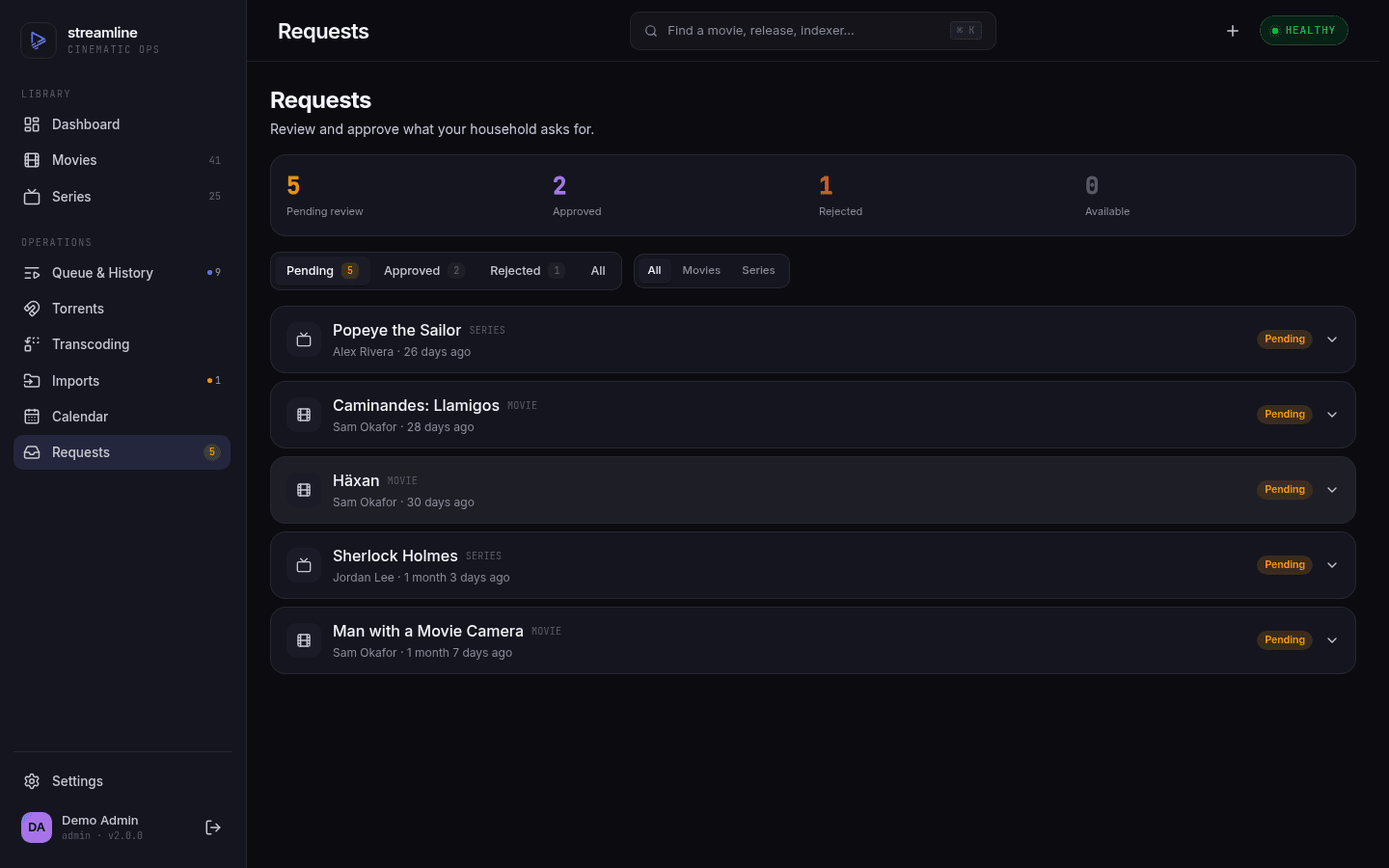
Requests, for admins and members. "Review and approve what your household asks for."
Each request shows the title, poster, synopsis, who asked, when, and any quality profile they preferred — enough to decide without opening TMDB in another tab.
| Status | Meaning |
|---|---|
| Pending | Waiting on you |
| Approved | Added to the library; being searched for and downloaded |
| Denied | Refused, with a reason the requester can see |
| Available | Downloaded and imported — ready to watch |
Approve & add creates the library item there and then. You pick the quality profile at approval time; leaving it blank uses your server default, and you're free to override whatever the requester asked for.
Deny (admins) requires a reason, and that reason is shown to the requester — the placeholder text suggests the tone: "Still in cinemas — let's revisit when it's on digital." It's a message, not a log entry.
Reopen as pending (admins) undoes a denial when circumstances change.
Filter by status and media type, or search by title or requester.
Settings → Users (admins only). Per user, you can:
- Change their role
- Reset their password — replaces the password and revokes every active session they have
- Clear a lockout — resets the failed-login counter after too many bad password attempts
- Revoke individual sessions — kick a specific device without touching the others
- Revoke their API keys
- Delete the account — permanently removes it and every resource they own
Two guard rails: you can't delete your own account, and Streamline refuses to remove or demote the last remaining admin. It will not let you lock yourself out of your own instance.
You can also clear a lockout from the command line if the UI is unreachable:
streamline auth unlock user@example.comThe avatar menu, top right → Account settings.
- Change your password
- Sessions — every device you're logged in on, with the option to revoke any of them
- API keys — create long-lived keys for scripts and mobile apps. Shown once at creation; store it immediately
Important
An API key carries the same permissions as the user that owns it. A key made by an admin is an admin key. If you're wiring up something that only needs to read, make the key on a member account. Keys can't touch account security either way — password changes, key/session management, user administration, and JWT rotation refuse keys with 403 and require a logged-in session.
Sessions last auth.session_ttl (default 168h — one week) before requiring a fresh login.
Next: Troubleshooting, or the advanced half starting at Configuration Reference.