Log
English · Русский
Kitten for kitty: a git history overlay — a commit list screen (current branch or all branches, with a branch graph) and, for the selected commit, its changes in a two-pane view (file tree + unified diff), like in review, with syntax highlighting, search, and copy to the clipboard for pasting into a Claude prompt.
All branches (a) with the branch graph — a merged feature and an unmerged one —
colored ref labels, and the details panel (i) with the full message and author:
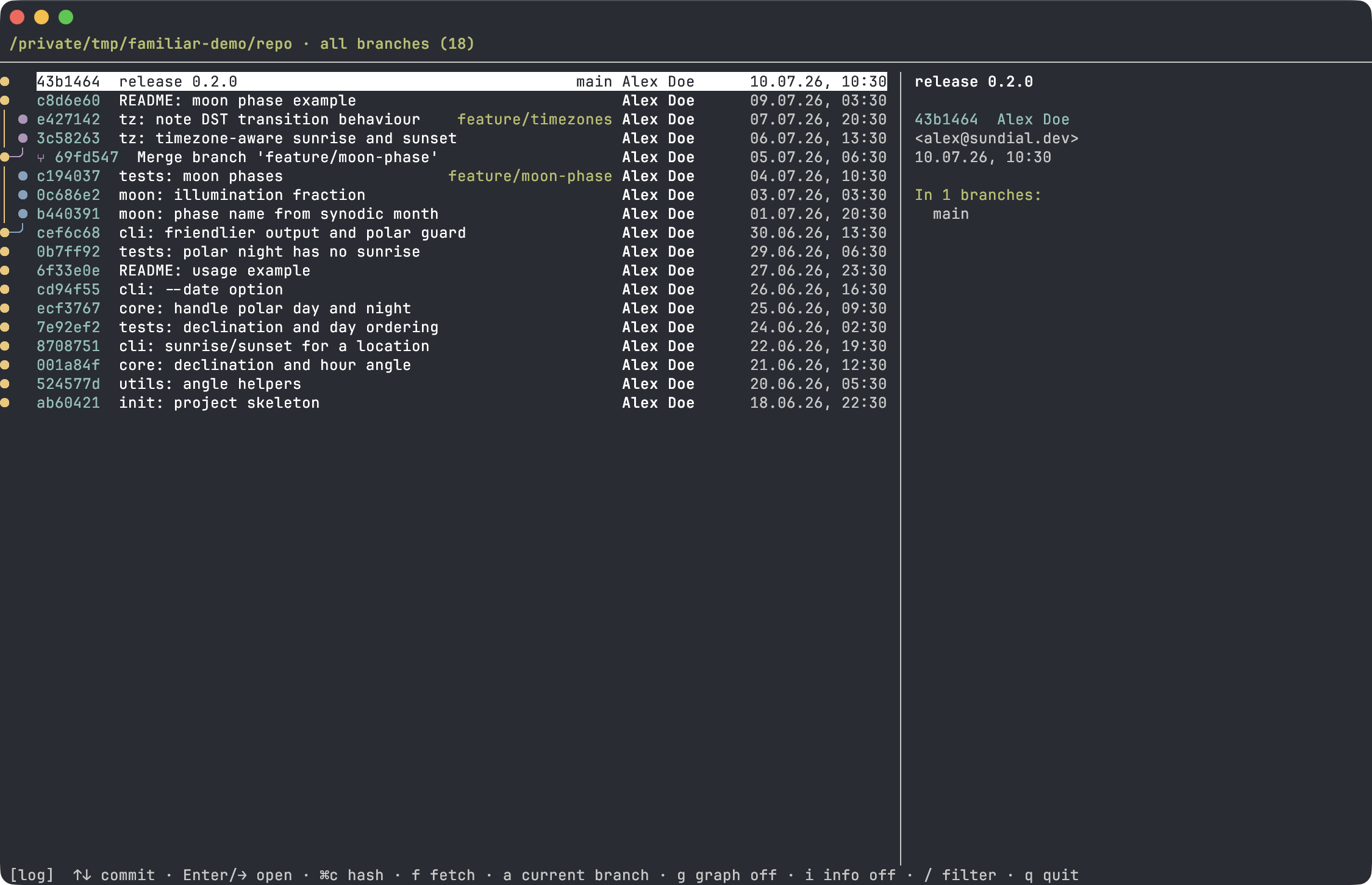
The two-pane diff mechanics are the same base class as review; here a commit list screen, a branch graph, and a details panel are added.
-
Commit list of the current branch; the
atoggle — show all branches (--all). -
Branch graph on the left (
gtoggle) — colored merge/branch lanes, as in an IDE. -
Details panel on the right (
itoggle): full commit message, author, email, date, committer (if different), and the list of branches that contain the commit. -
Ref labels in the row: local branches,
origin & name(a collapsed local+remote pair), remotes, and tags — each in its own color. -
git fetchstraight from the overlay (f) — pull remotes and reread the list. -
git push(p) — push the current branch after ayconfirmation. -
Copy hash of the selected commit (
⌘c) — for pasting into a prompt/command. - Lazy loading: commits are fetched in batches as you scroll down.
-
Filter (
/) — by subject, short hash, and author. - For the selected commit (
Enter/→) — its changes relative to the first parent: file tree + unified diff with syntax highlighting, word-diff, sticky header, a "hunks only ↔ whole file" mode (a), jump between changes ([/]), horizontal scroll (h/l), and search (/,n/N). - Russian keyboard layout for shortcuts (by key position).
The project folder and git root are determined from the cwd of the window the hotkey is pressed in.
familiar enable logReload the config with Cmd+Ctrl+, (macOS) or restart kitty. Open with: cmd+shift+l.
Minimal fallback — a manual map in ~/.config/kitty/kitty.conf (or an include
file):
map cmd+shift+l kitten /path/to/familiar/plugins/log.pyUnlike familiar enable, this bare map lacks the toggle-to-close behavior, the
guard against re-opening the overlay on top of itself, the Cyrillic key
duplicates, and the cmd+c / cmd+shift+c pass-through for copying inside the
overlay.
Commit list
| Key | Action |
|---|---|
↑/↓ |
navigate commits |
PgUp PgDn
|
page up/down |
Home / End
|
to start / end of list |
Enter →
|
open commit changes |
⌘c |
copy hash of the selected commit |
f |
git fetch — pull remotes and reread |
p |
git push the current branch; asks y to confirm. A branch with no upstream is created on origin and bound to it. Shown only while something is unpushed |
a |
current branch ↔ all branches (--all) |
g |
branch graph on/off |
i |
details panel on/off |
/ |
filter by subject / hash / author |
q Esc
|
quit |
Commit file tree (Enter/→ from the list)
| Key | Action |
|---|---|
↑/↓ |
navigate files (diff on the right updates) |
g / G
|
first / last file |
Enter Space
|
collapse/expand folder |
→ Tab
|
go to diff |
u |
show/hide "noisy" folders (.idea, node_modules, …) |
⌘c |
copy @path of the file/folder |
← Esc
|
back to commit list |
Commit diff (→/Tab from the tree)
| Key | Action |
|---|---|
↑/↓ |
cursor over diff lines |
g / G
|
to start / end of diff |
Enter |
on the ┈ separator — expand hidden context lines |
[ / ]
|
previous / next change |
PgUp PgDn
|
scroll the diff |
h / l
|
horizontal scroll (long lines) |
a |
view mode: hunks only ↔ the whole file |
v |
pane view: unified diff ↔ final code (IDE-style) |
/ n/N
|
search the diff and jump between matches |
⌘c |
copy the selection (or the line under the cursor) |
⌘shift+c |
copy @path#L42 (#L42-58 for a selected range) |
← Tab
|
back to the tree |
Esc |
clear selection/search → back to the tree → back to the list |
Mouse: click a commit to select, click again to open; wheel scrolls the list.
In the diff — as in review (click to place the cursor, click on ┈ to expand, select with Shift held).
Both panes have a scrollbar; the wheel scrolls the pane it's over, without moving the selection.
File statuses and "noisy" folders — as in review. Unlike review, log is read-only: no comments, refresh, or opening in an editor.
From history it's easy to point Claude Code at a specific spot in the code:
-
⌘ccopies the commit hash (in the list), the @-mention@path/to/file.pyof a file (in the tree), or the selection / line under the cursor (in the diff). -
⌘shift+cin the diff copies@path/to/file.py#L42, or#L42-58when a range of lines is selected with the mouse.
Paths are relative to the repository root, the way Claude Code expects them — it resolves
@path against the directory it was started in. Land on a line in the diff →
⌘shift+c → Cmd+V into the prompt, no need to describe where to look in words.