Review
English · Русский
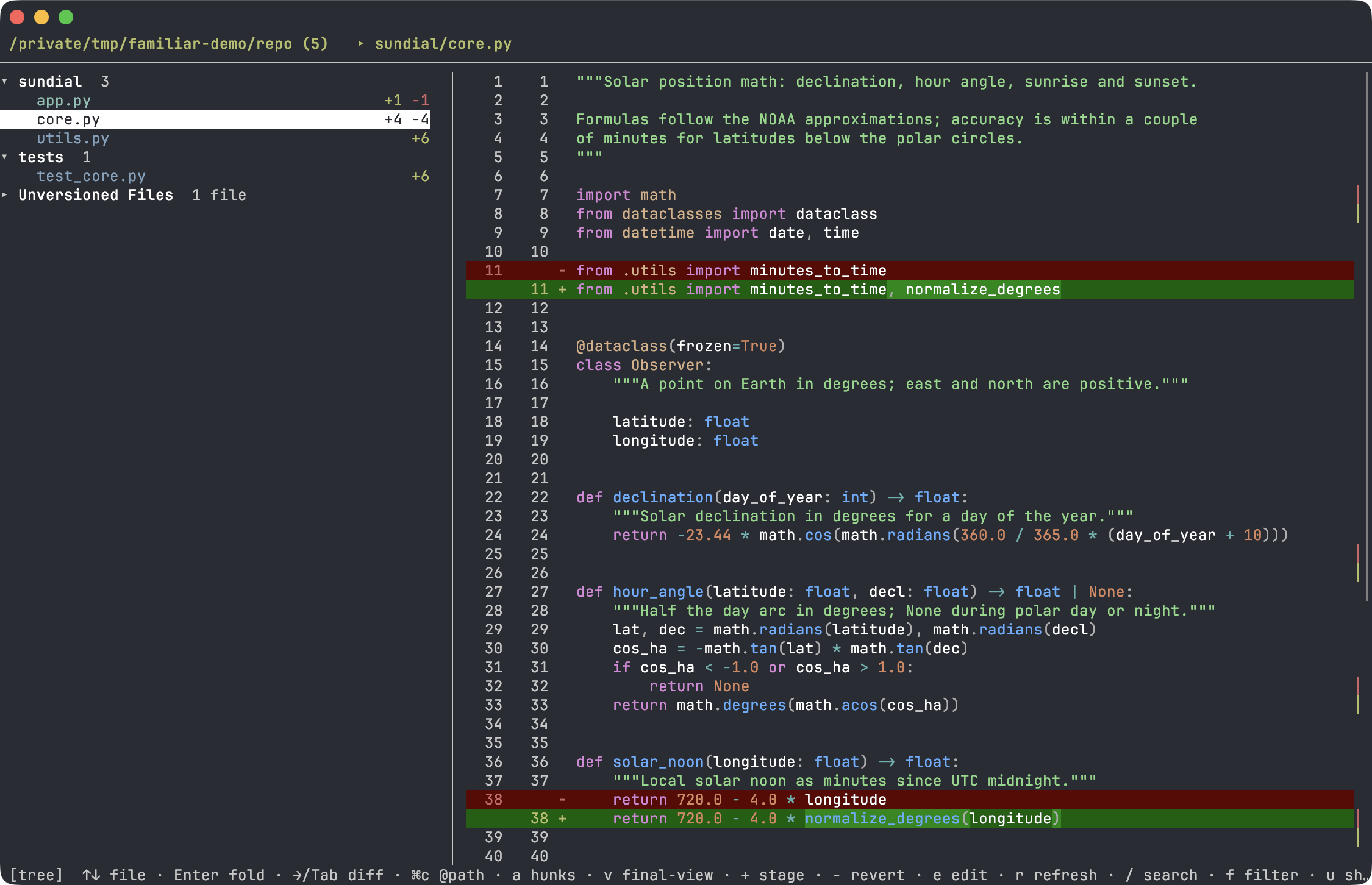
A kitten for kitty: a two-pane overlay for reviewing uncommitted git changes. On the left, a tree of changed files; on the right, a unified diff with syntax highlighting, live as you navigate.
The tree shows every kind of change at once — staged, modified, renamed and
untracked files — with per-file +/− stats; in the diff, the words that actually
changed within a line are highlighted brighter (word-diff):
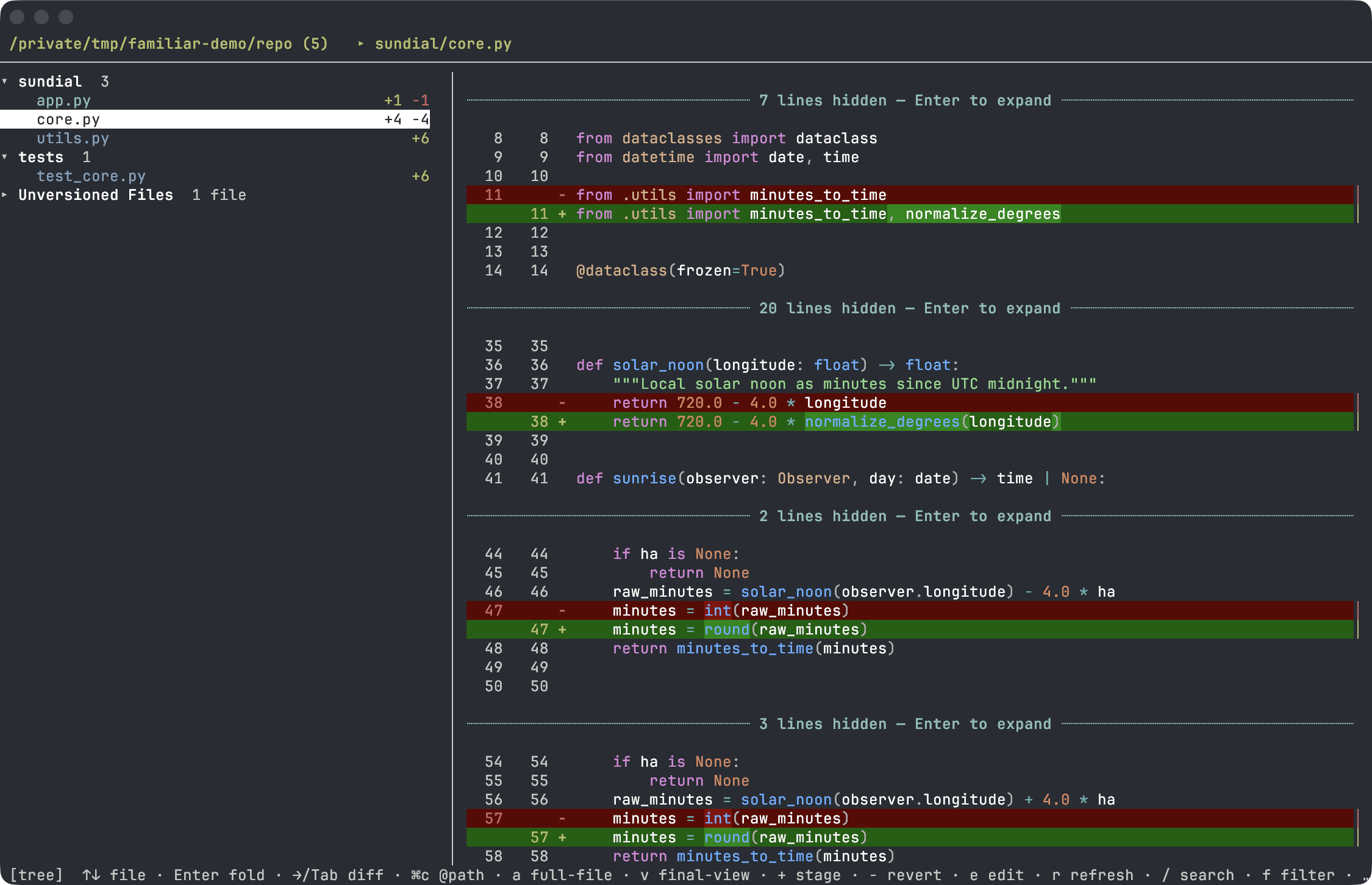
a toggles the view — the whole file, or just the changed hunks with unchanged
context collapsed into ┈ separators (click one to reveal the hidden lines):
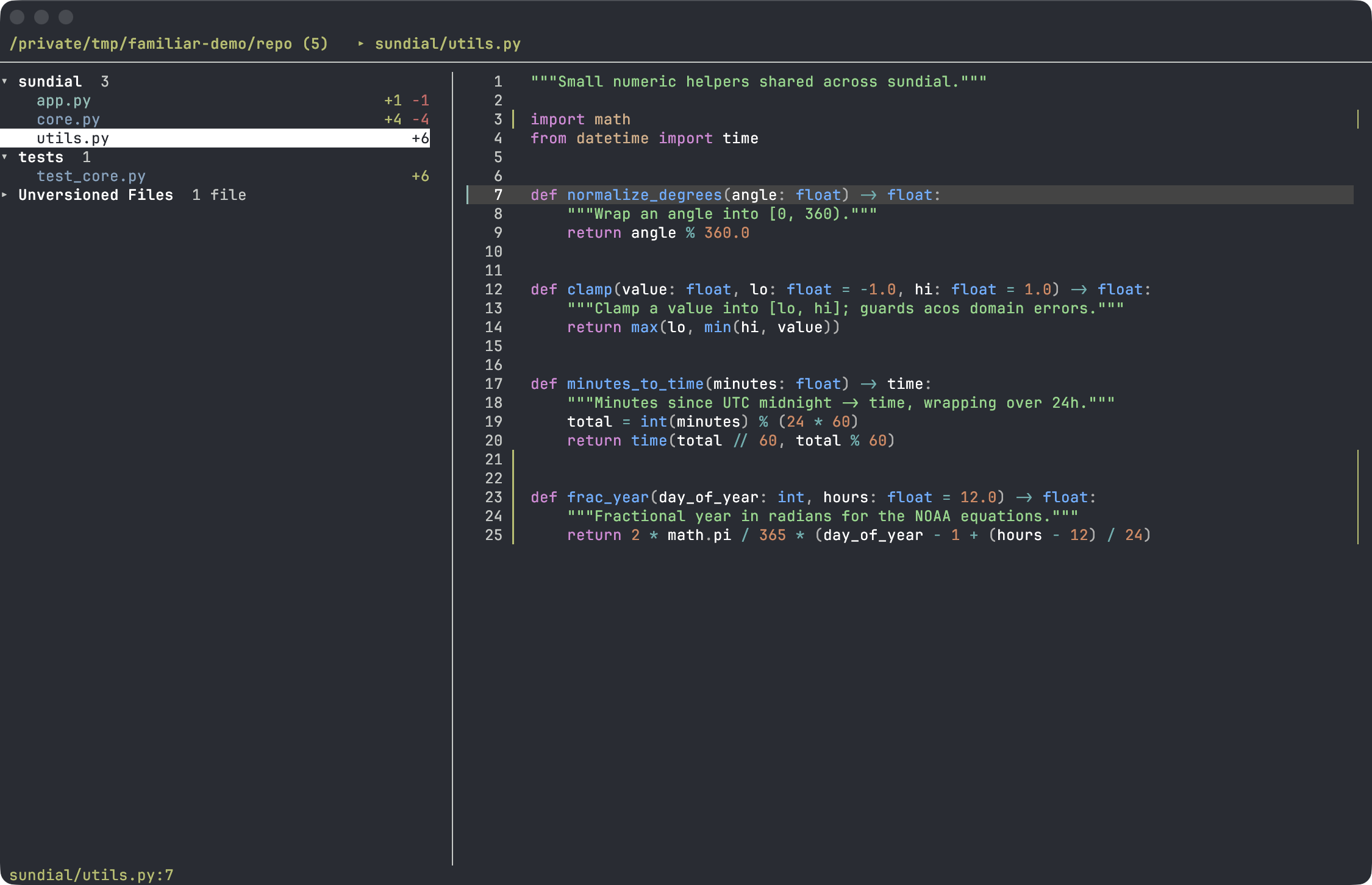
Plus a third view (v) — final code, the way an IDE shows it: the whole file with no
+/− signs and no removed lines; edits are marked in the gutter.
- Shows the uncommitted changes in the working tree (vs
HEAD), untracked files included. - On the left, a tree of files (folders in blue, files colored by status
M/A/D/R). - On the right, the unified diff of the selected file: additions in green
+, deletions in red−, context with IDE-grade syntax highlighting (Pygments): functions, types,self, decorators, docstrings, f-strings — by file extension. Updates instantly as you move. - Word-diff: in a removed/added line pair, the words that actually changed are highlighted more brightly, not the whole line.
-
Go to definition — ⌥-click a symbol in the diff (or select a word and press
d) to jump to where it is defined, without leaving the overlay — see Go to definition. -
Two view modes (
a): hunks only (changes with context) or the whole file expanded, with changes marked inline. -
Final code (
v) — an IDE-style view: read the code as it will look after the merge. No+/−, no removed lines, no highlighting inside the lines — just a gutter marker (▎green — added,▎blue — modified,▔red — something was cut here). To see what exactly changed within a line, switch back to the unified view. Jumps, comments, copying and search work as in the diff, and the cursor stays on the same line when you switch. - A change map on the scrollbar to the right of the diff — colored ticks show where the edits are (green — added, blue — modified, red — deleted), so you can see where to scroll.
-
Jump between changes (
[/]) — across edit blocks within the diff (in both modes). -
Per-file line stats in the tree (
+added −removed), like in an IDE/GitHub. - Unversioned Files — untracked files are gathered into their own group at the bottom of the tree, collapsed by default, so a pile of new files doesn't bury the changes you came to review.
-
Stage from the tree (
+) —git addthe file under the cursor, a whole folder, or every untracked file at once (+on the group node). -
Revert changes (
-) — drop the edits of the file/folder under the cursor back toHEAD(both the working tree and the index). Asks for confirmation first: onlyygoes through. Untracked files have nothing to revert to, so they are deleted, and the prompt says so. - Sticky header: while scrolling, the enclosing function/class is pinned at the top.
-
Horizontal scroll for long lines (
h/l). - Scrollbars in both panes; the mouse wheel scrolls the pane it's over, without moving the selection.
-
Comments → markdown — you comment on lines right in the diff (multi-line:
Shift+Enter); pressingwcollects all comments into markdown, copies them to the clipboard to feed back to Claude ("here are the comments, fix them") and clears them. Closes the review → edit loop. -
Refresh (
r) — rescan changes without reopening the overlay (handy while Claude is still editing files). -
Open in editor (
e) — open the current file at the visible line. The editor is chosen by project config:.idea/→ JetBrains (PhpStorm/IDEA/PyCharm/…),.vscode/→ VS Code,.cursor/→ Cursor,.zed/→ Zed — the whole project opens focused on the line, and the overlay stays open. If there's no config —$VISUAL/$EDITOR, otherwisevimin a new tab (in which case the overlay closes — a terminal editor needs a terminal). -
Search the diff (
/, navigate withn/N) with match highlighting. - Filter the tree by file name (
f), Russian keyboard layout for shortcuts.
The project folder and git root are determined from the cwd of the window the hotkey was pressed in.
⌥-click a symbol in the diff — or select a word and press d — to jump to where
it is defined. The jump happens inside the viewer with a back stack (⌃o to
return): a definition in a changed file opens its diff, a definition in an
unchanged file opens read-only. When a symbol has several definitions a picker
lists them (1–9 or click to choose).
Resolution is context-aware: obj.name prefers methods, name( prefers
declarations, and imported names are resolved to the exact file via the current
file's imports (Python from a.b import x / relative ./..; JS/TS
import/require with extension and index resolution; PHP use via composer
PSR-4; Go package symbols via go.mod). Everything else falls back to a
repo-wide git grep, new untracked files included — no index or language server
needed.
⌘-click is not possible: the terminal mouse protocol carries only Shift/Alt/Ctrl, never Cmd, so the trigger is ⌥-click. The pointer turns into a hand over identifiers you can jump to while ⌥ is held.
familiar enable reviewReload the config with Cmd+Ctrl+, (macOS) or restart kitty. Open: cmd+shift+r.
Minimal fallback — a manual map in ~/.config/kitty/kitty.conf (or an
included file):
map cmd+shift+r kitten /path/to/familiar/plugins/review.pyUnlike familiar enable, this bare map lacks the toggle-to-close behavior, the
guard against re-opening the overlay on top of itself, the Cyrillic key
duplicates, and the cmd+c / cmd+shift+c pass-through for copying inside the
overlay.
Two focus areas: the tree (left, navigate files) and the diff (right, cursor over
lines for comments). Switch with Tab or the arrows ← (tree) / → (diff).
Mouse: click a file in the tree to select it; click a folder to select it, click it
again to fold/unfold; click a diff line to place the cursor,
double-click a word to select just that word (for copy),
double-click to open a comment; click a line number to comment on that line;
⌥-click a symbol — go to its definition; click the ┈ separator to reveal hidden lines.
(While mouse capture is on, select text for copying with Shift held down.)
Tree focus
| Key | Action |
|---|---|
↑/↓ |
navigate files (the diff on the right updates) |
g / G
|
first / last file |
Enter Space
|
collapse/expand folder |
→ Tab
|
go to the diff (cursor over lines) |
+ |
git add the file / folder / all Unversioned Files under the cursor |
- |
revert changes to HEAD (new files are deleted); asks y to confirm |
r |
rescan changes (refresh) |
u |
show/hide noisy folders (.idea, node_modules, __pycache__, …) |
f |
filter the tree by file name |
q Esc
|
quit |
Diff focus (→/Tab from the tree; ←/Tab/Esc — back to the tree)
| Key | Action |
|---|---|
↑/↓ |
move cursor over diff lines |
g / G
|
to the start / end of the diff |
Enter |
on the ┈ separator — reveal hidden context lines |
Enter / c
|
comment on the line under the cursor (empty — delete one) |
{ / }
|
jump to the previous / next comment (●) |
w |
collect all comments into markdown, copy to the clipboard and clear them |
x |
delete all comments |
[ / ]
|
previous / next change |
d |
go to the definition of the selected word (also ⌥-click a symbol) |
⌃o |
back after a go-to-definition jump |
While typing (comment / filter / search)
| Key | Action |
|---|---|
Enter |
save (in a comment: an empty text deletes it) |
Shift+Enter |
new line — comments are multi-line and wrap by words |
Ctrl+W |
erase the word before the cursor |
Ctrl+U |
erase the whole text |
Esc |
cancel |
Common (in both focus areas)
| Key | Action |
|---|---|
PgUp PgDn
|
scroll the diff (also Ctrl+U / Ctrl+D) |
h / l
|
horizontal scroll of the diff (long lines) |
a |
view mode: hunks only ↔ whole file |
v |
pane view: unified diff ↔ final code (IDE-style) |
/ n/N
|
search the diff and jump between matches |
⌘c |
copy: in the tree — @path of the file/folder, in the diff — the selection / line under the cursor |
⌘shift+c |
copy @path#L42 (in the tree — @path) |
e |
open the file in the project IDE (.idea/.vscode/.cursor/.zed) or $EDITOR
|
File statuses (colored as in an IDE): A added — green, M modified — blue,
D deleted — red, R renamed — cyan, ? untracked (new, not yet in git) —
red (the file is shown but marked as not added to git).
Untracked files are gathered into an Unversioned Files group at the bottom of the
tree, collapsed by default. + on the group node stages all of them at once; + on a
file or a folder stages just that. The hint only shows up when there is actually
something to add — an already staged file offers nothing.
- reverts instead: the file goes back to its HEAD version, in the working tree and in
the index alike, and an untracked file is deleted from disk — irreversibly, git has no
copy of it. Nothing happens until you press y; Enter, Esc and every other key
cancel.
Noisy IDE folders (.idea, .vscode, node_modules, __pycache__, dist, venv,
etc.) are hidden by default — as in an IDE; u shows them (and says how many). They are
never staged by + while hidden.
-
Tab— go to the diff,↑/↓— land on a line. -
Enterorc— write a comment (a●appears next to the line).Shift+Enter— a new line; the text wraps by words,Ctrl+W/Ctrl+Uerase a word / everything. -
Go through all the spots, across different files.
-
w— all comments are collected into markdown, copied to the clipboard and cleared from the diff:# Review comments ## app/Http/Controllers/UserController.php - **L42** `return $user->save();` no permission check, add authorize()
-
Paste (
Cmd+V) into the Claude chat: "here are the review comments, fix them."
Besides collecting comments, the diff is a quick way to point Claude Code at a specific spot in the code. Both keys copy an @-mention with a path relative to the repository root — the form Claude Code expects:
-
⌘ccopies@path/to/file.pyof the selected file, or@path/to/dir/of a folder (tree focus); in the diff it copies the selection / line under the cursor as code. -
⌘shift+ccopies@path/to/file.py#L42, or@path/to/file.py#L42-58when a range of lines is selected with the mouse.
Claude Code resolves @path against the directory it was started in, so this works when
you run claude from the project root. Land on a line in the diff → ⌘shift+c → Cmd+V
into the prompt — no need to describe the spot in words ("in such-and-such file, somewhere
near that function").
The file list is git status (plus untracked); each file's diff is the version in
HEAD ("before") against the file on disk ("after"). It answers the question "what
have I changed since the last commit".
For untracked files and for a repository without commits the "before" side is empty: the whole file shows up as added.