Repository navigation
Home
Windows tray app for Quest Link / Air Link + SteamVR OpenXR. Free, modern OTT-inspired settings — a new C# app, not a decompile of ApollyonVR’s Oculus Tray Tool.
Current public release: v1.1.34
v1.1.34 completes the high-bitrate startup protection by preserving Dynamic Bitrate Max (DBRMax) as well as fixed Link bitrate when ODT already has a value above the old 500 Mbps cap. Quest Link bitrate presets still reach 960 Mbps; headset performance sampling starts from the headset's current log time; recording download waits for stabilization; and Meta runtime compatibility baselines stay pending until the read probe and prerequisite checks are clean.
What-s-New · Download Setup.exe · GitHub repo · Donate
| Video | What it shows |
|---|---|
| Walkthrough (25 Aug 2026, v1.1.18) | Full shell walkthrough — Status, pages, profiles, VR Tools |
| Earlier walkthrough (13 Aug 2026) | Previous recording (pre–Status / VR Tools stills) |
Screenshot gallery: Screenshots-and-Videos · docs/media
- Pick your pipe — Quest-Link-vs-Steam-Link (Quest Link vs the Steam Link app — they are not the same)
- Getting-Started
- Skim What-s-New if you last used the app around v1.1.18 or earlier
- Set Game-Settings-and-Profiles
- Tune Quest-Link bitrate / encode, then Dash-to-SteamVR if you want SteamVR games over Link (full tweaks). Skip this if you only use the Steam Link app.
- Configure HotKeys-Voice-and-Announcements before you put the headset on
SteamVR cannot click an elevated tray menu. Mid-session control is HotKeys, voice, and automation — not the tray icon.
| Area | Highlights |
|---|---|
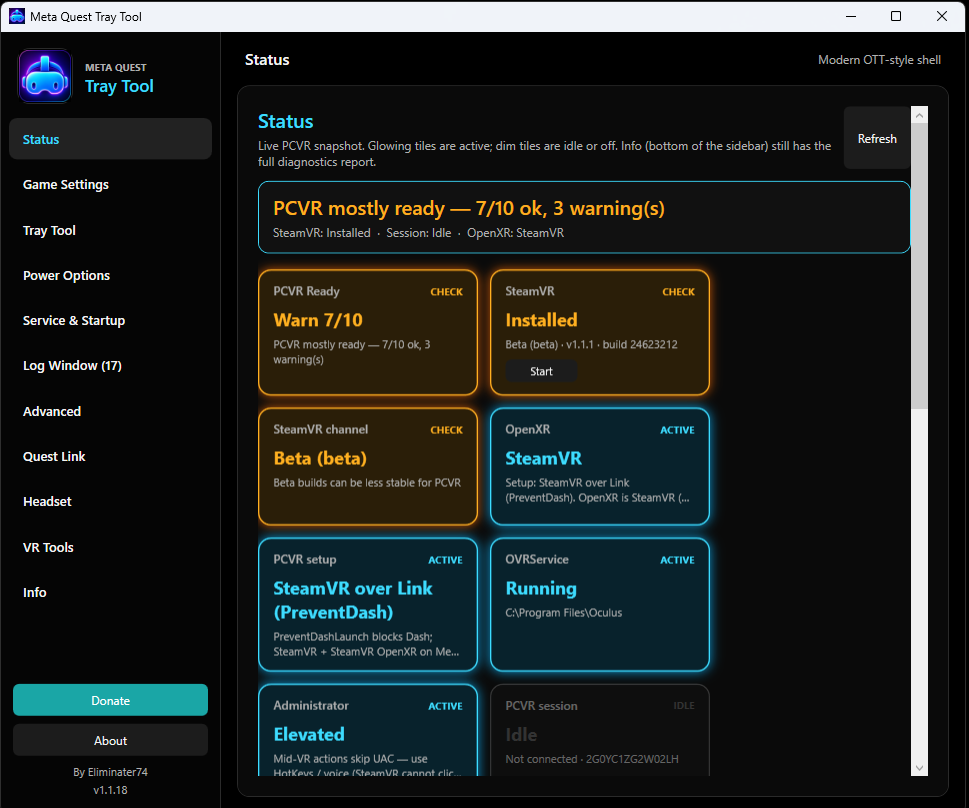
| Status | Live PCVR Ready chips, session type (Air / wired / Steam Link / VD), SteamVR install, GPU, battery/Wi-Fi, support diagnostics |
| Game settings | Super Sampling, ASW, FOV, HUD via Oculus Debug Tool CLI + GUI, observed mapping fixes |
| Profiles | Auto-apply on game launch, restore globals on exit, library Launch |
| Quest Link | Bitrate presets through 960 Mbps, encode width, HEVC, sharpening, DBR/DBRMax preservation, Mobile ASW, editable saved presets, mirror screenshots |
| Dash → SteamVR | PreventDashLaunch registry (no Meta process killing); auto SteamVR on real Link stream |
| OVRService | Start / stop / restart; Manual-at-boot so Meta does not pop at Windows sign-in |
| OpenXR | Switch Meta vs SteamVR (global + per-profile); Steam Link assist |
| Audio / power | Switch to headset on PCVR start, restore desktop on exit; power plan; USB suspend |
| Headset ADB | CPU/GPU/refresh/FFR; recording/download; performance samples; Wireless Pair; VR headsets only; Pause ADB; ADB screenshots |
| Voice / HotKeys | Ctrl+Numpad, push-to-talk, bindable Exit, headset spoken status, smart / Link / ADB screenshot commands |
| Updates / support | Private checked installer download, SHA-256 sidecars, sanitized support ZIP, durable settings backups |
- Windows 10 / 11 (64-bit)
- Meta Quest PC app for Quest Link / Air Link features
- SteamVR for Steam PCVR
- Headset ADB: Quest Developer Mode (USB or Wireless debugging). ADB is bundled.
Installer is self-contained (.NET 8 included). Settings live in %AppData%\MetaQuestTrayTool\ and survive uninstall.