Repository navigation
Service and Startup
Control OVRService (Oculus VR Runtime Service) — the Windows service behind Meta Horizon Link.
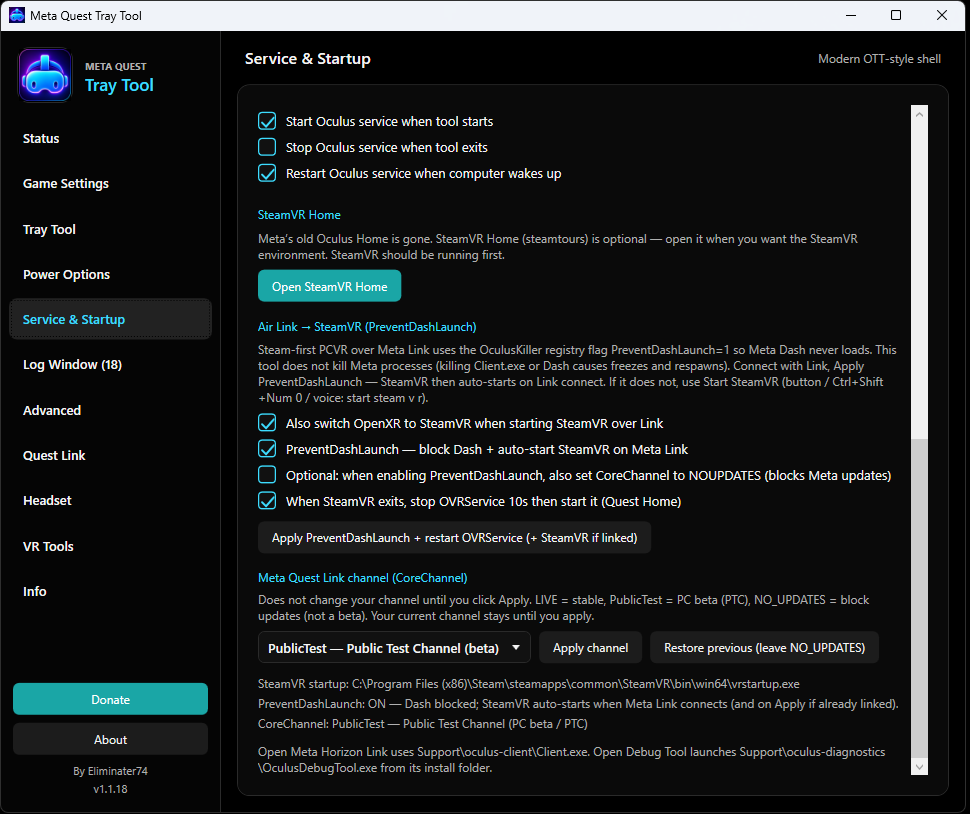
Needs the tray elevated for service config and PreventDashLaunch.
| Button | Effect |
|---|---|
| Start | Start OVRService
|
| Stop | Stop the runtime — active Link drops |
| Restart | Useful after PreventDashLaunch, CoreChannel, or Link registry |
| Open Meta Horizon Link | Focus Client.exe
|
| Open Debug Tool | OculusDebugTool.exe |
| Start SteamVR over Link | Same as Dash-to-SteamVR |
Meta Horizon Link usually opens at sign-in because OVRService is Automatic — it is not listed under Settings → Apps → Startup.
Uncheck “Start OVRService automatically at Windows boot”:
- Sets startup type to Manual
- Horizon Link stays closed until something starts the runtime
- Tray re-applies Manual if a Meta update resets Automatic
Does not: uninstall Meta, block Link forever, or stop Client.exe when you deliberately start Link.
Before Quest Link PCVR with boot start off: Start OVRService, Open Meta Horizon Link, or enable Start Oculus service when tool starts.
Steam Link–only (no Quest Link): uninstall Meta PC software instead.
If Meta will not open after Manual: the service is probably stopped. Start OVRService in the tray first, then open Horizon Link. Recover PCVR on Info/tray if needed.
| Option | Meaning |
|---|---|
| Start Oculus service when tool starts | Tray starts OVRService at logon (good pair with Manual-at-boot) |
| Stop Oculus service when tool exits | Leave off if you want Link after closing the tray |
| Restart Oculus service when computer wakes | Recovers Link after sleep; can drop an active session on wake |
Run with Administrator rights at logon uses a scheduled task with highest privileges (a Windows service cannot show a tray icon). One UAC, then silent elevated starts.
The elevated tray starts a session helper at your normal user token (--session-helper) so programs it launches (SteamVR, Steam games, Horizon Link, Debug Tool, browsers) do not run as Administrator. If Steam is already elevated, SteamVR / steam:// skip the helper so they match that Steam instance. A Windows Service cannot do this (Session 0).
SteamVR cannot click that tray — use HotKeys / voice.