Repository navigation
Troubleshooting
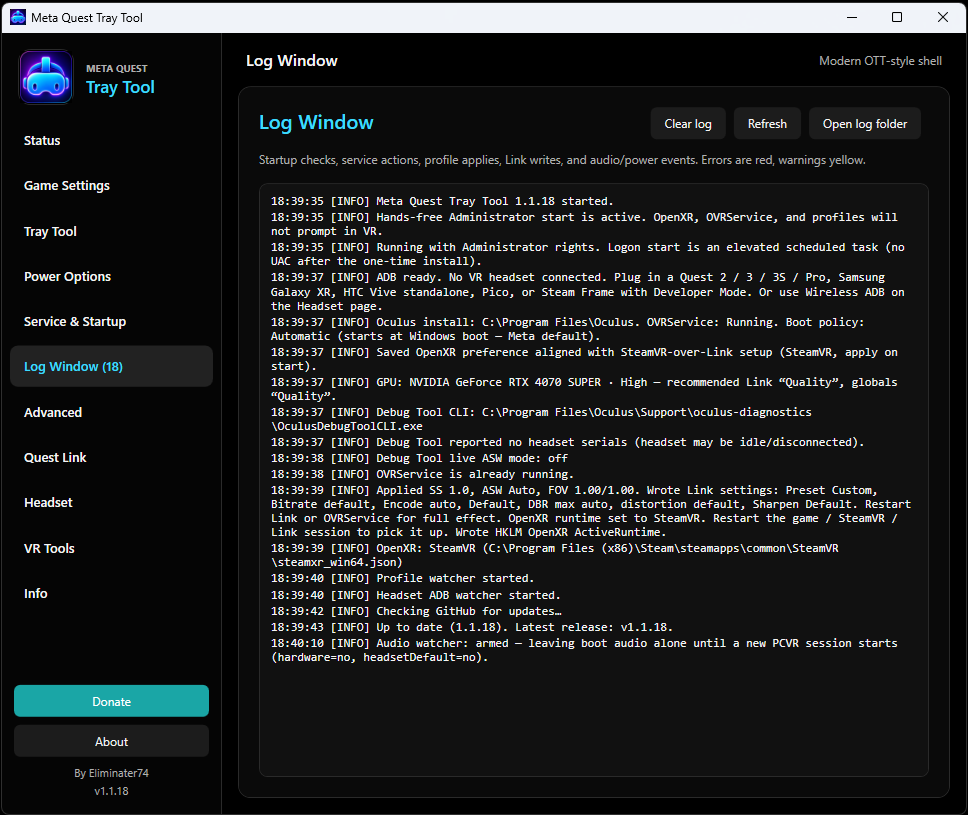
Log Window (or %AppData%\MetaQuestTrayTool\). Look for profile apply, Link writes, voice recognition, Dash → SteamVR, and “system resumed”.
Fixed in v1.1.2+: auto-start needs a live Meta Link stream (not Wi‑Fi DeviceCache / EnumHmd). Confirm PreventDashLaunch is what you want. Log will show Meta Link streaming suspected (1/2) while confirming.
DeviceCache and Oculus virtual audio often blip on resume. v1.1.3 ignores connect/disconnect edges for ~20 seconds after wake and only toasts a real stream drop.
Restart OVRService after sleep (on by default) will kill an actual Link session — turn that off on Power / Service & Startup if you sleep mid-PCVR.
Expected when the tray is elevated. Use HotKeys-Voice-and-Announcements.
Exit leaves a hidden helper or the next launch is silent
v1.1.24 fixed the main exit/helper shutdown path. v1.1.25 adds Advanced → Repair stuck helper and Copy diagnostics. Use Repair if Task Manager shows a leftover Meta Quest Tray Tool background process after Exit; it asks the helper to quit first, then terminates only a validated same-exe helper if it is still stuck.
If the problem returns, use Copy diagnostics or Info → Copy system info and check the App internals lines for main PID, helper pipe PID, recorded helper state, same-exe child helpers, and settings/profile paths.
Run as Administrator. Use Restart as Administrator or the logon elevation task.
- New Meta runtimes may reject
server:ASW — Log will say so - Pixel density often needs a new VR session
- Under Steam Link / VD, ODT is skipped on purpose (no Meta command channel). Use Quest Link / Air Link for SS / ASW, or ADB only for headset CPU/GPU — see Quest-Link-vs-Steam-Link
Reconnect Link or Restart OVRService. Confirm you are on Meta Link, not Steam Link/VD. v1.1.34 preserves existing ODT fixed bitrate and DBRMax values above the old 500 Mbps preset ceiling during startup auto-apply; older builds can overwrite those values if their saved Quest Link baseline is still capped.
Important limit: registry read-back proves the value was written or preserved. It does not prove the active headset stream adopted the new bitrate. For that, reconnect Link or restart OVRService, then validate in a real session.
Developer Mode + USB debugging or Wireless Pair. Same Wi‑Fi for wireless. Phones/emulators never get Quest tweaks. Props reset on Quest reboot — leave apply-on-connect on.
If a phone or TV keeps disappearing from adb devices, VR headsets only is on (default). Uncheck it on the Headset page or tray → Headset (ADB) to leave other wireless ADB devices connected. Or use Pause ADB (until resume / 2 hours) so the watcher fully stops without quitting the tray.
SideQuest on the headset: if SideQuest is running in VR, it may open an ADB port (often 5555). Use that LAN IP:port with Connect on the Headset page — see Headset-ADB.
Quest Link mirror screenshot needs an active Meta Quest Link / Air Link stream and Meta's OculusMirror.exe under the Meta install folder. If it says Link is not streaming, connect Quest Link / Air Link first and try Quest Link → Take Quest Link mirror screenshot again.
Headset screenshot (ADB) needs a trusted, ready Quest over ADB. Check Headset status for unauthorized/disconnected/ignored devices, then try Headset (ADB) → Take headset screenshot (ADB) again. PNG files save to %AppData%\MetaQuestTrayTool\screenshots\; corrupt output is deleted instead of reported as success.
Use Stop & download latest recording after starting a recording from the Headset page or from the Quest UI. The tray waits for a new or changed recording to stabilize before downloading. If the headset has not finalized the file yet, wait a moment and retry; the app should not report success for a stale, empty, or still-growing file.
The 10-second sample only reports fields emitted by the active app, headset firmware, and runtime logs during that window. Run it while a VR app is active. Missing FPS, utilization, or SpaceWarp lines usually means the firmware/app did not log them in that sample, not that the command failed.
Start OVRService in the tray, then Open Meta Horizon Link. Or enable Start Oculus service when tool starts. See Service-and-Startup.
Enable the audio switcher and set fallback devices. Session-end restore keys off a live stream ending, not “headset still Windows default”.
PTT (Ctrl+Shift+V), matching Windows speech language, raise min confidence, check Log. Spell A S W / steam v r.
Info page or tray: restarts OVRService, re-applies Link + globals + audio. Voice: recover PCVR.
Setup.exe is not Authenticode-signed yet. Windows may warn; that is a known limit until signing budget exists.
The release page also publishes MetaQuestTrayTool-Setup-<version>.exe.sha256.txt. The in-app updater uses the GitHub asset metadata and checksum before launching the installer.