Getting Started
PC: Unbuntu 18.04 with ROS melodic, RT kernel version 5.2.21
Router: ipTIME T5008
Install Ubuntu and install real-time kernel.
Install ROS following instructions provided here.
Install Universal_Robots_ROS_Driver following instructions provided here.
Use a router with more than 5 ports. I failed to use wifi network.
I will use 192.168.1.* IPs for NW connection. Set the router IP like below.
-
192.168.0.1에 접속해서 Advanced Setup > LAN Setup의 LAN IP를 192.168.0.1 에서 192.168.1.1로 변경

-
Apply 후 공유기 재부팅
-
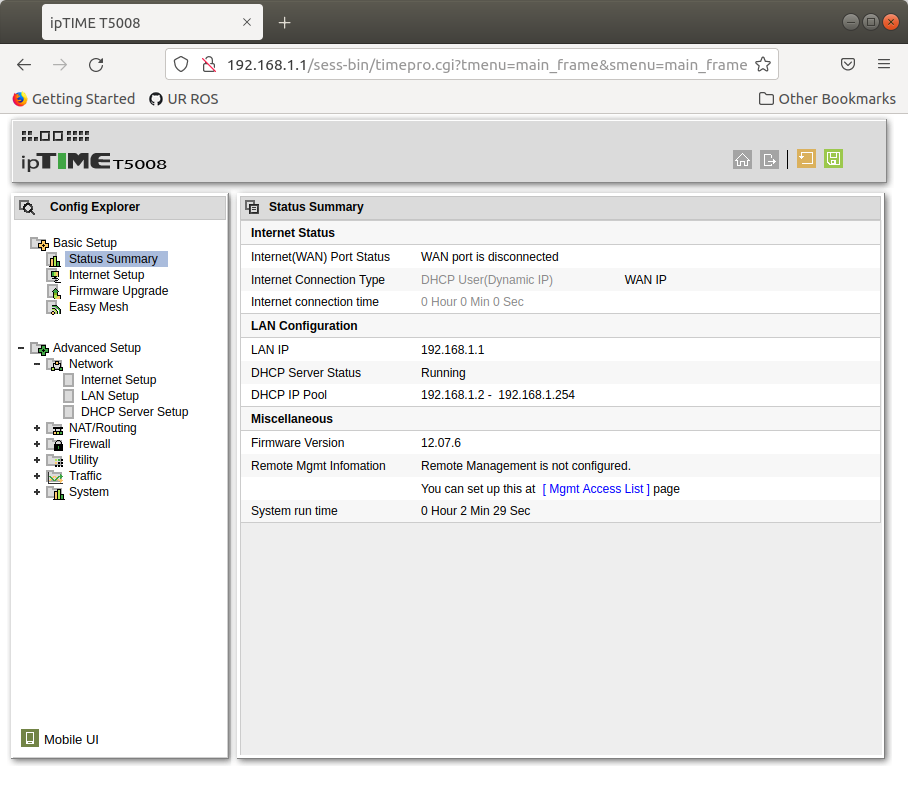
192.168.1.1에 접속해서 아래와 같이 변경된 IP 확인
I tried to follow the UR ROS package description (here), but robot PC keep shows "external control connection refused". Instead of using this method, I followed the method here.