Picker_Panel_Gamut
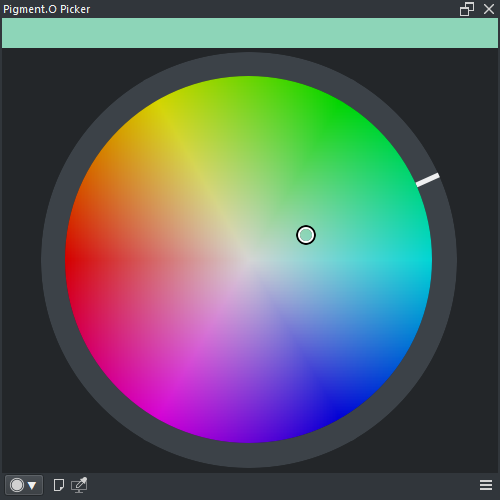
Panel Gamut is a Selector panel. Gamut Mask can be changed with the context menu.


-
WHEEL : Hue circle section
- LMB : Select hue
- SHIFT + LMB : Zoom panel at maximum size
- CTRL + LMB : Snap by 5 degree
-
GAMUT : Gamut section
- LMB : Select color
- [PRESSURE] LMB : Zoom panel with pressure scaling
- SHIFT + LMB : Zoom panel at maximum size
- CTRL + LMB : Other axis shift
- ALT + ( LMB or RMB ) : Select Pin and Node
- ALT + RMB + Drag : Edit selected Pin and Node
- SHIFT + CTRL + ALT + LMB + Drag : Rotate the mask Nodes
- RMB : Context menu
Right click anywhere to access the following menu options.
- None : No Gamut mask Polygon
- Triangle : 1 Polygon with 3 Nodes
- Square : 1 Polygon with 4 Nodes
- Circle : 1 Polygon with 4 Nodes
- 2 Circle : 2 Polygon with 8 Nodes
- 3 Pie : 3 Polygon with 6 Nodes
- Reset : Reset the active Gamut Mask
- Harmony : True
- Wheel : Digital and Analog
- Space : HSV, HSL, HCY and ARD
- Analyse : True