Event Graph
Your events, on_actions and decisions as one picture, laid out so that left to right means "happens after", with an inspector that edits the event without making you read script. Open it with Paradox: Show Event Graph, Ctrl+Alt+G, or the graph icon on the editor title of an events, on_action or decisions file.
Works for all three games. The query box at the top takes an event id (namespace.123), an on_action or decision name, or a whole namespace, and completes on your mod's real ids as you type, from the same index that draws the graph.
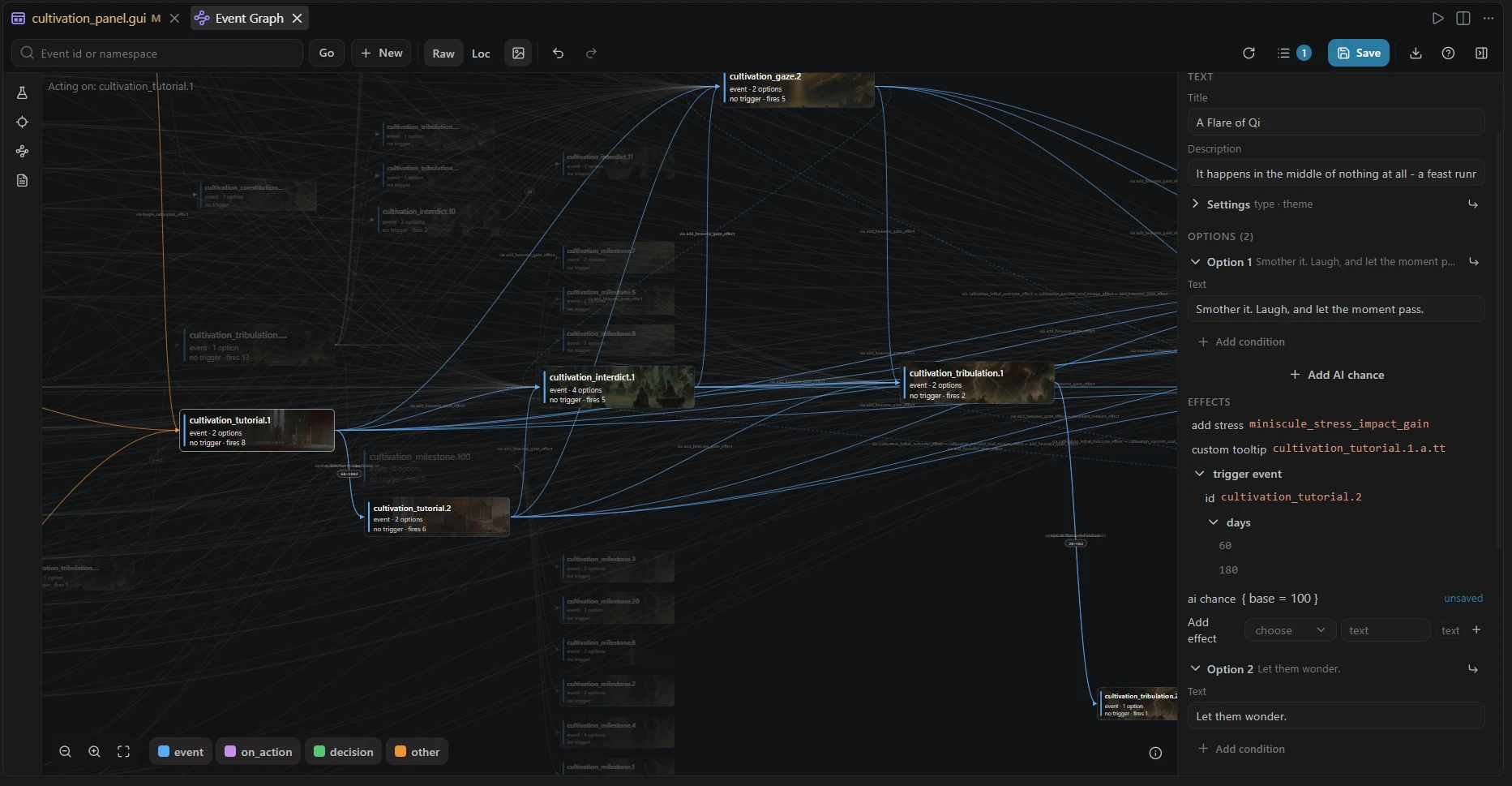
The x axis is time. Every card's column is its distance from the chain's entry points, so a card to the right of another fires after it. Columns are fixed; the layout only ever spreads cards vertically inside their column. This makes the graph deterministic: the same mod always draws the same picture, and a re-layout after an edit glides cards from where they were instead of reshuffling the world.
A few more conventions the picture uses:
- A cycle draws as a return arc, not a forward step, so "event A eventually re-fires event A" reads as the loop it is.
- Cards with no connections are left out by default (see Connected only below). Switch that off and they sit in their own grid to the left of the flow, out of the way.
- Namespaces group into horizontal bands when the graph spans more than one, so two unrelated chains do not interleave.
- Hubs grow. A card with many connections draws up to a third larger, because it is the one you are looking for.
- Card borders say where a definition lives: solid is your mod, dotted is a parent mod, dashed is vanilla.
-
Delay chips on an edge spell out
trigger_eventdelays ("fires 30 days after this step runs"), ranges included.
Edge labels name the firing relationship: which option fires it, whether it comes from immediate or after, through which scripted effects, or which on_action list (events, random_events, first_valid). In a dense graph, labels show only for the selected card's own edges, because labels everywhere is how graphs become soup.
Step rows. Below 150 cards, each event card grows one row per phase: trigger, immediate, each option, after. Edges attach to the row they come from, so you can see that a chain continues from option B specifically, and an edge fired through a scripted effect anchors at the option that runs it. Every row is clickable and opens the source at that line.
The layout is fast enough not to think about: a 1000-card graph lays out in about 22 ms, and once the layout settles the simulation stops entirely, so an idle graph costs nothing.
-
Select a card and everything outside its neighborhood dims. Blue is what it fires, orange is what fires it.
-
The legend is clickable to dim whole kinds (events, on_actions, decisions, other). Esc deselects; so does clicking empty canvas.
-
Chain (
Cor the tools rail) cuts the graph to one card's chain: what leads to it and what it leads to. A depth control appears while chained (1 to 5 steps, or everything), and a card whose neighbors were cut carries a count of what is hidden in each direction. All (A) brings the whole mod back.
-
Connected only (the link button in the tools rail, on by default) leaves out every event nothing fires and that fires nothing. The server drops them before it reads their cards, so a mod with hundreds of standalone events opens faster. Turn it off to see the whole namespace; the event you queried always stays, connected or not.
-
Raw / Loc switches card captions between the raw id and the localized title.
-
The background toggle draws each event's background illustration behind its card; one that cannot be resolved gets a hatched placeholder that says so.
-
Zoom with
+,−,0(fit) or the buttons; middle-mouse drag pans./focuses the query box. -
Simulate (
S) opens the event simulator in a window over the graph, with its own Back control. Open source (O, or Ctrl+click the card) jumps to the file. -
New (
N) creates a new event from inside the graph. -
The graph exports as SVG, and the ? button opens the built-in tour.
The right-hand panel shows the selected event as a structured editor, not a summary. Every block the event runs (trigger, immediate, each option's effects, ai_chance, after) renders as an indented tree that reads as words, not script: keys drop their underscores, braces and = go unsaid, and known sections carry a plain-language subtitle ("Runs as soon as the event fires, before it is shown").
Only the value keeps the mono face, which is also what marks it as editable:
- an enumerable value is a dropdown chip,
- a free value is plain text that turns into an input when clicked, with a tag naming the type that belongs in it (number, yes / no, event id, loc key),
- every "Add ..." is one muted button that expands into its picker on demand, completing from the game's real trigger and effect vocabulary for the block you are in.
The localized title, description and option texts edit the same way and write back BOM-correct. + Add option scaffolds a new option straight into the file, localization key included. Settings, Options and References start folded, with enough in each header (the option's text, the keys it sets) to read without unfolding.
Nothing reaches disk until you save. Edits collect as pending changes drawn over the graph and the inspector, each changed row marked "unsaved". The Changes button lists them; Save writes them; undo and redo step through them. Close without saving and the files are untouched.
Edges come from trigger_event (in immediate, options and after), from on_action lists, from decisions' effects, and from calls through scripted effects: an event that fires another via a shared scripted effect is connected, labeled via the effect. References the index cannot resolve are shown as unresolved rather than guessed at.
The graph is mod-scoped like the other views: it draws the focused mod, with parent-mod and vanilla definitions drawn where the chain reaches them (their border style says which is which). See Sidebar Views for how focus works.
Right-click a source-backed event node for the native PX source actions. A focused node also supports Shift+F10 or the context-menu key. These actions use that node's source coordinates rather than whichever text editor happens to be active.