Flag Builder
A visual editor for coat-of-arms script: compose a flag from the game's and your mods' patterns, emblems and sub-flags, see it exactly as the game recolors it, and save it back as script. Open it with Paradox: Open Flag Builder or the coat-of-arms row in the Project panel's Create group.
Victoria 3 and Europa Universalis V. On Crusader Kings III the same command opens the Coat of Arms Designer instead, which is built against CK3's own designer data: preset layouts, the dynasty, house and title frames with their six tiers, multi-select and alignment tools, a snapping grid and a design library. It is documented on Content Creators. Paradox: New Coat of Arms… is the door to both: it asks what the arms are for and opens whichever panel the game has.
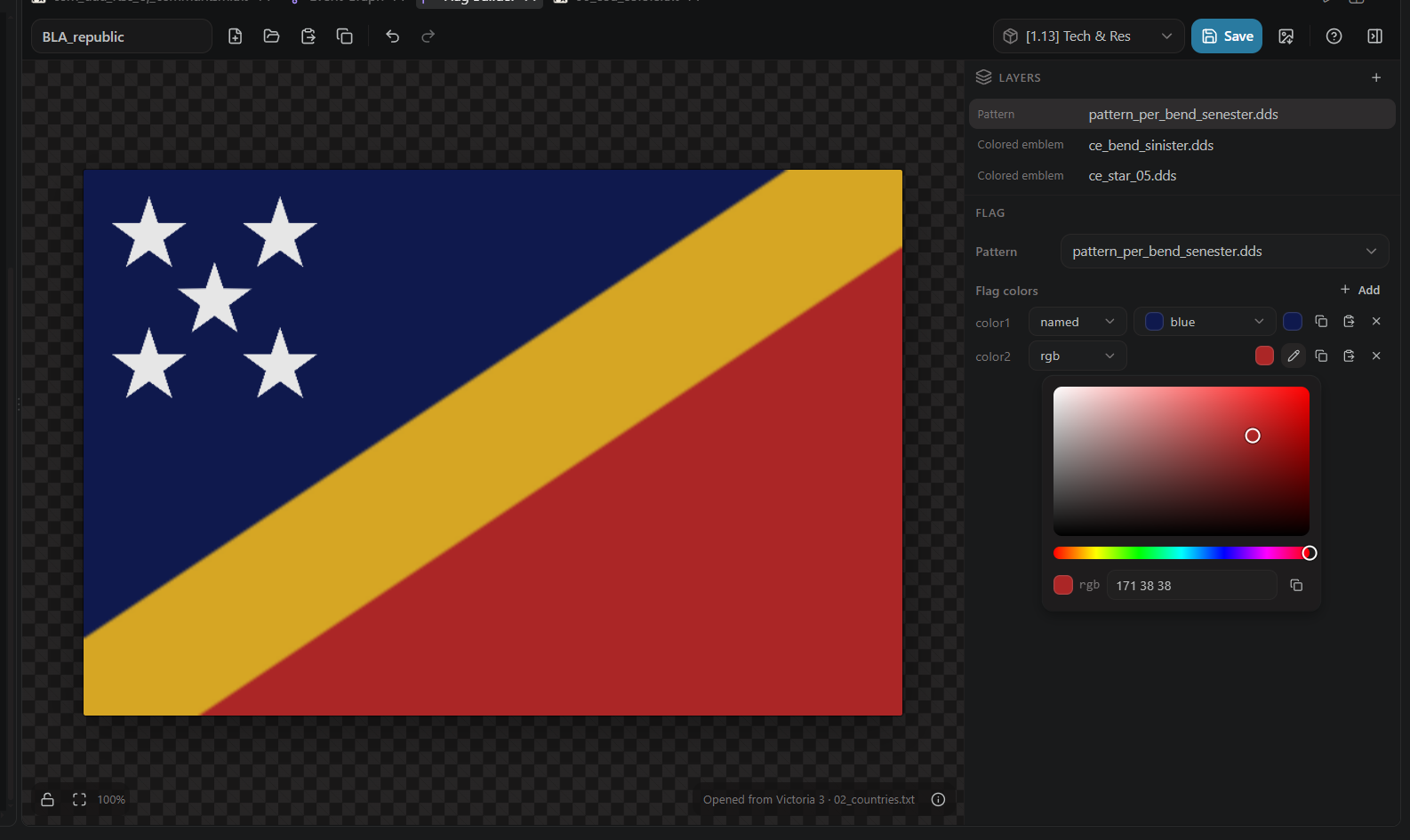
The preview is not an approximation. The recoloring the game applies to patterns and colored emblems (placeholder color slots, blue-channel shading, pattern masks) is reimplemented from pdx-flag-builder, so what you see is what the game draws, including how a rotated emblem stretches on the 3:2 flag. Patterns and emblems come from the game files and every mod in your workspace, in load order.
Three ways in:
- New starts from a blank pattern.
-
Open browses every flag the database knows, each rendered as a live preview, paged as you scroll, searchable by name, file, or mod name (
gamefinds the vanilla ones). The footer names where the opened flag came from. -
Paste reads a coat-of-arms block from your clipboard. It parses real script,
@variablesand@[expressions]included.
When you open an existing flag, resolution is mod-first: a flag your mod defines under the same name wins over the game's, matching what the game itself loads.
A flag is a pattern plus a stack of emblem layers (colored or textured) and optional sub-flags (a whole coat of arms nested as a layer). The layers panel lists them in draw order; drag rows to reorder, later rows paint on top.

Each emblem layer holds one or more instances: a position, a scale and a rotation, each a number field you can type into or scrub sideways. Five stars on a canton are one layer with five instances, not five layers.
You do not have to type coordinates. On the canvas, click an emblem to select it (topmost in draw order wins), drag to move it, and drag a corner to scale it, aspect ratio locked. The numbers in the panel follow.

Color slots take the formats the games actually use: a named color from the game's color table, rgb, or hsv360, plus "same as" another slot. Every slot has a swatch that opens the shared color picker, and copy / paste buttons that accept whatever you have: rgb { 171 38 38 }, hsv360 { ... }, a bare 171 38 38, or #ab2626.
Save asks two questions and then writes script:
- Which mod, when your workspace has more than one. The picker names each mod and its path.

- Which file: the opened flag's own file first (same path in your mod overrides the game's flag), another existing file, or a new one.
The write is an upsert into that file, BOM-correct like every script file the games read. Export saves the rendered flag as a PNG instead, and Ctrl+Z / Ctrl+Y step through your edits. The ? button opens the built-in tour.
The coat-of-arms model and the recolor math follow kaiser-chris/pdx-flag-builder (MIT); the toolkit's version is a TypeScript reimplementation, with the details in THIRD-PARTY-NOTICES.md. No game assets are redistributed; the patterns and emblems you see come from your own install and mods.