Repository navigation
Status Checks
The Status card on the Play screen is the launcher's checklist. It runs when the launcher starts, every 30 seconds, and when you press Check again.
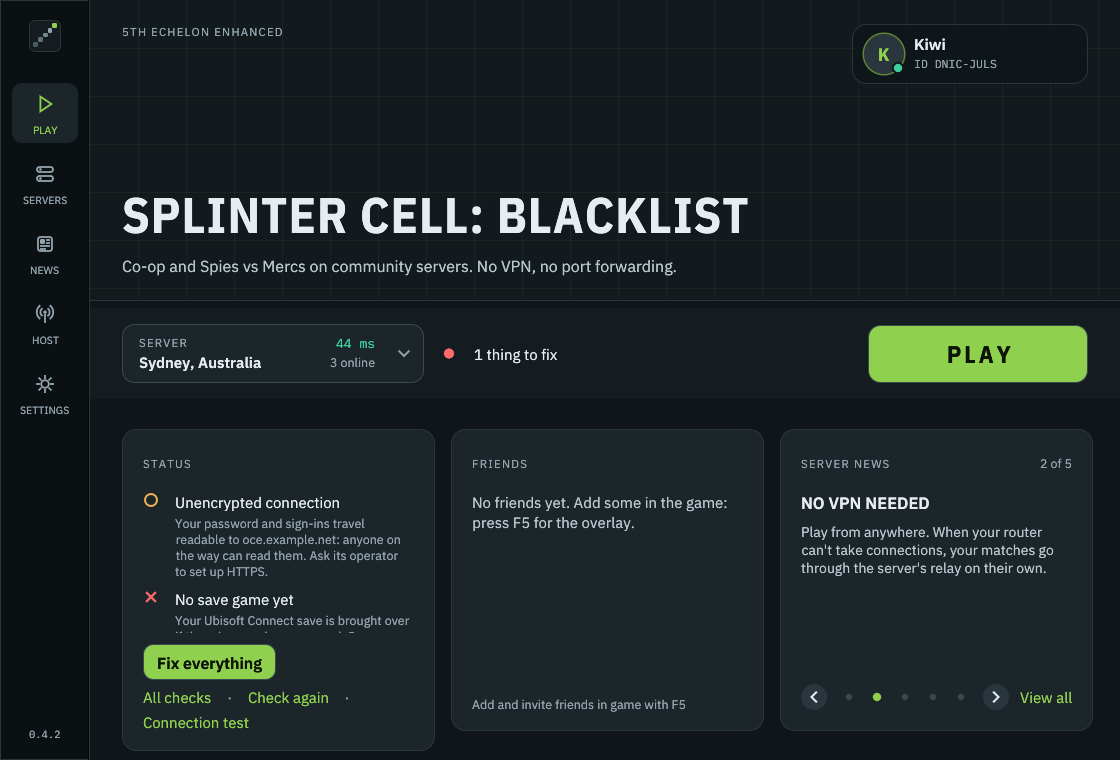
- Green: fine.
- Amber (a note): worth knowing, never stops you playing.
- Red (a problem): the game may not connect until it's fixed. Play still works.
When something's red, the card shows only the problems, each with its own button. Fix everything runs the whole setup again on the current server, which fixes most things in one go. All checks shows the full list.
Tip: Close the game before fixing anything: the client can't be replaced, and some tests can't run, while it's open.
| You see | What it means | What to do |
|---|---|---|
| ✅ Game found | ||
| ❌ Game not found | The launcher hasn't found Splinter Cell: Blacklist | Press Find, or choose the folder with Blacklist_game.exe / Blacklist_DX11_game.exe in Settings › Game
|
| ❌ This game version isn't supported yet | The game's .exe isn't one the client knows: usually a modified exe |
Press Try to identify: the launcher works out the addresses the client needs. If that fails, verify the game's files in Steam or Ubisoft Connect, and open an issue with the hash it shows |
| ❌ Start the game once first (Linux) | Proton or Wine hasn't created the game's Wine files yet, and your save goes in there | Start the game once from Steam (or Lutris, Heroic or Wine), quit it, then Check again |
| Your CPU has more than 16 threads, and the game can freeze at start under Proton | Copy the launch options into Steam: see CPUs with more than 16 threads | |
The game's launch options in Steam have -offline (or -offline_mode): started from Steam, or by the launcher through Steam, the game never goes online |
In Steam, open the game's Properties › General › Launch options and remove it | |
| The game's data differs from the unmodified game's, usually because of a mod (it names the balaclava mod when it finds it). Players whose data differs can't join each other ("data version mismatch") | To play with everyone, remove the mod (or rename its file, e.g. a PEC.ini in the game folder) or verify the game's files. Players who all have the same mod play together fine |
| You see | What it means | What to do |
|---|---|---|
| ✅ 5th Echelon installed | ||
| ❌ Install 5th Echelon | The game still has Ubisoft's online DLL, or your antivirus removed ours | Press Install. If it keeps disappearing, see Antivirus Warnings |
| ❌ Update 5th Echelon | Another version of the client is installed. Servers refuse other versions | Close the game; the launcher replaces it by itself, or press Install |
| ❌ Reinstall 5th Echelon | 5th Echelon's uplay_r1_loader.dll is gone from the game folder (the game's own copy is still kept), so the game can't start. Usually antivirus software removed it |
Press Install (Play does it too). If it goes again, see Antivirus Warnings |
| ❌ Game files incomplete |
uplay_r1_loader.dll is missing from the game folder, and there's no copy of the game's own |
Verify the game's files in Steam or Ubisoft Connect, then Fix everything |
| You see | What it means | What to do |
|---|---|---|
| ✅ Server <name> | ||
| ❌ Choose a server | No server set yet | Press Choose |
| ❌ Server not found | The server's name doesn't resolve to an address | Check the spelling, or choose another server. See Troubleshooting |
| ❌ Server not answering | The server doesn't answer on its ports | It may be down or restarting (an update, say). Try another server in the server menu, or wait a few minutes |
| The server has no HTTPS, so your sign-ins travel readable | Nothing for you to do; tell the server's operator. The community servers all use HTTPS | |
| ✅ Signed in as <name> | ||
| ❌ No account on this server yet | Press Connect: it finds yours with your identity, or makes one | |
| ❌ Account refused | The server refused the saved password, or the account no longer exists there | Press Connect to sign in again with your identity. Forgot the password? The server's admins can reset it: on the community network, write to them on the launcher's Support page |
| ❌ Update the launcher | The server needs a newer 5th Echelon than yours | Press Update. See Updates |
| ❌ Banned on this server | The server's admins banned this account. The check says for how long, and why | Ask that server's admins about it, or press Choose and play on another server |
| The check failed; the detail says why, e.g. Too many failed logins; wait 10 minutes before trying again, or the server didn't answer | Wait a few minutes and Check again |
| You see | What it means | What to do |
|---|---|---|
| ✅ Network chosen automatically | The game uses the adapter that reaches the server, chosen each time it starts | |
| ✅ Playing over "<adapter>" | The adapter the game uses: the one that reaches the server, or the one you pinned | |
| You pinned an adapter (a VPN's, usually) in Settings › Network and it isn't connected. Red if you also ticked Don't start the game without this adapter | Turn the VPN on, or press Choose automatically | |
| The pinned adapter isn't the way to your server | Press Choose automatically, unless you play over that adapter on purpose | |
| Your connection to the server goes through a VPN (NordVPN, Proton VPN, Mullvad, Radmin VPN, Hamachi, ZeroTier, Tailscale…). It works, but adds delay, and your matches go through the server's relay | Turn the VPN off while you play if you can, then Check again. See VPNs |
| You see | What it means | What to do |
|---|---|---|
| ✅ Save game ready | Your save is rank 5 or higher | |
| ✅ Save game found | A save the launcher can't read the rank of (a save straight from the game, say). Usually fine | |
| ❌ No save game yet | Press Set up a save: it brings over your Ubisoft Connect save, or makes a new rank 5 one | |
| ❌ Save below rank 5 | Co-op and Spies vs Mercs need rank 5 | Press Raise to rank 5. Your save is backed up first, and keeps your progress |
These read the log your last game wrote (bl-tracing.log).
| You see | What it means | What to do |
|---|---|---|
| The adapter you pinned wasn't connected, so the game played over another | Press Choose automatically, or connect your VPN before starting the game | |
| The game played over another adapter than the one now pinned | Start the game again | |
| Part of the client didn't load | Make sure the game version is supported (above), then report it with the log | |
Report it: the launcher's report sends bl-tracing.log with private details removed |
- Press Fix everything, then Check again.
- Run the Connection test (link under the Status card).
- Look up the message on Error Messages, or the symptom on Troubleshooting.
- Send a report from the launcher: Settings › Feedback › Send feedback (Reporting a Problem).