Repository navigation
Telemetry Viewer
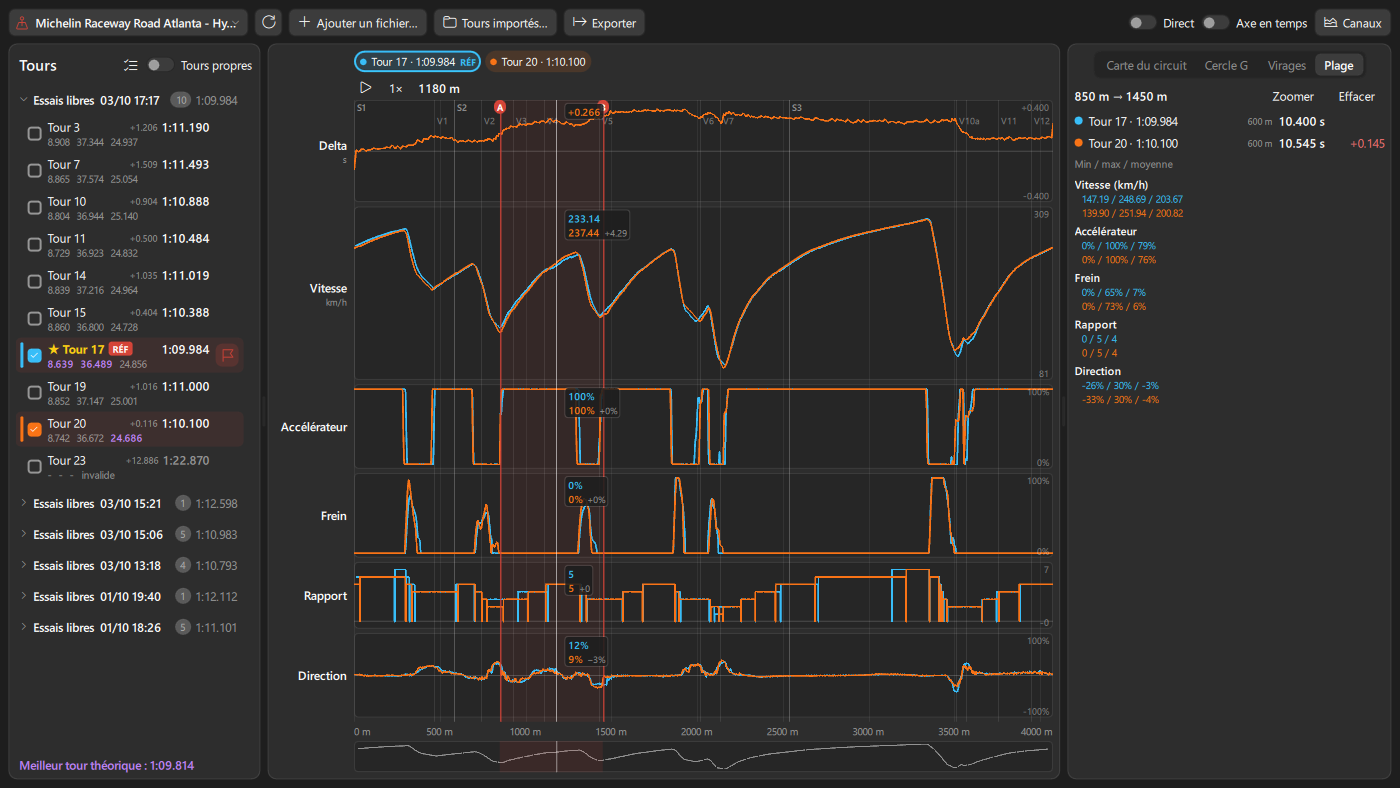
Every lap you drive is recorded, and the Lap Telemetry Viewer compares them: charts, racing line map, corner analysis, session pace, XY plots and a simple view drawn like the overlays. It is drawn by the graphics card (Qt Quick), so zooming and moving stay smooth.
Open it with the Telemetry entry of the navigation bar, or Tools > Lap Telemetry Viewer.
The Recorder module (on by default, Module page) saves each complete lap as a CSV file in the telemetry folder, one subfolder per track and car class. Laps are checked against the game lap time; laps that are not confirmed (track limits, invalid lap) are marked invalid.
Main options of the Recorder module:
| Option | Default |
|---|---|
number_of_saved_laps_per_track |
50 laps kept per track and class, oldest removed |
number_of_best_laps_kept_per_track |
3 fastest valid laps never removed |
save_invalid_laps |
On |
enable_out_and_in_lap_recording |
Off |
enable_compressed_lap_files |
Off (.csv.gz, about 5 times smaller) |
Recorded channels include pedals, steering, speed, gear, RPM, fuel, position, G forces, TC and ABS activity, battery, and per wheel: tyre temperatures (inner, middle, outer), pressures, wear, load, brake temperature, wheel speed, ride height, suspension, slip angle and camber. Brake bias, TC and ABS levels, engine map, water and oil temperatures and the steering wheel rotation (degrees lock to lock) are recorded too, and with LMU the name of the setup loaded in the game. Each lap also gets a binary copy, so the viewer opens it without reading the CSV again.
- Select the track at the top.
- In the lap list, laps are grouped by session (newest first). Check laps to show them: each lap keeps its own color.
- The fastest valid lap is the reference (
REFbadge). Double-click a lap, or use its flag button, to make it the reference.
Lap list tools:
-
Clean onlyhides invalid, out and in laps. The search field finds laps by vehicle, session, setup or note. - The quick selection menu checks
Best vs Last Lap,3 Best Laps,5 Best LapsorBest Lap in Similar Conditions(track temperature, compound, wet track), orUncheck All.Shift+ click checks every lap between two. - Right-click a lap:
Set as Reference,Export MoTeC...,Keep Lap(never removed by the recorder),Note...,Use as Delta Best...(the lap becomes the delta best used on track; your first delta best is always kept as a backup, plus the 5 latest ones; a teammate's lap of the same track and class can be used too),Setup Differences with Reference...,Move to Trash. Session rows have the same actions for all their laps. - Deleted laps go to a trash:
Ctrl+Zrestores them. -
Livelists new laps as soon as they are recorded and compares the newest lap with the best one (a new best lap with the previous best). A reference lap you picked stays the reference, and the viewer switches to the track you are driving.
-
Simple View / Advanced View: the switch in the toolbar shows the charts (
Advanced View) or the Simple View in their place. Both show the same channels. -
Channels: the
Showmenu picks what both views show, by group (Pedals & Steering Wheel,Timing,Engine,Tyres,Brakes,Chassis,Electronics,Track,Math Channels) or channel, with a search field (channels of one wheel are found there) and presets (Pedals, Tyres, Brakes, Suspension). Channels not recorded in the shown laps are greyed out. Four-wheel channels share one panel. The chart options are at the bottom of the same menu. -
Delta and time gain/loss: delta to the reference along the lap, and where time is gained or lost (
Gain/Loss windowfrom 20 to 150 m).Delta vs ideal lapcompares with the fastest clean lap in each mini-sector instead. - Cursor: move the mouse to read every lap's value and its gap to the reference.
-
Markers A and B (right-click, or
A/Bkeys) and theRangetab: time of each lap between the markers, gap to the reference, minimum, maximum and mean of each channel. - Distance to Center and Track Position: the game's values when the lap recorded them, else measured on the map once track edges are known.
-
Calculated channels: wheel slip (lock under braking, spin on throttle), steering rate, fuel used, tyre temperature spread.
Math Channels...adds your own formulas (+ - * /,abs,min,max,d()change per second) and has built-in understeer angle, brake release rate and throttle application rate. -
Display:
Smoothingfor noisy channels,Min / max bandof the shown laps (3 laps or more),Time axis(charts along lap time instead of distance). -
Align on braking: right-click >
Align Laps on Braking Point Hereshifts laps so their braking starts line up with the reference. -
Playback: the bar under the charts (same place in the simple view) plays the reference lap at real speed (0.1x to 4x,
Space), with optional loop between markers A and B; drag its position bar to move along the lap. -
Right-click menu: markers, zoom to sector or between markers, copy values or picture,
Open Replay Herewhen a Session recorder replay covers the lap.
Zoom with the mouse wheel, Shift + drag to zoom an area, double-click or Reset to reset. Click S1, S2, S3 to zoom on a sector. Drag a channel name to reorder channels, drag a panel edge to resize it. Right-click a panel and choose Fit Values to Visible Part to scale its values to the zoomed part.
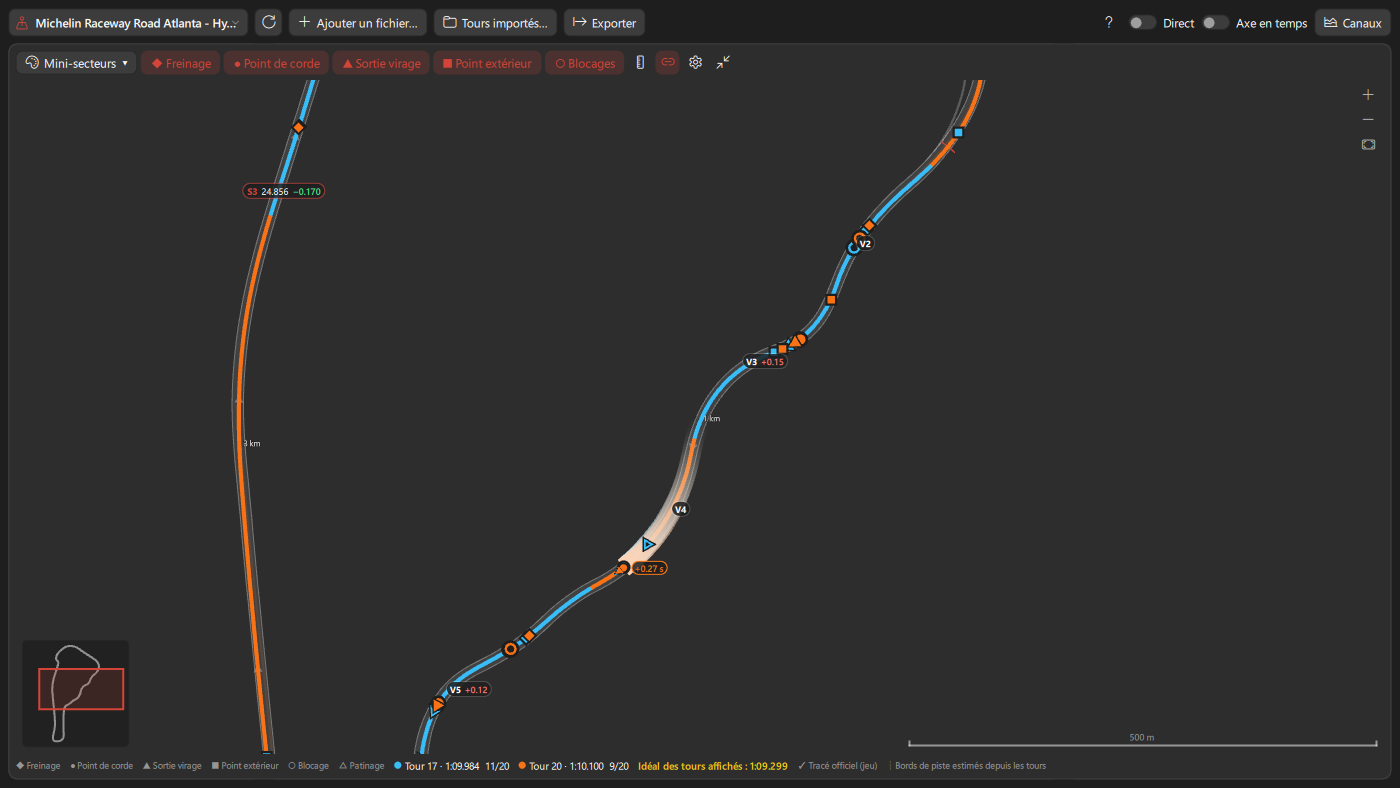
- Driving line of each lap over the circuit. With LMU, the official circuit path (a racing line) and pit lane come from the game and are kept for offline use; track edges come from laps that recorded them, else from the spread of your laps.
- Driving points of each lap in each corner: braking, apex (minimum speed), exit (back to full throttle) and track-out, with the margin to the track edge.
- Off track (2 wheels or more on grass, dirt or gravel) and track limits exceeded (4 wheels out), counted per lap.
-
Line coloring:
Laps,Gain / Loss,Speed,Pedals,Racing Line,Gear,Elevation,Delta per corner,Mini-sectors(with the ideal lap of the shown laps) andConsistency(spread of mini-sector times over the stint, session or shown laps). - Sector times, direction arrows, front lockups and rear wheelspin, pedal zones, cursor trail, distance marks, ruler (
M), colorblind colors. - Zoom synchronized with the charts (or separate), large map over the charts, minimap, follow the cars during playback,
Export Map Picture...andCopy Map Picture.
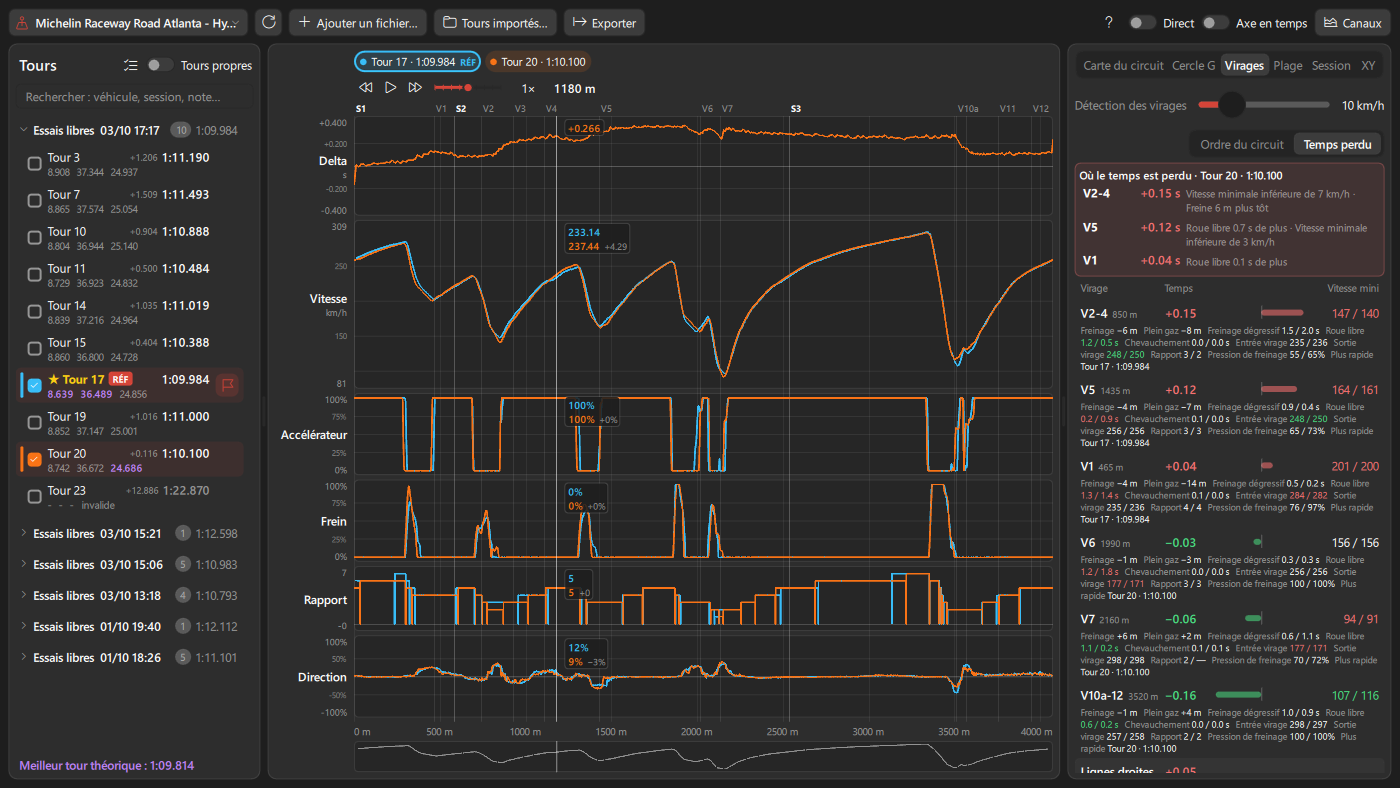
- Where time is lost: the corners that cost the most, with the cause in plain words (brakes earlier, lower minimum speed, longer coasting, later full throttle).
- For each corner: time lost or gained, entry, minimum and exit speed, gear, brake pressure, braking point, full throttle point, trail braking, coasting and pedal overlap, and the fastest lap in that corner (ideal lap).
- Official corner numbers (
T1,T10a...) for Silverstone, Imola, Spa-Francorchamps, Circuit of the Americas, Interlagos, Paul Ricard (F1 layout), Monza, Bahrain, Portimão, Lusail, Road Atlanta, Laguna Seca and Long Beach; named corners at Le Mans. Other tracks number corners in lap order. -
Corner detectionsets how big a speed drop counts as a corner.Report...exports a corner report (table, deltas, coaching notes and map) as HTML or PDF.
- G Circle: lateral against longitudinal acceleration of each lap, with the grip envelope.
- Session: every lap of the session with fuel and tyre wear per lap, off tracks and track limits, long-run pace (clean laps, slow laps left out), stints split on pit stops (refuel, tyre change), lap time trend per lap (also per % of tyre wear) and consistency. Click a lap to show or hide it.
- XY: one channel against another as a scatter plot (presets: speed / lateral G, steering / lateral G, throttle / wheel slip...) or a histogram. Limited to the zoomed part when zoomed.
Simple View (toolbar switch) shows the channels picked in Show at the cursor, drawn like the overlays, in place of the charts. It follows the cursor, the track map hover, the kept position and lap playback (playback bar or Space), so you can watch the lap as it plays. The keys of the charts still work.
- Every channel charted in the advanced view is shown here: pedal, steering, gear or speed channels give the pedal cards, a G channel gives the G circle, a 4-wheel channel (or one wheel of it) gives the 4-wheel tiles.
- Pedals & steering wheel of each lap, side by side when there is room: throttle, brake and clutch gauges (clutch only when the lap used it), a steering wheel turned by the steering input, gear and speed. Laps recorded from this version also save the wheel rotation: the wheel turns by its real angle, shown in degrees (older laps show steering in % of lock).
- Channel groups: timing (delta), engine (RPM, water and oil temperature, fuel, battery), tyres (temperatures, pressures, wear, load as 4-wheel tiles, colored from cold to hot for temperatures), brakes (temperatures, bias), chassis (G circle, body slip, wheel slip and speed, suspension, ride height), electronics (TC and ABS lights, levels), track (position on track, elevation, steering rate) and your math channels. Values are those of the main lap (the lap card clicked, else the reference lap); other laps are marks of their color on each bar, and the tooltip lists every lap.
- The lap chips above hide or show a lap in this view only. The view chosen is kept per telemetry folder.
The Telemetry Compare overlay shows the reference lap of the viewer while you drive: speed, pedals, steering and gear of your current lap over the reference lap, with the next braking point ahead of the car, delta and speed difference. Set a lap as reference here (double-click or flag button), the overlay picks it up within a few seconds.
-
Add File...adds laps from another folder or track, or imports a MoTeC i2 log (.ld), for example one from the LMU built-in logger or a lap shared by another driver. You can also drop a.ldfile on the main window. Laps are named with the log date, and engine temperatures, inner/middle/outer tyre temperatures, brake bias, tyre load and track position are imported too. Laps already imported are not copied again. -
Imported Laps...opens the library of imported laps: search, add to the viewer, rename, delete (moved to the trash, withUndo). -
Import Folder...imports laps of the same track and class from another folder (a teammate, a shared folder). They are marked as foreign. Importing the same folder again only adds its new laps. - Only laps of the reference lap's circuit are compared: a lap of another circuit stays in the list, greyed out, and is not shown (a message tells why). To look at it, set it as reference lap.
The Export menu saves:
- MoTeC i2 logs (
.ld):Reference Lap...,Displayed Laps...orAll Laps of Track...; -
Reference Lap as Delta Best...; - CSV for spreadsheets:
CSV, Displayed Laps...,CSV, Displayed Laps on Time Base...,CSV, Passage A ↔ B...; - pictures:
Picture (PNG)...,Copy Picture(to paste in Discord),Picture of Passage A ↔ B....
Click the ? button for the full list. Main keys: Space play / pause, Left / Right move the cursor (Shift: the view), [ / ] previous / next corner, A / B markers, Esc clears them, R sets the highlighted lap as reference, + / - zoom, Home resets. On the map: F fit, R turn, 1-9 coloring, L lockups, Z zones, T trail, M ruler. In the large map, these keys go to the map and the others still reach the charts. On an AZERTY keyboard the digit row works without Shift. Esc never closes the viewer.
- Laps load in the background with a progress bar. Heavy computations (track limits, session values, MoTeC imports) run in a separate process, so the page stays fluid. Lap details are kept in an index (
telemetry/.lap_cache/info), so tracks with hundreds of laps open quickly. - On long laps, charts, map, delta to the best lap and MoTeC export are made in the background, so the page does not freeze, and the side tabs open without a stall.
- When the page stays in the background for 3 minutes, loaded laps are released from memory, then reloaded with the same zoom when you come back.
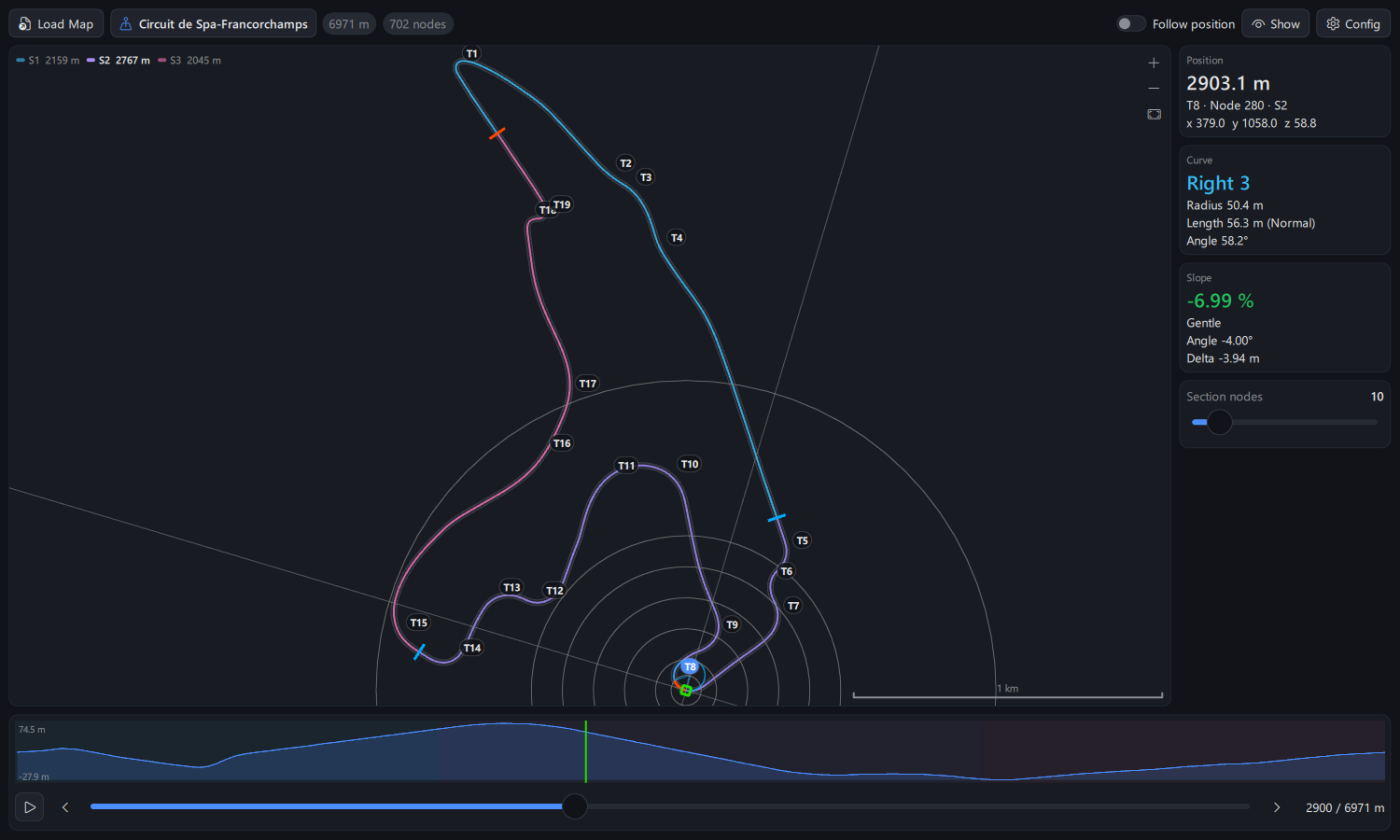
Tools > Track Map Viewer shows the track maps recorded by the Mapping module (Load Map):
- road at its real width, line colored by sector, start and sector lines, official corner numbers (click one to go there);
- at the current position: curve section, osculating circle, distance circles, curve radius and angle, slope, XYZ position;
- elevation profile of the whole lap;
-
Play(orSpace) drives around the track,Follow positionkeeps the position centered.
All options: Lap telemetry viewer, Track map viewer and Recorder module.