Portable Monitor_EN
The Portable Wireless Network Monitor is a handheld device that auto-displays a HUD when in your inventory (including any Baubles accessory slot), showing real-time wireless grid energy, EU/t change rate, and GT power tier. No block needs to be placed.
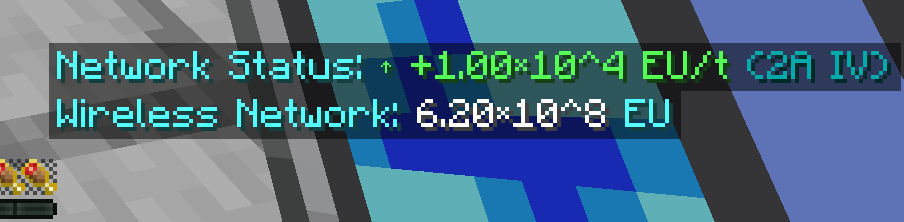
- Handheld device; HUD auto-displayed when in inventory (incl. Baubles slots)
- Real-time display of wireless grid energy, EU/t change rate, GT power tier
- No block placement required
- Uses C→S→C network packet sync; works in both single-player and dedicated servers
- HUD status uses the same four branches as the Wireless Energy Monitor (Calculating / Silent / <1EU / Normal)
- Not stackable (setMaxStackSize(1))
Craft the Portable Wireless Network Monitor in a crafting table using this 3×3 matrix:
| Slot | Col 1 | Col 2 | Col 3 |
|---|---|---|---|
| Row 1 | LV Receiver | Steel Plate | LV Receiver |
| Row 2 | LV Receiver | Screen Cover | LV Receiver |
| Row 3 | Steel Screw | Steel Plate | Steel Screw |
| Material | Count | Source |
|---|---|---|
| LV Receiver (Sensor_LV) | 4 | GT crafting table |
| Steel Plate (plateSteel) | 2 | GT plate forming |
| Screen Cover (Cover_Screen) | 1 | GT cover |
| Steel Screw (screwSteel) | 2 | GT screw forming |
The portable monitor supports 3 interaction types:
| Action | Behavior |
|---|---|
| Unbound + Right-click | Binds the current player as owner; default HUD mode = 0 (Off) |
| Bound + Right-click | Cycles HUD mode: 0 → 1 → 2 → 0 |
| Shift + Right-click | Overwrites binding to current player (resets HUD mode = 0) |
HUD mode switching runs on the client (aPlayer.worldObj.isRemote) and syncs to WirelessMonitorHUD.setEnabled and setDisplayMode.
First-use tip: When unbound, a normal right-click only performs binding and does not switch HUD mode. After binding, right-click again to cycle HUD display.
The HUD supports 3 modes, switched by right-clicking:
| Mode | Name | Example |
|---|---|---|
| 0 | Off | No HUD shown |
| 1 | Normal counting | 1,234,567 EU |
| 2 | Scientific notation | 1.23×10^6 EU |
The HUD shows three lines (top to bottom):
| Line | Y coordinate | Content | Field |
|---|---|---|---|
| Line 1 (top) | hudY - 24 | Realtime EU/t status | cachedRealtimeEUTText |
| Line 2 (middle) | hudY - 12 | Average EU/t status | cachedEUTText |
| Line 3 (bottom) | hudY | Grid energy | cachedEUText |
Both average EU/t and realtime EU/t come with a GT-style power tier display, formatted as 2A HV (2 amperes High Voltage). The system auto-upshifts to keep amperage ≤ 4A, sharing the GTTierUtil.formatGTPower implementation with the Wireless Energy Monitor.
The HUD grid status display is unified with the Wireless Energy Monitor:
-
size < 2: Network status: Calculating... (title cyan §b + calculating orange §6) -
eut == 0: 0 EU/t (Silent) or 0 EU/t (Long-Term Silent, dark gray §8) -
0 < |eut| < 1: 0 EU/t (<1EU) -
|eut| >= 1: Normal display (value + voltage tier)
| Parameter | Value | Description |
|---|---|---|
| HUD X coord | screenWidth/2 + 91 + hudXOffset | Based on screen width & config offset |
| HUD Y coord | screenHeight - 54 - hudYOffset | Based on screen height & config offset (positive = up) |
| HUD update interval | 100 ticks (5 s) | Unified with Wireless Energy Monitor |
| Inventory scan interval | 20 ticks (1 s) | Detects whether the inventory contains a portable monitor |
| Semitransparent bg color | 0x80000000 | 50% transparent black |
| Font scale | Config.hudScale | Scaled around (hudX, hudY) as origin |
| Dataset capacity | 61 | FIFO (1 initial + 60 × 100t = 300s) |
| Long-reload threshold | 10000 ms (10 s real time) | Above this threshold the dataset is cleared and cold-start triggers |
The portable monitor can be placed in any Baubles accessory slot (BaubleType.UNIVERSAL). Scan order:
- Main hand
- Baubles accessory slots (scanned in slot order)
- Inventory slots 0-35 (scanned in slot order)
Safe fallback when Baubles is not installed: NoClassDefFoundError is caught; the portable monitor still works in the main inventory slots — only accessory slot placement is unavailable.
The portable HUD dataset is not persisted across saves (portable device trait). On rejoin, the dataset resets and is rebuilt via gap detection and the first sample.
Because getTotalWorldTime() does not advance while the player is logged out (cannot detect logout duration), gap detection uses the real-time System.currentTimeMillis() timestamp:
- Long reload (> 10000 ms real time): dataset cleared, cold start triggered
- Short stutter exemption (≤ 10000 ms): dataset preserved, not cleared
- Field
lastUpdateRealTimeMs(long, not persisted)
Note: The portable HUD
dataSetis a static field, not persisted to item NBT; thelongTermSilentflag is also not persisted (resets on logout, consistent with the portable design).
When a change in mc.theWorld.provider.dimensionId is detected, only UI state fields are reset — the dataSet is NOT cleared (preserving history maintains EU/t continuity):
Reset fields:
-
syncedEuStr(synced EU string) -
cachedEUText(cached grid energy text) -
cachedEUTText(cached average EU/t text) -
cachedRealtimeEUTText(cached realtime EU/t text) -
lastUpdateTick(last update tick)
The item NBT structure of the portable monitor:
| Key | Type | Meaning |
|---|---|---|
| OwnerUUID | String | Owner player UUID (written after binding) |
| Initialized | boolean | Whether the owner has been initialized |
| OwnerName | String | Owner player name (for tooltip display) |
| HUDMode | int | HUD mode: 0=Off, 1=Normal, 2=Scientific |
Note: Unlike the Wireless Energy Monitor, the portable monitor does NOT persist measurement history (
measurementHistory). HUD history data is a static field, reset on logout, and rebuilt via gap detection and the first sample.