Redstone Control_EN
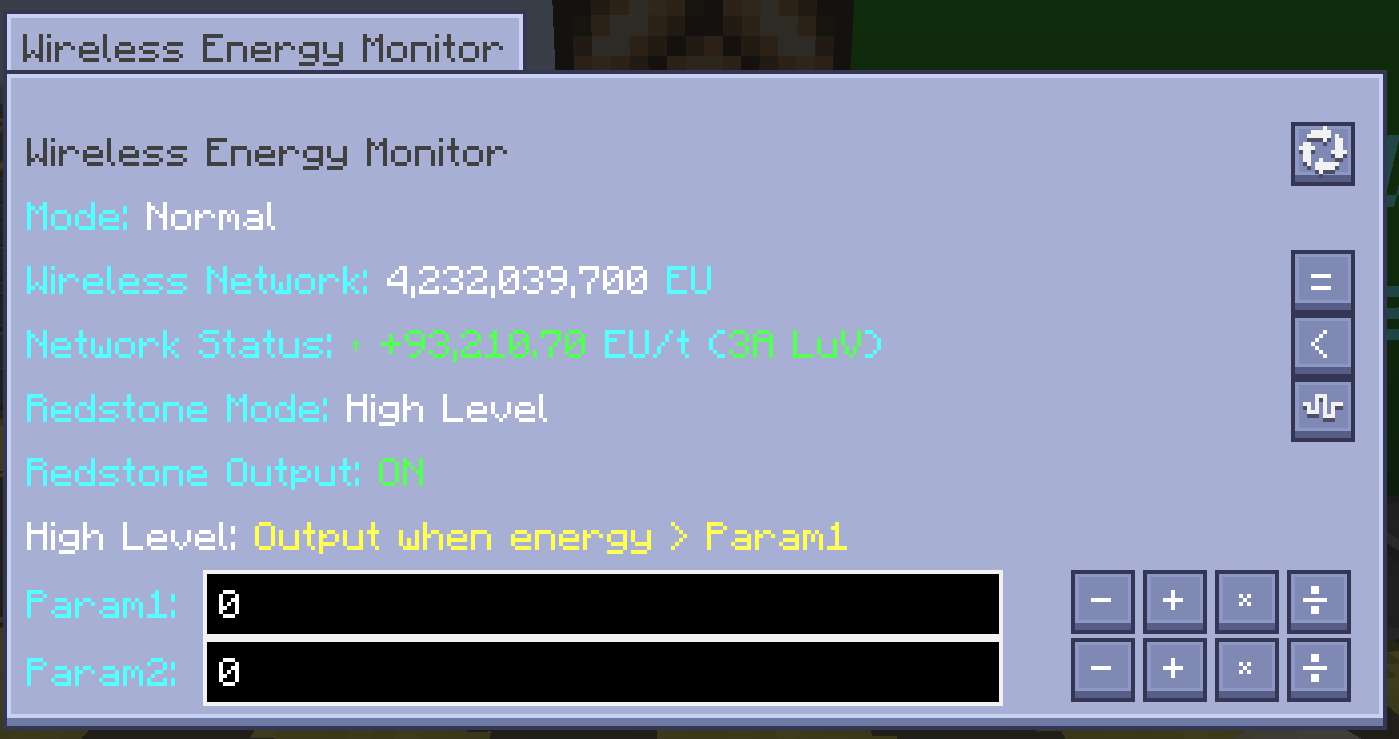
The Wireless Energy Monitor (MTEWirelessEnergyMonitor) provides 5 redstone output modes switchable in the GUI. The mode numbers, decision logic, and parameter dependencies are listed below:
| Mode | Name | Decision Logic |
|---|---|---|
| 0 | Off | No redstone signal output |
| 1 | High | Outputs signal when energy > param1 |
| 2 | Low | Outputs signal when energy < param1 |
| 3 | High-Hysteresis | Outputs when >param1; must drop <param2 to cancel |
| 4 | Low-Hysteresis | Outputs when <param2; must rise >param1 to cancel |
Design note: Mode 0 disables redstone output entirely; modes 1/2 use a single-threshold comparison; modes 3/4 introduce a dual-threshold hysteresis band to avoid chattering near the threshold (redstone jitter).
Redstone modes 1–4 depend on two thresholds: param1 and param2. Parameters support negative values; after input they are rounded to integers via Math.round before being used in decisions.
-
Input field: 200×17 pixels, uses
ScientificTextFieldWidget(scientific notation text field) -
4 adjustment buttons:
- - (decrement top digit): step = 10floor(log10(abs(value)))
- + (increment top digit): same step
- × (×10): multiplies the current value by 10
- ÷ (÷10): divides the current value by 10
-
Fault tolerance: illegal input throws
NumberFormatException, caught and ignored by the GUI; the parameter is not written
Step note: The step of the "decrement/increment top digit" buttons is computed dynamically from the magnitude of the current value. For example, when the value is 12345 the step is 104=10000; pressing - changes it to 2345. This design allows rapid adjustment of large values.
Redstone decisions are based on the anchor value. Three anchor modes are available:
| Anchor Mode | Data Type | Source |
|---|---|---|
| 0 = Grid Energy | BigInteger | getWirelessEU() |
| 1 = Average EU/t | double → long | Math.round(euPerTick) |
| 2 = Realtime EU/t | double → long | Math.round(realtimeEuPerTick) |
- The GUI provides 3 anchor buttons; selected shows
=, unselected shows< -
setAnchorModeclamps the input to the range[0, 2]to prevent out-of-bounds - After switching anchor mode, redstone decisions immediately use the new anchor value
| Characteristic | Description |
|---|---|
| Output strength | 15 when outputting, 0 when not |
| Redstone check interval | 2 ticks (0.1 s), constant REDSTONE_CHECK_INTERVAL = 2L
|
| State change notification | Notifies all 6 sides on state change |
| Independent timestamps | Redstone output and UI updates use independent timestamps and do not block each other |
Independent timestamps: The redstone logic checks every 2 ticks while the UI refreshes at a different rate. Separating them ensures fast redstone response (sub-0.1 s) without UI updates slowing down redstone decisions.
Modes 3 and 4 introduce a dual-threshold hysteresis mechanism to prevent the redstone from toggling frequently when the anchor value jitters near the threshold.
- Initial: not outputting
- Enter output: anchor value > param1 → output
- Exit output: once outputting, anchor value < param2 → cancel output
- Hysteresis band: when param1 > param2 a hysteresis band forms; within the band the previous state is retained
- Initial: not outputting
- Enter output: anchor value < param2 → output
- Exit output: once outputting, anchor value > param1 → cancel output
Logic Unification Note:
getGeneralRS(used for GUI preview/queries) andupdateRedstoneOutput(used for actual redstone output updates) previously diverged in logic. They have been unified into a single hysteresis decision logic so the GUI preview matches the actual output behavior exactly.
When the grid undergoes a long reload (> 10 s) that triggers a cold start, the redstone output enables a buffer period to prevent external systems from misjudging the state during the dataset clear-out.
-
Buffer duration: 600 ticks (30 s),
redstoneReloadDelay = 600 - Decrement mechanism: decremented by 1 each tick until it reaches zero
-
During buffer: maintains the
mSidedRedstone[]cache; redstone output is not interrupted - Display hint: during the buffer the text "重载计算中,红石逻辑维持" (Reload in progress, redstone logic held) is shown
Design purpose: During cold start the dataset is insufficient and EU/t cannot be computed accurately. Clearing the redstone output directly could trigger false alarms in external redstone alarm systems. The 30-second buffer provides a time window for the dataset to re-accumulate.
Wireless Energy Monitor GUI (including redstone mode and parameter configuration area):