Repository navigation
3D Viewport Preferences
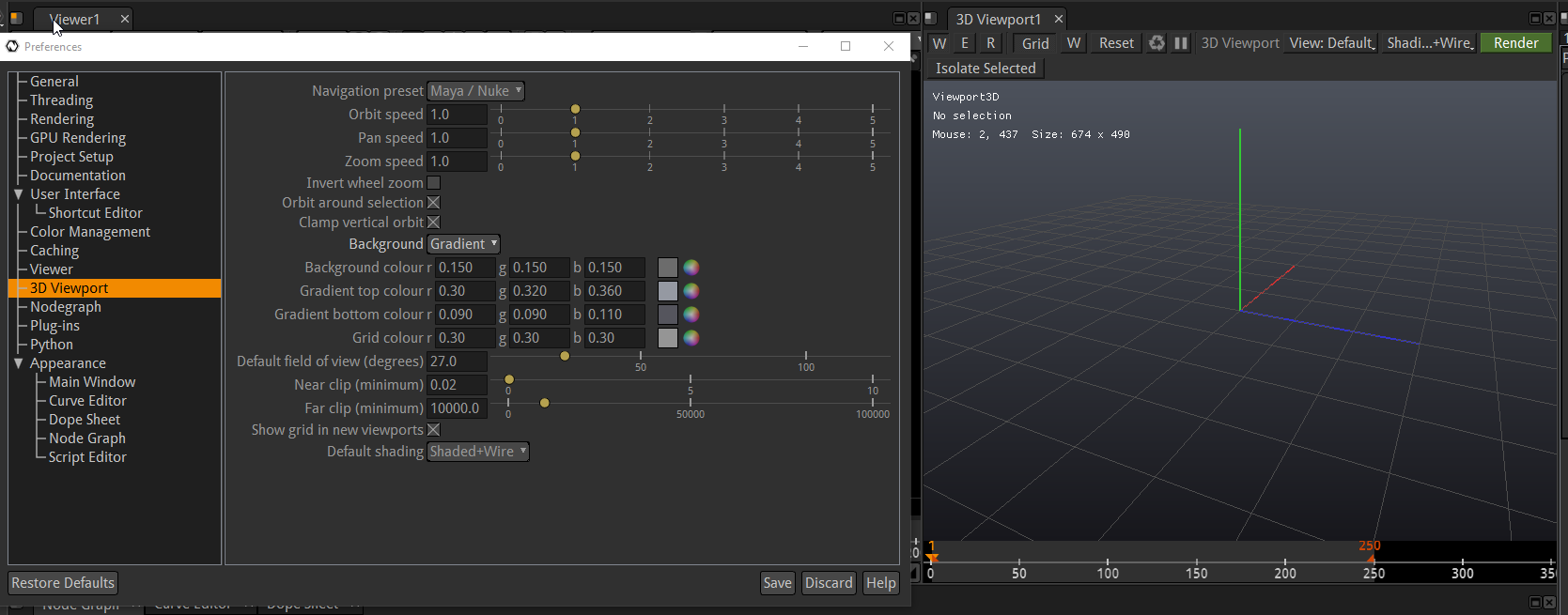
Edit → Preferences → 3D Viewport (added 2026-09-21). Everything here applies live to every open 3D viewport and is remembered between sessions.
| Preset | Orbit (tumble) | Pan (track) | Zoom (dolly) |
|---|---|---|---|
| Maya / Nuke (default) | Alt + left drag | Alt + middle drag | Alt + right drag, or wheel |
| Blender | middle drag | Shift + middle drag | Ctrl + middle drag, or wheel |
| Natron (legacy) | middle drag, or Alt + left drag | Alt + middle or Shift + middle drag | Alt + right drag, or wheel |
The same bindings work while looking through an editable Camera3D (the camera's knobs move instead of the free camera). A plain left drag always selects; W / E / R pick the gizmo mode; F frames the selected points, else the selected node, else the point cloud. The Blender preset uses no Alt, which matters on Linux desktops that grab Alt + drag to move windows.
- Orbit / Pan / Zoom speed — multipliers, 1 = default.
- Invert wheel zoom — wheel up zooms out.
- Orbit around selection — starting an orbit with a node selected re-centres the orbit on that node.
- Clamp vertical orbit — off lets you tumble over the top like Maya.
Solid or gradient background with its colours, and the grid line colour. The X / Y / Z axes keep red / green / blue.
Default field of view (also used by Reset View), the near / far clip floors (the planes still scale with the camera distance for large environments), whether new viewports show the grid, and their default shading. The viewport toolbar still changes grid and shading per viewport afterwards.