Repository navigation
Launcher
NFSUServerChanger.exe (Linux: NFSUServerChanger) goes into the game folder. It lists the
servers, writes the selected one into scripts\NFSUServerChanger.ini and starts the game. The
Host line is the only thing it changes there.
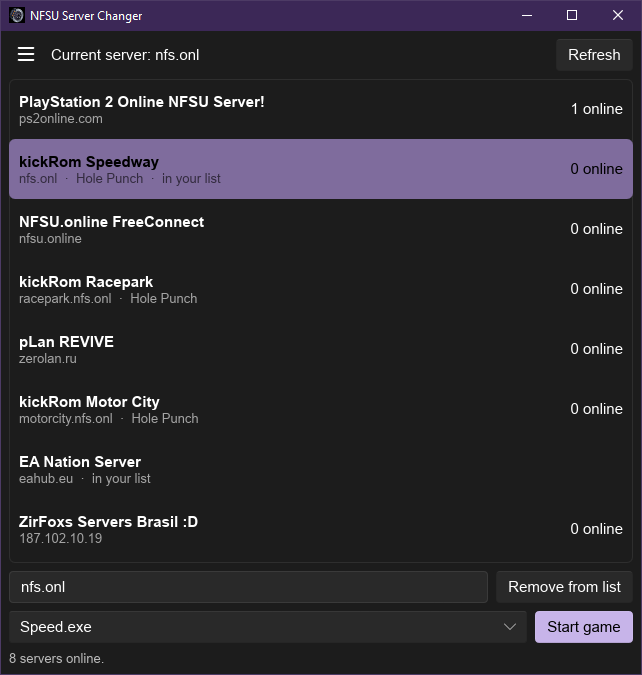
It is a lightweight, open source alternative to kickStart. If you already use kickStart, there's no need for this launcher.
- The list is built from the servers in the ini (
[FixedServers]), the public server lists ([PublicList], chosen in Settings) and your own list. Every server is asked directly for its status; the list shows how many players are online. - Offline servers are hidden - except the ones in your list (marked "in your list").
- Hole Punch next to a server means it supports Hole Punching.
- Click a server to select it. You can also type any hostname or IP into the field and press Enter; Start game also uses whatever is in the field.
Type the hostname or IP and click Add to list (for servers already in it the button says
Remove from list). Your list is the file servers.dat in the game folder, one server per line.
Start game runs the selected speed*.exe: on Windows directly, on Linux with Wine (see
Linux). A different command can be set in Settings ({exe} = the game's exe, appended if
missing) - usually not needed.
-
File: open the game folder; edit
NFSUServerChanger.ini,NFSUServerChangerTrax.csvandservers.dat -
Server: refresh; use the original EA server; use the server from the game's
.exe -
Community: links from
[Community]in the ini - Check for updates
- Settings: start command, pings (Linux), public server lists, editor for the File entries
-
Help: links from
[Help]in the ini - Language: switch, or Download languages...
- About, Exit
English is built in, other languages can be downloaded in the Language menu. To add one: copy
launcher/lang/en.lang,
translate it and send it as a pull request - once it's in the repository, everyone can download it.
At every start the launcher looks for new plugin and launcher versions and shows them in a popup.
Nothing is installed until you click Update. An existing NFSUServerChanger.ini and
dinput8.dll are kept; the ini only gets settings it doesn't have yet.