Repository navigation
AI Agents and Skills
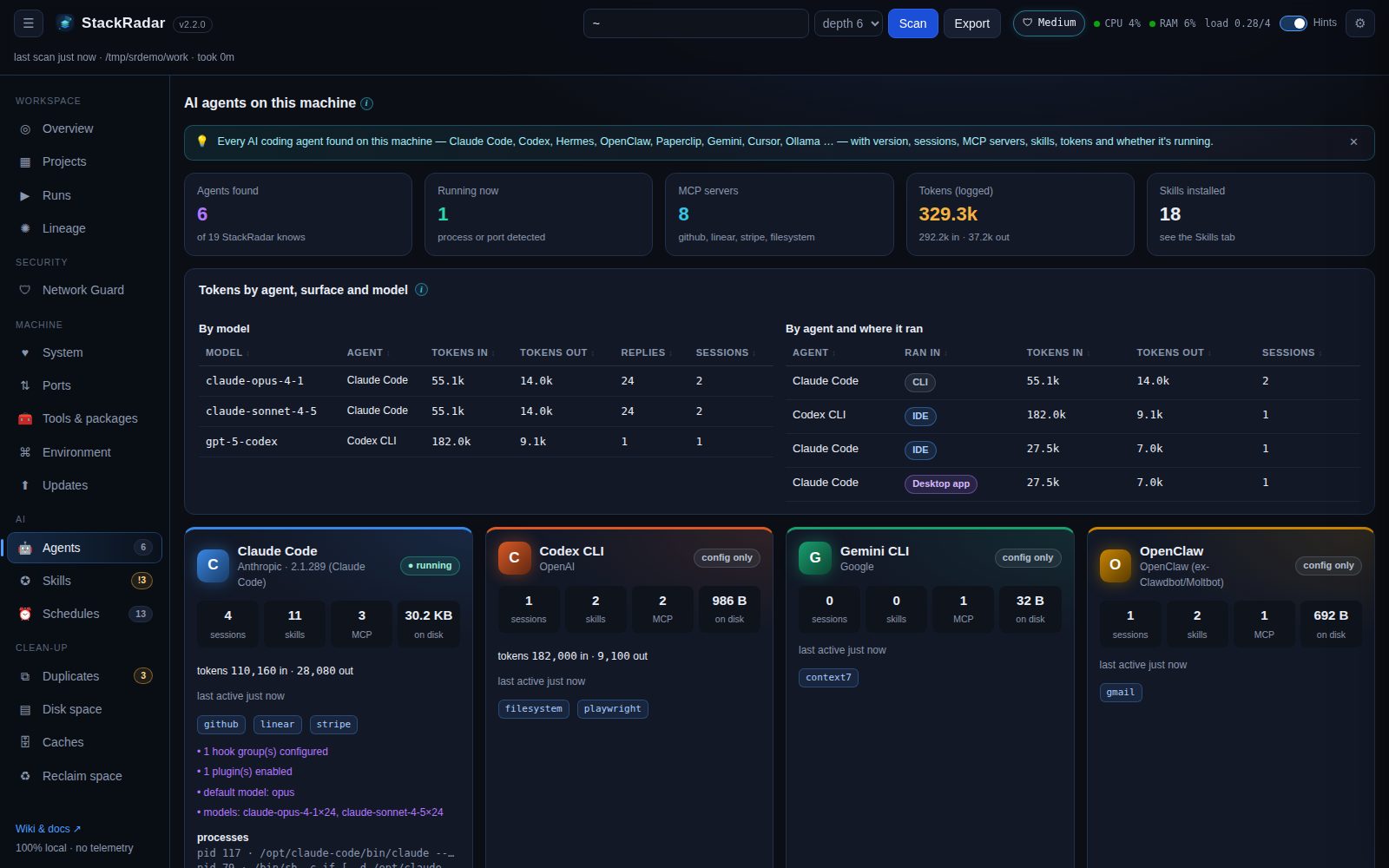
StackRadar detects an agent when its CLI is on your PATH or its config folder exists:
| Agent | CLI | Folder(s) checked | Extras read |
|---|---|---|---|
| Claude Code | claude |
~/.claude |
sessions, tokens, models, MCP servers (~/.claude.json), hooks, enabled plugins |
| Codex CLI | codex |
~/.codex |
sessions, token totals, MCP servers (config.toml) |
| Hermes Agent (Nous Research) | hermes |
~/.hermes |
sessions, MCP servers (config.yaml), cron jobs |
| OpenClaw (ex-Clawdbot / Moltbot) | openclaw |
~/.openclaw, ~/.clawdbot, ~/.moltbot
|
sessions, MCP, cron jobs, gateway port 18789 |
| Paperclip | paperclipai |
~/.paperclip |
server port 3100 |
| Gemini CLI | gemini |
~/.gemini |
sessions, MCP servers |
| Cursor · Windsurf · Copilot CLI · OpenCode · Goose · Aider · Qwen Code · Amp · Kiro · Continue · Cline/Roo | various | various | MCP servers where stored |
| Ollama · LM Studio |
ollama · lms
|
~/.ollama · ~/.lmstudio
|
local models, ports 11434 / 1234 |
Each card shows version, sessions, last activity, skills, MCP server names (never their env values or keys), logged tokens, on-disk size, matching running processes and ports. A status badge says running, installed or config only. Agents StackRadar knows about but didn't find are listed at the bottom, so you know what was checked.
Above the cards, a table splits logged tokens by model (in / out, replies, sessions) and by agent and where the
session ran: CLI, IDE (VS Code, JetBrains), Desktop app or Web / cloud. Claude Code records this in
each transcript (entrypoint); Codex in originator.
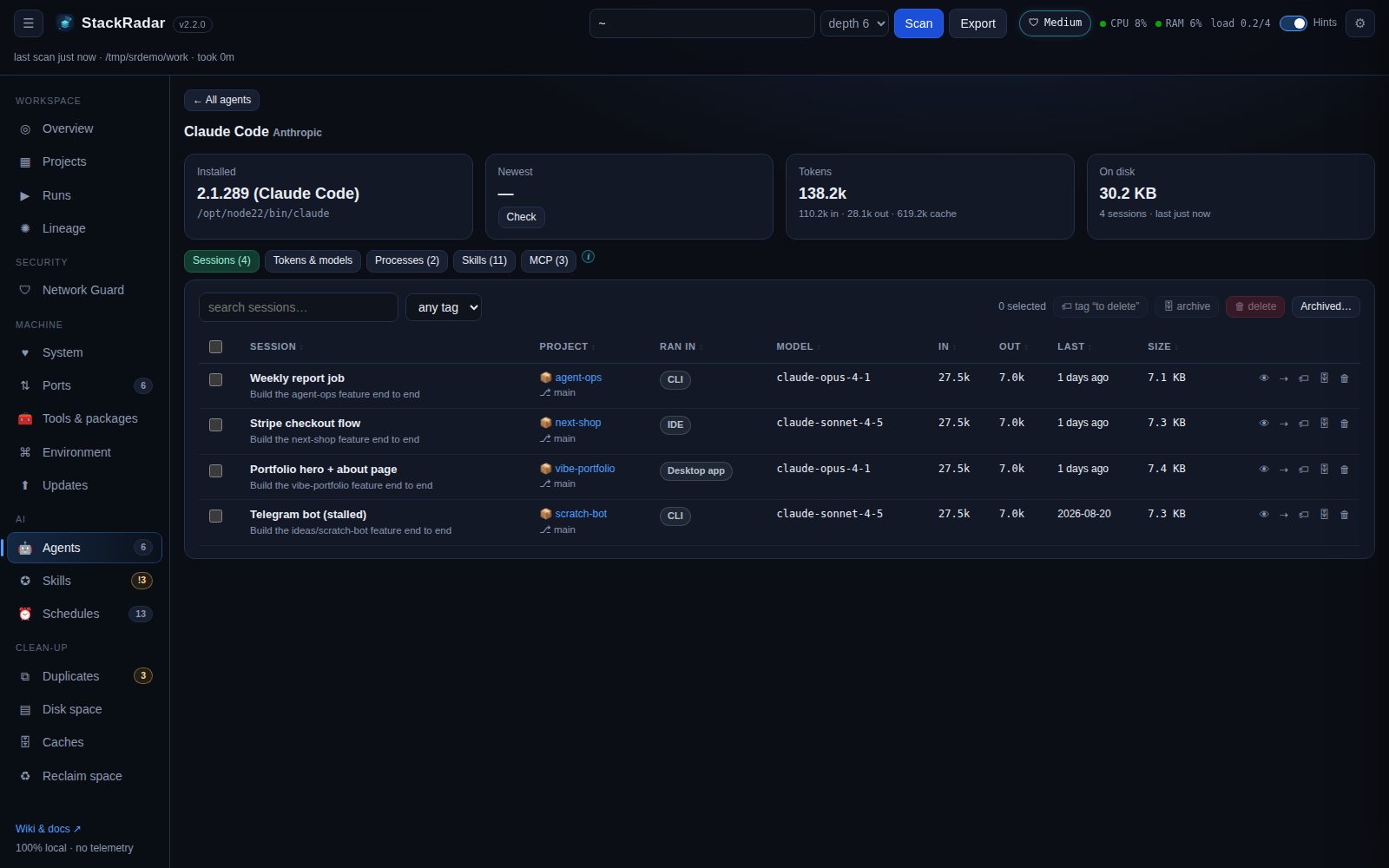
Click a card:
-
Installed vs newest version (Check asks npm / PyPI / Homebrew) and ⬆ Update (Claude Code uses
claude update). -
Sessions: title, first prompt, project, where it ran, model, tokens in / out, last active, size. Per session:
👁 read it, ⇢ hand off, 🏷 tag (use to delete to mark clean-up candidates), 🗄 archive (hidden from the
agent, kept in
~/.stackradar/archived-sessions, restore any time) and 🗑 delete (to the Trash). Select several for bulk tag / archive / delete. Filter by tag. - Tokens & models for this agent.
- Processes with start time, CPU and memory, Stop / Force each, and Stop all but the newest when an agent has left old processes behind.
- Its skills and MCP servers.
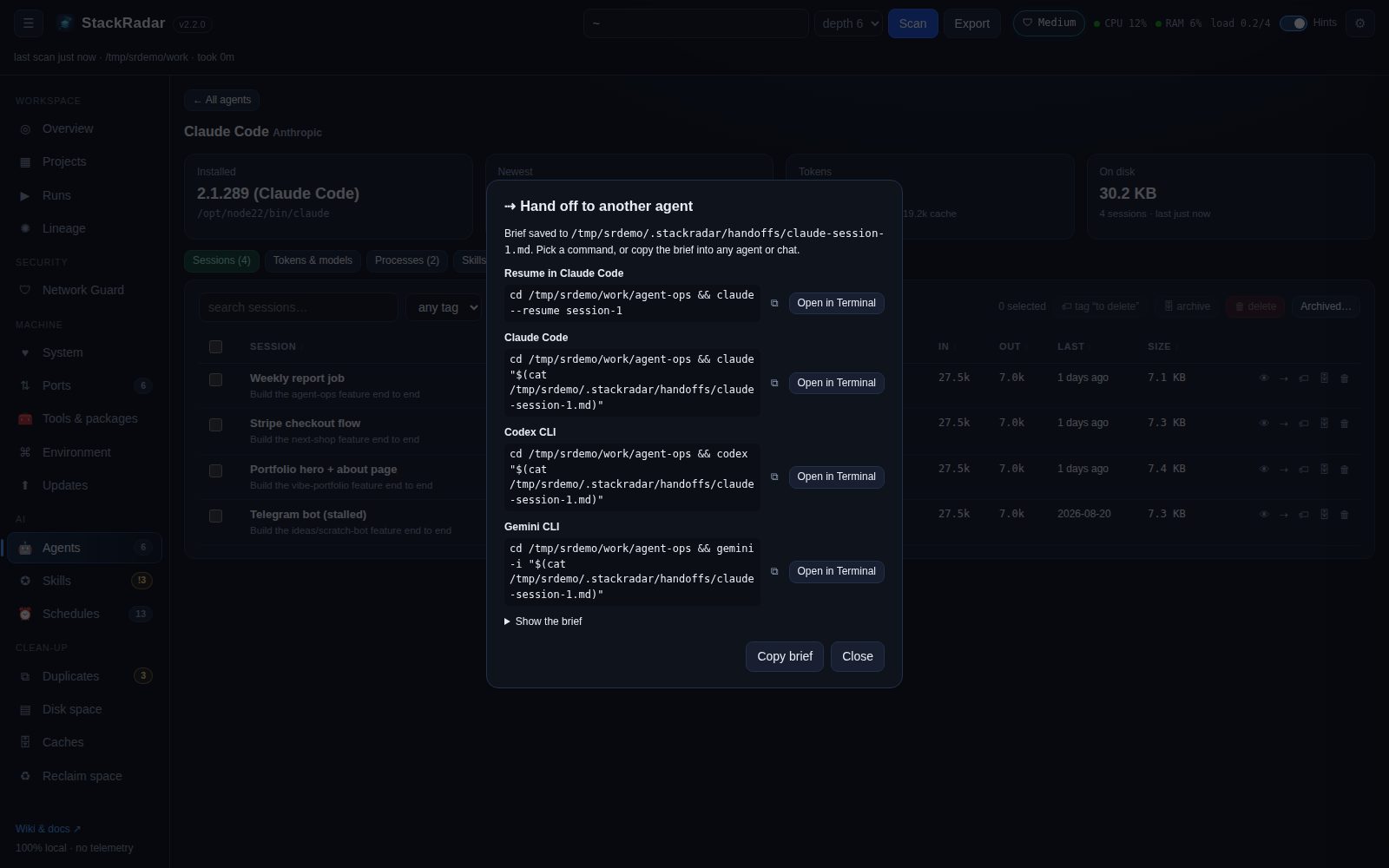
Hand a session, or a whole project, to another agent and model:
- From a session: ⇢ hand off. From a project's drawer: Continue with another agent (StackRadar marks projects that have agent sessions but no activity for 14+ days as stalled). Pick Claude Code, Codex, Gemini CLI, Aider or OpenCode and, optionally, a model (suggestions come from models you've used and your local Ollama models).
- StackRadar writes a brief to
~/.stackradar/handoffs/: the original request, later instructions, where the last agent stopped, open to-dos and the files it touched (or, with no session, what StackRadar knows about the project). - You get the command (
cd … && codex -m <model> "$(cat brief.md)",claude --resume <id>to continue in the same agent …) to copy, or Open in Terminal to start it right away.
-
SKILL.mdfolders:~/.claude/skills, Claude Code plugin skills,~/.codex/skills,~/.agents/skills,~/.hermes/skills,~/.openclaw/skillsand~/.openclaw/workspace/skills,~/.gemini/skills,~/.cursor/skills, OpenCode, Goose, Copilot … -
Slash commands (
~/.claude/commands/*.md,~/.codex/prompts, Geminicommands/*.toml) and sub-agents (~/.claude/agents/*.md). - Project-level copies:
<project>/.claude/skills,.agents/skills,.codex/skills,skills/*/SKILL.md… -
skills-lock.jsonpins.
-
Claude Code: every
Skilltool call and every/slash-commandin~/.claude/projects/**/*.jsonl(newest first, up to 300 MB of logs), with the project (cwd) it happened in. -
Codex / Hermes / OpenClaw: mentions of
<skill-folder>/SKILL.mdin their session logs (they read the file instead of calling a tool). Best effort.
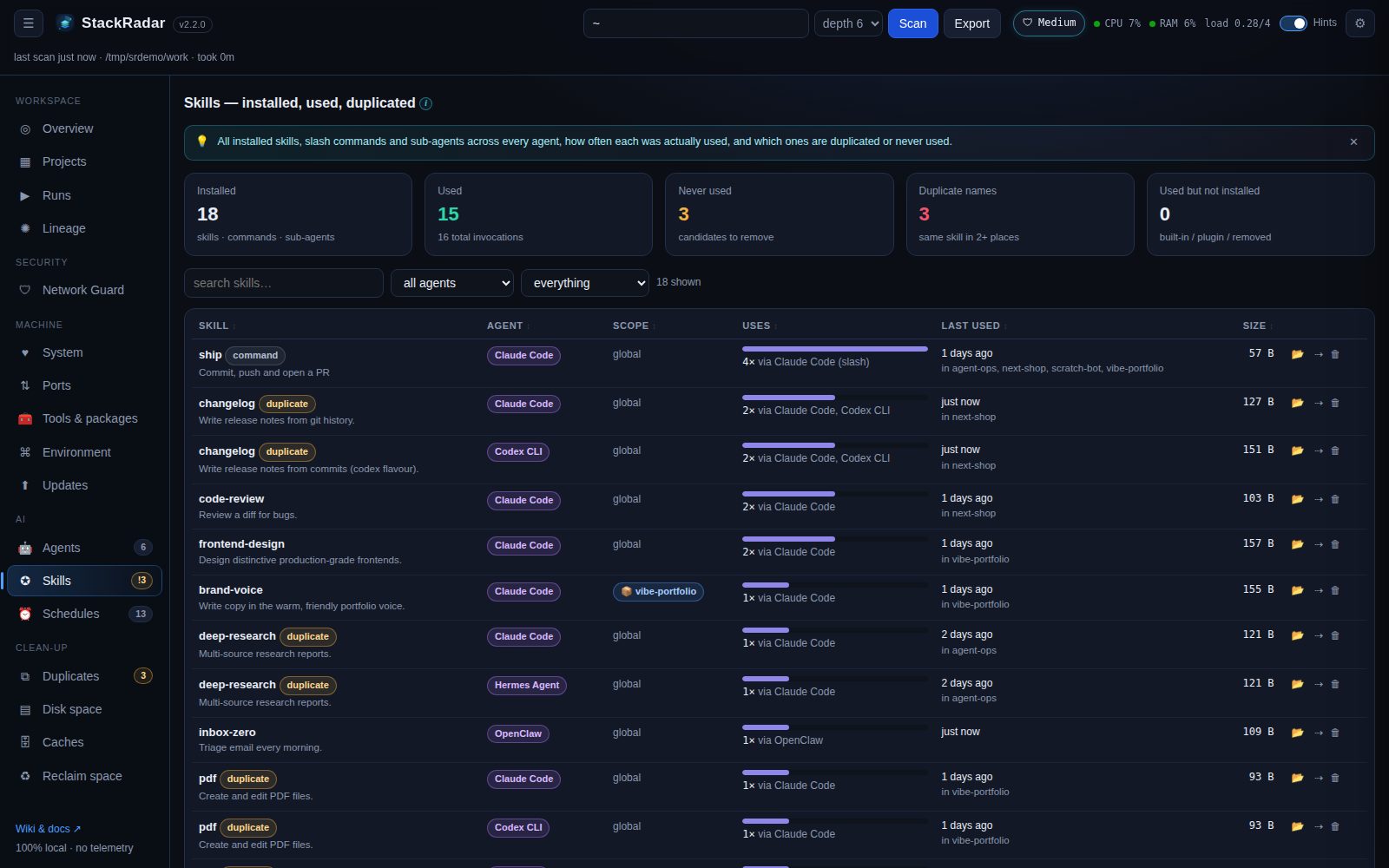
- Installed / used / never used / duplicate names / used-but-not-installed cards (click to filter).
- Per skill: agent, scope (global or project), usage bar, which agents used it, last used, which projects, size, 📂 reveal.
-
Duplicate skills: the same name in several places, with every location, its agent, modified date, uses and a
version tag (same number = identical). Identical compares every file in the skill folder, not just SKILL.md.
Keep this, link the rest moves the copy you choose to the shared
~/.agents/skills/<name>and replaces every other location with a link to it (old copies go to the Trash), so all agents use one copy. - Per skill: 🗑 delete (to the Trash; for a link, only the link is removed) and ⇢ use it in another agent (adds a link in that agent's skills folder). Plugin skills are managed by the agent's plugin command instead.
- Most-used Claude Code tools and used but not installed (built-in, plugin-provided or deleted skills).
- In each project's drawer: skills installed in that project and skills used while working there.