Repository navigation
Schedules
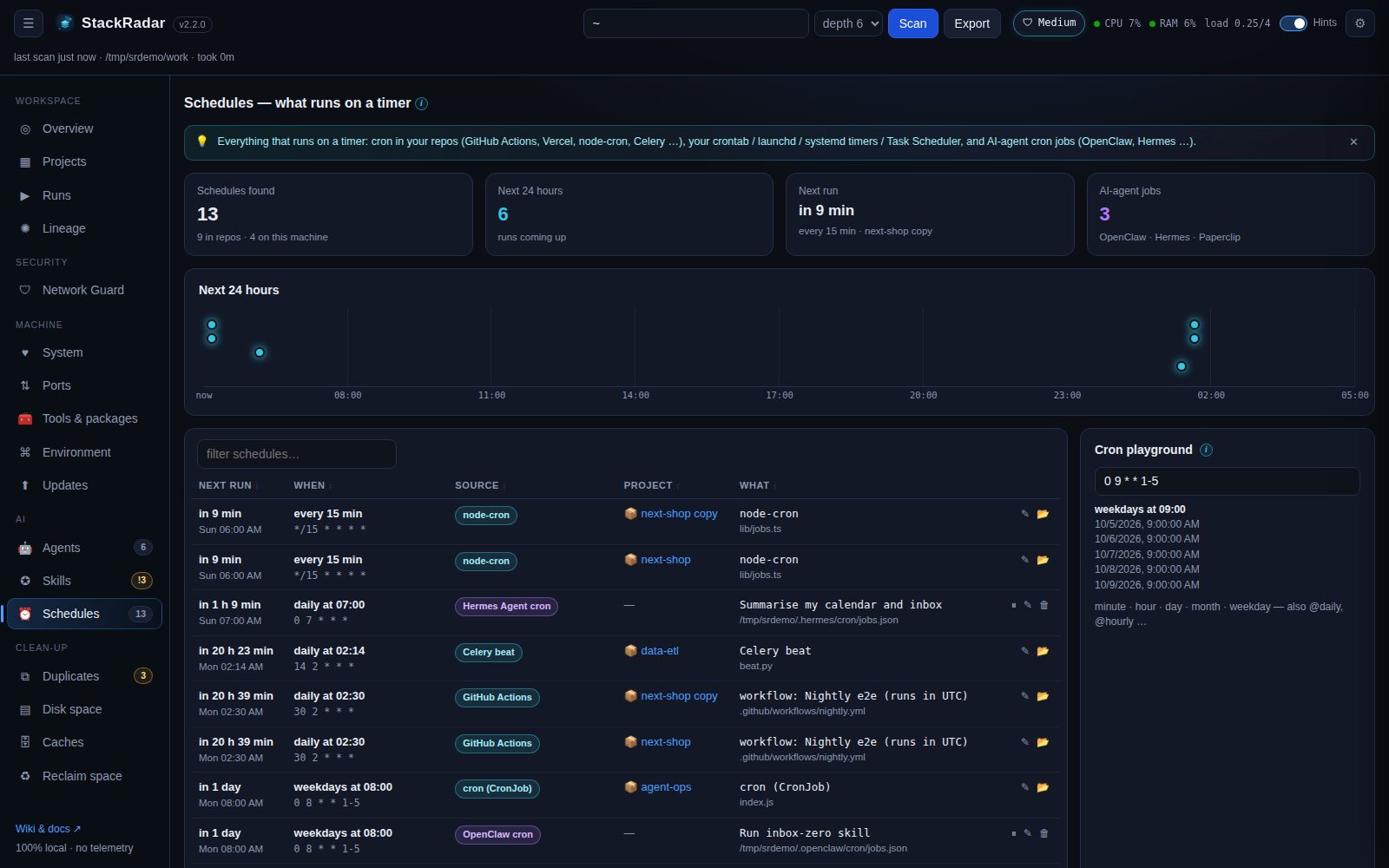
"What runs on a timer?" StackRadar collects schedules from three places and shows them in next-run order, with a countdown, a 24-hour timeline and a plain-English description of each cron expression.
Inside your projects (read-only, from code and config):
| Source | Detected from |
|---|---|
| GitHub Actions |
.github/workflows/*.yml → on: schedule: - cron: (runs in UTC) |
| Vercel Cron |
vercel.json → crons[].schedule
|
| Cloudflare Workers / Netlify |
wrangler.toml crons = [...], netlify.toml schedule = "..."
|
node-cron / cron
|
cron.schedule('*/15 * * * *', …), new CronJob('0 8 * * 1-5', …)
|
| Celery beat | crontab(minute=…, hour=…) |
| APScheduler · Spring · Go cron |
CronTrigger.from_crontab(…), @Scheduled(cron = …), .AddFunc("…")
|
Python schedule · setInterval
|
schedule.every(10).minutes, long-interval timers |
| Kubernetes · Serverless |
kind: CronJob schedule:, serverless.yml cron(…) / rate(…)
|
On this machine: your user crontab, macOS launchd agents (~/Library/LaunchAgents), systemd user timers
(~/.config/systemd/user/*.timer + the matching .service), and the Windows Task Scheduler (non-Microsoft tasks).
AI-agent jobs: OpenClaw (~/.openclaw/cron/jobs.json), Hermes Agent (~/.hermes/cron/jobs.json) and Paperclip
schedules, each with its prompt (secret-looking text redacted).
System schedules are linked to a project when their command or working directory points inside it.
Type any expression (0 9 * * 1-5, */15 * * * *, @daily, 6-field with seconds …) to see it in words and its next
five run times. The same parser powers the table (/api/cron/preview?expr=…).
Every row on this machine has ⏸ pause / ▶ resume, ✎ change timing and 🗑 delete:
| Source | Pause | Change timing | Delete |
|---|---|---|---|
| crontab | comments the line out (#[stackradar-paused]) |
new cron expression | removes the line |
| launchd | launchctl unload -w |
StartCalendarInterval from a cron (numbers / *) or every 15m
|
unload + plist to the Trash |
| systemd user timer | systemctl --user disable --now |
new OnCalendar= value, then reload |
disable + timer to the Trash |
| Task Scheduler | schtasks /Change /DISABLE |
opens Task Scheduler | schtasks /Delete |
| OpenClaw / Hermes jobs | enabled: false |
new cron expression | removes the job |
| Cron in a repo file | — (edit the file) | replaces the expression in the file (commit and push it) | — |
A new cron expression is checked and shown in words with its next runs before it's saved. Every change first saves a
backup in ~/.stackradar/backups/.