Repository navigation
E64 WS
The E64 WS syncs with a Mahlkönig Xenia: it polls the machine over WiFi every 2 seconds. gbs-anywhere answers those polls in the Xenia's place, so the grinder's menus and messages say "Xenia" when they mean gbs-anywhere.
Works with every gbs-anywhere release. Install it first: see Installation.
- Put the grinder on the same network as the computer running gbs-anywhere. The E64 WS only supports 2.4 GHz WiFi.
- On the grinder, open Settings (lower-left button on the home screen).
- Go to Connectivity → Machine To Machine → Enable Xenia.
- Open Configuration. The scan does not find gbs-anywhere, so enter
the hostname by hand: the computer's IP address, e.g.
192.168.1.20. An IP is more reliable than a.localname. - Within a few seconds the status at the top right of the app turns Ready, and System status on the Start tab says Ready to grind; tap it to see Grinder connected.
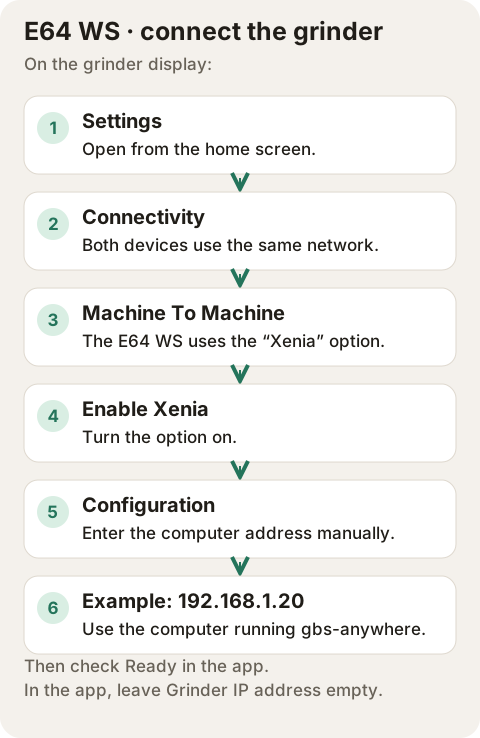
Menu guide; these are the grinder's menu names, not a recording of its display.
Leave Grinder IP address under Status → Settings empty. That setting is for the E65/E80 GbS only.
- New recipe: Settings → Setup Assistance → Assisted Dial-in, follow the steps, save the recipe in a slot, answer yes to "Fine-tune with GbS?" and choose GbS.
- Existing recipe: open the recipe's menu and turn on Enable GbS, then set Brew Time (target time), Brew Weight (target weight in the cup) and GbS start DD (the grind setting to start from).
A blue chain icon on the recipe means GbS is active.
If your grinder offers them, two more settings are worth a look:
- GbS Brew Time Tolerance: how close to the target time a shot must be for the grinder to count it as correct.
- Disc Distance lower limit: the finest setting the grinder may choose. A limit just below your usual setting keeps one odd shot from making the next one choke. Change it when you change beans.
- Open
http://<computer's IP>/on your phone. - Grind with a GbS recipe.
- When the grinder says "Press grinder rotary knob to start brewing.", press the knob and start the shot on your machine right away. The app's timer starts at the knob press.
- Time the shot from pump start (always use the same timer), weigh the cup, and enter both in the app. Tap Send. Or let an integration report it.
- The grinder shows its new grind setting. Step 3 in the app says whether the shot was too fast or too slow for the recipe.

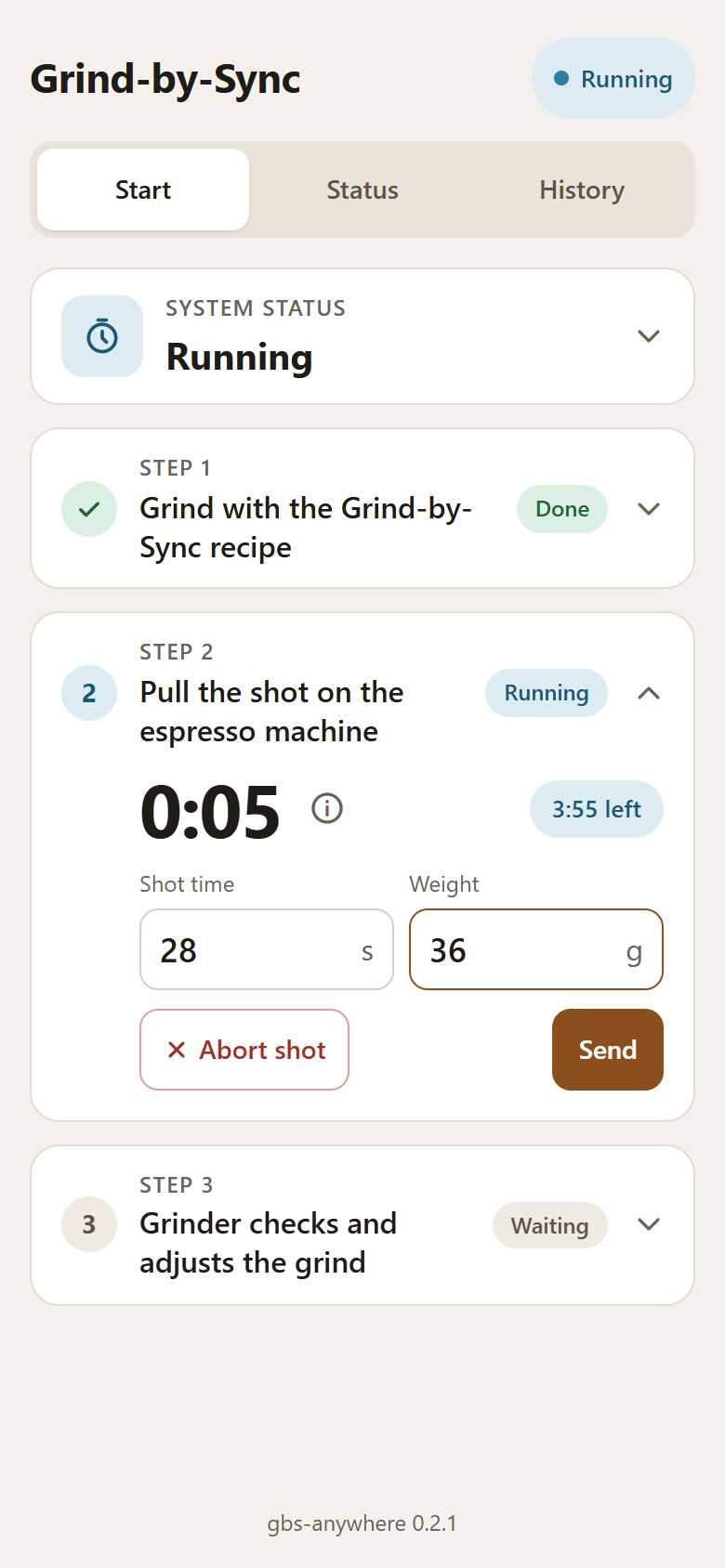
The recording uses a simulated E64 WS and example readings of 28 s and 36 g. Enter what you measured. The app timer measures time since the knob press; it does not replace the pump-start time you enter.
For aborting a shot, history and settings, see the App guide.
Things to know:
- Shots of 10 s or less, or over 80 s, are ignored by the grinder. The app warns you before sending one. After a shot of 10 s or less the grinder asks you to grind finer by hand.
- Leaving the weight empty sends the recipe's target weight.
- Abort shot in the app tells the grinder to skip the shot. It keeps its grind setting.
-
The shot window is how long gbs-anywhere waits for the numbers after
the knob press: 3 minutes unless changed under Status → Settings → Time
to pull the shot (or with
--brew-timeout-s). After that the shot ends as a timeout and the grinder keeps its setting. - The History tab keeps the last 200 shots, with time, weight, target and how each one ended.
The app says "The grinder is not polling". The grinder has not called gbs-anywhere yet, or stopped. Check that:
- the grinder is on and connected to your WiFi (2.4 GHz);
- Enable Xenia is on and Configuration holds the computer's current IP address. If the computer got a new address, enter it again, and give it a DHCP reservation so it keeps it;
- nothing else on the computer uses port 80, and the firewall allows it.
docker logs gbs-anywhereshows whether gbs-anywhere started.
The grinder says "Xenia is brewing. Please wait until it's finished." A shot is still open in the app. Send its numbers or tap Abort shot, then grind again.
The grinder never asks to press the knob. The recipe does not use GbS: look for the blue chain icon and turn on Enable GbS.
The grinder did not change its setting. Look at step 3 in the app or at the History tab: a shot under 10 s or over 80 s, an aborted shot and a timeout leave the setting as it was. Also check that the recipe uses GbS (Enable GbS). A shot close to the target may count as correct (GbS Brew Time Tolerance), so the grinder changes little or nothing.
"Timeout: no shot within …". The numbers came after the shot window, so the grinder was told to skip the shot. Raise Time to pull the shot under Status → Settings. With an integration, the window also has to cover the few seconds it needs to report.
The grinder adjusts too much: one shot is too fast, the next one chokes. GbS can change the setting noticeably after a single shot, and the change only shows fully once the coffee left inside the grinder is used up, often after two or three doses.
- Set the Disc Distance lower limit just below your usual setting, so a jump can never go far enough to choke the shot.
- Try a GbS Brew Time Tolerance (for example Medium), so the grinder counts shots close to the target as correct.
- Avoid changing the grind setting by hand while GbS learns. If you do, purge a little coffee afterwards, so the next shot is ground at the new setting.
- Judge a change after one or two shots, not on the first.
You want to see what the grinder sends. Start gbs-anywhere with
--log <file> to append every grinder request and reply to a file. Leave
real device logs out of public issues, as they may contain your grinder's
serial number.