Repository navigation
Half Decent Scale
The Half Decent Scale from Decent Espresso can share its readings over WiFi. gbs-anywhere reads them and reports each shot by itself: the time from the first drops in the cup to the flow stopping, and the weight in the cup. Nothing needs to be typed, and the Decent app keeps working alongside.
- Works with any espresso machine.
- Works with the E64 WS. With the E65/E80 GbS it should work the same way, but has not been tested there yet.
- Available since release 0.2.0. The scale needs firmware 3.0 or newer.
The full reference is the integration's README.
- Turn WiFi on. Hold O and ▢ together until "HDS Setup" shows, then Setup → Connections → WiFi (older firmware: WiFi settings → WiFi on/off). Exit and restart the scale.
-
Join it to your WiFi. With no WiFi saved, the scale opens its own
network
DecentScale(password12345678). Join it with your phone, openhttp://192.168.1.1and enter your home WiFi (2.4 GHz, like the grinder). - Give it a fixed address. Find the scale's IP address in your router and give it a DHCP reservation.
-
Add it in the app. Open Status → Machine integrations, tap the
green +, pick Half Decent Scale and enter that address, e.g.
192.168.1.40. Outside Docker the scale's own namehds.localusually works too; inside Docker, use the IP. - The card turns Ready once gbs-anywhere has found the scale. It shows the scale's address and firmware.

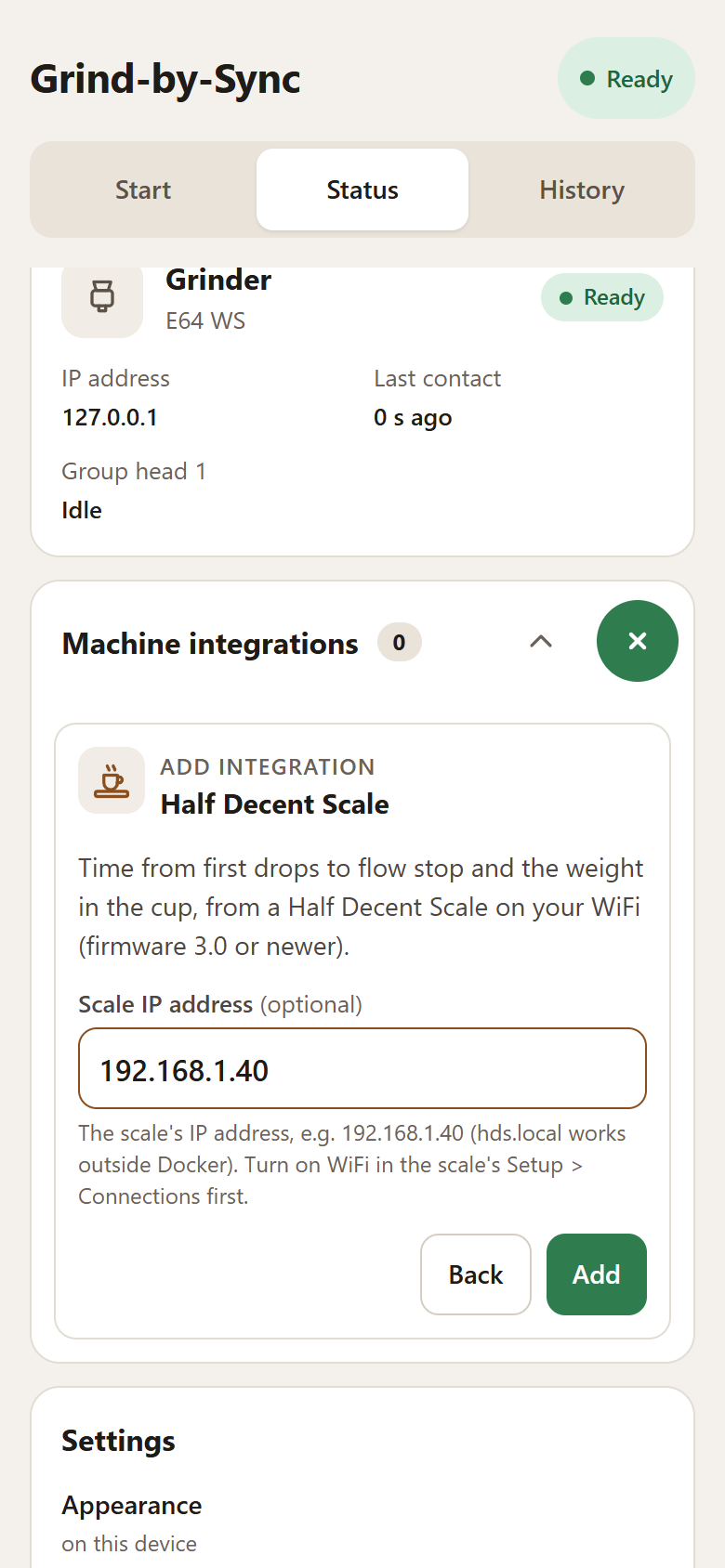
The example 192.168.1.40 must be replaced with your scale's address.
The recording stops before Add and does not contact a scale. On your
own setup, tap Add, then wait for the card to say Ready.
To change a saved scale address later, use the card's ⋮ menu → Edit, enter the new address and tap Save.
Or start gbs-anywhere with it, in Docker:
docker run -d --name gbs-anywhere --restart unless-stopped \
  -p 80:80 -v gbs-anywhere:/data \
-e HDS_HOST=192.168.1.40 ghcr.io/skamba/gbs-anywhere| setting | flag | env | default |
|---|---|---|---|
| Scale address | --hds-host |
HDS_HOST |
off (hds.local when added in the app and left empty) |
An integration set this way shows "From the start settings", has no Delete, and is turned off by removing the flag. To change it in the app, use its ⋮ menu → Edit → Move into the app; see Upgrading from 0.2.x.
- Put the cup on the scale before you press the knob (on an E65/E80 GbS: before the grind ends).
- Grind with a GbS recipe and press the knob. gbs-anywhere tares the scale, so its display counts the coffee from zero.
- Start the shot before the first drops reach the cup.
- When the flow stops, the time and weight go to the grinder a few seconds later. The app shows Reported by Half Decent Scale.
After the knob press, gbs-anywhere tares the scale, waits for a steady weight, then for the first drops. The shot ends when the weight stops rising.
- Times start at the first drops, not at pump start. They come out shorter than a timer started with the pump, by the time before coffee reaches the cup. Set your recipes' target times to match.
- Placing or lifting the cup is recognised and not counted as coffee.
- A pause is not the end. The shot only ends once at least half the recipe weight is in the cup, so the flow pausing after pre-infusion is timed as part of the shot.
- Lifting the cup ends the shot at the last moment coffee was flowing.
- Avoid taring during the shot.
- Only after a knob press. Weighing at other times is never reported.
- The scale still switches itself off. A connected app keeps the scale awake, so gbs-anywhere only connects from the knob press until the shot is reported. Between shots the card says Ready, not connected.
- Up to four apps can read the scale at once.
"the scale at … did not answer". The scale is off, not on your WiFi, or
at another address. Check its address in your router. Inside Docker, use the
IP rather than hds.local.
The scale was off at the knob press. Turn it on: gbs-anywhere looks for it every few seconds while the grinder waits, and watches the shot without the tare.
The time is much shorter than your timer. That is expected: the scale times from the first drops. Lower the recipe's Brew Time to match, or type the shot by hand if you prefer pump-start times.
No shot reported. If the scale has not reported the shot a minute after it should have ended, the app says so and shows the fields to type it in. Coffee in the cup before the knob press is not counted, so press the knob before the first drops.
"lost the connection to the scale" or "the scale stopped sending readings". The WiFi dropped or the scale switched off during the shot. Type that shot by hand; the next one connects again.
The app shows a generic scale glyph, because vendor logos are trademarks and
are not shipped. To show your own, put a monochrome half_decent.svg or
.png (transparent background) you are allowed to use in a directory and
pass -v /that/dir:/icons:ro -e ICONS_DIR=/icons; the app tints it to match.