Repository navigation
Custom Palettes
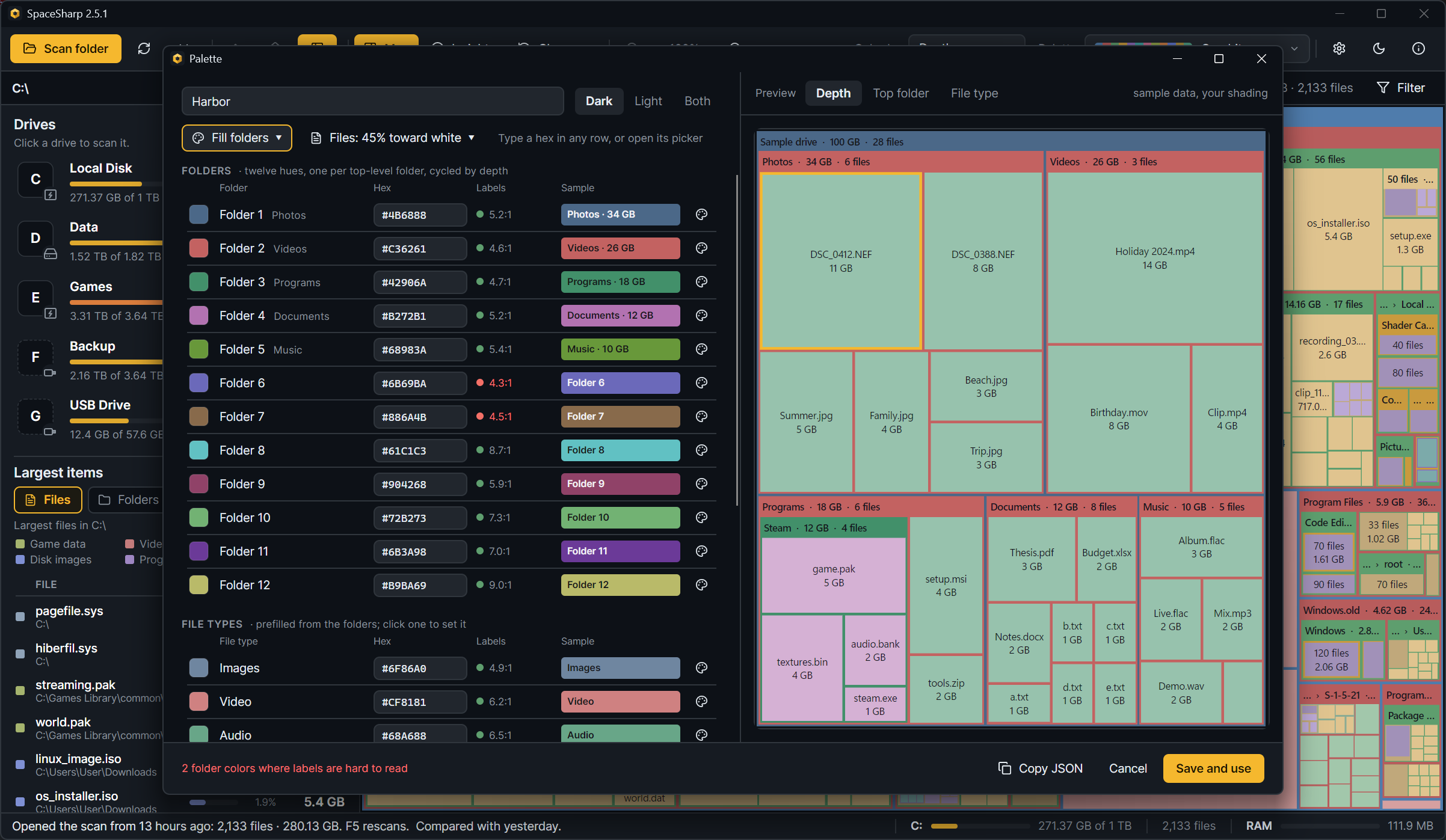
A custom palette is a JSON file in your palettes folder. The palette editor writes one for you; a text editor works too. Either way the palette appears in the picker's Custom tab next to the built-in ones, and the map uses it like any other.
- The palette picker in the toolbar: New palette… in its corner.
- Settings › Treemap › Custom palettes: New palette, or Edit under a custom palette you already have, or Start from… under any built-in one to begin with its colors.
The window is three lists and a preview.
Folders. Twelve rows, one per top-level folder color (and every twelfth level down in Depth mode). Each row has the swatch, the hex you can type into, a sample, and a readability note: which text color labels get on it and the contrast ratio, in red when it falls under 4.5:1. The Fill folders menu starts you off from Folder 1's color with a spread: Rainbow (twelve hues evenly around the wheel), Neighbors (hues close to Folder 1), Two-tone (Folder 1 and its opposite, alternating) or One hue (shades of Folder 1 only). Random picks a base color and a spread; press it until something looks right, then adjust. Paste 12 hexes takes the codes on your clipboard in order.
Files. By default the folder color lifted toward white by one tint; the slider sets how far. Set each file color yourself turns the list into twelve editable rows instead, and Use one tint instead goes back.
File types. One color per type for Color by file type, prefilled from the folder colors. Click one to set it; a type you set stays set when the folders change, one you did not follows them. Back to derived forgets your choice for that type.
Preview. A sample map on the right, drawn with your shading settings, in the Color by mode the map is in. It follows every edit.
The header has the palette's name (what the picker will call it; built-in names are refused), which theme it is for (Dark, Light or Both; decides which tab lists it), and a readability summary: "Labels read on every folder color, and no two are too alike", or which folders are too close to tell apart.
Save and use writes the file and switches the map to it. Copy JSON puts the file's text on the clipboard instead, for sharing or for a palette you keep somewhere else. Saving over an existing custom palette asks first.
Each row's swatch opens a picker: hue, saturation and lightness sliders, the hex, and a strip of suggested shades. Under it the same readability line for that color alone.
%LocalAppData%\SpaceSharp\palettes, one .json per palette. Open folder in Settings › Treemap › Custom palettes takes you there and writes Example.json (commented) and a README the first time. Reload picks up files you edited or dropped in without a restart.
- One to twelve folder colors,
#RRGGBB; fewer are cycled to twelve. -
files,fileTint,categoriesandthemeare optional. Leavefilesout andfileTintapplies; leave both out and the tint is 0.45. - The fourteen type keys are
video,images,audio,archives,programs,documents,code,gamedata,installers,diskimages,databases,fonts,system,other. - Comments and trailing commas are allowed. A file that cannot be read is listed with its error under Custom palettes rather than skipped silently.
- The palette's line in the picker is its file name.
Send the .json, or the Copy JSON text. The other person drops it in their palettes folder and presses Reload. A palette worth having in the app itself can be proposed as a pull request: built-in palettes live in BuildSchemes() in SpaceSharp/Util/Palette.cs with a one-line description (Architecture).
{
  "name": "Harbor",
  "theme": "dark",            // "dark", "light" or "any": which tab lists it
  "folders": ["#4F7CAC", "#49B86B", "#E8C547", "#E8864A", "#B565D9", "#4CC3C9", "#E86A8A"],
  "fileTint": 0.45,           // files are the folder colors lifted toward white by this (0 to 0.9) ...
  // "files": [...],          // ... unless you list twelve file colors yourself
  "categories": {             // File type mode; any left out come from the folder colors
    "video": "#E8864A", "images": "#49B86B", "audio": "#B565D9", "archives": "#E8C547",
    "programs": "#5B8DEF", "documents": "#BAC4E2", "code": "#4CC3C9", "gamedata": "#C9A66B",
    "installers": "#D9A066", "diskimages": "#C7C09A", "databases": "#5FA8D3", "fonts": "#B9A0E0",
    "system": "#8FA3B8", "other": "#B8B4AC"
  }
}