Repository navigation
Finding Values
Everything on the Find tab. The four modes at the top of the card are Number, Text, Group and Before/after.
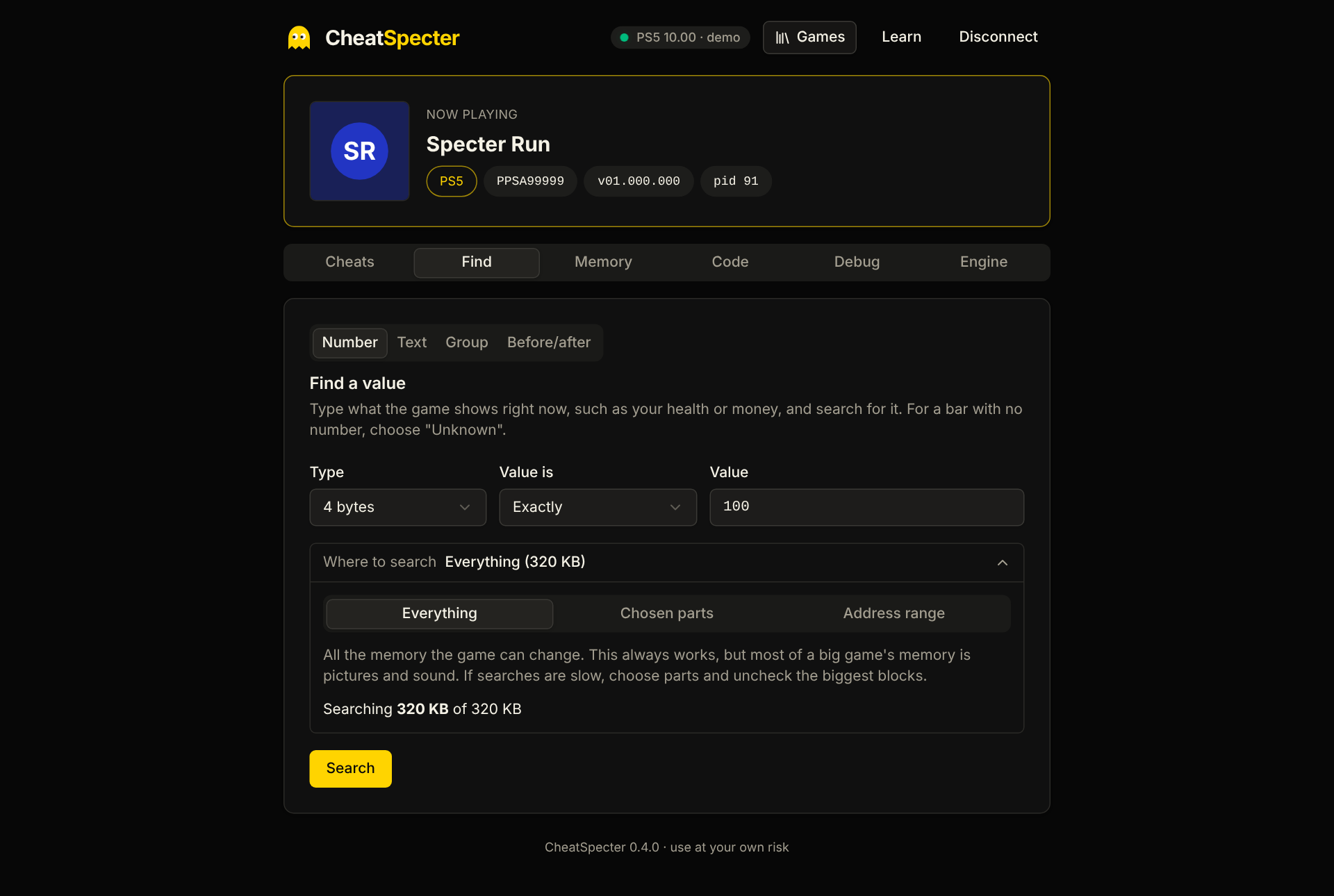
The everyday search: type what the game shows, search, change it in the game, narrow down.
Type is how the game stores the number.
| Type | Use it for |
|---|---|
| Auto | When you do not know. Tries 4 bytes, Float and Double at once. |
| 4 bytes | Most whole numbers: ammo, money, counts. The default. |
| Float, Double | Numbers with decimals: timers, speeds, many health values. |
| 1, 2 or 8 bytes | Small counters and flags; very large numbers. |
| (signed) variants | Values that can go below zero. |
Value is says what you know about it.
| Choice | Meaning |
|---|---|
| Exactly | Equal to the number you type |
| About (shown rounded) | For decimals: the game shows 99 but stores 99.4 |
| Bigger than, Smaller than, Between | A range |
| Unknown (I cannot see a number) | Start from everything; for bars and gauges |
| Went up, Went down | After the first search: it changed in that direction |
| Went up by, Went down by | It changed by exactly this much |
| Changed, Stayed the same | Use "Stayed the same" while nothing happens in the game to clear out values that move by themselves |
After Narrow down, Undo last step puts back the list from before that step (one step is kept). It is not available for an Unknown search, because that list is held on the console.
On each result you can change the value, freeze it, check several rows to Set all or Freeze all, show values as hex, copy the address, show it in Memory, or ask Find what writes to this.
A big game has gigabytes of memory, most of it pictures and sound, and a full search can take over a minute. Where to search lets you cut that down:
- Everything: all memory the game can change. Always works.
- Chosen parts: a checklist of the game's own data, its larger memory blocks, and its libraries, with sizes. Uncheck the huge blocks to make searches much faster.
- Address range: a start and end you type.
The line underneath shows how much is covered ("Searching 1.2 GB of 9.6 GB"). The choice is remembered per game and applies to Number, Text and Group searches.
Finds text in the game's memory: a character's name, an item, a menu label.
- Both plain (UTF-8) and wide (UTF-16) text are searched; Unreal games mostly use wide text.
- Ignore case is exact for words with up to five letters. For longer words it searches the common spellings (as typed, lower case, UPPER CASE, Title Case), and the result says which were tried.
- By default only memory the game can change is searched. Check the option to include read-only data and code, where names and interface text usually are.
- The first 200 hits are shown, each with the text around it. The search can be canceled.
Several values that sit close together, in any order: health 100, armor 50 and ammo 30 within a few dozen bytes of each other is usually the player.
Add each value with its type, set the distance, and search. The rarest-looking value is searched for first and the others are checked around each hit. If the first value is too common you are told the search is too broad; add a rarer value or narrow Where to search. From a result, one member's address can be handed to a Number search to continue narrowing.
Takes a snapshot of one block of memory (a chosen region, or a number of bytes around an address; up to 16 MB), lets you do something in the game, then shows what changed, with before and after. Filter by changed, went up or went down, compare against the first snapshot or the previous one, and send the changed spots to a Number search.
This is the quick way to answer "what does this object look like after I get hit?".
- If a search for the right number finds nothing, try Auto, then About, then Unknown.
- If the count stops shrinking, the survivors are usually copies of the same value. Try changing each.
- Displayed values are sometimes scaled (the game shows 100 but stores 1.0, or 1000). Unknown searches handle that.
How far this has been tested: known-value searches have been used on a real PS5. Unknown-value search, and the Text, Group, Before/after and Where-to-search features added in 0.4.0, have so far only been tested against the simulated console.