Repository navigation
Launcher Page
-
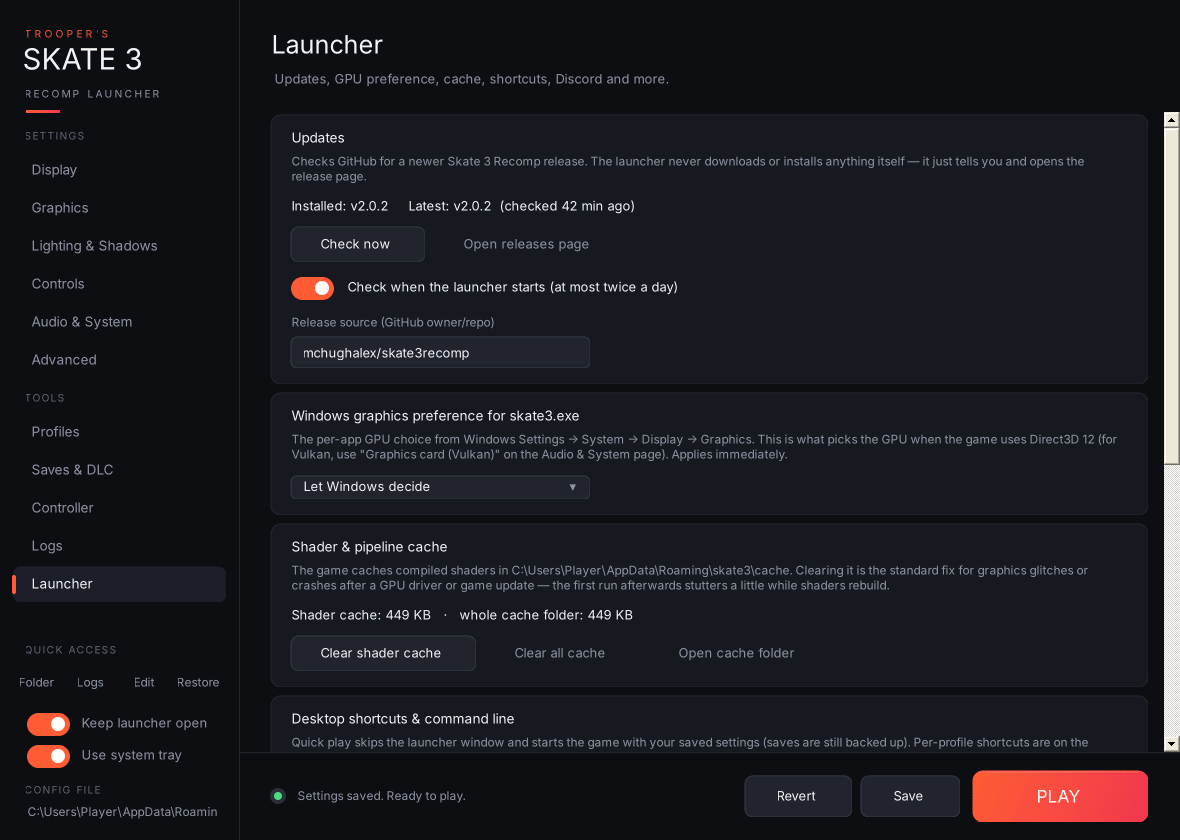
Updates: shows your installed Skate 3 Recomp version (read from the game's log, or from
skate3.exeitself) and the latest release on GitHub.- Check now and Open releases page.
- Check when the launcher starts: on by default, and checks at most once every 12 hours.
-
Release source: the GitHub
owner/repoto check. The default ismchughalex/skate3recomp; change it if you follow a fork. - Installing and rolling back updates is on the Game files page. The sidebar badge takes you there.
- Windows graphics preference for skate3.exe: Let Windows decide, Power saving or High performance. This is the same per-app setting as Windows Settings → System → Display → Graphics, and it's what decides the GPU under Direct3D 12. It applies immediately; it's stored in your user registry, so no admin rights are needed.
-
Add to Steam: adds Skate 3 (Recomp) to your Steam library as a non-Steam game, so it works in Big Picture and on a Steam Deck. Choose whether it opens the launcher (controller-friendly) or plays straight away. Steam must be closed while the launcher edits its library file (a backup of
shortcuts.vdfis kept). Set artwork… files your own images by shape: tall = library cover, very wide = hero banner, wide = grid, square = logo. -
Graphics driver: your GPU, driver version and date, and the Vulkan driver the game reported. Drivers over a year old are flagged, and Check driver also checks a list of known-bad versions kept in this repo (
known-driver-issues.txt). Get the latest driver opens AMD's, NVIDIA's or Intel's driver page. - Controller navigation: see Keyboard and controller shortcuts. What's new shows this version's changes again. The pop-up also appears once after each update (and includes v3.1.0's changes if you skipped it).
-
Shader & pipeline cache: shows the size of the shader cache and of the whole
cachefolder.-
Clear shader cache deletes
cache\nrhi_shadersandcache\shaders. -
Clear all cache deletes everything in
cache. - Open cache folder.
- Both clear buttons are refused while the game is running. The cache rebuilds itself, with a little stutter on the first run. Clearing it is the usual fix after a GPU driver or game update.
-
Clear shader cache deletes
-
Desktop shortcuts & command line:
- Launcher shortcut opens the launcher.
- Quick-play shortcut starts the game straight away with your saved settings, skipping the window; saves are still backed up.
- The available command-line options are listed here too.
- Discord Rich Presence: see below.
-
Modding tools: Show modding tools (
modding_toolsinlauncher.ini, off by default) adds a Modding tools page to the sidebar on the next launch for making and testing mods. -
Game location & reset:
- Shows the game path, the settings folder and the saves folder (marked when portable mode or a portable
savesfolder is in use), the launcher version and the game version. -
Change game location… points the launcher at a different
skate3.exe. If that copy keeps its data somewhere else (portable mode), the launcher restarts to load it. - Reset all settings to defaults puts every setting back to its default on screen; Revert undoes it, and nothing is written until Save.
- Shows the game path, the settings folder and the saves folder (marked when portable mode or a portable