Repository navigation
Mods
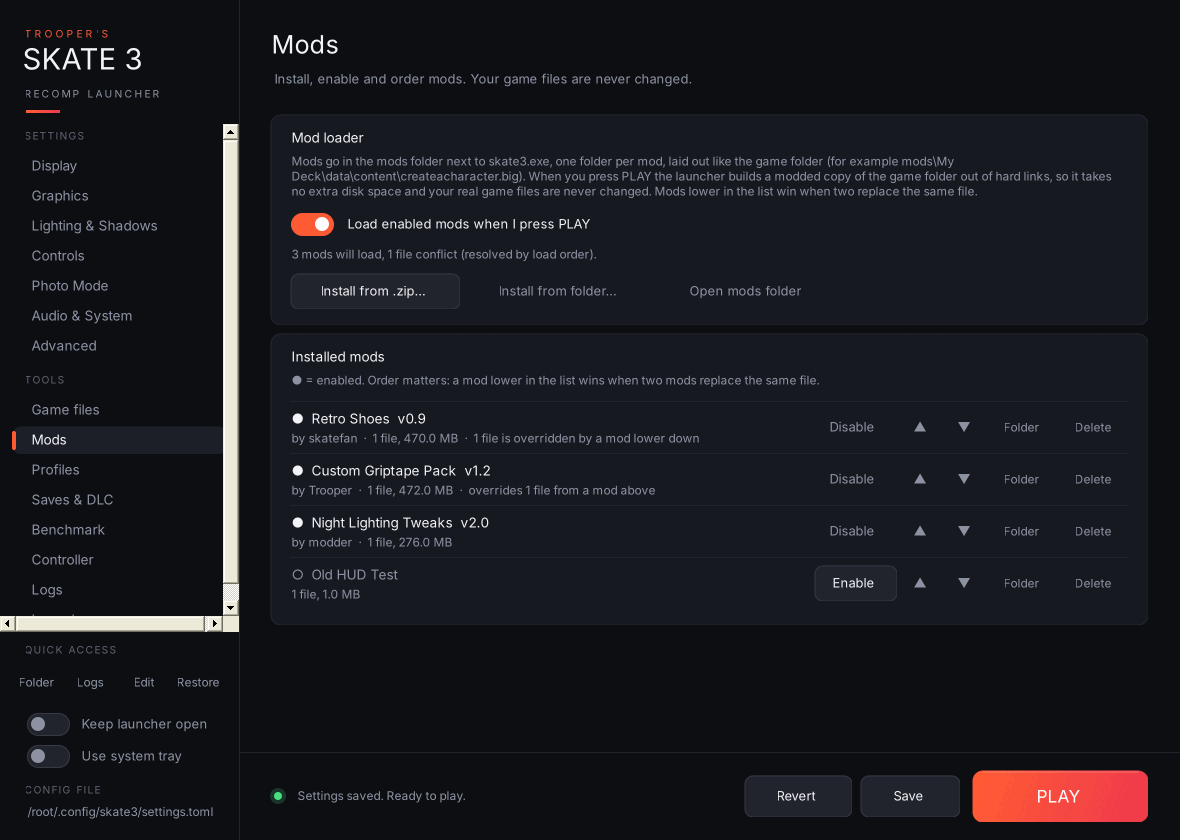
- Load enabled mods when I press PLAY: the master switch.
- Dropping the
modsfolder itself, thegamefolder or the recomp folder is refused, so you can't copy the game by accident. -
Install from .zip… / Install from folder… copies a mod into the
modsfolder next toskate3.exeand enables it. You can also drag and drop.zipfiles and mod folders straight onto the Mods page. Open mods folder opens it; you can also drop mod folders in by hand (new folders start disabled). - Installed mods: one row per mod with its file count and size, and whether it overrides (or is overridden by) another mod. Buttons: Enable / Disable, ▲ / ▼ to change the load order, open its folder, and remove it. Mods lower in the list win when two mods replace the same file.
How it works: when you press PLAY with mods enabled, the launcher builds mods\.active-game, a copy of your game folder made of hard links (so it takes no extra space), swaps in the mods' files, and starts the game with --game_data_root pointing at it. Your real game folder is never changed, and it's only rebuilt when something changes. With no mods enabled the game starts normally. Mods can't replace default.xex, default.xexp or the EAWebkit files, because the recomp's code is built against exactly those.
If a game file a mod replaces changes later (for example after a game or recomp update), you're warned once before launching.
See Making Mods for the folder layout, mod.json, and the Modding tools page.