Repository navigation
Control Room
The Control Room is the right end of the Mixer's outputs row, with its keys beside it. It's where you listen: your speakers (Main) and your headphones (Phones).
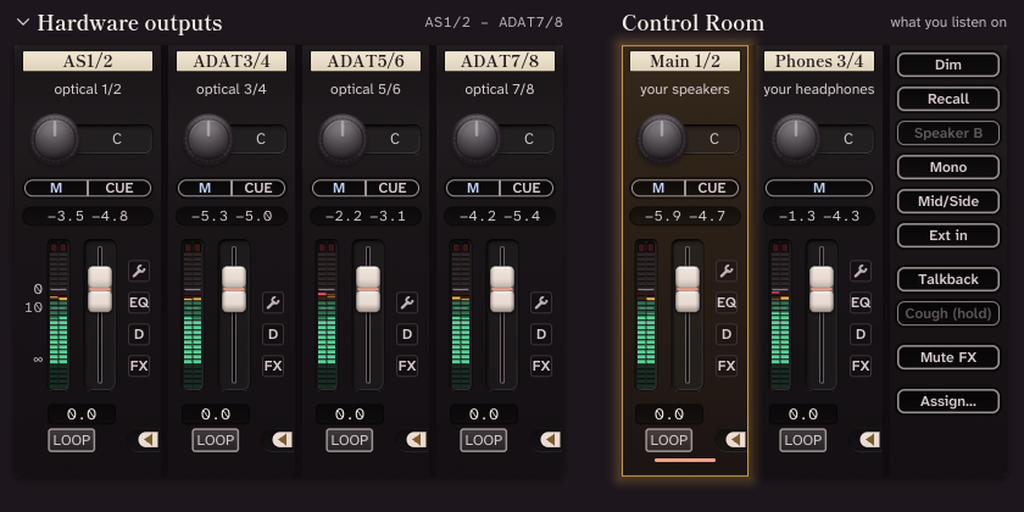
Where the outputs fit on the window, the Control Room's strips stand right after the last output, named as the placard names them: Main 1/2 and Phones 3/4.
Audra settings (the gear in the top bar, or F2) → Monitor → Control Room:
- Main: your speakers, AN1/2 out by default.
- Main B: a second pair of speakers, for Speaker B.
- Phones 1 and Phones 2: PH3/4 out by default.
- Cue plays on: where Cue and PFL are heard.
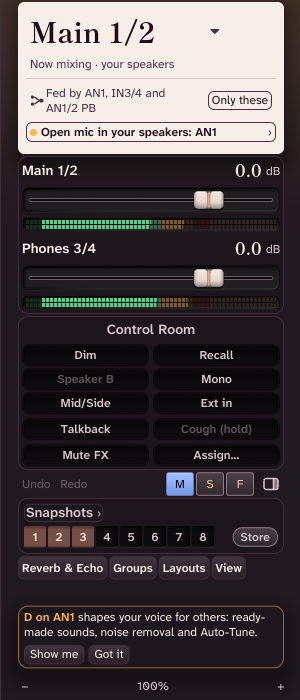
The keys are the same set, in the same order, wherever they stand: Dim, Recall, Speaker B, Mono, Mid/Side, Ext in, Talkback, Cough (hold), Mute FX and Assign… (which opens Audra settings → Monitor, at its Control Room section). On a wide window (1440px or more) they stay with the Control Room in the Mixer: a column of their own beside Main and Phones, carved into its panel as in TotalMix, or, while the outputs row is folded, a compact row in its band. On a smaller window such as 1280×700, and on Quick setup and the Matrix, they sit in the Control Room section of the right-hand column, two to a row in TotalMix's groups, so they're always in view and never move while you work. Hover one for what it does. Cue is the CUE key on each output strip. On a wide window with the outputs row folded, its band keeps the keys you press mid-call (Dim, Talkback, Cough) and any key that's lit; the rest wait behind More ▾, at the band's left so it never moves. Open, they take the mixes' place until Less ▴.
- Dim lowers Main by the Dim amount (Audra settings → Monitor → Main out, −20 dB by default). The unit's own DIM button does the same. Pressing it drops the sound at once; letting go brings Main back up over half a second instead of in one jump, so your ears and speakers never get a jolt (TotalMix jumps back at once). Press Dim again during that half second and it goes straight back down, with your level kept. If Audra closes with Dim on (a crash, a logout), it comes back still dimmed, the Dim key lit and a notice saying so: press Dim to bring Main up. Unplugging the Babyface and plugging it back in keeps Dim, Talkback and the rest as they were.
- Recall sets Main to the Recall level (Audra settings → Monitor → Main out). Set to Main’s level now there stores where Main is now. If Recall turns Main up a lot, it glides up rather than jumping; Dim, another Control Room key or your hand on the fader stops it.
- Talkback sends the talkback mic to the Phones (and to any output with Gets Talkback on in its Settings panel), lowering everything else there by Headphones down by. Pick the mic in Audra settings → Monitor → More for studios → Talkback. Letting go of Talkback, Listen or Ext in brings the mix back the same gentle way as Dim, over half a second. While it's on, the Phones level in the sidebar says so under its name, in Dim's amber: Talkback: AN1 talks in here (pointing at it says the rest: everything else in those headphones is 20 dB quieter). Dim's note sits the same way under Main's name (Dim: 20 dB quieter), and Main's big number stays your own level, as its fader shows; the Main strip wears an amber DIM. Neither note moves anything below it (on a short window or zoomed, each is one word on the name's line: Main 1/2 · Dim).
- Ext in plays an external stereo input on Main instead of the mix (Audra settings → Monitor → More for studios → External Input picks the input and its gain). It stands beside Mid/Side: both change what Main plays.
- Cough (hold), beside Talkback: hold it to silence what others hear (a cough, a sneeze); let go and you're back. You still hear yourself. Holding C does the same while Audra's window is in front. It works while Voice runs (a mic's D panel, then ON), and is greyed until then. It lights in mute's colour while held, and lets go by itself if the voice stops or Audra's window loses the keyboard.
- CUE on an output strip plays that output's mix on the Cue output (usually the Phones), to hear what that output hears.
- Assign… (beside Main and Phones) opens Audra settings → Monitor, at its Control Room section, where Main, Main B, the Phones and Cue are picked.
- Speaker B switches from Main to Main B, which plays Main's mix. Link keeps their levels together. Until a Main B is assigned it stands greyed (beside Main) or isn't shown (in the right-hand column).
- Listen (once a Listenback mic is chosen, in Audra settings → Monitor → More for studios) puts the Listenback mic into Main, lowering the rest. It's the other direction of Talkback: the performer talks to the control room.
- Mute FX (where the driver opens the effects) takes Reverb and Echo off Main and Main B, and gives your return levels back when you press it again. See Reverb and Echo.
- Mono plays Main's left and right together, to check the mix in mono (driver from 2026-11-07; an older one keeps it greyed with the reason).
- Mid/Side (TotalMix's M/S) plays Main as mid on the left and side on the right: a quick check of how wide the mix is. It's a check, like Dim: on until you press it again, never kept in a snapshot, and released when Audra quits. A notice and a line on the Now Mixing card say it's on. (An output's own M/S processing, kept with the mix, is a row in its Settings panel; see Inputs and EQ.) Driver from 2026-11-09.
None of these change your mixes. Each one changes what plays, and switching it off puts everything back as it was, even after a crash or replug.
The Main and Phones faders in the right-hand column set those outputs' levels; they carry the placard's names (Main 1/2, Phones 3/4). Each is a fader on its side: drag the cap (Shift for fine moves), click the lane to bring the cap there, or scroll over it. With the keyboard on one, ← → or + − move it.
A double-click brings a level above 0 dB down to 0 dB, but never turns Main, Main B or the Phones up: a level below 0 dB stays where it is, and a notice says so (Phones 3/4 stays at -30.0 dB: a double-click never turns up what you listen on. Drag it up.). A click on the lane that turns one up a lot glides it there.
Under each fader a stereo LED meter shows what that output plays, lined up under the fader so a level on the meter sits under the same level on the fader, so you see your headphones' level while you work on any row. While Dim is on, Main's level turns amber and says how far it's dimmed. The output meters show what actually plays, including Cue, Talkback, solo and Dim.
On a short window, a folded row's head says clip in red when something in it clipped: open the row to see where.
A mic with phantom power on or a high gain, playing in your speakers, can howl as soon as it's near them. So when a mic input with 48V on, or 20 dB of gain or more, is unmuted and sent into Main or Main B, while those speakers are up and not muted and the mic has picked up sound in the last 10 seconds, the placard (the Now Mixing card) says so in one line, in any view:
● Open mic in your speakers: AN1 ›
With more than one, it names them all (AN1 + AN2), so a second mic that can howl isn't hidden until the first is dealt with.
With Dim on it stays, saying Open mic: AN1 · Dim quiets it: the mic is still in the speakers, only quieter.
Once you've opened it, the line goes quiet: a faded dot and plain (not bold) words, still there as a warning you've noted. It turns amber again if anything makes a howl more likely than when you looked: that mic hotter (more gain, PAD off, its send up, 48V switched on), the speakers louder (Main up 3 dB or more, Dim let go, unmuted), or another mic or mix warned of. So amber always means something new. If the warning goes away (you take the mic out of the speakers, or turn them down) and later comes back, it comes back amber. A pause in your talking doesn't count. After a restart it starts amber.
Click it (or press Space on it) and it opens: Near the mic, Main 1/2 can howl. Two answers:
- Take it out: sends that mic nothing in that mix, and nothing else: not the other mixes, not its group, not the Phones. It's one Undo step, and the card says AN1 is out of Main 1/2. Undo brings it back.
- Hide: I listen on headphones (a mic far from the speakers, say): no more warning for that mic in that mix, and Audra remembers it the next time it starts. To be warned again, Audra settings → App → Warn about open mics in the speakers again.
In Quick, the third step says the same for the mix you listen on there. See Quick Setup.