Repository navigation
Sounds and Particles
Emotes can make sounds and spawn particles at exact moments, like the clap of a high five. Every player's game plays them on its own, so they don't cost the server anything.
There are two ways to add sound:
The sound option in pack.json - one sound when the emote starts, stops with the emote
Effect keyframes - sounds and particles at any moment in the animation, from Blockbench
This page is about the second one. For the first, see pack.json.
In the Animate tab, the timeline has an Effects row at the bottom. Add a keyframe there and pick Sound or Particle.
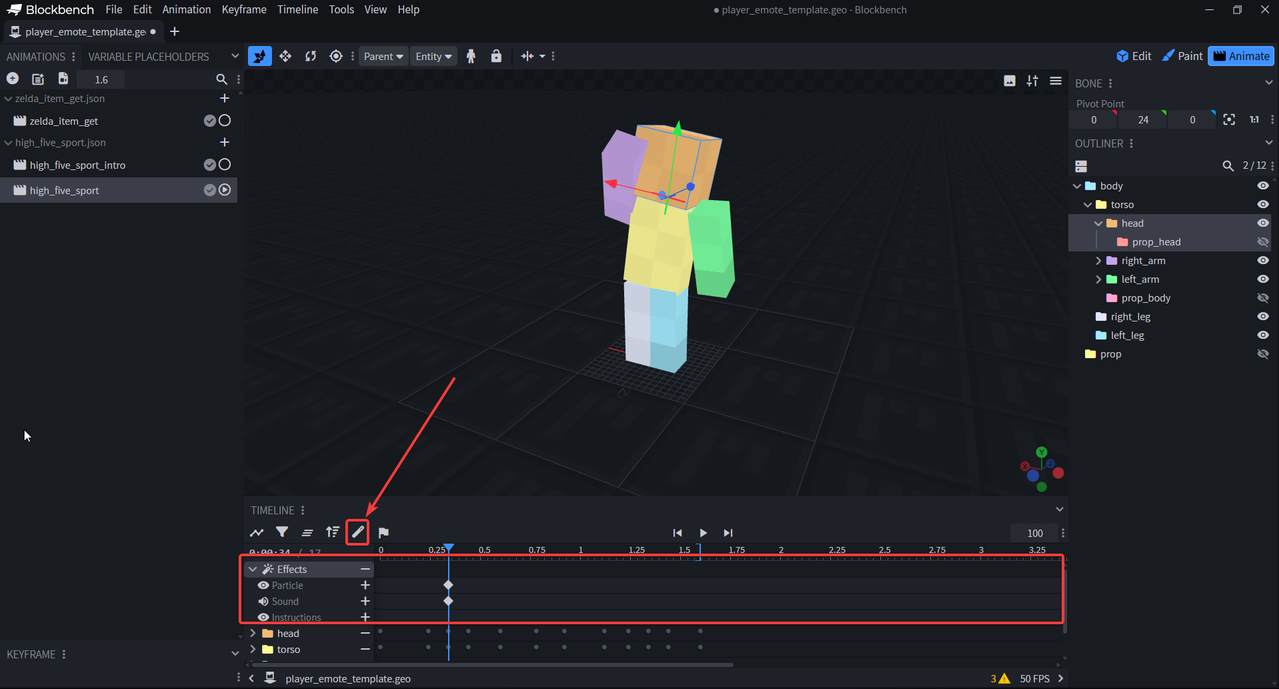
The high five's clap:
"high_five": {
  "animation_length": 1.5,
  "bones": { ... },
  "sound_effects": {
    "0.32": { "effect": "minecraft:entity.player.attack.crit", "volume": 0.6, "pitch": 1.4 }
  },
  "particle_effects": {
    "0.32": { "effect": "minecraft:crit", "locator": "right_hand" }
  }
}
The number is the second it plays at. More than one at the same moment? Use a list:
"0.5": [
  { "effect": "minecraft:heart", "locator": "head" },
  { "effect": "minecraft:note", "locator": "right_hand" }
]| Field | What it is |
|---|---|
effect |
a sound event id, or a particle id |
locator |
head, torso, right_hand, left_hand, right_foot, left_foot (default: torso) |
volume |
sounds only, default 1
|
pitch |
sounds only, default 1
|
Locators follow the animation, so a particle on right_hand spawns where the hand is at that moment.
Particles have to be ones without options, like minecraft:heart, minecraft:crit, minecraft:note,
minecraft:happy_villager, minecraft:flame. Ones that need a color or a block (dust, block) don't work.
Any sound event works, vanilla ones too (minecraft:entity.villager.celebrate). For your own .ogg files, add them
like any resource pack sound:
assets/myemotes/
  sounds.json
  sounds/
    whoosh.ogg
sounds.json:
{
  "emote.whoosh": {
    "sounds": ["myemotes:whoosh"]
  }
}
Then use myemotes:emote.whoosh as the effect.
Sounds have to be mono .ogg files, stereo ones don't fade with distance.
Server packs can't send sound files, only vanilla sounds or sounds players already have work there.
In the Settings players can turn off sounds of their own emotes, and of other players' emotes.