Repository navigation
Order Lifecycle
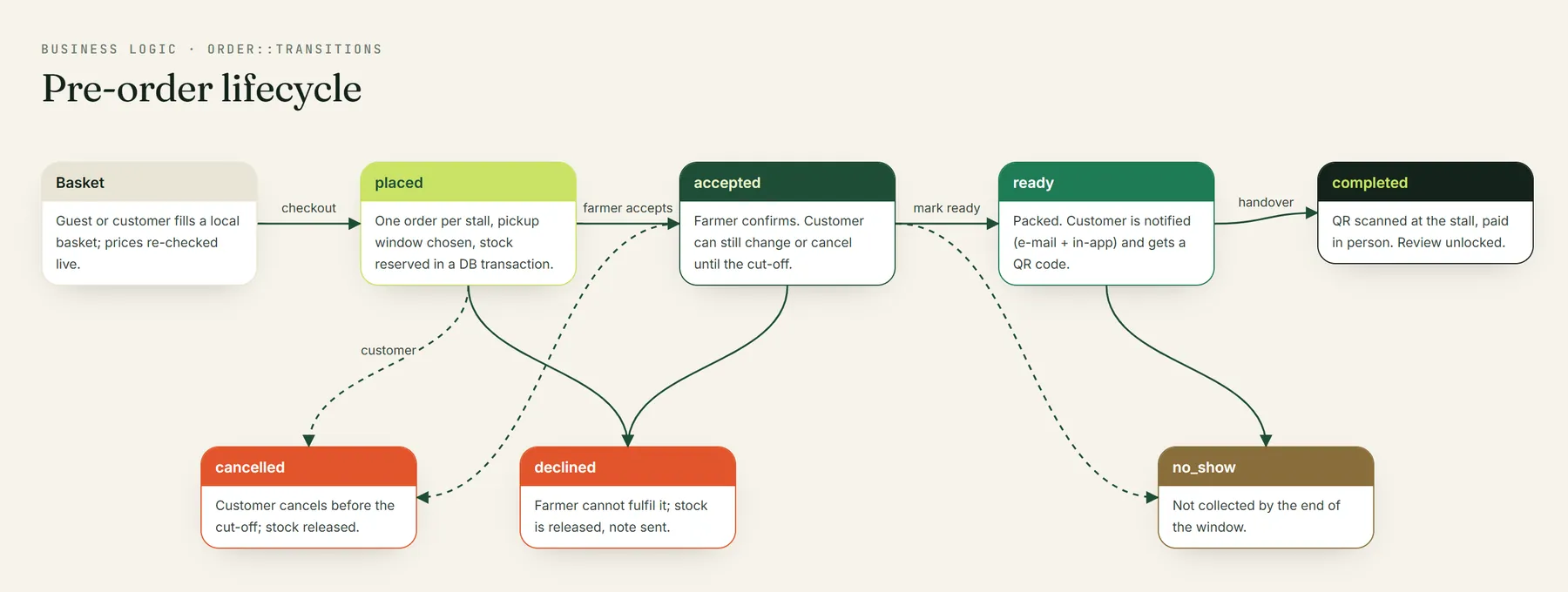
stateDiagram-v2
    [*] --> placed: customer checks out
    placed --> accepted: farmer accepts
    placed --> declined: farmer declines
    accepted --> ready: farmer packs on market day
    accepted --> declined: farmer can't fulfil
    ready --> completed: handed over & paid at stall
    placed --> cancelled: customer cancels (before cut-off)
    accepted --> cancelled: customer cancels (before cut-off)
    completed --> [*]
    declined --> [*]
    cancelled --> [*]
Guests and customers add products to a basket kept in the browser (lib/cart.js). When a customer signs in it syncs to the server (POST /cart/sync, throttled). Items from different farmers can share a basket.
Customer\CheckoutController → OrderService::place():
- A per-customer atomic lock refuses a second concurrent checkout (double-click, two tabs).
- Lines for the same product are merged, then products are locked
FOR UPDATEin id order (no deadlocks) and stock is checked and decremented. - Each farmer's items become a separate order. The chosen pickup slot row is locked and its capacity for that date re-counted, so a full window can't be overbooked.
- Prices, discounts and totals are recalculated on the server; coupons are locked and redeemed (
CouponService). -
cutoff_at = pickup start − farmer.order_cutoff_hours(1–168 h) is stored on the order. - After commit: the customer gets an order confirmation (e-mail + in-app) and the farmer a new-order alert.
Allowed while status is placed or accepted and cutoff_at is in the future (Order::isEditableByCustomer()). The order is re-read under lock; stock is released or re-reserved; coupons are released if dropped. Farmers are notified.
Order::TRANSITIONS — placed → accepted | declined, accepted → ready | declined, ready → completed. Each transition re-reads the order FOR UPDATE, so a customer cancelling at the same moment can't be silently overridden. Declines release stock and coupons.
At the stall the customer shows the order code (e.g. GG-7K2M9Q), checks the produce and pays the farmer. Once completed, the customer may review the farmer and each product exactly once (unique per order), and the farmer may reply publicly. Ratings are recomputed atomically.
| Event | Customer | Farmer |
|---|---|---|
| Placed | ✉️ + 🔔 confirmation | ✉️ + 🔔 new pre-order |
| Accepted / Ready / Completed / Declined | ✉️ + 🔔 | — |
| Modified / Cancelled by customer | — | 🔔 (cancel also ✉️) |
| New review | — | 🔔 |
| Restock of a favourite | ✉️ + 🔔 | — |
All notifications are dispatched after the database transaction commits, so rolled-back work never sends mail.