Repository navigation
Bode Analyzer
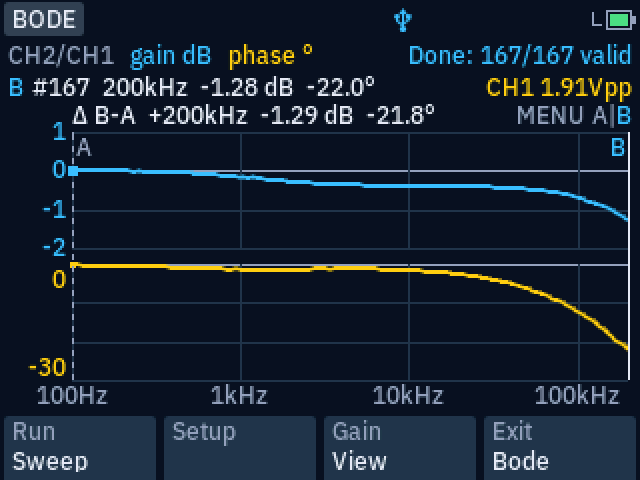
The Bode analyzer measures the frequency response of a circuit on the device: gain and phase against frequency, without a computer. It drives the circuit with the built-in generator and compares CH2 (the circuit output) with CH1 (its input). It works on the ZT703S and the ZT706S; on the ZT706S it has not been tested on a device yet.
- Connect the generator output to the circuit input and to CH1.
- Connect the circuit output to CH2.
- On the oscilloscope, in RUN, enable both channels.
- Open Analyze → Bode (FRA).
CH1 is the live reference, so any change of the generator level with frequency divides out.
| Row | |
|---|---|
| Start, Stop | The frequency range, from 1 Hz. When the sweep starts, the top is limited by the generator (see below) |
| Points/decade | 5, 10, 20 or 50 points per decade, log-spaced |
| Settle | Wait after each frequency change before measuring: 0 to 2000 ms. Give slow circuits more time |
| Averages | 1, 3 or 10 frames per point |
| Drive | ZT703S: the generator's own level (GEN), Dedicated, Low, High or Custom. ZT706S: shows the GEN amplitude |
| Custom low code, Custom high code | ZT703S, Custom: DAC codes 0–4095, low below high. ←/→ step by 1, ↑/↓ by 100 |
| Run sweep | Starts the sweep |
| Show plot | Back to the plot |
| Results | Peak, both −3 dB points, bandwidth, gain and phase margins |
| Save CSV | Saves the sweep |
At low frequencies one capture can take several seconds.
If the generator stops with a DAC underrun during a sweep, Bode discards the interrupted average and measures the same frequency again after the settle time. A second underrun at the same frequency ends the sweep; the points measured so far stay in the plot, the table and the CSV.
| ZT703S | ZT706S | |
|---|---|---|
| Source | Built-in DAC sine | Generator module sine at the GEN amplitude |
| Top frequency | Set by the DAC rate and the drive level | Set by the amplitude, for example 10 MHz at 3.0 V and about 995 kHz at 5.0 V |
| Per point | Settle time, then the capture | The module confirms each frequency first (about 0.5 s), then the settle time and the capture |
On the ZT706S, set the amplitude on the generator screen before the sweep.
| Key | Action |
|---|---|
| F1 | Start or stop the sweep |
| F2 | Setup; Back returns to the result |
| F3 | Cycle the views: both plots, gain at full height, phase at full height, the table. From Results, back to the plot |
| F4 | Close the Bode analyzer |
| MENU | Switch the active cursor, A or B |
| ← / → | Move the active cursor from point to point |
| ↑ / ↓ | Jump between markers on the plot; page through the table |
| HOLD/SAVE, long press | Screenshot of the current Bode screen (Screenshots and Captures) |
When a sweep starts, cursor A stays on the first point and B follows the last measured point. The top line shows the frequency, gain and phase at the active cursor, and the Δ B−A line the difference from A to B. Missing values show as --.
The gain and phase scales each fit the measured values, so the curves use the full height of their plots.
- The table lists each point by number with its frequency, gain and phase, and below it the signal level and input range of each channel at the active point.
- part avg marks a point with fewer good frames than Averages asked for.
- low CH2 marks a point where CH2 was too small and the gain is an estimate.
- Results shows the peak, both −3 dB points relative to the peak, the bandwidth between them, and the gain and phase margins with their crossover frequencies. Crossings are interpolated on a log frequency scale between good points. The gain margin uses the −180° phase crossing, the phase margin the 0 dB gain crossing; with several crossings the smallest margin is shown.
Setup → Save CSV writes a finished or stopped sweep to /openosc/FRA/FRAnnnnn.CSV (Files on the Device). The file starts with # key=value lines that describe the sweep, including the drive level (on the ZT706S the module amplitude in volts) and averaging, followed by one row per point: index, frequency, gain, phase, signal level, input ranges and quality flags.
- The capture uses 64K points, 32K per channel.
- The generator and capture commands over SCPI wait until the sweep ends.
- When the sweep ends, or you stop it or leave, the capture depth and the generator settings come back as they were.