Repository navigation
PerformanceInvestigation
한국어 · Documentation index · perf-investigation Skill
AgentMcp separates the process of measuring game interactions, identifying bottlenecks and verifying changes into a Skill, standalone measurement scripts, and MCP analysis tools. Rather than relying on average FPS alone, it measures the frames in which opening a screen, swapping items or dragging UI actually occurs.
Sonheim PR #6 is an applied example. AgentMcp owns reusable investigation tooling, while Sonheim owns project-specific playback scenarios and UI optimization code. This page focuses on the tooling.
Implement project-specific scenes (CSV_EVENT + CPU Trace scopes)
    → preflight.py : check background work and open editors
    → run.py       : warm up and repeat standalone game runs
    → perf_summarize_csv : examine steady frames and interaction spikes
    → run.py --trace → perf_trace_hotspots : find CPU causes
                  └─ ProfileGPU log → perf_read_gpu_profile : inspect GPU passes
    → Fix the identified cause
    → Repeat run.py under the same conditions
    → perf_compare_csv : compare changes and run-to-run spread
    → Review gameplay, visuals and memory costs
| Component | Responsibility | Code |
|---|---|---|
perf-investigation Skill |
Investigation sequence and measurement/interpretation rules | SKILL.md |
preflight.py |
Check editor, builds, background load and process-close approval | preflight.py |
run.py |
Warm-up launches, repeated standalone runs, CPU load sampling and validation | run.py |
| Project scene runner | Reproduce actual UI interactions, mark events and write CSV captures | Scene runner contract |
perf_* tools |
Interpret generated CSV, .utrace and game logs |
AgentMcpPerfTools.cpp |
Measurement and analysis happen at different times. run.py refuses to measure while the editor of the same project is open, avoiding CPU/GPU contention with the standalone game. Reopen the editor after the runs and use MCP tools to analyze the generated files.
AgentMcp cannot automatically know how to open a particular game's inventory. Each project implements a scene runner to set the view, camera and data, then replay fixed interactions.
The scene runner contract includes a development-only UGameInstanceSubsystem example and these conventions:
- Select scenarios with
-PerfScenes; leave regular play unaffected. - Use
-PerfLabeland-PerfRunand writeSaved/Perf/<label>/csv/<scene>_r<n>.csv. - Wait for the scene to settle before capture, and poll for completion of asynchronous CSV writing on later frames.
- Record
CSV_EVENTand an appropriately named CPU Trace scope at the operation being profiled.
// Example markers around the actual operation in project code
CSV_DEFINE_CATEGORY(PerfUI, true); // Define once in a suitable source file

// In the function that performs the interaction:
CSV_EVENT(PerfUI, TEXT("Open Inventory"));
TRACE_CPUPROFILER_EVENT_SCOPE_TEXT(TEXT("PerfUI Open Inventory"));
OpenInventory();
The CSV marker identifies the frame of the interaction; the Trace scope helps explain the function cost around that operation. If the game waits for a network reply, place the marker where the UI actually updates, not merely where input was sent.
preflight.py checks for project editors, builds, shader workers, and busy applications. It does not indiscriminately close applications. Only explicitly named --close targets may be closed; confirm before closing anyone's work.
run.py requires Python and psutil. The following is a shell command, not an MCP tool invocation:
python Plugins/AgentMcp/Skills/perf-investigation/scripts/run.py --uproject "<PROJECT.uproject>" --label before --map /Game/Maps/Main --runs 3 --game-args "-PerfScenes=OpenClose,InvSwap -PerfSeconds=10 -PerfWarmup=3 -PerfLabel={label} -PerfRun={run}"
/Game/Maps/Main and OpenClose,InvSwap are placeholders; use names supported by your project. The script does not create a scene runner or generate UI interactions by itself.
The script discards an initial warm-up launch and samples competing CPU use every second during subsequent launches. Runs with excessive background load are marked invalid and retried, within a maximum of twice the requested run count. The analysis tools exclude the runs listed in runs.json as invalid; development-build ensure events produce separate warnings.
The script restores GameUserSettings.ini after each launch to avoid leaking sg.* overrides into later runs. Match resolution, graphics settings, code revision, map and test data between baseline and candidate.
After reopening the editor, call perf_summarize_csv with:
{"folder": "Saved/Perf/before/csv"}Files named <scene>_r<n>.csv are grouped into runs of the same scenario. The result has these specific statistical meanings:
| Field | Meaning |
|---|---|
stats[].median |
Median of the per-run averages, not the median frame of all captures |
stats[].spread |
Maximum minus minimum of the per-run averages |
stats[].p95 |
Median of the per-run 95th percentiles |
events[].frameMedian |
For each CSV marker, take the longest frame in its window (three frames by default), then take the median over occurrences |
events[].gameThreadMedian |
Same event-window metric for Game Thread time |
events[].frameMax |
Largest frame-time observation across occurrences |
Frame averages describe ongoing cost; event statistics describe the hitch at an opening, swap or drag. Do not present event medians as average FPS improvements.
Unreal's CSV profiler may append columns during capture. The parser reads rows using the complete header repeated at the end of the CSV, rather than assuming the initial header describes every column.
A Trace identifies where the interaction spends time, rather than serving as the final before/after benchmark.
python Plugins/AgentMcp/Skills/perf-investigation/scripts/run.py --uproject "<PROJECT.uproject>" --label trace --map /Game/Maps/Main --trace --game-args "-PerfScenes=OpenClose,InvSwap -PerfSeconds=10 -PerfWarmup=3 -PerfLabel={label} -PerfRun={run}"
Reopen the editor and call perf_trace_hotspots:
{"traceFile": "Saved/Perf/trace/run.utrace", "markerPrefix": "PerfUI ", "thread": "GameThread", "top": 20}If necessary, the tool launches UnrealInsights.exe without showing a window, exports thread timing events beside the trace and analyzes the frame containing each marker plus subsequent frames. Outputs include selfMs, inclusiveMs, caller and maxSelfMs. Use bSkipFirst to exclude the first cold occurrence when appropriate.
For GPU analysis, run ProfileGPU in the game and parse the resulting log with perf_read_gpu_profile:
{"logFile": "Saved/Perf/before/game_r1.log", "minMs": 0.1, "maxDepth": 4}This log path is only useful if that run actually recorded a ProfileGPU dump.
Traces and ProfileGPU rank causes; repeated CSV runs measure outcomes. -statnamedevents and GPU profiling introduce overhead, so the traced or profiled timing numbers are not directly interchangeable with CSV before/after measurements.
Repeat the same scenario after the fix with --label after, then call perf_compare_csv:
{"baselineFolder": "Saved/Perf/before/csv", "candidateFolder": "Saved/Perf/after/csv"}For matching scenario/statistic columns, the tool returns candidate minus baseline. stats[].bBeyondNoise indicates that the absolute difference exceeds both runs' spreads. This is a run-to-run variation filter, not a formal statistical significance test. The tool also reports changes to event medians in events[], but does not compute a bBeyondNoise flag for individual events. Interpret event improvements alongside repeated observations and their conditions.
The Skill recommends six runs on each side for changes under 0.5 ms. A change indistinguishable from run variation may be rejected; changes such as widget reuse should also be evaluated for their memory costs.
The Sonheim scene runner reproduces menu reopen, inventory swap, drag-and-drop and other real interaction paths. The following values are taken from PR #6 and Wiki chapter 20: 1920×1080, RTX 2070 SUPER, medians of marked interaction events from three runs.
| Interaction | Before: Frame (Game Thread) | After: Frame (Game Thread) |
|---|---|---|
| Inventory item swap | 32.6ms (19.4ms) | 17.1ms (3.0ms) |
| Open inventory | 57.5ms (44.6ms) | 22.1ms (8.2ms) |

Insights analysis identified unnecessary repeated slot/tooltip reconstruction and widget creation on reopening screens. The actual optimization code lives in Sonheim: slot presentation updates, UIStack reuse, delegate lifetime and Render Target cleanup. These numbers are project-specific measurements, not a claim that merely installing AgentMcp automatically improves game performance.
After the earlier inventory measurements, an agent investigated previously unprofiled chest, quest and notice UI, identifying repeated screen construction, accumulated delegate bindings and a notice-feed error. The request, scenarios, traces and fixes are in the actual investigation log. This investigation is separate from the inventory measurements above.
| CSV run comparison | Unreal Insights trace analysis |
|---|---|
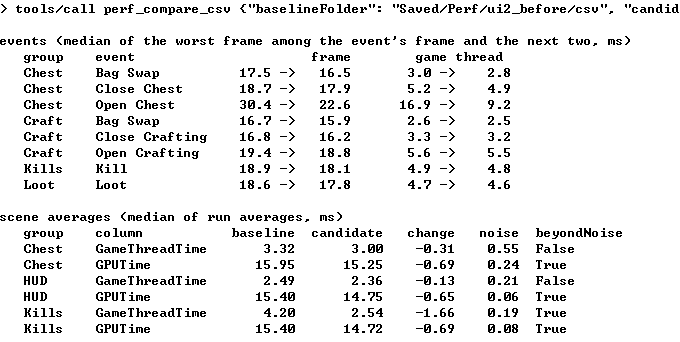 |
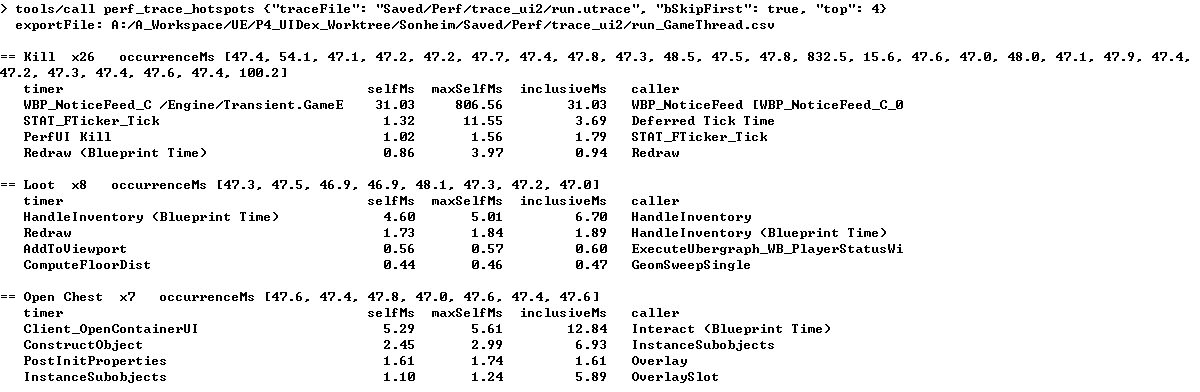 |
- Measurements require a runnable Development build and a project-specific scene runner. The Skill and MCP tools alone do not generate scenarios.
- Different UI paths, input timings, resolutions and cold/warm startup conditions produce different results.
- Evaluate cold creation separately from reopening reused UI, and review behavior and visual output after changes.
-
run.pymust run without the project editor; MCP analysis reads project-local output after reopening the editor. -
perf_trace_hotspotsrequires Unreal Insights and a CPU trace;perf_read_gpu_profilerequires a log containing aProfileGPUdump. - The two images above show MCP analysis outputs. The Sonheim frame comparison SVG is a chart built from measured values, not a screenshot of the Unreal Insights UI.
Tool input/output declarations · Performance workflow · Sonheim investigation and UI implementation