Repository navigation
UiStyleSystem
The dungeon UI sample keeps its look in a small design system: color and radius tokens and named styles in a theme data asset, widgets
that store a style name instead of brushes and fonts, and a kit gallery that shows all of it on one screen. Agents set it up, change it
and check it through the Agent MCP tools and the scripts of the ui-style-system
skill. This page describes the parts, how to work with them, and how the sample moved to them.
- Why
- The theme
- Styled widgets
- The kit gallery
- Working with the scripts
- Changing the style
- How the sample moved
- Limitations
The first three versions of the sample were built in conversation, one request at a time, and each screen got values of its own. When
images from the art request were connected, they matched neither each other nor the screens, and the screens had no single style to
match. This is what style_extract.py found in the Widget Blueprints before and after the change:
| Found in the Widget Blueprints | Before | After |
|---|---|---|
| Drawn widgets that use a theme style | none | 46 of 47 in the screens and components (59 of 60 with the gallery), with 28 styles |
| Colors of their own | 72 uses in 30 clusters, 9 of them near duplicates; one white outline at 10, 12, 25 and 45% opacity | none |
| Font sizes | 14, among them 18/19/20 and 13/14/15/16 | none (the text styles use 7 sizes) |
| Corner radii | 9: 0, 6, 8, 9, 12, 14, 16, 24 and half height | none (the tokens are 8, 14, 24 and half height) |
| Line widths | 4: 1, 1.5, 2 and 4 | none (the box styles use 1, 2 and 4) |
| Spacing | 17 values, 43% on a 4 unit grid | 7 values, all on a 4 unit grid |
The one drawn widget without a style is the reward slot's icon image, which code fills.
Web teams keep an interface consistent with design tokens, a component library, Storybook and screenshot tests. The sample uses the same ideas with Unreal parts:
| Web practice | Dungeon UI sample |
|---|---|
| Design tokens |
Colors and Radii of the theme data asset |
| CSS classes | Box, text, bar and button styles of the theme, applied by styled widgets through a Style name |
| Component library |
WBP_RewardSlot, WBP_StatTile and WBP_ObjectiveRow in Components
|
| Storybook | WBP_UiKitGallery |
| Screenshot tests (Chromatic, Playwright) | Play captures compared with capture_compare.py
|
| Token audit (CSS Stats, stylelint) | style_extract.py |
| Theme from an image (Material Theme Builder) | style_palette.py |
UAgentMcpSampleUiTheme in Source/AgentMcpTestbed/Public/AgentMcpSampleUiTheme.h is a data asset class, and
Content/Samples/DungeonUi/Data/DA_DungeonUiTheme is its asset. Config/DefaultGame.ini selects the asset; without one, the widgets
use the class defaults, which hold the same values.
| Property | Contents |
|---|---|
Colors |
25 colors in linear space, with opacity. Surfaces: Surface, SurfaceOverlay, SurfaceRaised, SurfaceHover, Scrim. Lines: Line, LineStrong. Text: Text, MutedText. Accent: Accent, AccentHover, AccentPressed, OnAccent. Gold: Gold, GoldDeep, GoldLight, OnGold. States: Success, Danger, DangerDeep, DangerTrack, DangerSoft, DangerLight. Effects: Shadow, Track. |
Radii |
Small 8, Medium 14, Large 24, and Pill, whose negative value rounds the ends by half the height. |
Boxes |
20 box styles, such as Card, HudPanel, Tile, SlotFrame, BadgeGold and the boxes of the button states: a fill token and opacity, a line token, opacity and width, a radius token, and optionally the content padding. |
Texts |
10 text styles from Display (52) to Label (14), bold except Body and Label: a font (Roboto when empty), typeface, size, default color token, and shadow and outline tokens. |
Bars |
Accent and Danger: track, fill and radius tokens. |
Buttons |
Primary and Secondary: a box style for the normal, hovered, pressed and disabled states. Without a hovered box the normal one is used, without a pressed box the hovered one, and without a disabled box the normal one at half opacity. |
Common to Legendary
|
The color and optional frame brush of each rarity, which the reward slot's code applies. |
Styles refer to tokens by name. Code reads colors the same way for states that data decides:
UAgentMcpSampleUiTheme::Get().GetColor(TEXT("Success")). The objective row colors open and completed objectives this way, and the HUD
timer pulses between Text and Danger in its last minute. A color token that the theme does not have draws magenta, so a typo shows
on screen.
Source/AgentMcpTestbed/Public/AgentMcpSampleStyledWidgets.h adds a style name to four UMG widgets. They apply the style whenever their
properties are synchronized, in the designer and in the game, and they are in the designer palette under Sample Styles.
| Class | Adds | The style sets |
|---|---|---|
AgentMcpSampleStyledBorder |
Style, a box style |
The background brush, and the content padding when the style has one |
AgentMcpSampleStyledText |
Style, a text style, and Color, a color token |
Font, color (the widget's token, otherwise the style's), shadow |
AgentMcpSampleStyledProgressBar |
Style, a bar style |
Track and fill brushes, with a white fill tint |
AgentMcpSampleStyledButton |
Style, a button style |
The brushes of the four states |
A Widget Blueprint stores only the names, and the umg tools set them like any other property:
{"class": "/Script/AgentMcpTestbed.AgentMcpSampleStyledText", "name": "TimerText", "properties": {"Style": "Heading", "Color": "Gold"}}Code that sets a brush or a color afterwards, such as a rarity frame or the timer pulse, still wins. A widget without a style, or with a style name that the theme does not have, keeps its own values.
CommonUI solves the same problem with UCommonTextStyle, UCommonBorderStyle and UCommonButtonStyle. These are abstract
Blueprint classes: each style is a Blueprint subclass whose class defaults hold the values. The Agent MCP tools cannot create such
Blueprint classes or edit class defaults, while a data asset is read and changed with object_get_properties and
object_set_properties. A CommonUI project can keep its style classes, made by a person, and use the rest of this page as it is.
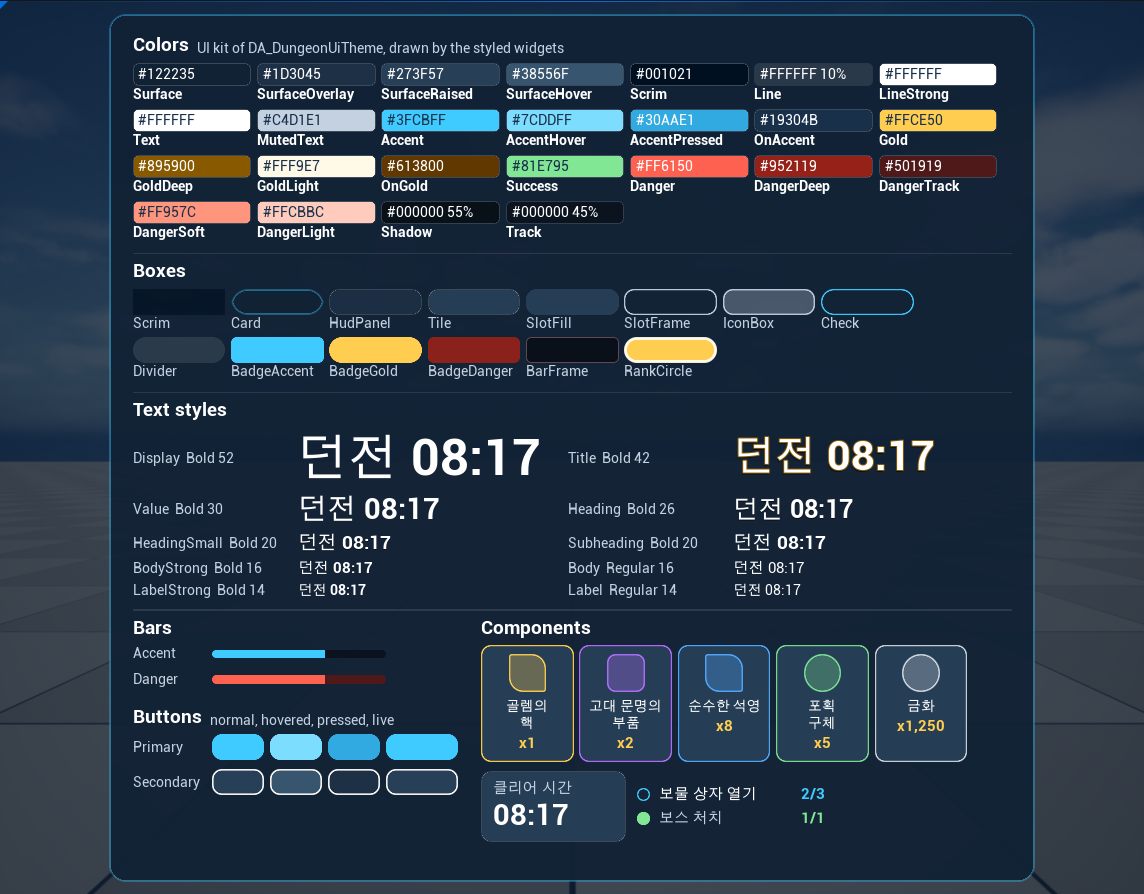
Content/Samples/DungeonUi/WBP_UiKitGallery is the sample's Storybook. Its C++ base, AgentMcpSampleUiKitGallery, fills five panels
from the theme whenever the widget is constructed, in the designer too, so a new token or style appears without editing the gallery:
| Panel, bound by name | Entries |
|---|---|
ColorList |
A swatch per color with its hex value and opacity |
BoxList |
A sample per box style, without the boxes of button states |
TextList |
Sample text in each text style, with the style's name, typeface and size |
BarList |
Each bar style at 65% |
ButtonList |
The normal, hovered and pressed boxes of each button style, and a live button |
The Widget Blueprint arranges the panels and places component instances in their states: a reward slot of each rarity, a stat tile, and an open and a completed objective. A capture cannot scroll, so the page has a fixed size of 1280 × 1200 inside a scale box that only scales down; the testbed's 1144 × 894 play viewport draws it at about 72%. At that scale the names of two reward slots wrap onto a second line, which is how the slot behaves at a small UI scale.
Show it like any screen:
pie_start {"windowWidth": 1144, "windowHeight": 894}
sample_show_widget {"widgetClass": "/Game/Samples/DungeonUi/WBP_UiKitGallery.WBP_UiKitGallery_C"}
viewport_capture
pie_stop
The scripts are in Plugins/AgentMcp/Skills/ui-style-system/scripts. They need only Python's standard library and write their reports
to Saved/UiStyle of the folder they run in, so run them in the project folder. In Git Bash, set MSYS_NO_PATHCONV=1, or /Game
arguments turn into Windows paths.
style_extract.py reads the Widget Blueprints of a folder and the theme through the server and writes an HTML and a JSON report:
styled widgets by style, widgets with a look of their own, color clusters with their uses and matching tokens, near duplicates, font
sizes, radii, line widths, spacing with its fit to a 4 and an 8 unit grid, fixed sizes and textures.
python Plugins/AgentMcp/Skills/ui-style-system/scripts/style_extract.py --url http://127.0.0.1:18766/mcp --path /Game/Samples/DungeonUi --theme /Game/Samples/DungeonUi/Data/DA_DungeonUiTheme.DA_DungeonUiTheme
Values are counted as Slate draws them: an outline with bUseBrushTransparency, the default of UMG button brushes, takes the opacity of
its fill instead of its own. Colors that code sets at runtime are not in the Widget Blueprints.
style_palette.py extracts the surfaces, lights and accents of a style frame image as sRGB and linear values. With --compare and
an extraction report, each color gets the closest color that the Widget Blueprints use and its token.
python Plugins/AgentMcp/Skills/ui-style-system/scripts/style_palette.py Art/Style/style_frame_dungeon_result.png --compare Saved/UiStyle/<extraction>.json
capture_compare.py compares two captures of the same size: the mean difference and the share of changed pixels in a region, and
an HTML report that marks the changed pixels in red.
python Plugins/AgentMcp/Skills/ui-style-system/scripts/capture_compare.py before.png after.png --region 258 150 886 740 --name result_card
-
A value. Change the theme asset with
object_set_properties. A struct value may list only the fields to change, but a map value replaces the whole map: read it withobject_get_properties, change the entry, and write the complete map. The read-back shows map keys as declared (LineStrong); names compare without regard to case, but write them as declared. - A new token or style. Add it to its map and use the name. Only a new kind of style, such as a new field or a styled widget for another class, needs C++ and a build with the editor closed.
- When it shows. Styled widgets read the theme when they are synchronized, so a change shows the next time a widget is constructed, for example in the next play session.
- The gallery first. Capture the gallery before and after a change and compare the two, then the screens that use the changed style.
- Class defaults. The constructor of the theme class holds the same values as the asset. They are the fallback when no theme is selected and the starting values of a new theme asset.
The skill offers two directions: move toward the style frame, a mockup image, or keep the existing look and clean it up. The user chose to keep the look.
-
Tokens. Each cluster of near-equal values in the extraction became one token or style: the four opacities of the white outline became
LineandLineStrong, 14 font sizes became 10 text styles on 7 sizes, and 9 radii became three andPill. -
C++. The theme maps, the styled widgets and the gallery base, then a build with the editor closed.
-
Baseline. A play capture of the demo screen before any Widget Blueprint changed.
-
New trees. The tools cannot change the class of a widget. A script read the five Widget Blueprints with
umg_inspect, replaced everyBorder,TextBlock,ProgressBarandButtonwith its styled class and a style name, dropped the brush, font and color values that the style provides, and snapped slot paddings to the 4 unit grid (10 → 12, 22 → 24 and so on). For each Widget Blueprint it removed the root withumg_remove_widgetsand added the new tree withumg_add_widgetsunder the same names, so everyBindWidgetstayed bound, and it would have undone the removal if adding had failed. All five compiled without errors. -
Review. Captures of the demo screen after the change were compared with the baseline.
- Layout and content were the same. The result card became 34 px taller (535 → 569 px in the 1144 × 894 capture), from the snapped
paddings and the text sizes of the scale (18 → 20, 13 → 14). Because everything below its title moved,
capture_compare.pymarked 24% of the card region as changed, and the review was by eye. - In the first capture after the change both buttons looked dim. A capture at 3 s and one at 6 s of the same session differed in 3% of the card, all in the buttons and the experience count: the 3 s capture had caught the fade-in of the intro, which lasts 2.75 s but can start late in a new play session. Captures now wait until the intro has finished.
- At 6 s one real difference was left: the retry button's outline was dim. The old brush had a white outline at 25% opacity with
bUseBrushTransparency, the default of UMG buttons, and with that flag Slate draws the outline with the opacity of the fill (DrawElementTypes.cppin SlateCore), so the outline had been opaque on screen.LineStrongbecame opaque white,LineHoverwas removed as a duplicate, andstyle_extract.pynow reads outlines the way Slate draws them. The 1 unit gray outline that the confirm button had from the same default was left out on purpose.
- Layout and content were the same. The result card became 34 px taller (535 → 569 px in the 1144 × 894 capture), from the snapped
paddings and the text sizes of the scale (18 → 20, 13 → 14). Because everything below its title moved,
-
Remaining values. The next extraction found two values outside the grid and the theme: the boss objective's accent color, which became the color token input
OpenColor, and the reward list's entry spacing of 10, which became 12. -
Gallery. The first layout of the gallery was too tall for the play viewport and was drawn at 40%, and the second overflowed it. The final page has a fixed size, two columns of text styles, and entries wide enough for the longest names.
-
Freeze. The user approved the gallery. Its capture and the captures of the result popup and the HUD became the baseline in
Art/Style/baseline/, and Art/Style/ui_style.md was written again from the theme values. Oncepie_startcould open a play window of a set size, the baseline was captured again in a 1144 × 894 window: captures in the level viewport depend on the editor window, and their edges differed from window captures by 3 to 7% of the pixels.
Every step after the C++ build went through the tools and the scripts; nobody opened the UMG designer.
- The tools cannot change the class of a widget, so moving a screen to styled widgets rebuilds its tree.
- Styled widgets exist for borders, texts, progress bars and buttons. Images, check boxes, sliders and CommonUI widgets have no styled class yet.
- The extraction sees Widget Blueprints only. Colors that code sets at runtime use tokens in the code and are checked by reading it.
- A map of the theme can only be written as a whole through
object_set_properties. - The baseline captures come from a 1144 × 894 play window (
pie_startwithwindowWidthandwindowHeight); captures to compare need the same window size.