Repository navigation
Samples DungeonUi
This document is more than a screenshot gallery. It records how Claude Code used Agent MCP tools and skills to build UMG UI, receive review feedback, and improve both the UI structure and the plugin workflow.
The sample is a dungeon progress HUD and result popup in the style of a creature-collecting survival game. It was built in the Agent MCP testbed, and the UMG Designer was never opened during the authoring process.
Flat Widget Tree
      ↓ review
Reusable Widget Blueprint Components
+ C++ BindWidget Contracts
+ DynamicEntryBox
      ↓ review
Theme Data Asset
+ DataTable
+ Art Request Pipeline
+ Capture-based Review
This case study tests whether an agent can:
- create and edit Widget Blueprints entirely through MCP tools
- preserve C++
BindWidgetcontracts while restructuring UI - replace copied subtrees with reusable Widget Blueprint components
- replace fixed copies with data-driven lists and a Theme Data Asset
- review its own changes through PIE and viewport captures
- keep tool capability separate from project-specific authoring rules by moving those rules into skills
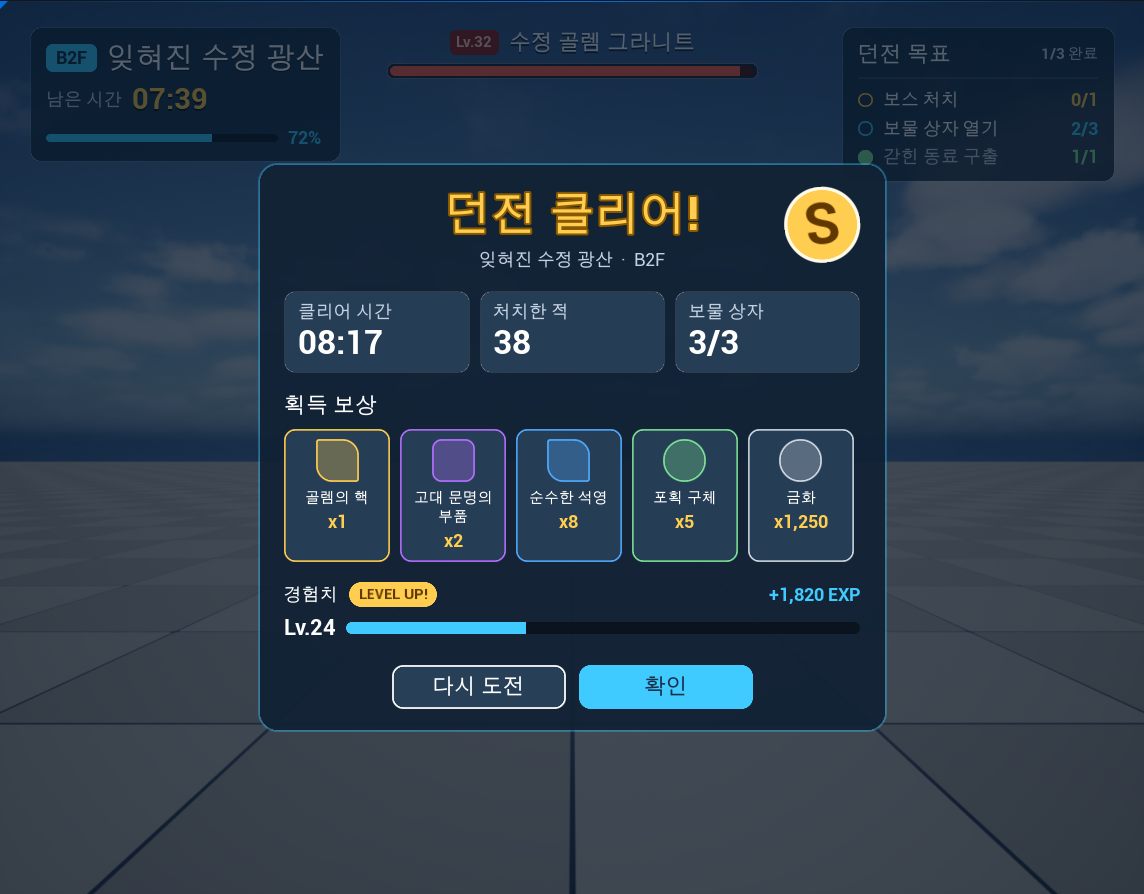
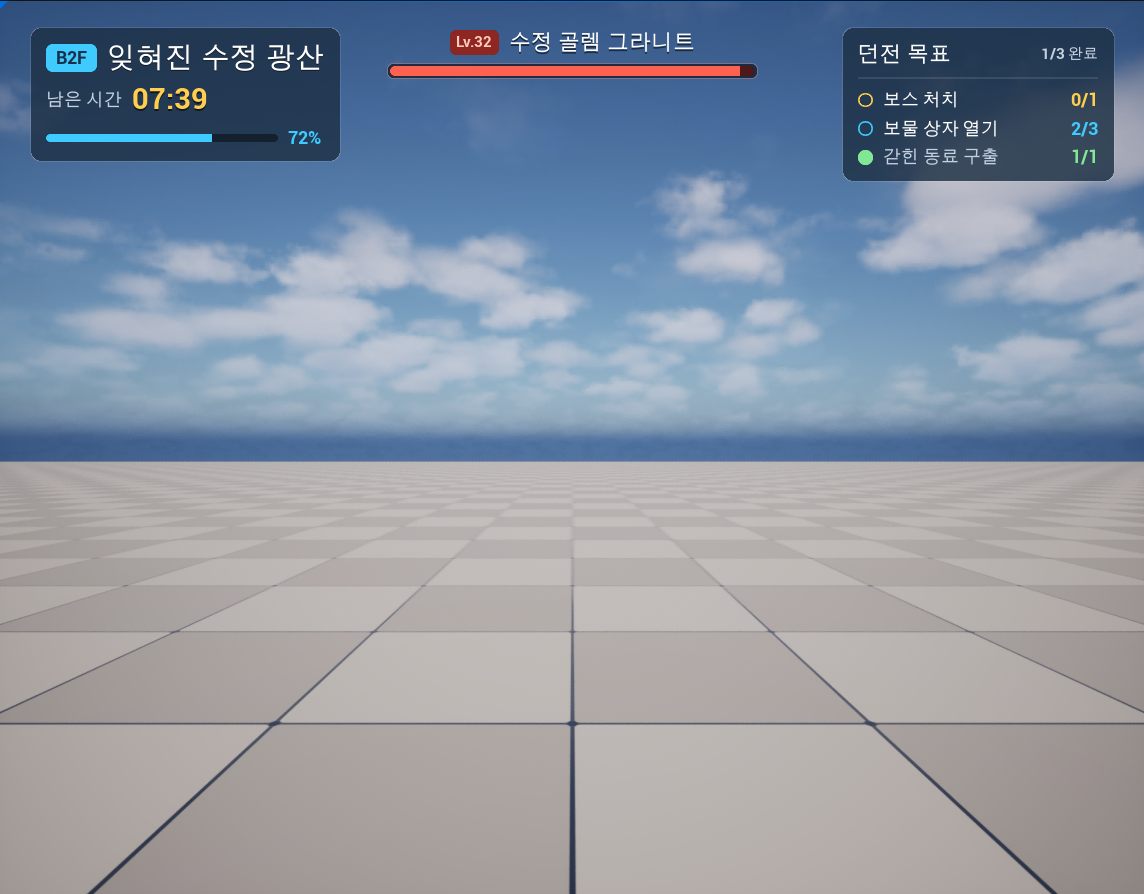
Asset under /Game/Samples/DungeonUi
|
C++ class | Role |
|---|---|---|
Components/WBP_RewardSlot |
AgentMcpSampleRewardSlot |
Reusable reward slot with icon, name and count. Reward is an item-table row plus count; rarity colors and frames come from the theme. |
Components/WBP_StatTile |
AgentMcpSampleStatTile |
Reusable statistic tile with a large value and label. |
Components/WBP_ObjectiveRow |
AgentMcpSampleObjectiveRow |
Reusable objective row with check mark, label and done/total values. |
WBP_DungeonHud |
AgentMcpSampleDungeonHud |
HUD composed from timer/progress, objective-row instances and a boss health bar. |
WBP_DungeonResult |
AgentMcpSampleDungeonResult |
Result card composed from stat tiles and a DynamicEntryBox reward list. |
WBP_DungeonDemo |
UserWidget |
Demo screen containing the HUD and result screen. |
WBP_UiKitGallery |
AgentMcpSampleUiKitGallery |
Kit gallery showing every color, box, text, bar and button style of the theme and the components in their states. |
Data/DA_DungeonUiTheme |
AgentMcpSampleUiTheme |
Theme Data Asset with color and radius tokens, the box, text, bar and button styles made of them, and a color and an optional frame brush per rarity. Config/DefaultGame.ini selects it. |
Data/DT_DungeonItems |
AgentMcpSampleItemRow |
Item table with name, rarity, icon texture and fallback presentation. |
The C++ classes live under Source/AgentMcpTestbed. The Widget Blueprints draw with the styled widgets of AgentMcpSampleStyledWidgets.h, which store a style name and take their look from the theme; the UI style system describes them. The texts are Korean; Roboto has no Hangul glyphs, so they render with the engine's fallback font.
Open the testbed as described in Testbed and smoke test, then call:
pie_start
sample_show_widget {"widgetClass": "/Game/Samples/DungeonUi/WBP_DungeonDemo.WBP_DungeonDemo_C"}
viewport_capture
pie_stop
Wait about five seconds before viewport_capture, until the intro animation has finished: it lasts 2.75 seconds but can start late
in a new play session. The kit gallery is shown the same way with /Game/Samples/DungeonUi/WBP_UiKitGallery.WBP_UiKitGallery_C.
The initial request was a HUD and result popup that looked like a commercial game. Claude Code wrote C++ bases for data and motion, then built each screen in one umg_add_widgets call.
- HUD: 48 widgets
- result popup: 78 widgets
Brushes, fonts and slot layout were all authored inline. The screens appeared quickly, but the structure was flat.
The first viewport_capture showed blue-tinted progress bars. ProgressBar multiplies its fill brush by FillColorAndOpacity, whose default is blue, so one umg_set_widget_properties call changed it to white.
A more important issue was tool output size. The two umg_add_widgets calls returned roughly 30,000 and 52,000 characters because the tool read back full struct values, and the second exceeded Claude Code's tool-output limit.
The implementation was changed to read back only the fields named by the request, then verified through Live Coding and the smoke test.
The sample therefore improved not only the UI, but also the tool-result design used by the agent.
Review of the first version found:
- five copied reward slots
- three copied stat tiles
- three copied objective rows
- 38 inline brushes
- a reward list that could not grow from data
The problem was not that umg_add_widgets lacked features. The important missing piece was guidance about what kind of UI structure the agent should build.
Componentization and data separation are authoring practices, not intrinsic behavior of an editor tool. Those rules therefore moved into the umg-authoring skill instead of expanding every tool description.
Tools are responsible for things such as:
- inspecting Widget Blueprints
- creating and editing Widget Trees
- validating
BindWidgetcontracts - compiling, starting PIE and capturing the viewport
The skill is responsible for guidance such as:
- turn repeated elements into separate Widget Blueprint components
- keep C++
BindWidgetcontracts stable - use
DynamicEntryBox,ListVieworTileViewfor data-driven entries - centralize style values in a Theme Data Asset
- review changes through PIE captures
The guidance began as a Claude Code-only skill under .claude/skills. The plugin later gained skills_get, so Codex and other MCP clients can read the same skill directly from the editor.
The UI was rebuilt by following umg-authoring.
-
Plan
- components: Reward Slot, Stat Tile, Objective Row
- data:
Reward, Label/Value, Done/Total - dynamic list: Rewards
-
C++ component bases
-
BindWidgetcontracts - instance-editable inputs applied in
NativePreConstruct - runtime setters
- screens pass data into components instead of reaching into their child widgets
-
-
Component Widget Blueprints
umg_create_widget_blueprintumg_add_widgetsblueprint_compile
-
Restructure the screens
- dry-run
umg_remove_widgetsto inspect affected widgets and bindings - remove 19 copied widgets from the HUD and 48 from the popup
- replace them with Reward Slot, Stat Tile and Objective Row instances
- replace fixed rewards with
DynamicEntryBox+EntryWidgetClass
- dry-run
-
Review
- compile components first
pie_startsample_show_widgetviewport_capturepie_stopasset_save
The smoke test also gained checks for:
- instance properties on Widget Blueprint instances
- a
DynamicEntryBoxentry class - rejection of a Widget Blueprint nested inside itself
The next review asked for presentation that could change without a C++ build.
Three tools were added or expanded for that workflow:
asset_createasset_import_textures-
object_set_propertiesextended to project assets
The structure then changed to:
- move color constants into a Theme Data Asset class
- move item presentation into a DataTable
- represent a reward as an item-table row plus count
- draw fallback shapes when icon textures are missing
- expose result-popup motion values as data
asset_create produced DA_DungeonUiTheme and DT_DungeonItems, and datatable_add_rows populated the item rows.
After changing Accent and Legendary colors through object_set_properties, a new capture showed the updated play result without rebuilding C++.
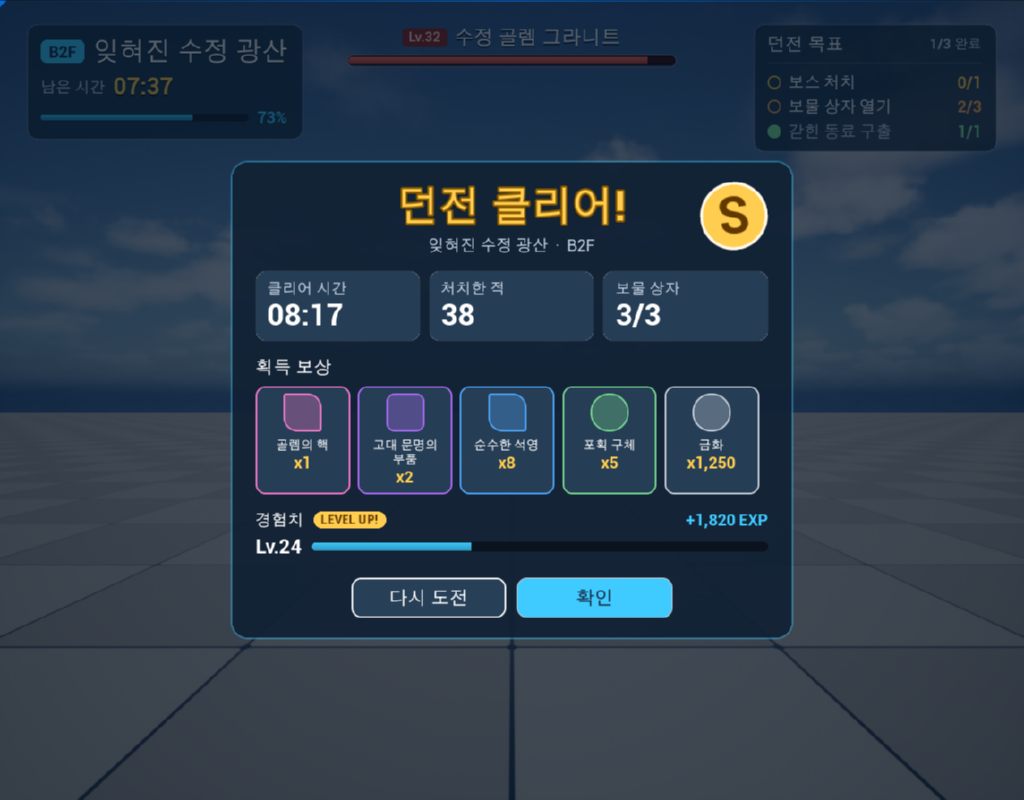
Image assets that cannot be represented as theme data are described in Art/Requests/dungeon_ui.json.
The current request includes:
- five item icons
- rare / epic / legendary slot frames
- result-card panel
Each entry records its size, alpha requirements, 9-slice border, target texture path and where the texture will be connected.
The ui-art-requests skill connects them through this workflow:
UI Agent
  ↓ request JSON
Image Model / Agent / Artist
  ↓ delivered image
Automated Review
  ↓
Texture Import
  ↓
Data / Theme / Widget connection
  ↓
PIE Capture
  ↓
User Review
This extends Agent MCP from Widget Tree manipulation into a broader UI production workflow.
Connecting the first images from the art request showed that they matched neither each other nor the screens, and that the screens had no single style to match. style_extract.py of the new ui-style-system skill found 30 color clusters, 14 font sizes, 9 corner radii and 17 spacing values in the six Widget Blueprints. The user chose to keep the look and clean it up.
- Tokens and styles. The theme data asset gained maps of color and radius tokens and of box, text, bar and button styles made of them, holding the values the screens already had, one per role.
-
Styled widgets. Subclasses of
Border,TextBlock,ProgressBarandButtonstore a style name and apply the style from the theme. -
New trees. A script replaced the drawn widgets of the five Widget Blueprints with styled widgets through
umg_remove_widgetsandumg_add_widgets, keeping the names andBindWidgetcontracts, and snapped paddings to a 4 unit grid. -
Review. Captures before and after showed the same layout with a slightly taller result card. One apparent difference was an intro that was still fading in; the one real difference, the retry button's outline, was fixed in the theme and in
style_extract.py. -
Kit gallery.
WBP_UiKitGalleryshows every token, style and component on one screen.
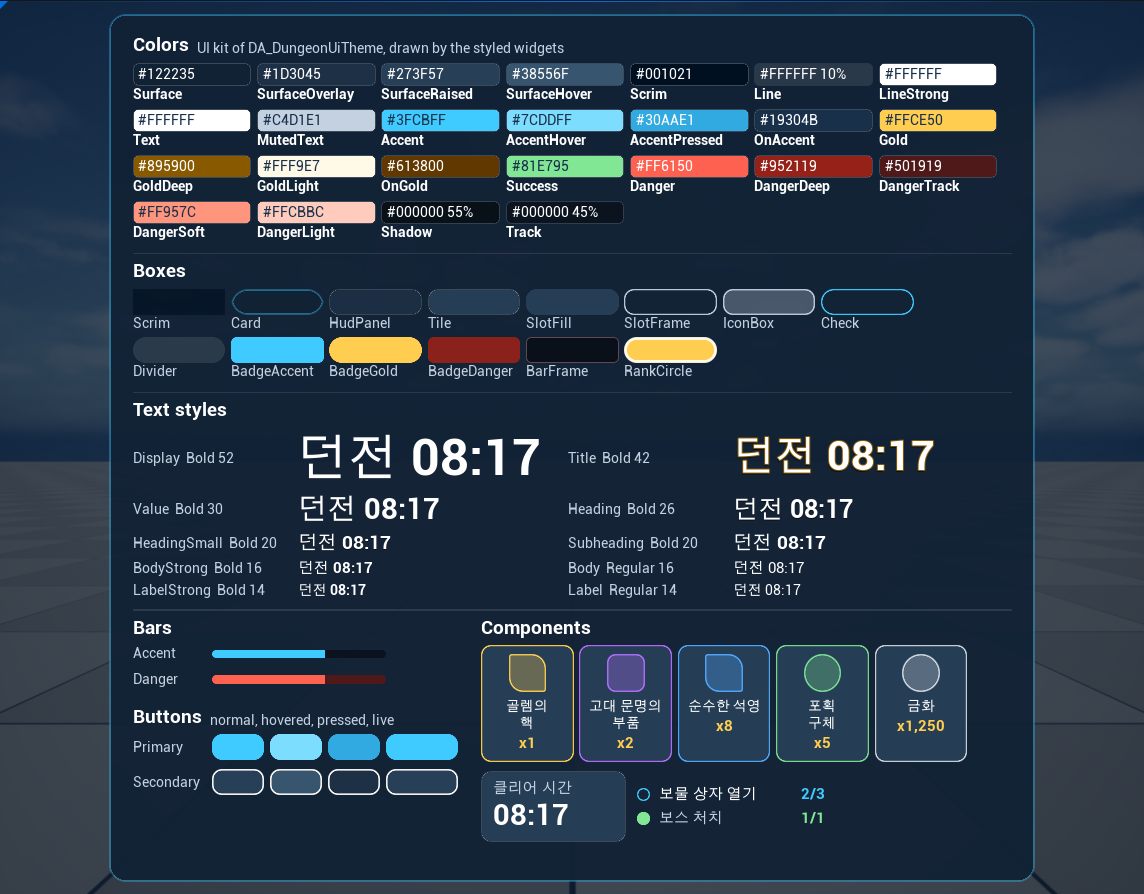
Afterwards the extraction finds no colors, font sizes, radii or line widths of their own in the Widget Blueprints, and all spacing on a 4 unit grid. UI style system describes the parts, the scripts and the review in detail. The user then froze the style: Art/Style/ui_style.md holds its values and rules, and Art/Style/baseline/ its approved captures.
The sample is both a demo and a design test for the plugin itself.
- oversized tool results → read back only requested fields
- flat UI → move authoring rules into
umg-authoring - Claude Code-only guidance → serve skills directly through MCP
- inline style values → add Theme Data Asset and DataTable workflows
- placeholder art → add
ui-art-requests - style values scattered per screen → extract them with
ui-style-system, then keep tokens and styles in the theme - judging results from text → use PIE + viewport capture review
In other words, real agent failures were fed back into both tool and skill design.
- UMG Widget Animation creation/editing is not supported yet; the intro is code in the C++ base with its values in data. The planned experiment is documented in WidgetAnimationAuthoring.md.
- The icons, frames and card panel are still placeholder shapes: the first delivered images were sent back for revision.
- There is no tool for directly moving a widget to another parent or changing its class yet; restructuring removes a subtree and re-adds component instances under the new parent.