Data Store and Management
When Data is generated from the tool it needs to be stored. The tool provides the solution for storing data locally and remotely. The user has the option to do either or both.
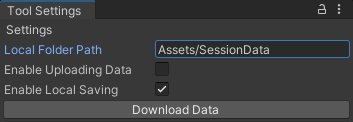
Data will generate a folder with the data, name and UUID as its name. The folder contains all JSON files generated from the play session each labelled with their name and date of creation. files with the same name will be numbered.

{
    "_id": "b975d30a-aa84-4559-9714-6dc6f8f82daa",
    "SceneName": "SampleScene 1",
    "UniqueID": "b975d30a-aa84-4559-9714-6dc6f8f82daa",
    "objectName": "progressionData",
    "sessionName": "b975d30a-aa84-4559-9714-6dc6f8f82daa",
    "dateCreated": "21-03-22",
    "trackedPositions": [],
    "trackedProgressions": []
}- _id: Unique ID generated by the MongoDB database.
- SceneName: name of the scene the was collected on.
- UniqueID: Unique ID generated by the tool for this specific JSON file.
- objectName: Name of the game object the data was generated on.
- sessionName: a unique ID generated for all JSON files in this set of Session data.
- dateCreated: date the data was created on.
- trackedPosition: collection movement tracked data.
- trackedProgression: collection of progression tracked data.
Saving locally when activated will save all generated session data to the local folder path in the settings menu.