Repository navigation
Commits and Time
Search Git history instead of today's files, narrow any search to a window of time, or search the code as it was at a release.
Every query searches one of two things:
| The query has… | It searches | Each result is | Text matches |
|---|---|---|---|
| No history operator | Current files | A file name, a code line, or a definition | File names and contents |
author:, message: or type:commit
|
Git history, newest first | A commit, opened as a diff | The lines each commit added or removed, or its message |
type:added or type:removed
|
Git history, newest first | A commit, opened as a diff | Only the lines each commit added (or removed), never its message |
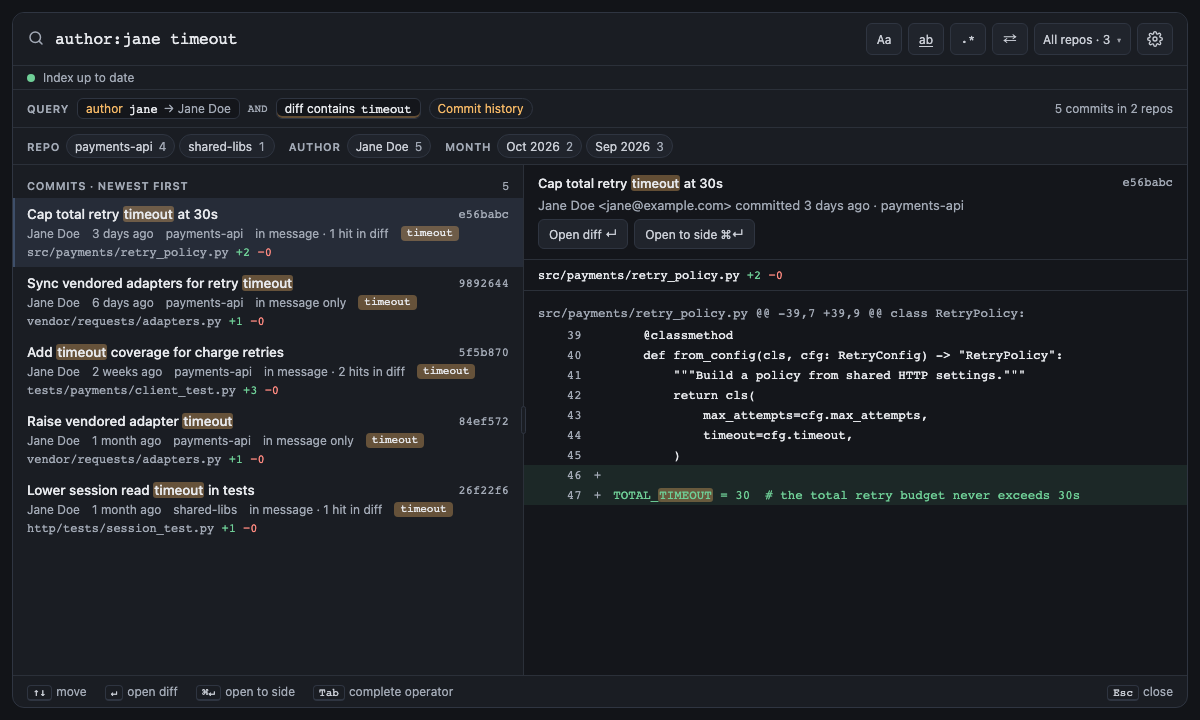
So author:jane timeout finds Jane's commits that mention timeout in a changed line or in the message, not files
that mention it today. Each commit says where it matched ("in message · 3 hits in diff", "in message only"), and
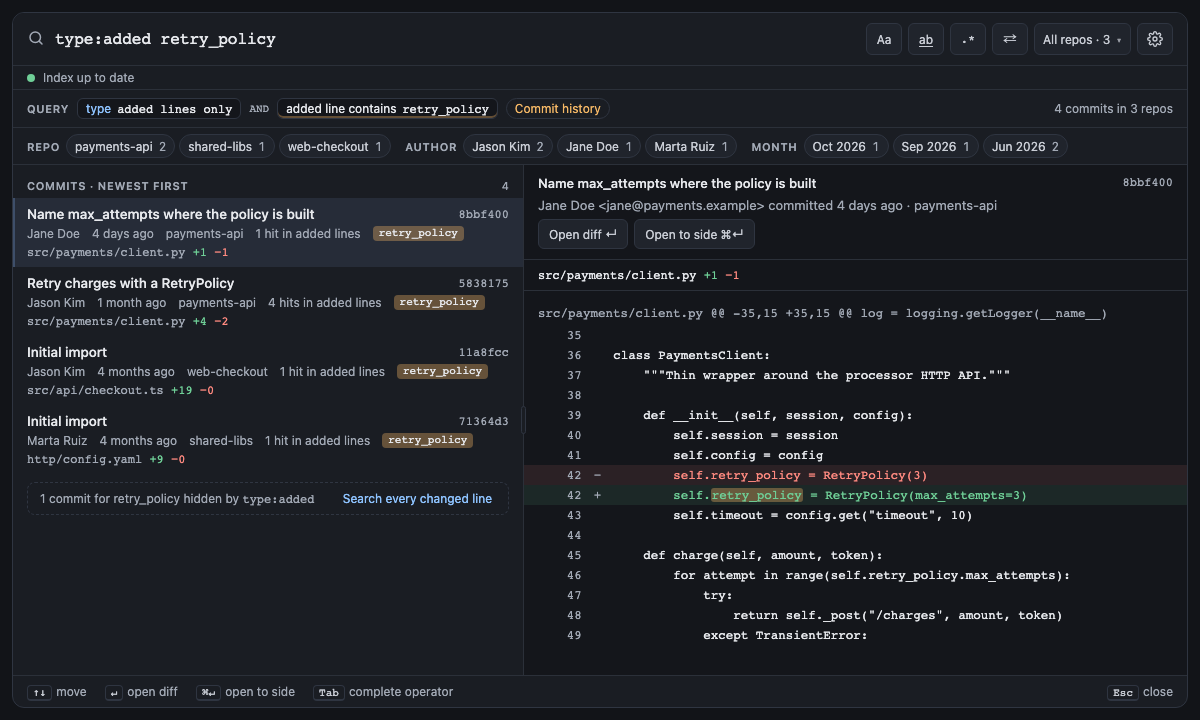
message:timeout searches the message alone. type:added retry_policy answers "who introduced this?": only +
lines count, each commit says "3 hits in added lines", and its preview marks only those lines. type:removed asks
when something went away. A note counts the commits that matched only elsewhere ("1 commit for retry_policy hidden
by type:added · Search every changed line", which switches to type:commit). Operators
marked "Both" adapt: file: keeps commits that changed a matching path, and since: keeps commits made in the
window. On current files, since: uses each file's last commit, and a file with uncommitted edits counts as
changed now.
A Jupyter notebook's changes are its cells' source: a commit that only re-ran a notebook (new outputs and run numbers) changed nothing a search sees, and a one-line edit counts as one line, shown in the preview under its cell (Cell 2 · Python), numbered within it.
symbol:, kind:, ref:, owner:, at:, is:open and is:changed only work on current files, and author: and message: only
on history, so the panel flags author:jane symbol:Foo and offers to remove symbol:Foo. For the same reason both sides of an OR must search the
same thing: author:jane OR file:x is an error.
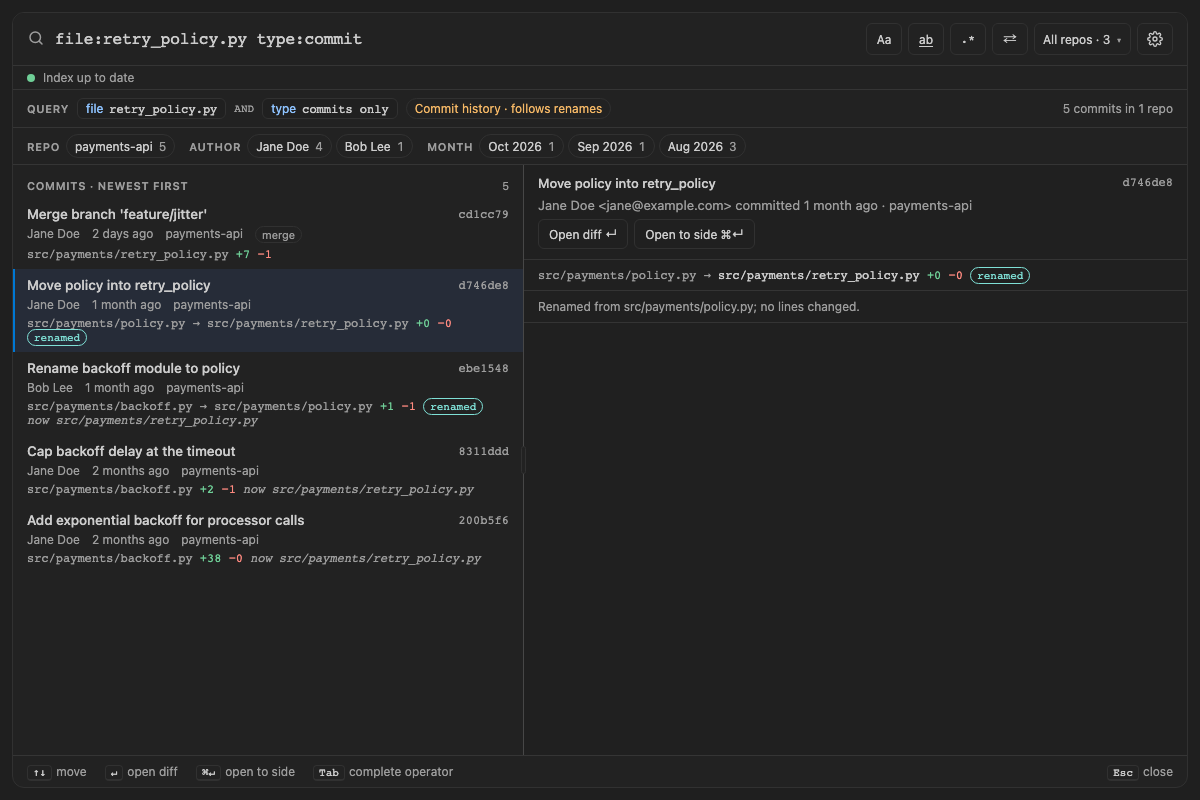
History follows a file through its renames. file:retry_policy.py finds every commit that changed the file,
including the ones made while it was called backoff.py or policy.py: each of those says what the file is called
now (now src/payments/retry_policy.py), and the commit that renamed it lists it as
src/payments/policy.py → src/payments/retry_policy.py, marked renamed. A rename is one change: a commit that
only moved a file adds and removes no lines, so type:added "def next_delay" finds the commit that wrote the line,
not every commit that moved it, and previewing a pure rename says "Renamed from src/payments/policy.py; no lines
changed." With file: the mode chip says Commit history · follows renames.
file: matches a commit's file by its path then, its old path in the commit that renamed it, or its name now. So an
old name finds the file while it had that name, and the commit that renamed it away, not what came after;
-file:retry_policy.py leaves the file out under every one of its names. Git decides what a rename is: a file moved
with at most half its lines changed. A file rewritten beyond that, or copied (the original stays), starts a history of
its own. Git also leaves out renames in a commit that renames more files than its rename limit (1,000 by default):
such a commit shows as deletes and adds.
Merged branches are off by default: history follows the line of the branch you have checked out, where a merge
holds everything its branch changed, credited to whoever merged it. With spelunk.index.mergedBranches on, history
also reads each commit a merge brought in from another branch, under its own author:
-
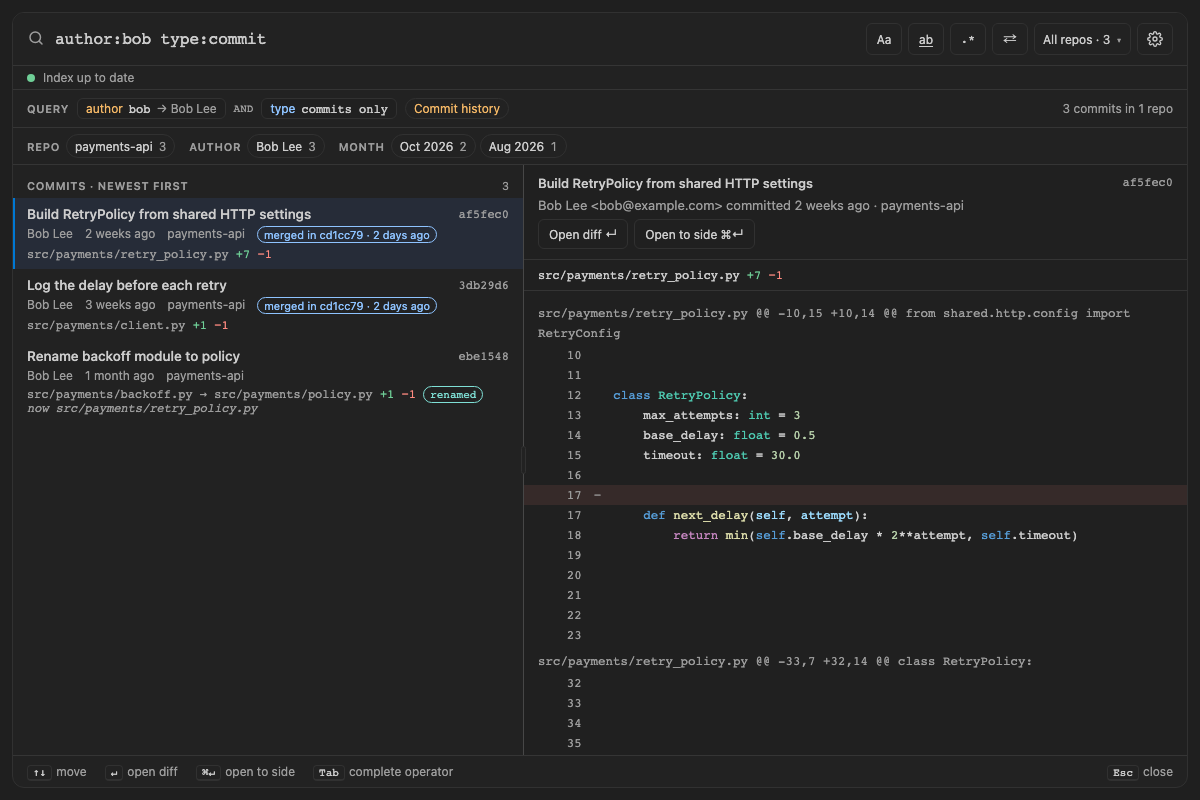
author:bobfinds Bob's commits on a branch Jane merged, each marked merged in cd1cc79 · 2 days ago. - A line that only ever existed on the branch, changed again before or during the merge, is found in the commit that wrote it.
-
since:,until:, the order of results (newest first) and the month facet go by when a commit landed: the date of the merge that brought it in. Sosince:1wstill finds work merged this week, even if it was written a month ago, and each branch's commits come right after their merge. - A merge, marked merge, holds only what it changed itself: the lines it resolved a conflict with, marked conflict resolved, without the conflict's two sides. A merge that needed no resolution, like an octopus merge of several branches, has no changes of its own, and its preview says so.
- Query watches count each new matching commit a merge brings in.
Reading every merged branch costs time and memory on a busy repo: the Linux kernel's last 2 years hold 5,702 commits on the branch's own line and 175,670 with every merged branch, read in 2 min 13 s instead of 56 s, using about 3 times the memory (1.8 GB instead of 535 MB) and a saved index of 530 MB instead of 344 MB. It needs Git 2.36 or later; with an older Git, history keeps to the branch's own line. Changing the setting reads each repo's history again.
Screen 59: History through renames: a file's commits under every name it had, renames marked, and the name each file has now · Screen id history-renames · milestone 2.1
file:retry_policy.py type:commit lists all five commits of a file that started as backoff.py, was renamed to
policy.py with an edit, then moved to retry_policy.py unchanged: the two renames say renamed and show the old
and new path with only the lines they edited, and the older commits say now src/payments/retry_policy.py. Before,
only the last two showed, the move as 39 added lines. type:added "def next_delay" finds only the commit that wrote
the line. With spelunk.index.mergedBranches on, author:bob type:commit lists Bob's two commits from a branch Jane
merged, each merged in cd1cc79 · 2 days ago, and the merge itself shows the one line it resolved a conflict with,
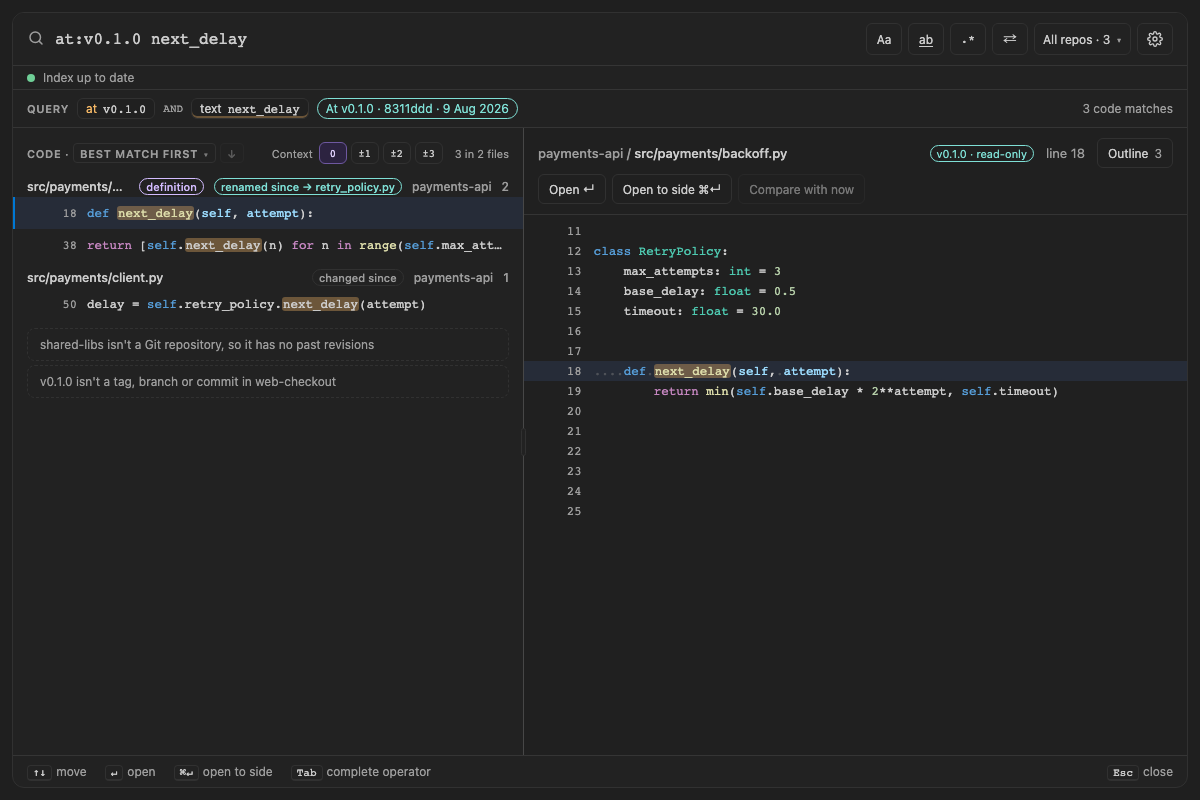
conflict resolved. at:v0.1.0 next_delay says backoff.py was renamed since → retry_policy.py rather than
deleted.

The built panel
| Short | Takes | Searches | Example |
|---|---|---|---|
a: |
Part of a name or email (jane, @acme.dev), or an exact name in quotes ("Jane Doe", not compared with emails), after .mailmap
|
Commits only | author:jane timeout |
Screen 3: author: + f: + text → commit diffs · Screen id author-history · milestone M3

The built panel
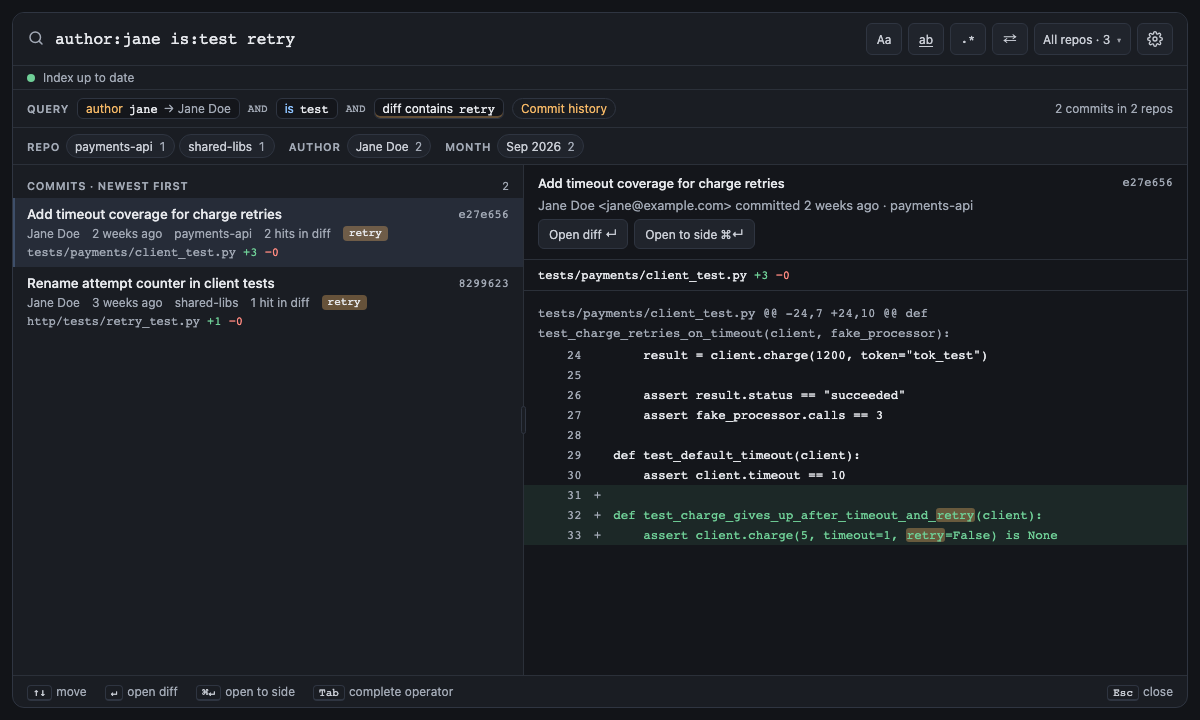
Screen 27: author: + is:test → the test changes in commits · Screen id test-history · milestone 1.1
In a commit search is:test works like file:: Jane's commits that touched a test file, with the other files
hidden until Show all.

The built panel
| Short | Takes | Searches | Example |
|---|---|---|---|
msg: |
Words, a "phrase" or a /regex/ on the commit message |
Commits only | message:"fix flaky" |
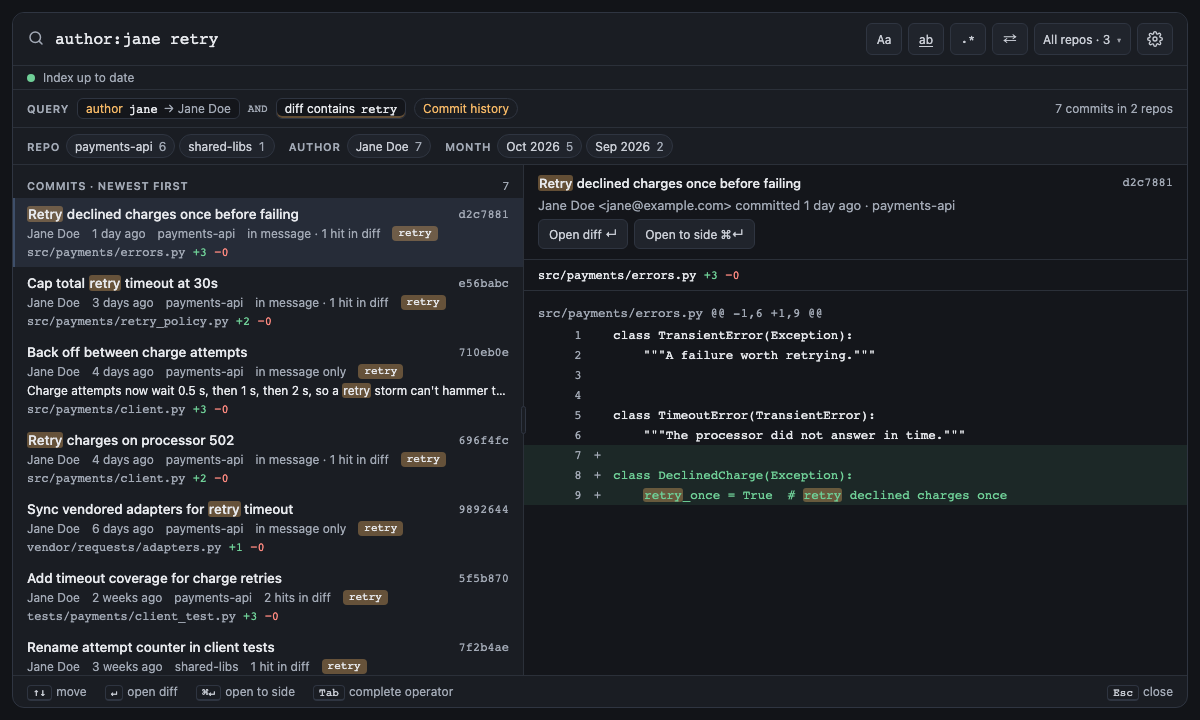
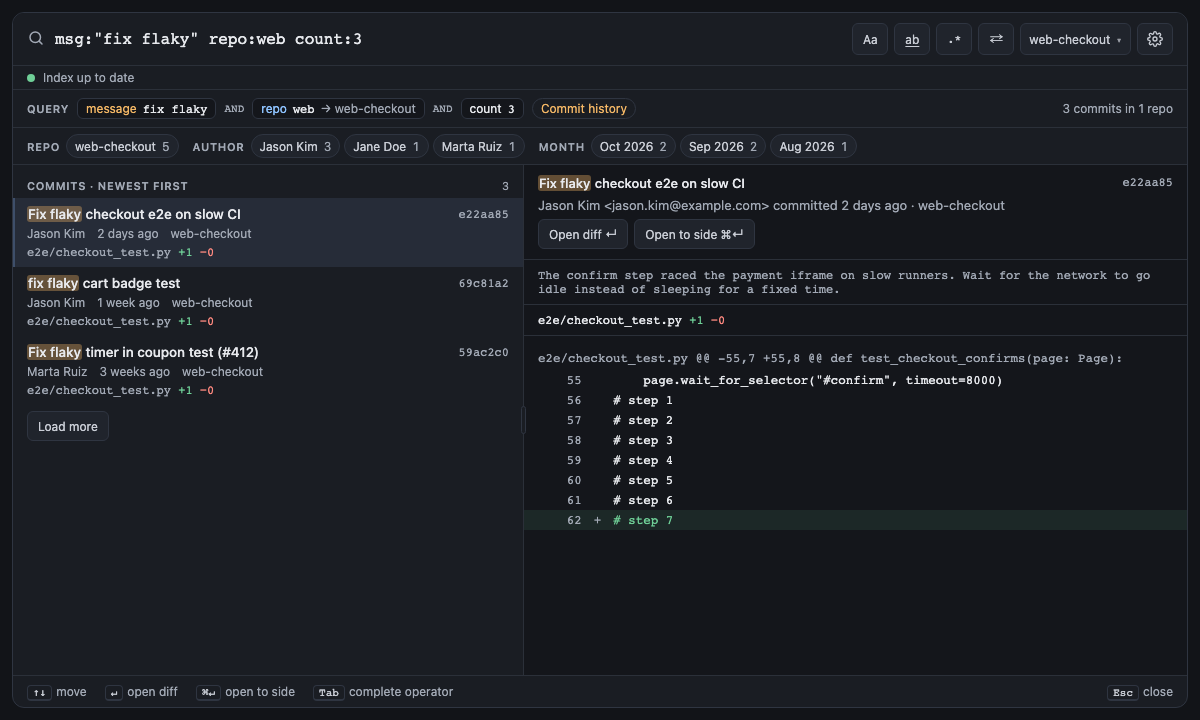
Bare words match commit messages too, so timeout alone, in a commit search, finds commits that say it in their
message or in a changed line. message: matches the message only.
Screen 23: Bare words match commit messages too · Screen id words-in-messages · milestone M3

The built panel
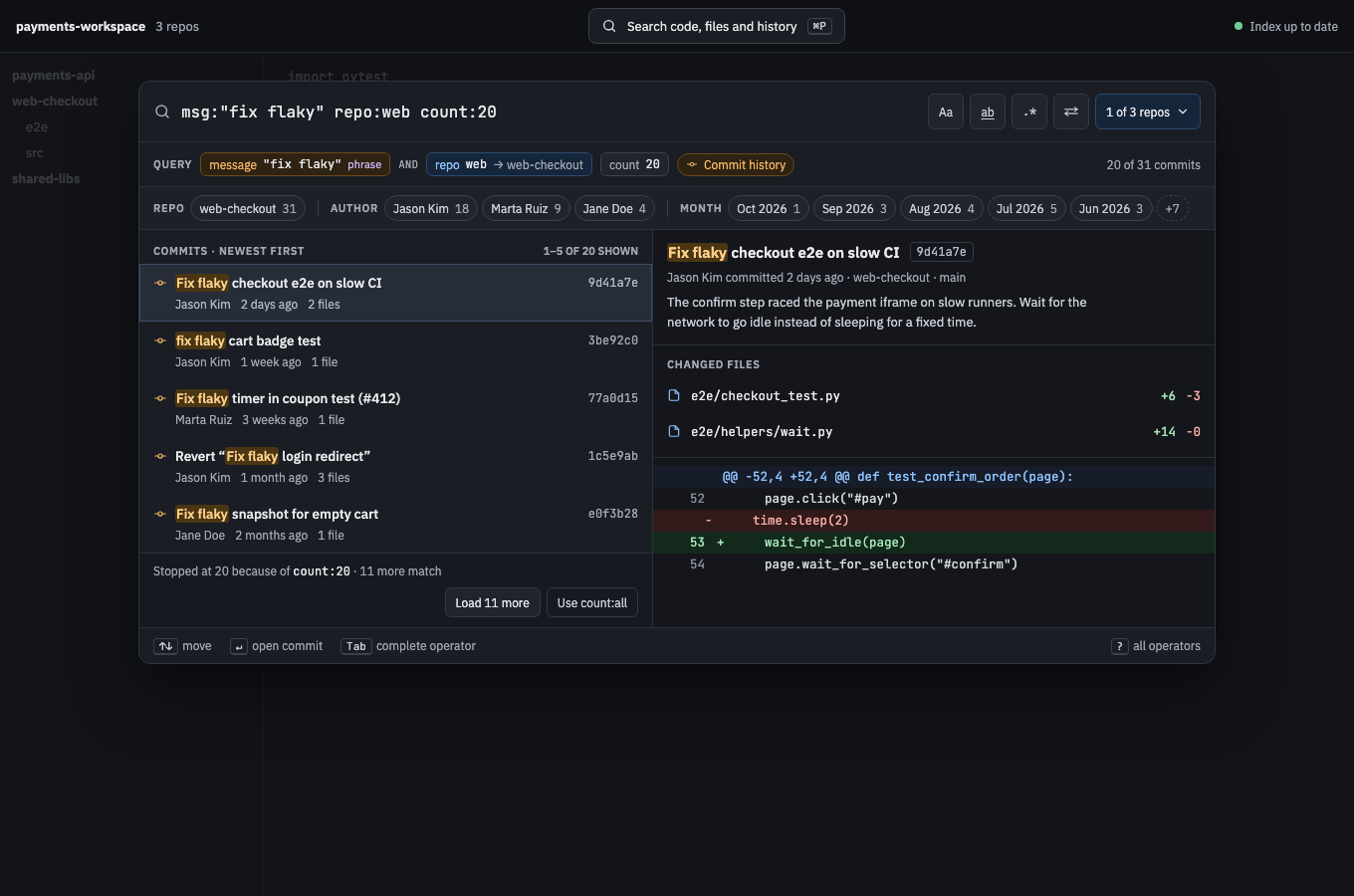
Screen 11: msg:"phrase" + repo: + count: · Screen id message-repo-count · milestone M3
<img src="images/mocks/MessageCount.png" alt="Mock 11: msg:"phrase" + repo: + count:" width="900">
The built panel
| Short | Takes | Searches | Example |
|---|---|---|---|
| none |
file (names only), code (lines only), commit (switches to history), or added or removed (history, only the lines commits added or removed) |
Current files and commits | type:file retry |
type:commit searches commits without naming an author or message. type:added and type:removed search only the
lines commits added or removed, never their messages: who introduced a line, and when it went away.
Screen 34: type:added finds the commits that added a line · Screen id added-removed-lines · milestone 1.1
type:added retry_policy lists the commits whose added lines mention retry_policy: who introduced it, and where.
Each commit counts its hits "in added lines", and the preview marks the term only on + lines, so the - line
that Name max_attempts… replaced stays unmarked. Messages aren't searched. A note counts the commit that only
removed retry_policy lines, with Search every changed line, which writes type:commit. type:removed is the
same for - lines: when something went away.

The built panel
| Short | Takes | Searches | Example |
|---|---|---|---|
| none |
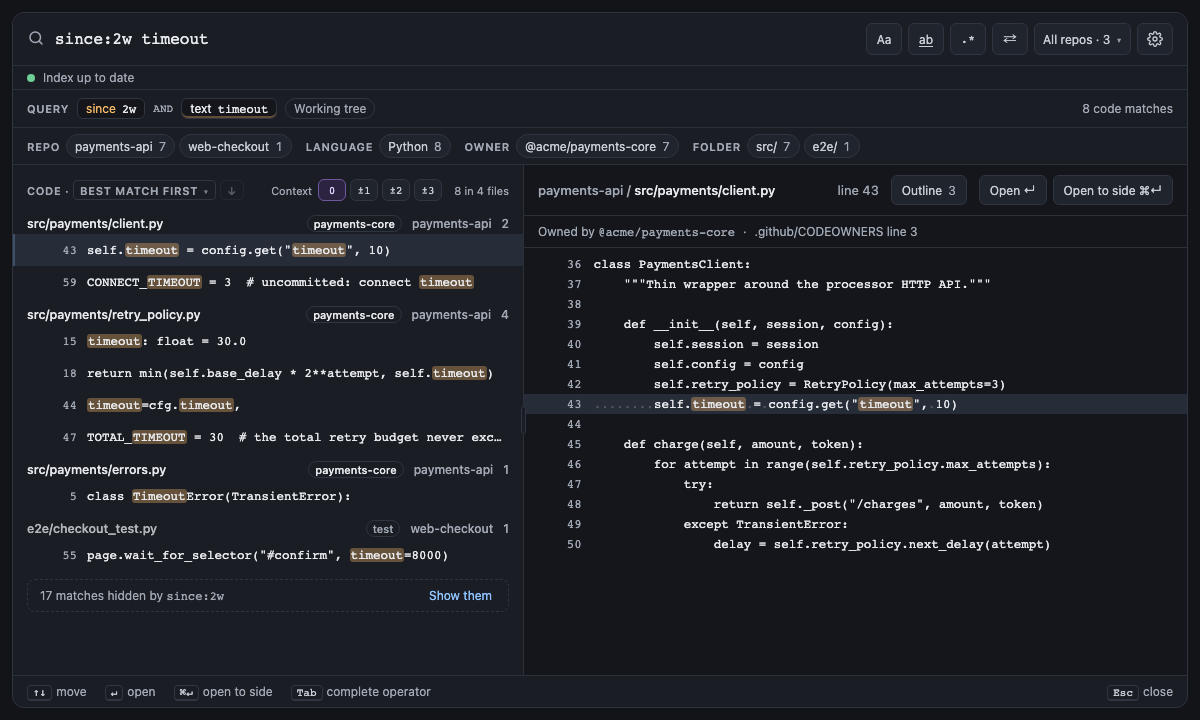
today, yesterday, a number + min, h, d, w, m (months), y, or a date: 2026-09-30 (from that day's midnight) or 2026-09 (from the 1st) |
Current files and commits | since:2w timeout |
Screen 10: since: on current files · Screen id since-on-files · milestone M4

The built panel
| Short | Takes | Searches | Example |
|---|---|---|---|
| none |
since:'s values; keeps what is before the end of the day or month (until:2026-09 is before October), or older than the length of time (until:2w) |
Current files and commits | since:2026-09 until:2026-09 timeout |
until: is the other end of since:: since: keeps changes from when its value starts, until: keeps changes before
its value ends. A day or a month counts in full, so until:2026-09-30 and until:2026-09 both keep everything
before October 1, until:yesterday everything before today and until:today everything up to now. A length of
time ends where since: would start: until:2w keeps what is older than two weeks. Together they make a range:
since:2026-09 until:2026-09 is September 2026. Dates and today are in your time zone, and a date that doesn't
exist (2026-02-30) is an error that offers the nearest real one. is:test, is:generated and is:vendored keep
commits' changes to those files too.
| Short | Takes | Searches | Example |
|---|---|---|---|
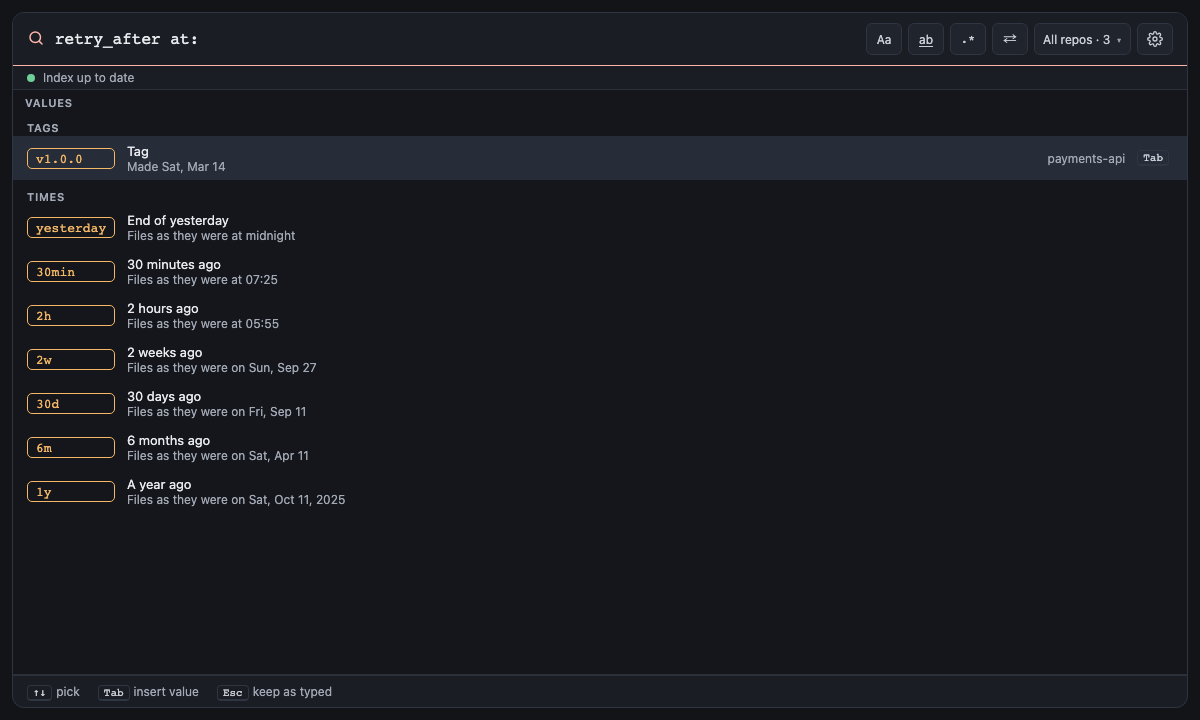
| none | A tag, branch or commit (v1.0.0, main, 3f9c2e1, HEAD~10), or a time as until: takes it (6m, 2026-01-31): the files as they were then (see Past revisions) |
Current files only | at:v1.0.0 retry_after |
at: searches the files as they were at a revision instead of today's: at:v1.0.0 retry_after finds retry_after
in the code you released as v1.0.0, including in files deleted or renamed since. It takes a tag, a branch or a commit, in full or
in part (3f9c2e1), or one of those with ~ or ^ after it (HEAD~10), or a time as until: takes it: at:6m is
the newest commit made six months ago, at:2026-01-31 the newest by the end of that day, on the first-parent line of
the branch you have checked out. A value that reads as a time is one, unless it's quoted: at:"6m" is a branch or tag
called 6m. Each repo reads its own commit of that name; one
without it, or outside Git, is left out, and a note under the results says why ("v1.0.0 isn't a tag, branch or commit
in web-checkout").
Nothing is indexed ahead of time: the first search of a revision reads its files from Git, every open repo at once (the
ones the index would hold: index.exclude and index.maxFileSizeKB apply), and keeps them in memory for the next search and for previewing
and opening its results, the two newest revisions at a time. Everything that searches current files works there: words, regexes, file:, symbol:, kind:,
ref:, struct:, is:test, best-match order, facets and context lines. Each result whose file was deleted since,
changed since, or renamed since says so (renamed since → retry_policy.py, its full path in the tooltip), and
file: finds a renamed file by its name then or its name now: at:v0.1.0 file:retry_policy.py finds backoff.py. The mode chip names the commit read and its date ("At v1.0.0 · 3f9c2e1 · 14 Mar 2026").
A result opens read-only as the file was, and Compare with now in its preview shows what changed since as a
diff.
is:open, is:changed, since:, until: and owner: describe files as they are now, or when they last changed,
which a past revision's files can't answer, so they're errors beside at:, each with a fix that removes it. at:
searches files, not commits, so a commit search can't have it, and Replace changes current files only.
Screen 41: at: searches the files as they were at a tag, branch, commit or time · Screen id past-revision · milestone 1.2
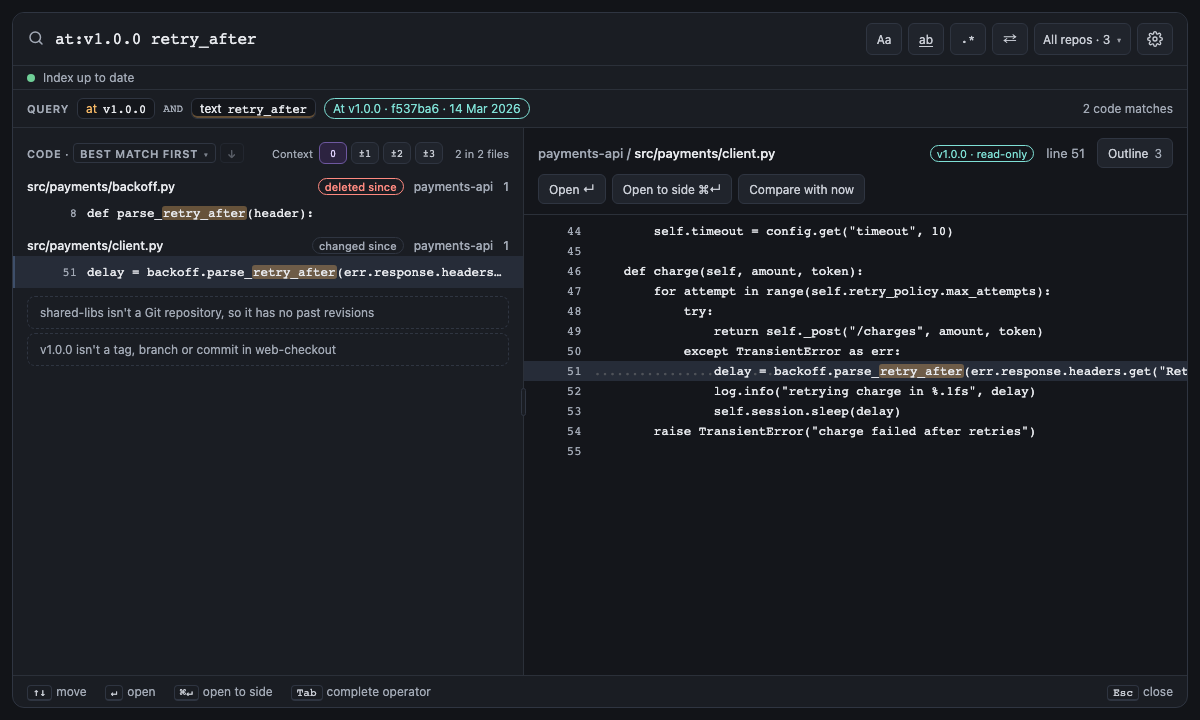
at:v1.0.0 retry_after searches each repo's files as they were at its v1.0.0 tag. In payments-api, backoff.py
defined parse_retry_after then and was deleted since, so its result says deleted since in red; client.py
called it then and reads differently now, so it says changed since. The mode chip after the query's chips names
the commit read and its date, At v1.0.0 · 3f9c2e1 · 14 Mar 2026, and the notes under the results say why the other
repos weren't searched: web-checkout has no v1.0.0, and shared-libs isn't a Git repository. The preview reads the file
from the commit and says v1.0.0 · read-only; Open shows it as it was, read-only, and Compare with now
opens a diff of client.py then against client.py now. For a file deleted since, or the same now, Compare is off.
Nothing was indexed for this: the first search of v1.0.0 read its files from Git and kept them for the next one.

The built panel
Next: Results and ranking: how many results, in what order, and how to narrow them.