Repository navigation
Troubleshooting
What the panel does in each situation, and what you can do about it. For an error or warning under the query, see the Error index.
- Each keystroke waits 120 ms (
search.typingDelayMs), then cancels the previous search and starts a new one. Results from an older keystroke are never shown over newer ones. - While you're still typing an operator or value, the results stay on the finished words. ↵ or Esc searches the word as typed.
It has an error. The panel underlines it, says what's wrong and offers a fix (⌘. applies the first). The last good results stay on screen until the query is fixed. Every error is listed, with its fix, in the Error index.
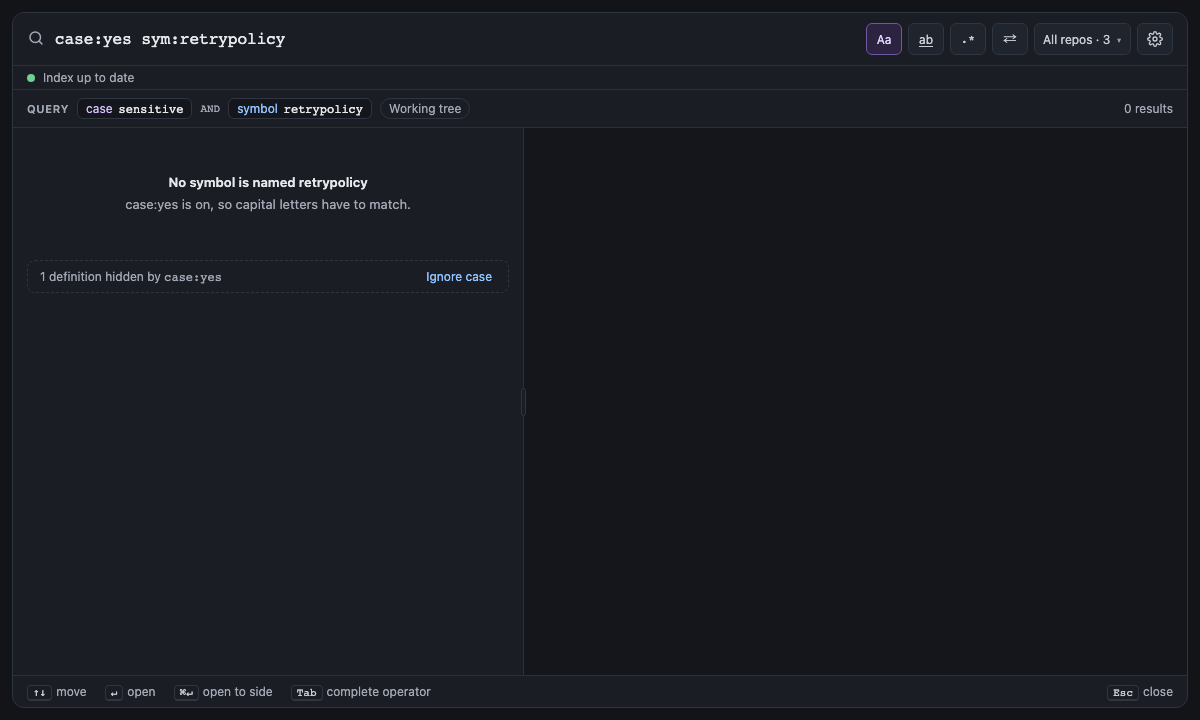
The panel says "No results" (or "No symbol is named …" for symbol:) and why:
-
case:yesis on, so capital letters have to match; - smart case matches case when the query has a capital letter;
-
word:yesis on, so only whole words match; - or filters hid results, listed below with their counts ("3 commits hidden by
-file:vendor/· Show them"); - otherwise, try fewer terms.
symbol: with no match also offers to search the name as text, with how many matches that finds.
You can search at once. A repo still indexing returns what's indexed so far, and a banner says which repos are still indexing. Recent history is searchable first: Git is read newest commit first.
Screen 14: No results while indexing · Screen id no-results-while-indexing · milestone M4

The built panel
| You | Searchable within |
|---|---|
| Save, create or delete a file | About a second, without a rebuild |
| Commit, pull or merge | About 5 seconds (HEAD is checked every 5 s, or as often as spelunk.index.commitCheckSeconds says) |
| Situation | What happens |
|---|---|
| A folder isn't a Git repository | Files are searched; commit searches find nothing there, since: uses each file's modification time, and at: leaves it out with a note. The welcome page says "not a Git repository, so no history". Run git init (or clone) there and history turns on within index.commitCheckSeconds, no reload needed |
| Git isn't installed | Same: files only |
| Several repos in the workspace | All are searched together; each result shows its repo. Scope with repo: or the repo menu |
| Nested repos, submodules | Indexed |
| A workspace folder inside another | Its files belong to the inner folder alone, so each is found, counted and replaced once; close the inner folder and the outer one takes them back |
| Symlinks | A symlinked root is indexed where it points; symlinks inside a root are skipped, and a preview never follows one out of its folder, even a folder replaced by a link after the search |
Files in .gitignore
|
Skipped, unless index.includeIgnored is on |
vendor/, node_modules/, *.min.js
|
Skipped by default (index.exclude). History keeps their line counts, not their lines |
| Files over 1 MB, or binary | Skipped (index.maxFileSizeKB) |
| UTF-16 files, byte order marks, CR line endings | Searched as the editor shows them |
| History older than 2 years | Not indexed unless index.historyDepth is all
|
| Merge commits | History follows the branch's own line, so a merge shows as one commit holding its whole branch. Turn on index.mergedBranches to also search the branch's commits, under their own authors (Git 2.36 or later) |
| Renamed files | Followed: file: finds a file's commits under every name it had. A copy, or a file rewritten by more than half, starts its own history |
| Limit | Value |
|---|---|
| Query length | 1,000 characters; a longer query is flagged as an error and not run, nor kept as the box's text for next time |
| Results per page | 500 by default; count:all, or any larger number, is capped at 50,000 |
| Regular expressions | RE2: linear time, no backreferences or lookaround, so no query can hang the search |
| A match across lines | Shows its first line and up to 10 more, then where it ends; the preview shows up to 200 more |
at: |
A revision's files are read from Git the first time it is searched, every repo at once, which takes as long as the biggest repo needs, and kept for the next search: the two newest revisions at a time, in memory only |
A struct: template |
A result lists up to 80 characters of what each hole took. A template whose holes could split a line in very many ways stops trying in that file after a bounded amount of work (two million steps, and more for a bigger file), so no template can hold the search; the search goes on in other files, and its results are marked truncated |
| Problem | What happens | What you can do |
|---|---|---|
| The search process crashes | Restarted automatically, after a pause that starts at 200 ms and doubles each time up to 30 s, at most 3 times a minute. The panel shows "Search restarting…", then "Search stopped" if it keeps failing | Click Restart in the panel, or run Spelunk: Restart Search |
| The search process stops answering | When a search, preview or open has waited and nothing has come from it for 20 s, it's asked whether it still answers; no answer within 10 s restarts it, as after a crash, and what waited fails | The same as after a crash |
| A result doesn't open | A result whose file is gone greys out. Otherwise (an editor that can't show the file, a commit or revision that can't be read, a stopped search process) an error message says why, and the Spelunk output channel keeps it | Act on the reason; search again for a greyed-out result |
| A saved index is damaged | That repo is rebuilt; others keep working | Nothing |
| The disk is full | The new index is used for this session but not saved ("Index not saved") | Free space, then Rebuild Index |
| Anything else | Details are in the Spelunk output channel (View → Output) | Spelunk: Rebuild Index starts the index from scratch |
Indexes stay on your machine under index.location. Nothing is sent anywhere.
Next: Settings and Commands: every setting and command.